Carousel Posts That Convert: Instagram & LinkedIn Design
SchedulifyX Team · April 16, 2026
Learn how to design high-converting carousel posts for Instagram and LinkedIn. Discover expert design tips, copywriting strategies, and algorithm secrets.
In the ever-evolving landscape of social media marketing, capturing and retaining audience attention is the ultimate currency. While static images and short-form videos have their place, there is one format that consistently outperforms the rest when it comes to deep engagement, education, and conversion: carousel posts. Whether you are a B2B brand trying to establish thought leadership or an e-commerce business showcasing a new product line, mastering the art of the carousel is no longer optional—it is a necessity.
This comprehensive guide dives deep into the mechanics, psychology, and aesthetics of creating carousel posts that convert. We will explore tailored design tips for Instagram carousels, the unique nuances of LinkedIn carousels, and how you can leverage these multi-slide powerhouses to skyrocket your social media strategy. By the end of this article, you will have a complete blueprint for designing, writing, and scheduling carousels that turn casual scrollers into dedicated followers and paying customers.
Why Carousel Posts Are Dominating Social Media

To understand why we need to invest time in design tips, we first need to understand why carousel posts are favored by both algorithms and human psychology. The shift from single-image posts to multi-slide carousels is not just a passing trend; it is fundamentally tied to how social media platforms measure value.
The Power of Dwell Time
Social media algorithms (particularly on Instagram and LinkedIn) prioritize a metric known as dwell time. Dwell time is the amount of time a user spends looking at a piece of content. Because carousel posts require users to swipe through multiple slides, they naturally keep users on the post longer than a static image. When the algorithm detects high dwell time, it signals that the content is valuable, prompting the platform to push the post to a broader audience, including the Explore page or outside your immediate network.
The Second Chance Algorithm
Instagram carousels have a unique algorithmic advantage often referred to as the "second chance." If a user scrolls past your carousel post the first time without engaging, Instagram will often show them the same post again later in their feed—but this time, it will display the second slide. This gives you two opportunities to hook a single user, effectively doubling your chances of engagement.
Micro-Learning and Storytelling
Modern consumers suffer from information overload. They want valuable insights, but they want them delivered in bite-sized, easily digestible formats. Carousel posts act as mini-presentations or micro-blogs. They allow you to break down complex topics, tell a sequential story, or provide step-by-step tutorials without overwhelming the reader with a massive wall of text in the caption.
The Anatomy of a High-Converting Carousel
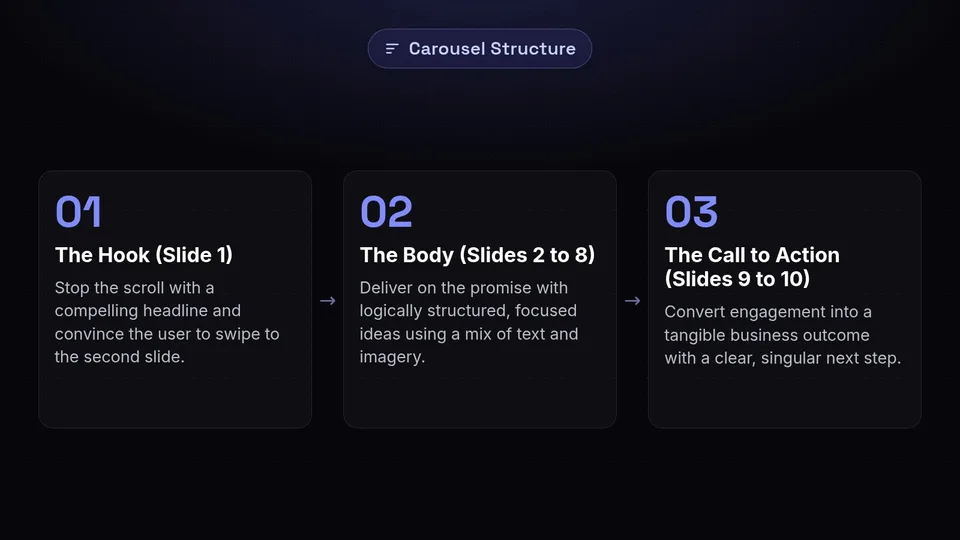
Before we dive into specific design tips for Instagram and LinkedIn, it is crucial to understand the structural anatomy of a successful carousel. Every high-converting carousel follows a specific narrative arc, much like a good book or movie. You can divide your carousel into three distinct sections: The Hook, The Body, and The Call to Action (CTA).
1. The Hook (Slide 1)
The first slide is the most critical part of your carousel. Its sole purpose is to stop the scroll and convince the user to swipe to the second slide. If your first slide fails, the rest of your beautiful design work will never be seen. A strong hook combines a compelling headline, high-contrast visuals, and an emotional or logical trigger. It should address a specific pain point, promise a desirable outcome, or spark intense curiosity.
2. The Body (Slides 2 to 8)
Once you have hooked the reader, the middle slides must deliver on the promise made in slide one. This is where you provide the actual value. The body should be structured logically, with each slide introducing a single, focused idea. Overcrowding a slide with too much information will cause the reader to lose interest and abandon the carousel. Pacing is key here—use a mix of text, data visualizations, and imagery to keep the rhythm engaging.
3. The Call to Action (Slides 9 to 10)
Never leave your audience hanging. The final slide is your opportunity to convert the engagement you have just built into a tangible business outcome. What do you want the user to do next? Whether it is saving the post for later, leaving a comment, clicking the link in your bio, or signing up for a webinar, your CTA must be clear, singular, and visually distinct from the rest of the carousel.
Expert Design Tips for Instagram Carousels
Instagram is a highly visual platform. While the content must be valuable, the aesthetic execution is what builds trust and brand affinity. Here are advanced design tips specifically tailored for Instagram carousels.
Embrace the 4:5 Aspect Ratio
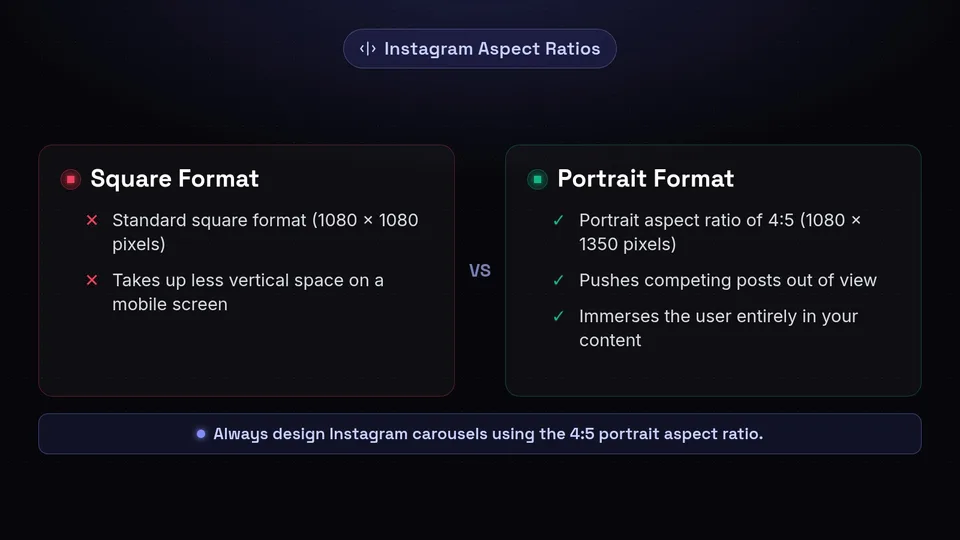
One of the most common mistakes creators make is designing Instagram carousels in the standard square format (1080 x 1080 pixels). To maximize your screen real estate and command attention, you should always design your carousels using the portrait aspect ratio of 4:5 (1080 x 1350 pixels). This taller format takes up significantly more vertical space on a mobile screen, pushing competing posts out of view and immersing the user entirely in your content.
Create Seamless Transitions
A hallmark of professional instagram carousels is the seamless transition. This is a design technique where graphical elements, images, or text span across the gap between two slides. When the user swipes, it creates a continuous, panoramic effect. This not only looks visually stunning but acts as a psychological cue that encourages the user to keep swiping to see the rest of the image. You can achieve this by designing your carousel as one long, continuous canvas in tools like Adobe Illustrator, Photoshop, or Figma, and then slicing it into equal 1080px wide segments before exporting.
Establish a Strong Visual Hierarchy
Visual hierarchy guides the viewer's eye to the most important elements on the slide first. Use size, weight, and color to differentiate your headlines, body text, and decorative elements.
- Headlines: Use a bold, highly readable font. Keep it large and position it at the top or center of the slide.
- Body Text: Use a clean, sans-serif font for readability on small screens. Ensure there is ample line spacing (leading).
- Accents: Use your brand's accent colors to highlight key words or phrases within the text to make them pop.
Consistent Branding is Non-Negotiable
Your carousel posts should be instantly recognizable as yours, even before the user reads your username. Develop a distinct visual style guide specifically for your carousels. This should include a consistent color palette, specific font pairings, and recurring layout structures. Additionally, always include your handle or logo on every slide (usually small, in the bottom corner). This protects your content if it gets reposted and reinforces brand recall.
Use the "Progress Bar" Technique
Because users cannot easily see how many slides are left in a carousel, they can sometimes experience "swipe fatigue." To combat this, incorporate a visual progress indicator. This could be a literal progress bar at the bottom of the slide, a simple "Slide 3 of 10" text counter, or a series of dots. This gives the user a sense of completion and encourages them to finish the sequence.
Expert Design Tips for LinkedIn Carousels
While Instagram is visual and consumer-focused, LinkedIn is the ultimate B2B networking platform. LinkedIn carousels (which are actually uploaded as PDF documents) require a slightly different approach. The audience here is looking for professional development, industry insights, and actionable business strategies.
The Power of the PDF Format
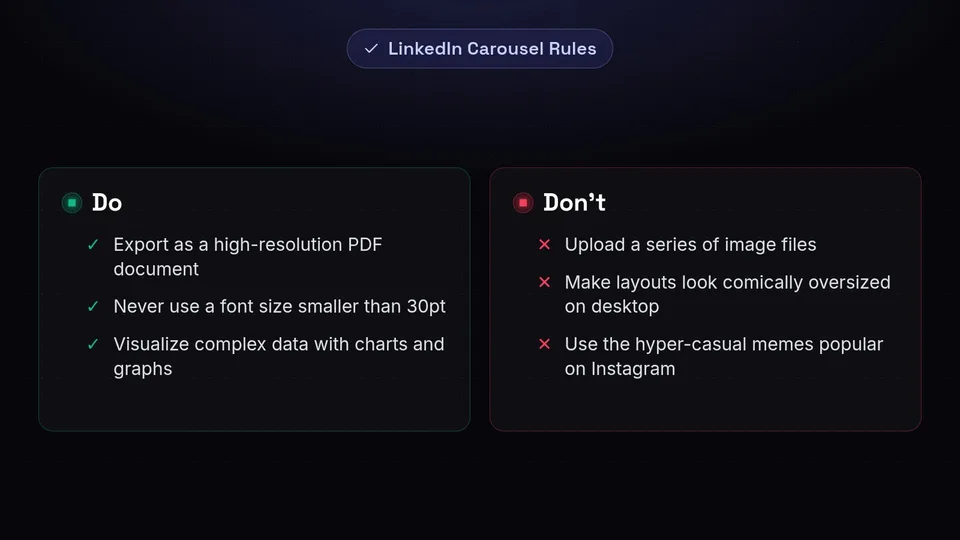
Unlike Instagram, where you upload a series of image files, LinkedIn's native carousel feature works by uploading a multi-page PDF document. The platform then automatically converts each page into a swipeable slide. This format is incredibly powerful because it allows for crisp, vector-quality text and graphics. Always export your LinkedIn carousels as high-resolution PDFs to ensure maximum clarity, especially for users viewing on desktop monitors.
Optimize for Both Desktop and Mobile
While Instagram is almost exclusively mobile, a significant portion of LinkedIn traffic comes from desktop users during working hours. Your design must accommodate both. Ensure your font sizes are large enough to be easily read on a mobile phone, but ensure your overall layout does not look comically oversized on a 27-inch desktop monitor. A safe baseline is to never use a font size smaller than 30pt for body text on a 1080x1080 canvas.
Leverage Data Visualization
LinkedIn audiences love data. If you are sharing statistics, survey results, or growth metrics, do not just type the numbers out—visualize them. Use charts, graphs, and infographics to make complex data instantly understandable. A well-designed pie chart or bar graph will stop a B2B professional mid-scroll much faster than a paragraph of text.
Maintain a Professional Yet Engaging Tone
Professional does not have to mean boring. While you might avoid the hyper-casual memes popular on Instagram, you should still use vibrant brand colors, dynamic layouts, and engaging photography. Use high-quality headshots of your team, clean iconography, and plenty of negative space to give your content a polished, premium corporate feel.
The B2B Storytelling Framework
When designing linkedin carousels, structure your content around frameworks that resonate with professionals. Popular structures include:
- The Problem-Agitation-Solution (PAS): Slide 1 states the problem. Slides 2-3 explain why it's costing them money/time. Slides 4-8 provide your solution.
- The Case Study: Slide 1 states the impressive result. Slides 2-8 break down the exact steps taken to achieve it.
- The Myth Buster: Slide 1 states a common industry misconception. Subsequent slides use data and logic to debunk it.
Copywriting for Carousels: Words That Make Them Swipe
Beautiful design will catch the eye, but compelling copywriting will hold the mind. The text within your carousel posts must be meticulously crafted. Remember, you are writing for a visual medium, which means brevity and punchiness are your best friends.
Crafting Irresistible Headlines
Your slide 1 headline is the gatekeeper of your engagement. It needs to be sharp. Use numbers, strong adjectives, and clear promises. For example, instead of "Tips for Better Marketing," use "7 Underrated Marketing Hacks That Doubled Our Revenue." The latter is specific, outcome-driven, and creates a curiosity gap.
The "One Idea Per Slide" Rule
Cognitive load is the amount of mental effort required to process information. If a slide is crammed with three different concepts, the cognitive load is too high, and the user will simply swipe away. Stick rigidly to the "one idea per slide" rule. If an idea requires more explanation, break it down across two or three slides. Use bullet points and short sentences to make the text scannable.
Action-Oriented Conclusions
Your final slide CTA must use strong, action-oriented verbs. Do not be passive. Instead of saying, "Link in bio if you want to read more," say, "Click the link in our bio to download your free template today." Tell the user exactly what to do, how to do it, and what they will get in return.
Accessibility and User Experience in Design
Great design tips must always include accessibility. Designing with accessibility in mind not only ensures your content is inclusive to all users, including those with visual impairments, but it also improves overall user experience and can positively impact algorithmic reach.
Color Contrast Ratios
Ensure there is a high contrast between your text and your background color. Light gray text on a white background might look sleek and modern, but it is incredibly difficult to read, especially on a mobile device outdoors. Use tools like the WebAIM Contrast Checker to ensure your colors meet the WCAG (Web Content Accessibility Guidelines) standards.
Avoid Relying Solely on Color
Do not use color as the only way to convey meaning. For example, if you are showing a "Do" and "Don't" list, don't just make the text green for "Do" and red for "Don't." Add a checkmark icon and an X icon so that colorblind users can immediately understand the context.
Alt Text and Captions
While the text is embedded in the image, screen readers cannot always parse it effectively. Always use the platform's native Alt Text feature to describe what is happening in the carousel. Furthermore, use your post caption to summarize the key points of the carousel, ensuring that users who prefer reading text formats can still consume your value.
Common Carousel Mistakes to Avoid
Even seasoned marketers can fall into traps when creating carousel posts. Here are the most common pitfalls and how to avoid them.
1. Text Overload
We have mentioned this, but it bears repeating: treating a carousel slide like a page in a novel is a fatal error. If you have to shrink your font size to fit all your words, you have too many words. Edit ruthlessly. Cut the fluff. Use icons to replace words where possible.
2. Inconsistent Pacing
A carousel should have a rhythm. If slide 2 has five words and slide 3 has fifty words, the pacing is jarring. Try to keep the amount of content relatively uniform across the body slides to maintain a smooth, predictable reading experience.
3. Neglecting the Final Slide
Many creators put all their energy into the first five slides and then throw together a generic "Thanks for reading" slide at the end. The final slide is where the conversion happens. It deserves just as much design attention and strategic thought as the first slide.
4. Ignoring Platform Context
Cross-posting the exact same carousel to Instagram and LinkedIn without adaptation is a missed opportunity. While the core message can be the same, the design and tone should be adjusted. An Instagram carousel might use a 4:5 ratio with a playful tone, while the LinkedIn version should be a 1:1 or 4:5 PDF with a more professional aesthetic and data-driven copywriting.
How to Measure Carousel Success
You cannot improve what you do not measure. To refine your design tips and strategy over time, you need to track the right metrics.
Key Metrics to Track
- Saves: This is the ultimate indicator of value. If someone saves your carousel, it means they found the information so useful they want to refer back to it. High saves push your content hard in the algorithm.
- Shares: Shares indicate that your content resonated emotionally or logically enough that the user wanted to associate their own profile with your message.
- Reach vs. Impressions: High impressions relative to reach means users are viewing your carousel multiple times, which is a great sign of engaging content.
- Comments: Carousels that ask a compelling question on the final slide drive comments, which boosts algorithmic visibility.
Analyzing the Drop-off Rate
If you have access to advanced analytics (or by simply observing user behavior), try to understand where users stop swiping. If your first slide gets massive attention but no one makes it to the CTA, your hook is writing checks your body slides cannot cash. You need to improve the value delivery in the middle slides.
Scale Your Strategy with SchedulifyX
Designing high-converting carousel posts takes time, effort, and strategic thinking. The last thing you want to do is waste time manually logging into different platforms to post them at the optimal times. This is where a robust scheduling tool becomes your secret weapon.
With SchedulifyX, our AI-powered social media scheduling platform, you can streamline your entire carousel workflow. SchedulifyX allows you to visually plan your grid, schedule multi-image Instagram carousels, and directly upload PDF documents for LinkedIn carousels—all from a single, intuitive dashboard.
Beyond just scheduling, SchedulifyX utilizes advanced AI to analyze your audience's historical engagement data, suggesting the exact days and times when your followers are most active. This ensures that your meticulously designed carousels hit the feed exactly when they have the highest probability of being seen, swiped, and saved. You can also leverage our AI caption generator to write compelling, keyword-rich captions that complement your carousel design perfectly.
Conclusion
Carousel posts are undeniably one of the most powerful tools in a modern social media marketer's arsenal. By combining strategic copywriting with expert design tips—such as seamless transitions, robust visual hierarchy, and platform-specific formatting for Instagram carousels and linkedin carousels—you can create content that not only stops the scroll but actively drives conversions.
Remember that social media is an iterative process. Use the frameworks provided in this guide to build your next carousel, measure the results, tweak your design, and try again. Consistency is the key to algorithmic success.
Are you ready to take your social media presence to the next level? Stop stressing over manual posting and start focusing on creating brilliant designs. Sign up for SchedulifyX today and let our AI-powered platform automate your success, ensuring your carousel posts always reach the right audience at the right time.