SchedulifyX Developer API & SDKs: Build Your Own Integrations
SchedulifyX Team · May 7, 2026
Unlock the power of SchedulifyX with our new Developer API and SDKs for JavaScript and Python. Build custom social media integrations and automate your workflow.
Introduction to the SchedulifyX Developer Ecosystem

In the rapidly evolving landscape of digital marketing, the ability to automate and customize workflows is no longer a luxury—it is a competitive necessity. SchedulifyX has long been at the forefront of AI-powered social media management, providing users with intuitive tools to schedule, analyze, and optimize their online presence. However, we recognize that every business has unique needs that off-the-shelf software cannot always meet. That is why we are thrilled to introduce the SchedulifyX Developer API and our comprehensive suite of SDKs.
Our developer platform is designed to bridge the gap between our powerful AI scheduling engine and your internal tools, CRMs, and custom-built applications. Whether you are a solo developer building a niche tool or an enterprise engineering team looking to sync social media data with your business intelligence suite, our developer api provides the flexibility and power you need to succeed. By opening our infrastructure, we are empowering you to build the next generation of social media integrations.
Why Build Your Own Integrations?
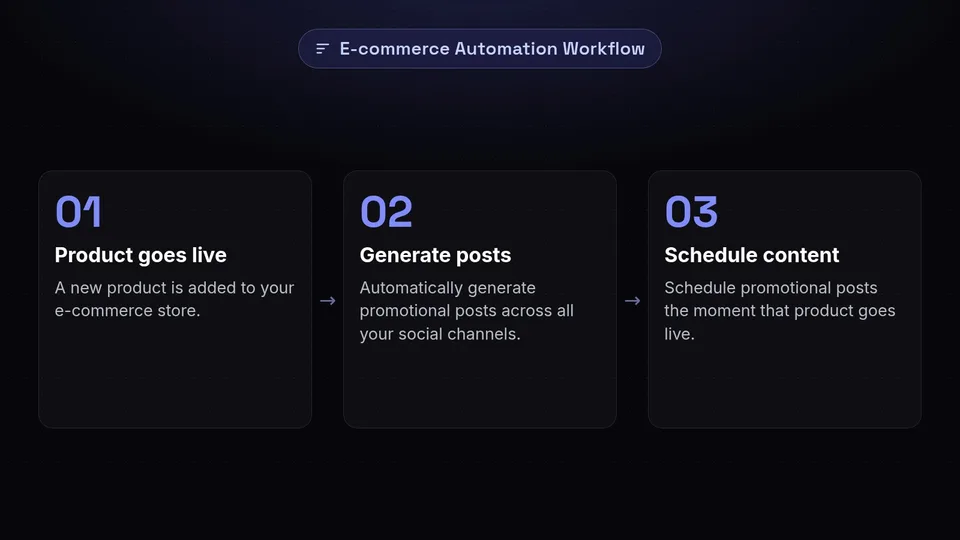
While SchedulifyX offers a robust web interface and mobile app, there are numerous scenarios where a custom integration provides superior value. Integrating directly via our developer api allows for a level of automation that manual scheduling simply cannot match. For instance, imagine a scenario where a new product is added to your e-commerce store. With a custom integration, SchedulifyX can automatically generate and schedule promotional posts across all your social channels the moment that product goes live.
Furthermore, internal dashboards often require a unified view of company performance. By using our integrations, you can pull real-time social media analytics directly into your company's private reporting tools. This eliminates the need for manual data exports and ensures that your stakeholders always have access to the latest engagement metrics. Custom integrations also allow for unique content workflows, such as approval chains that involve external stakeholders or specialized AI content generation pipelines that feed directly into our scheduling engine.
Understanding the SchedulifyX Developer API Architecture
The SchedulifyX developer api is built on RESTful principles, ensuring that it is intuitive, predictable, and easy to use for developers familiar with modern web standards. Our API utilizes standard HTTP methods like GET, POST, PUT, and DELETE to interact with resources. All data is exchanged in JSON format, making it compatible with almost every programming language and framework available today.
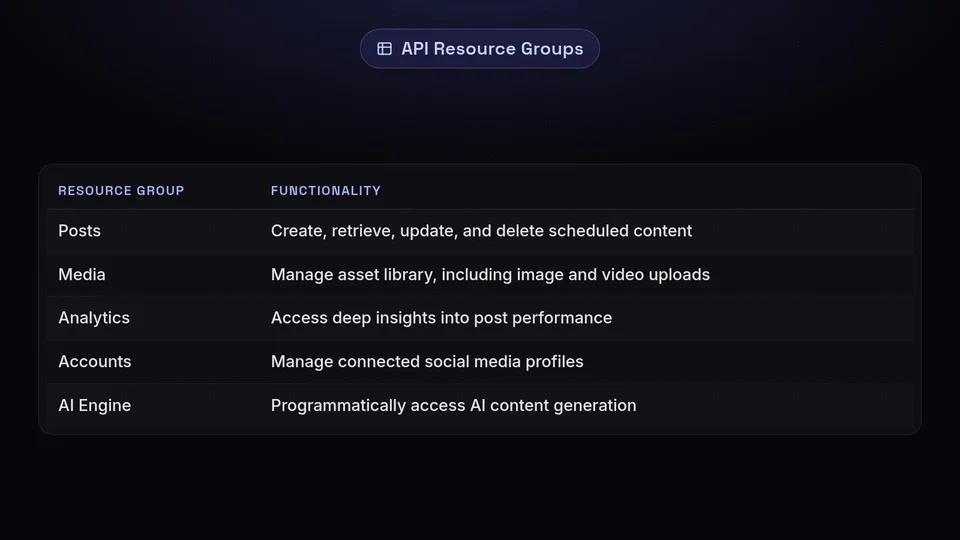
The API is organized into several key resource groups:
- Posts: Create, retrieve, update, and delete scheduled social media content.
- Media: Manage your asset library, including image and video uploads for use in posts.
- Analytics: Access deep insights into post performance, audience demographics, and engagement trends.
- Accounts: Manage connected social media profiles and workspace settings.
- AI Engine: Programmatically access our AI content generation and optimization tools.
Each endpoint is documented with clear request and response schemas, ensuring that you spend less time guessing and more time building. We also provide a sandbox environment where you can test your integrations without affecting your live social media accounts.
Mastering the JavaScript SDK for Web and Node.js

For developers working in the JavaScript ecosystem, our javascript sdk is the fastest way to get up and running. Whether you are building a browser-based extension, a React-based dashboard, or a Node.js backend service, the SDK simplifies the process of interacting with our API by handling the underlying HTTP requests and providing a type-safe interface.
The javascript sdk includes built-in support for asynchronous operations using Promises and async/await syntax, making your code clean and readable. It also handles common tasks such as token refreshing and request retries automatically. Here is a brief overview of how you can initialize the SDK and fetch your latest scheduled posts:
const SchedulifyX = require('schedulifyx-sdk');
const client = new SchedulifyX.Client({ apiKey: 'YOUR_API_KEY' });

async function getPosts() {
  try {
    const posts = await client.posts.list({ status: 'scheduled' });
    console.log(posts);
  } catch (error) {
    console.error('Error fetching posts:', error);
  }
}
By using the javascript sdk, you can significantly reduce development time and ensure that your application remains compatible with future updates to the SchedulifyX API.
Powering Automation with the Python SDK
Python has become the language of choice for data scientists, DevOps engineers, and automation specialists. Our python sdk is designed to cater to these professionals, providing a clean, Pythonic interface to our platform. If you are looking to build complex data pipelines or automate your social media strategy using machine learning, the python sdk is your best friend.
The SDK integrates seamlessly with popular Python libraries like Pandas and NumPy, allowing you to fetch social media analytics and immediately perform complex data analysis. It also supports environment variable configuration for secure API key management. For example, scheduling a post via the python sdk is as simple as:
from schedulifyx import Client

client = Client(api_key='YOUR_API_KEY')

client.posts.create(
    content="Hello from the SchedulifyX Python SDK!",
    platforms=["twitter", "linkedin"],
    schedule_time="2026-06-01T12:00:00Z"
)
The python sdk also excels in script-based automation, such as cleaning up old media assets or generating weekly performance reports that are automatically emailed to your team.
Authentication and Security Best Practices
Security is our top priority. When building integrations with the SchedulifyX developer api, you have two primary methods of authentication: API Keys and OAuth2. API Keys are ideal for internal scripts and server-to-server communication where the environment is trusted. OAuth2, on the other hand, is the gold standard for third-party applications that need to access SchedulifyX data on behalf of a user without ever seeing their password.
We recommend following these security best practices:
- Never expose your API keys: Use environment variables or secret management tools like AWS Secrets Manager or HashiCorp Vault. Never commit keys to version control systems like GitHub.
- Use the principle of least privilege: When creating an API key, only grant the permissions (scopes) necessary for your specific integration.
- Implement Webhook signatures: When receiving data from our webhooks, always verify the cryptographic signature to ensure the request originated from SchedulifyX.
- Rotate keys regularly: Periodically rotate your API keys to minimize the impact of a potential leak.
Leveraging Webhooks for Real-Time Updates
While the API allows you to pull data from SchedulifyX, webhooks allow SchedulifyX to push data to you. This is essential for building responsive integrations. Instead of constantly polling our API to see if a post has been published or if a new comment has arrived, you can register a webhook URL, and we will send a POST request to your server the moment the event occurs.
Our webhooks cover a variety of events, including:
- post.published: Triggered when a scheduled post goes live.
- post.failed: Triggered if a post fails to publish due to platform issues or invalid content.
- analytics.updated: Daily updates on the performance of your active posts.
- account.disconnected: Alerts you if a social media token expires and needs reconnection.
By leveraging webhooks, you can build truly reactive systems. For example, you could trigger a Slack notification the moment a post fails, allowing your team to resolve the issue immediately.
Step-by-Step: Building Your First Custom Integration
Ready to start building? Let's walk through the process of creating a simple integration that monitors your social media engagement and logs it to a Google Sheet. This workflow demonstrates the power of combining our developer api with other web services.
Step 1: Obtain Your API Credentials
Log in to your SchedulifyX dashboard and navigate to the 'Developer Settings' section. Here, you can generate a new API key. Make sure to copy it and store it securely, as it will only be displayed once.
Step 2: Set Up Your Development Environment
Choose your preferred language and install the corresponding SDK. If you are using Node.js, run npm install schedulifyx-sdk. If you prefer Python, run pip install schedulifyx-sdk.
Step 3: Write the Integration Logic
Your script will fetch the latest analytics data for a specific post and then use the Google Sheets API to append a new row to your spreadsheet. By scheduling this script to run daily (using a tool like GitHub Actions or a CRON job), you create a self-sustaining data logging system.
Step 4: Test and Deploy
Run your script in a development environment first. Once you have verified that the data is flowing correctly, deploy your code to a cloud provider like Heroku, Vercel, or AWS Lambda for continuous execution.
Advanced Use Cases: AI and Data Science
The true power of the SchedulifyX developer api is revealed when it is combined with modern AI and data science workflows. Because we offer programmatic access to our AI optimization engine, you can build tools that automatically A/B test content variations. For instance, you could use the python sdk to send five different versions of a caption to our AI engine, receive engagement predictions for each, and automatically schedule the one with the highest predicted success rate.
Data scientists can use our analytics endpoints to perform sentiment analysis on comments across all platforms simultaneously. By aggregating this data, businesses can gain a holistic view of brand perception that goes far beyond simple like counts. The javascript sdk can also be used to build custom internal visualization tools that map social media growth against internal sales data, providing a clear picture of ROI.
Rate Limits and Performance Optimization
To ensure the stability of our platform for all users, the SchedulifyX API employs rate limiting. These limits are based on your subscription tier and are clearly communicated in the HTTP headers of every response. If you exceed these limits, our API will return a 429 'Too Many Requests' status code.
To optimize your integrations and avoid hitting these limits, consider the following strategies:
- Caching: Store frequently accessed data (like your list of social accounts) in a local cache or database.
- Pagination: When fetching large lists of posts or analytics data, use our pagination parameters to request data in smaller chunks.
- Batching: Where possible, use batch endpoints to perform multiple operations in a single request.
- Exponential Backoff: If you do receive a rate limit error, implement an exponential backoff strategy in your code to retry the request after an increasing delay.
Conclusion and Getting Started
The introduction of the SchedulifyX developer api and our javascript sdk and python-sdk marks a new chapter for our platform. We are no longer just a tool for scheduling posts; we are a foundational layer for your entire social media technology stack. By building your own integrations, you can unlock efficiency, gain deeper insights, and create a social media presence that is perfectly tailored to your business goals.
We invite you to explore our documentation, download our SDKs, and start building today. Whether you are automating a simple task or building a complex AI-driven application, SchedulifyX is here to provide the infrastructure you need. Join our developer community and show us what you can create!
Ready to take your social media automation to the next level? Sign up for a developer account today and start building with SchedulifyX!