SchedulifyX Enterprise: RBAC, Audit Logs & Custom Permissions

SchedulifyX Team · May 12, 2026

Scale your social media operations securely with SchedulifyX Enterprise. Explore RBAC, granular custom permissions, and comprehensive audit logs for total control.

Table of Contents

Introduction: The New Standard for Enterprise Social Media

Introduction: The New Standard for Enterprise Social Media

In the early days of social media marketing, a single password shared among three team members was the norm. Today, for global enterprises managing hundreds of social profiles across multiple continents, that approach is a catastrophic security risk. As social media platforms have evolved from simple communication channels into critical business infrastructure, the tools used to manage them must evolve accordingly. Enter SchedulifyX Enterprise.

Managing social media at an enterprise level requires more than just a scheduling calendar; it requires a robust governance framework. The challenge lies in balancing agility with security. How do you allow a local marketing manager in Tokyo to post relevant content while ensuring that a junior intern in New York doesn't accidentally delete a multi-million dollar campaign? The answer lies in three pillars of modern software security: Role-Based Access Control (RBAC), Custom Permissions, and Audit Logs.

In this comprehensive guide, we will explore how SchedulifyX Enterprise empowers large organizations to scale their social presence without compromising on security or brand integrity. We will delve into the technical nuances of our latest security features and explain why they are essential for any organization serious about digital governance.

The Evolving Landscape of Enterprise Social Media Security

The Evolving Landscape of Enterprise Social Media Security

For an enterprise, a social media account is a high-value asset. A single compromised account can lead to brand devaluation, stock price fluctuations, and legal liabilities. According to recent cybersecurity reports, social media-related breaches have increased by over 40% in the last two years. These breaches aren't always the result of external hackers; often, they stem from internal errors, lack of oversight, or improper offboarding of former employees.

Traditional social media management tools often lack the sophistication needed to handle complex organizational structures. They offer "all or nothing" access, which forces companies to grant more permissions than necessary—a direct violation of the Principle of Least Privilege (PoLP). SchedulifyX Enterprise was built from the ground up to solve these specific enterprise pain points, ensuring that security is baked into every workflow.

The Risk of Shared Credentials

Shared passwords are the "silent killer" of enterprise security. When multiple people use the same login, accountability vanishes. If an unauthorized post goes live, it is impossible to determine who was responsible. Furthermore, if an employee leaves the company, every single password they had access to must be changed—a logistical nightmare for large teams. SchedulifyX eliminates this by integrating with Single Sign-On (SSO) and providing individual user accounts governed by central policies.

Deep Dive: Role-Based Access Control (RBAC) in SchedulifyX

Deep Dive: Role-Based Access Control (RBAC) in SchedulifyX

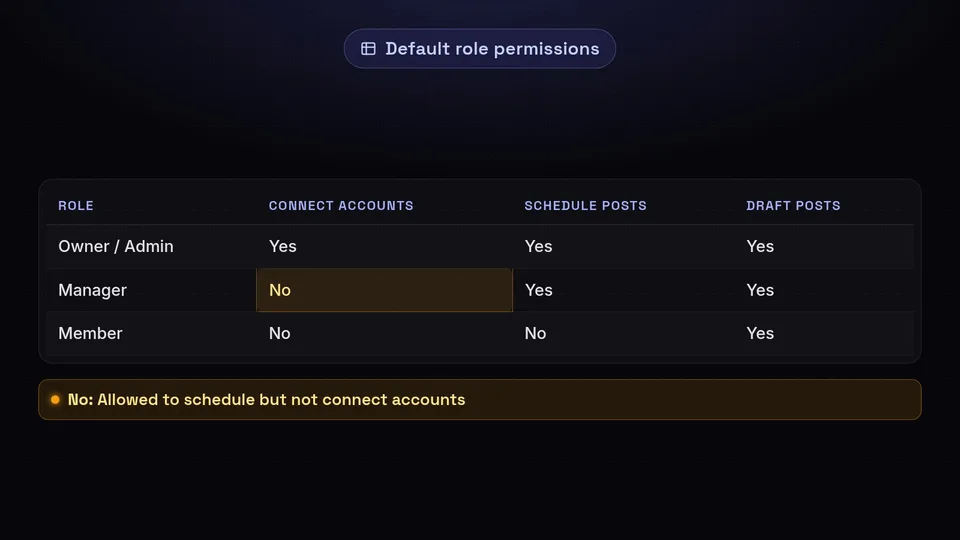
Role-Based Access Control (RBAC) is the foundation of our enterprise offering. Instead of assigning permissions to individuals one by one, administrators assign users to specific "Roles." Each role comes with a predefined set of permissions that align with the user's job function.

This systematic approach offers several advantages:

  • Efficiency: Onboarding a new team member takes seconds. Simply assign them to the "Content Creator" or "Regional Manager" role, and they instantly have the correct access levels.
  • Consistency: Ensures that every user in a specific department has the exact same capabilities, reducing the risk of configuration errors.
  • Scalability: As your organization grows from 10 to 1,000 users, RBAC allows you to manage permissions globally rather than locally.

Standard Roles in SchedulifyX

While SchedulifyX allows for custom roles, we provide several optimized templates out of the box:

  1. Super Admin: Full control over the entire organization, billing, and security settings.
  2. Organization Manager: Can manage teams and social profiles but cannot change global security or billing settings.
  3. Content Approver: Responsible for reviewing and approving posts. They cannot create original content or connect new accounts.
  4. Contributor: Can draft posts and view analytics but cannot publish without approval.
  5. Analyst: Read-only access to performance data and reports.

Custom Permissions: Granularity at Scale

Custom Permissions: Granularity at Scale

While RBAC provides the structure, custom permissions provide the nuance. Every enterprise is unique, and a one-size-fits-all role system isn't always sufficient. SchedulifyX allows administrators to toggle hundreds of individual permissions to create bespoke roles that fit their specific internal workflows.

Consider a scenario where a legal department needs to review posts. They don't need to see the "Draft" folder or manage the "Media Library." They only need access to the "Pending Approval" queue and the ability to leave comments. With custom permissions, you can create a "Legal Reviewer" role that has exactly those rights and nothing more.

Examples of Granular Permission Controls:

  • Profile-Level Access: Restrict users to specific social media profiles (e.g., the UK team only sees the @SchedulifyX_UK accounts).
  • Feature-Specific Access: Allow a user to use AI writing tools but restrict them from using the AI image generator.
  • Action-Based Access: Distinguish between the ability to "Edit" a post and the ability to "Delete" a post.
  • Data Access: Control who can export raw CSV data vs. who can only view the in-platform dashboard.

"Granular control is not about lack of trust; it is about providing employees with the focused environment they need to succeed without the risk of accidental errors." — Chief Security Officer, SchedulifyX

Audit Logs: Transparency, Accountability, and Forensic Safety

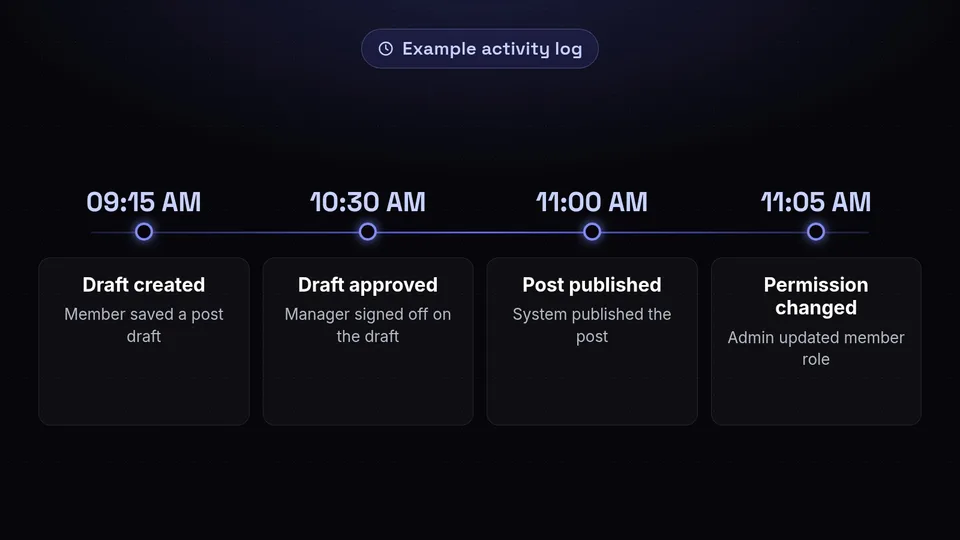
In a high-stakes enterprise environment, knowing what happened is just as important as how it happened. Audit logs are a chronological record of all activities within the SchedulifyX platform. They provide a transparent trail of every action taken by every user.

What do SchedulifyX Audit Logs track?

Our comprehensive logging system captures a wide array of data points, including:

  • Authentication Events: Logins, logouts, failed login attempts, and password changes.
  • Content Actions: Who created, edited, scheduled, approved, or deleted a post.
  • System Changes: Changes to RBAC roles, new social profiles added, or API integrations modified.
  • Metadata: Each log entry includes the timestamp, the IP address, the device used, and the specific user ID.

The Practical Value of Audit Logs

Audit logs serve three primary purposes for the enterprise:

  1. Troubleshooting: If a post goes out with a typo, the audit log allows the manager to see who last edited the post and provide constructive feedback or training.
  2. Security Forensics: In the event of a suspected account compromise, audit logs help security teams identify the entry point and the extent of the unauthorized activity.
  3. Compliance Auditing: For industries like finance or healthcare, maintaining records of communication is a legal requirement. Audit logs provide the proof of oversight needed for regulatory reviews.

Enhancing Brand Safety with Enterprise Governance

Brand safety is often discussed in the context of advertising placement, but it is equally relevant to organic social media management. One rogue post can erase years of brand equity. SchedulifyX Enterprise uses RBAC and custom permissions to build a "Safety Net" around your brand.

By implementing a mandatory Approval Workflow, you ensure that no content goes live without being vetted by at least one other person. For global brands, this can be scaled into multi-level approvals. For example:

  • Level 1: Local Manager checks for local language accuracy.
  • Level 2: Regional Director checks for campaign alignment.
  • Level 3: Legal/Compliance checks for regulatory safety.

This hierarchy is entirely powered by the custom permissions engine, ensuring that each stakeholder only sees the tasks relevant to their stage of the process.

Meeting Compliance Standards: GDPR, SOC2, and Beyond

For large organizations, software procurement isn't just about features; it's about compliance. SchedulifyX Enterprise is designed to meet the most stringent global standards. Our use of audit logs and RBAC is a key component of our SOC2 compliance, providing the necessary controls that auditors look for.

Furthermore, for companies operating in the European Union, our platform facilitates GDPR compliance. By using custom permissions to limit access to personal data within social media analytics, enterprises can ensure they are following the principle of "data minimization." Our audit logs also assist in the event of a Subject Access Request (SAR), allowing you to prove exactly who had access to what data and when.

How to Implement SchedulifyX Enterprise Features

Moving to an enterprise-grade setup may seem daunting, but SchedulifyX makes the transition seamless. Here is a high-level overview of the implementation process:

Step 1: Define Your Hierarchy

Before touching the software, map out your organization. Who are the stakeholders? Which departments need access? What are the common job functions? Documenting this on paper first will make the RBAC setup much faster.

Step 2: Configure SSO

Integrate SchedulifyX with your existing Identity Provider (IdP) like Okta, Azure AD, or Google Workspace. This ensures that when an employee leaves the company and is removed from your central directory, their access to SchedulifyX is automatically revoked.

Step 3: Set Up Roles and Permissions

Use our templates to create your primary roles. Then, use the custom permissions toggle to fine-tune them. We recommend starting with more restrictive permissions and loosening them only as necessary.

Step 4: Enable Mandatory Workflows

Set up your approval chains. Define which social profiles require approval and who the designated approvers are. This is the single most effective way to prevent brand-damaging mistakes.

Step 5: Monitor and Audit

Schedule a monthly review of your audit logs. Look for anomalies, such as logins from unexpected locations or a high volume of deleted posts. Use these insights to refine your security policies.

Best Practices for Large-Scale Team Management

To get the most out of SchedulifyX Enterprise, consider these expert tips:

  • The Principle of Least Privilege: Always give users the minimum level of access they need to do their jobs. It is easier to grant a permission later than to recover from a mistake made with excessive access.
  • Regular Permission Audits: At least once a quarter, review who has access to what. Roles change, and "permission creep" can lead to security vulnerabilities over time.
  • Use Descriptive Role Names: Instead of "Role 1," use descriptive names like "North America - Junior Copywriter" to avoid confusion.
  • Train Your Team: Ensure every user understands why these controls are in place. When people understand the "why" behind security, they are more likely to follow best practices.
  • Leverage the Media Library: Use permissions to control who can upload to the media library vs. who can only use approved assets. This ensures brand visual consistency.

Conclusion: Future-Proofing Your Social Strategy

As the digital landscape becomes increasingly complex, the tools you use to manage your presence must be as sophisticated as the threats you face. SchedulifyX Enterprise provides the robust security, granular control, and total transparency that modern organizations demand.

By leveraging RBAC, custom permissions, and audit logs, you aren't just protecting your brand; you are empowering your team to work more efficiently and confidently. Security shouldn't be a barrier to creativity—it should be the foundation that makes it possible.

Ready to secure your enterprise social media operations? Contact our Enterprise Sales team today for a personalized demo of our security features and learn how SchedulifyX can help you scale with confidence.

SchedulifyX