How to Set Up a Client Approval Workflow for Social Media
Discover how to set up a client approval workflow for social media. Streamline feedback, eliminate errors, and automate publishing with SchedulifyX.
SchedulifyX is the AI-powered social media command center built for creators, businesses, and agencies. Schedule posts across 10+ platforms, generate content with 9 specialized AI agents, collaborate with your team using approval workflows, analyze performance with deep analytics, and manage all social engagement from a unified inbox. Trusted by professionals worldwide — free plan available, paid plans from
Managing social media for clients requires more than just creating engaging content; it necessitates a rigorous, transparent process for review and sign-off. Knowing how to set up a client approval workflow is essential for agencies, freelance social media managers, and in-house teams managing multiple brands. Without a structured system, content teams often find themselves trapped in endless email chains, lost messages, and confusing spreadsheet trackers, which can lead to delayed campaigns or, worse, publishing unapproved content.
A well-defined approval pipeline ensures that every piece of content—from a simple X/Twitter update to a complex Instagram carousel—is reviewed, amended, and authorised by the right stakeholders before it reaches the public. This guide explores the mechanisms of establishing a robust, error-free approval process that protects brand integrity and enhances team collaboration.
Workflow Strategy
Why a Formal Client Approval Process is Critical
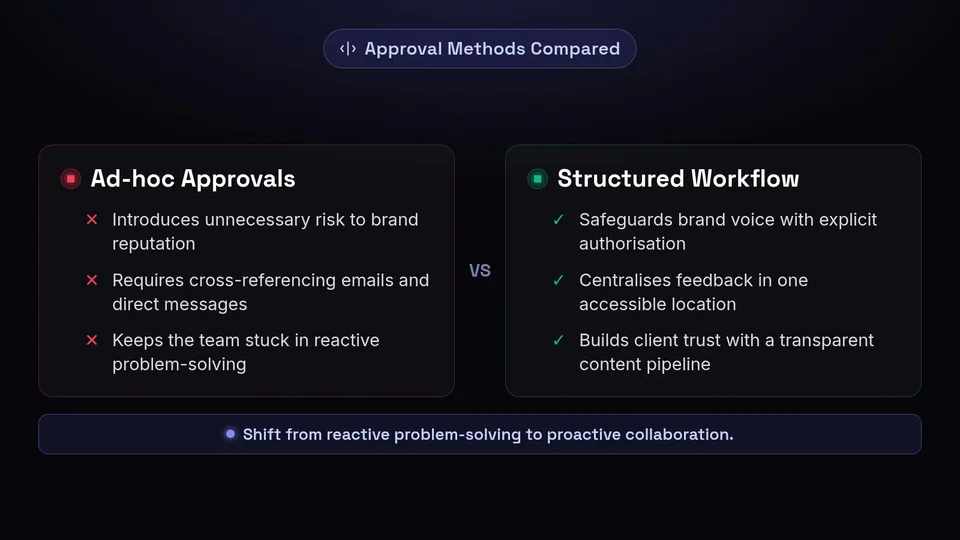
Relying on ad-hoc approval methods introduces unnecessary risk into your social media management. When you set up a dedicated client approval workflow, you replace chaos with predictability. The primary mechanisms by which a structured workflow improves operations include:
Brand Protection
Ensures no post goes live without explicit authorisation, safeguarding the client's brand voice and reputation from accidental missteps.
Operational Efficiency
Centralises feedback in one location, eliminating the need to cross-reference emails, direct messages, and shared documents.
Client Trust
Provides clients with a professional, transparent window into the content pipeline, reinforcing their confidence in your services.
When clients have a clear, predictable way to view and approve upcoming posts, they are more likely to provide timely, constructive feedback. This structured approach shifts the dynamic from reactive problem-solving to proactive collaboration.
Implementation Guide
How to Set Up a Client Approval Workflow: Step-by-Step

Transitioning from manual approvals to an automated system requires careful planning. By following these steps, you can establish a workflow that accommodates both your internal team's creative process and your client's need for oversight.
Map Out Your Internal and External Hierarchy
Before inviting clients into any system, define who holds responsibility at each stage of content creation. Determine who drafts the copy, who designs the assets, who performs the internal review, and finally, who the designated client approver is. Establishing these roles upfront prevents bottlenecks where content sits idle waiting for an unspecified person to review it.
Pro Tip: Limit the number of final approvers on the client side. Having a single point of contact for final sign-off prevents conflicting feedback and accelerates the publishing timeline.
Configure Your Workspace and Client Portal
Utilise a dedicated platform to separate internal drafting from client presentation. Set up a secure client portal where stakeholders can view content exactly as it will appear on platforms like LinkedIn or Facebook. Ensure the workspace is branded appropriately and restrict client access solely to the campaigns they need to review, keeping your internal drafts and brainstorming sessions private.
Establish Content Status Categories
A successful workflow relies on clear visual indicators of a post's current stage. Implement a status system using customisable labels. Common stages include 'Draft', 'Internal Review', 'Pending Client Approval', 'Changes Requested', and 'Approved'. This taxonomy allows anyone on the team to glance at the content calendar and immediately understand what requires attention.
Automate Notification Triggers
Manual follow-ups are a significant drain on agency resources. Configure your workflow to automatically dispatch notifications when a post changes status. When a social media manager moves a post to 'Pending Client Approval', the system should alert the client. Conversely, when a client marks a post as 'Changes Requested', the original creator should be notified instantly.
Centralise Feedback and Revisions
Train your clients to leave comments directly on the specific post within the platform, rather than sending a separate email. This contextual feedback ensures that notes regarding a specific TikTok video or YouTube Short are permanently attached to that asset. It creates an audit trail, making it easy to reference past decisions and ensuring that all requested amendments are addressed before resubmission.
Enable Auto-Scheduling Upon Approval
The final step in setting up a client approval workflow is linking approval directly to publishing. Configure the system so that once a client clicks 'Approve', the post is automatically locked and queued for scheduling. This eliminates the manual step of downloading approved assets and re-uploading them to a separate publishing tool.
Ready to streamline your client approvals?
Stop chasing emails and start collaborating efficiently. Build professional, automated approval workflows with SchedulifyX.
Start Your Free Trial →Comparison
Manual Workflows vs. Automated Platforms
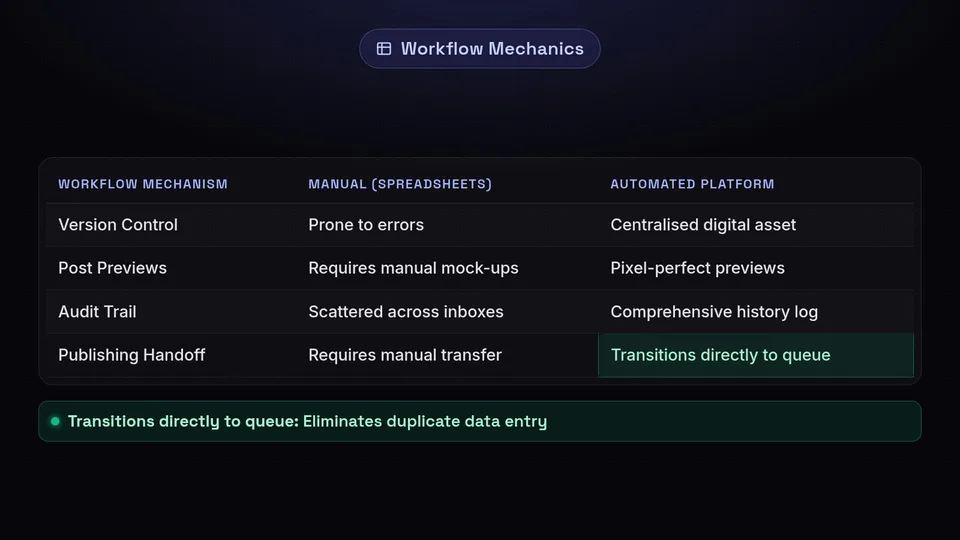
Understanding the mechanical differences between traditional methods and purpose-built platforms highlights the necessity of upgrading your approach.
| Workflow Mechanism | Manual (Spreadsheets & Emails) | Automated (SchedulifyX) |
|---|---|---|
| Version Control | Prone to errors; difficult to track which document is the final version. | Centralised; all revisions and comments are attached to a single digital asset. |
| Post Previews | Requires manual mock-ups; clients must imagine the final layout. | Pixel-perfect, platform-specific previews generated automatically. |
| Audit Trail | Scattered across multiple email inboxes and chat applications. | Comprehensive history log detailing who approved what and when. |
| Publishing Handoff | Requires manual transfer from the approval document to the scheduling tool. | Seamless; approved posts transition directly into the active content queue. |
Best Practices
Refining Your Approval Pipelines
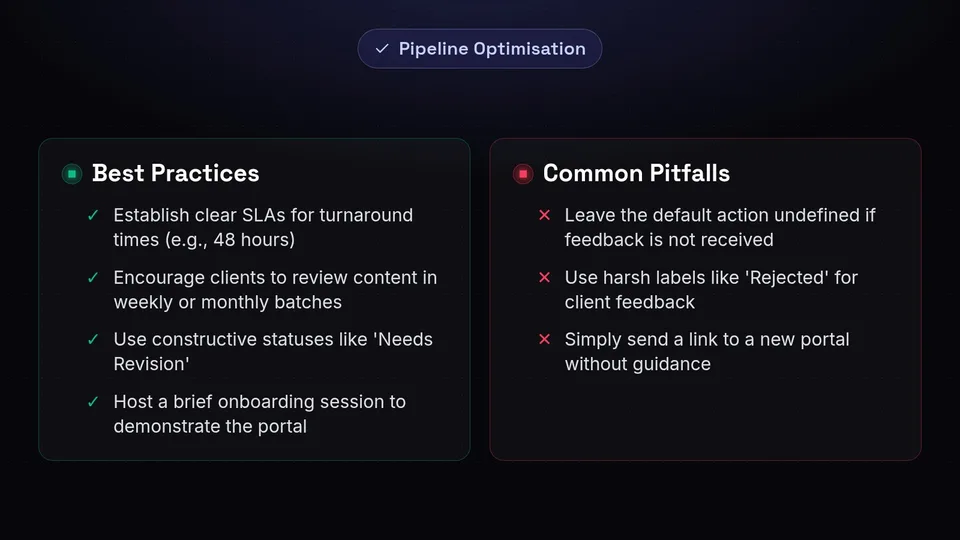
Once you understand how to set up a client approval workflow fundamentally, you can begin to optimise it for smoother daily operations. The goal is to reduce friction for the client while maintaining strict quality control for the agency.
Set Clear Service Level Agreements (SLAs)
Technology alone cannot fix communication issues. Establish clear expectations regarding turnaround times. For example, agree that clients will review content within a specific timeframe (e.g., 48 hours) before the scheduled publishing date. If feedback is not received, define the default action—whether the post is paused or published as-is.
To further enhance your workflow, consider implementing the following best practices:
- Batch Approvals: Encourage clients to review content in weekly or monthly batches rather than approving single posts daily. This reduces fatigue and provides a better overview of the broader campaign narrative.
- Use Constructive Statuses: Instead of a harsh 'Rejected' status, use 'Needs Revision' or 'Changes Requested' to maintain a positive, collaborative tone.
- Mobile Accessibility: Ensure the platform you choose allows clients to review and approve content on their mobile devices, accommodating busy stakeholders who are often away from their desks.
- Onboard Your Clients: Do not simply send a link to a new portal. Host a brief onboarding session to demonstrate how to navigate the system, leave comments, and approve posts.
Troubleshooting
Common Pitfalls to Avoid
Even with the best intentions, approval workflows can falter if not managed correctly. Being aware of potential stumbling blocks allows you to proactively address them.
✔ Recommended Actions
- Require specific, actionable feedback rather than vague comments like "make it pop".
- Lock approved content to prevent unauthorised last-minute edits by internal staff.
- Regularly review the workflow efficiency with your team to identify bottlenecks.
✗ Actions to Avoid
- Bypassing the system for "quick changes" via text message or phone call.
- Overwhelming clients with internal drafts that are not ready for external review.
- Failing to establish a clear chain of command for final sign-off.
A common issue agencies face is scope creep during the revision process. When clients have a direct line to request changes, they may ask for extensive redesigns that fall outside the original brief. To mitigate this, define the number of revision rounds included in your service agreement. If a post reaches the 'Changes Requested' stage multiple times, it may indicate a misalignment in the initial strategy rather than a simple execution error.
Mastering Client Approvals for Scalable Growth
Learning how to set up a client approval workflow is a foundational step in scaling your social media operations. By migrating away from fragmented communication channels and embracing a centralised, status-driven platform, you protect your agency from costly errors and provide your clients with a superior, professional experience. The right workflow transforms the potentially stressful process of content review into a seamless, collaborative effort.
When your team is no longer bogged down by administrative tasks and chasing approvals, they can dedicate more energy to strategic planning and creative execution. Implement these structured processes today, and build a foundation for sustainable, efficient social media management.
Get started free — no credit card required.