How to Schedule Posts Across All Platforms Simultaneously with SchedulifyX
SchedulifyX Team · July 6, 2026
Learn how to schedule posts to all platforms simultaneously using SchedulifyX. Master cross-platform posting, content overrides, and optimal timing strategies.
In today's hyper-connected digital landscape, maintaining an active and engaging presence across multiple social media networks is no longer a luxury—it is a strict necessity for brands, creators, and businesses. However, the sheer volume of work required to format, optimize, and publish content to Instagram, Facebook, Twitter, LinkedIn, TikTok, Threads, and Pinterest can quickly become overwhelming. If you have ever found yourself drowning in a sea of browser tabs, frantically copying and pasting captions while trying to remember optimal posting times, you are not alone.
This is where the true power of a dedicated social media scheduling tool comes into play. In this comprehensive SchedulifyX tutorial, we are going to dive deep into the exact strategies and step-by-step processes you need to schedule posts all platforms simultaneously. We will explore the art of cross-platform posting, the necessity of platform-specific content overrides, and the science of optimal timing using our AI-powered engine.
By the end of this guide, you will have a fully operational workflow that saves you dozens of hours each week while maximizing your reach and engagement across every major social network.
Why Cross-Platform Posting is Essential in 2026
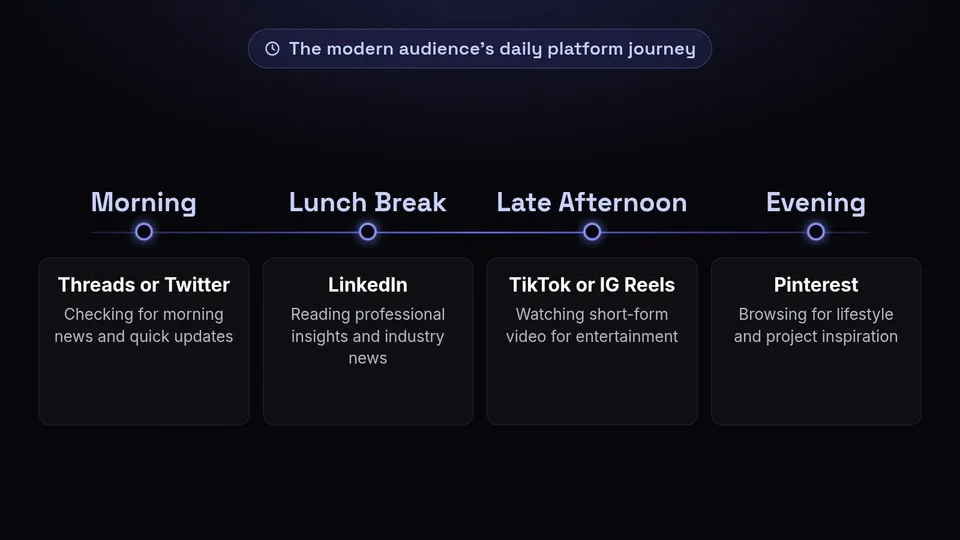
Before we dive into the technical steps of our SchedulifyX tutorial, it is crucial to understand why multi-platform scheduling is the cornerstone of a modern digital marketing strategy. The internet has become increasingly fragmented. Your target audience does not live on just one platform; they migrate between apps depending on their mood, the time of day, and the type of content they wish to consume.
Consider the average user's daily journey: They might scroll through Threads or Twitter for morning news, check LinkedIn during their lunch break for professional insights, watch TikToks or Instagram Reels in the late afternoon for entertainment, and browse Pinterest in the evening for inspiration. If your brand is only active on one or two of these networks, you are leaving massive amounts of engagement and revenue on the table.
"Brands that maintain a consistent, optimized presence across five or more social platforms see a 300% increase in overall brand recall compared to those focusing on a single channel."
However, successful cross-platform posting does not mean blasting the exact same message, in the exact same format, at the exact same time across all networks. What works on TikTok will likely fail on LinkedIn. A post tailored for Instagram's visual grid might not translate well to the text-heavy environment of Threads. This is why you need a sophisticated social media scheduling tool like SchedulifyX, which allows you to centralize your workflow while decentralizing your content formatting.
Getting Started: Connecting Your Accounts to SchedulifyX
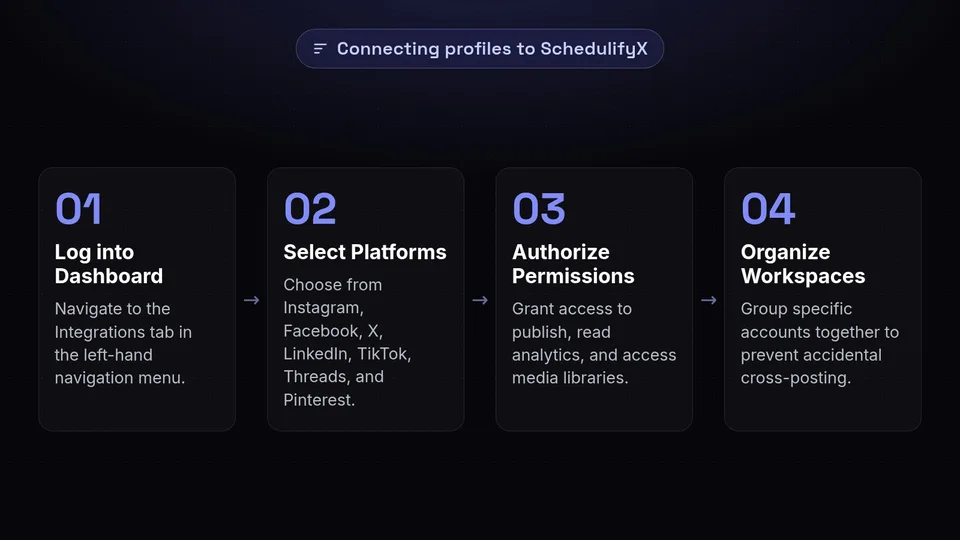
The first step to achieving social media nirvana is setting up your SchedulifyX workspace. We have designed the onboarding process to be as frictionless as possible, allowing you to connect all your profiles securely via official APIs.
Step-by-Step Account Integration
- Log into your SchedulifyX Dashboard: Navigate to the Integrations tab located in the left-hand navigation menu.
- Select Your Platforms: You will see icons for Instagram, Facebook, Twitter (X), LinkedIn, TikTok, Threads, and Pinterest. Click on each one to initiate the OAuth connection process.
- Authorize Permissions: Ensure you grant SchedulifyX the necessary permissions to publish content, read analytics, and access media libraries. For Instagram, ensure your account is set to a Professional or Creator account and linked to a Facebook Page.
- Organize into Workspaces: If you manage multiple brands or clients, use the Workspace feature to group specific accounts together. This prevents accidental cross-posting to the wrong brand's profiles.
Once your accounts are connected, you will see them populate at the top of your main Composer window. You are now ready to begin scheduling.
Step 1: Crafting Your Base Post

When you want to schedule posts all platforms, the most efficient method is to start with a "Base Post." The Base Post acts as the foundation of your content—it contains the core message, the primary media asset (image or video), and the main call-to-action (CTA).
To create a Base Post in SchedulifyX:
- Click the bold Create Post button in the upper right corner of your dashboard.
- In the platform selector, check the box for Select All. This tells SchedulifyX that you intend to publish this campaign across all connected networks.
- Upload your primary media asset. We recommend starting with the highest resolution possible. SchedulifyX's built-in media editor will automatically flag if an asset needs resizing for a specific platform later on.
- Write your foundational caption. Keep this version relatively generic but engaging. Focus on the core value proposition of your post.
- Add your primary link (if applicable).
At this stage, if you were using a lesser tool, you might just hit "Schedule" and hope for the best. But as expert marketers know, a one-size-fits-all approach is a recipe for algorithmic suppression. This leads us to the most powerful feature of SchedulifyX.
Step 2: Mastering Platform-Specific Content Overrides
This is where the magic happens. Multi-platform scheduling is only effective if the content feels native to each specific network. SchedulifyX features a tabbed interface in the Composer window, allowing you to click into each platform and customize—or "override"—the Base Post.
Let us break down exactly how you should customize your content for all seven platforms simultaneously.
Instagram: Visuals and Hashtags
Instagram is a highly visual platform that demands aesthetic perfection and strategic hashtag usage. When you click the Instagram tab in SchedulifyX:
- Aspect Ratio: Use the built-in cropping tool to ensure your image is 4:5 (portrait) or 1:1 (square). If it is a Reel, ensure it is 9:16.
- Caption Formatting: Break up large blocks of text. Use emojis to add visual interest.
- Hashtags: Move your hashtags to the first comment (a toggle option in SchedulifyX) or place 3-5 highly targeted hashtags at the bottom of the caption.
- Tagging: Use the user-tagging and location-tagging features directly in the SchedulifyX interface to boost local discoverability.
Facebook: Community and Links
Facebook's algorithm prioritizes community engagement and meaningful interactions. For your Facebook override:
- Link Previews: If your Base Post includes a link, SchedulifyX will automatically generate a link preview. You can customize the headline and description of this preview.
- Caption Tone: Make the caption more conversational. Ask a question to prompt comments, which heavily signals the Facebook algorithm to push your post to more feeds.
- Media: Facebook is more forgiving with aspect ratios, but landscape (16:9) or square (1:1) generally performs best for standard posts.
Twitter (X): Brevity and Threads
Twitter is fast-paced and text-centric, with strict character limits. When customizing for Twitter:
- Character Limit: SchedulifyX will alert you if your Base Post exceeds the 280-character limit (unless you are a Premium X user, which SchedulifyX supports).
- Create a Thread: If your core message is long, use the Create Thread button in the override tab. SchedulifyX will automatically split your long caption into a cohesive, numbered Twitter thread.
- Media: Attach up to 4 images, or a single video. Ensure your most compelling text is in the very first tweet.
LinkedIn: Professionalism and Value
LinkedIn is the premier B2B networking platform. Your content here must provide professional value, industry insights, or thought leadership.
- Tone Adjustment: Rewrite the caption to be more professional. Remove excessive emojis and focus on the business impact of your message.
- Document Posts: If your media is a series of images, use SchedulifyX to convert them into a PDF document. LinkedIn's algorithm heavily favors document carousels, often granting them 3x the reach of standard image posts.
- Hashtags: Limit yourself to exactly 3-5 broad, industry-specific hashtags (e.g., #Marketing, #Leadership).
TikTok: Trends and Authenticity
TikTok is arguably the most unique platform on this list, requiring a completely different approach to media and captions.
- Video First: If your Base Post is an image, SchedulifyX will warn you that TikTok requires video. You can use our integration to turn static images into a dynamic slideshow.
- Trending Audio: While SchedulifyX can push your original audio, you can use the override notes to remind your team to select a trending sound from TikTok's commercial library upon publishing.
- Short Captions: Keep the caption incredibly brief. Let the video do the talking. Use hyper-niche hashtags to target specific subcultures (e.g., #TechTok, #MarketingTok).
Threads: Conversational and Raw
Meta's Threads app thrives on raw, unfiltered, and highly conversational text. It is less about polished visuals and more about community banter.
- Remove the Polish: Strip away the marketing jargon from your Base Post. Write as if you are texting a friend or colleague.
- Engagement Hooks: Post a controversial or thought-provoking statement related to your core message to spark immediate replies.
- Media: While you can include images, text-only posts or text with a single, unedited photo often perform best on Threads.
Pinterest: Search Engine Optimization
Unlike the other platforms, Pinterest is a visual search engine, not a traditional social network. Content here has a lifespan of months, not hours.
- Vertical Imagery: Use the SchedulifyX editor to crop your image to a strict 2:3 aspect ratio (e.g., 1000 x 1500 pixels). This is non-negotiable for Pinterest success.
- SEO Title and Description: Override the caption completely. Write a keyword-rich Pin Title and a description that naturally incorporates search terms your target audience is using.
- Destination Link: Ensure the outbound link points directly to a relevant blog post, product page, or landing page. Pinterest is one of the highest drivers of outbound social traffic.
Step 3: Utilizing AI for Optimal Timing
Once you have perfectly tailored your content for all seven platforms, the next hurdle is deciding when to hit publish. Historically, social media managers relied on generic infographics claiming "Tuesday at 10 AM is the best time to post." In 2026, this generalized advice is entirely obsolete.
Your audience's active hours are unique to your specific account, your industry, and the geographic distribution of your followers. Furthermore, the optimal time to post on LinkedIn is drastically different from the optimal time to post on TikTok.
This is where SchedulifyX's Optimal Timing AI revolutionizes cross-platform posting.
How SchedulifyX Calculates Optimal Timing
When you are ready to schedule, navigate to the scheduling module at the bottom of the Composer. Instead of manually selecting a date and time, click the AI Optimal Time button. SchedulifyX's algorithm analyzes:
- Historical Engagement: It looks at your past 100 posts on each platform to determine when you received the highest velocity of likes, comments, and shares within the first hour of publishing.
- Follower Activity APIs: For platforms that provide it (like Instagram and Facebook), SchedulifyX pulls data on when your specific followers are actively online.
- Global Time Zones: If your audience is split between New York, London, and Tokyo, the AI calculates a "golden window" where the maximum number of users are awake and active.
Staggering Your Posts
One of the best features of this social media scheduling tool is the ability to stagger posts automatically. Instead of blasting all seven platforms at exactly 9:02 AM, SchedulifyX can schedule your LinkedIn post for 8:30 AM (morning commute), your Twitter post for 12:15 PM (lunch break), and your TikTok for 7:00 PM (evening relaxation)—all from that single Base Post you created.
This staggered approach not only maximizes reach but also makes your brand appear more authentically active throughout the day, rather than automated.
Step 4: Leveraging the SchedulifyX AI Assistant
We understand that manually rewriting captions for seven different platforms can still be time-consuming, even with a streamlined UI. To truly master how to schedule posts all platforms, you need to leverage the SchedulifyX AI Assistant, built directly into the Composer.
If you are suffering from writer's block or simply want to speed up the override process, click the magic wand icon in any platform's tab. The AI Assistant can perform several powerful functions:
- Platform-Specific Rewrites: Highlight your Base Post caption and click "Rewrite for LinkedIn." The AI will instantly transform the text, adopting a professional tone, structuring it with bullet points, and adding appropriate business hashtags.
- Thread Generation: Paste a long blog intro into the Twitter tab and ask the AI to "Turn this into an engaging 5-part thread." It will automatically segment the text, add suspenseful hooks, and number the tweets.
- Hook Generation: The first line of your caption is critical for stopping the scroll. The AI can generate 10 different hooks for your Instagram Reel or TikTok video based on your core topic.
- Hashtag Strategy: Instead of guessing, the AI analyzes real-time trending topics and suggests a mix of broad, niche, and trending hashtags specific to the platform you are overriding.
By combining your strategic oversight with the rapid generation capabilities of the AI Assistant, you can fully optimize a 7-platform campaign in under five minutes.
Step 5: Analyzing Cross-Platform Performance
Publishing the content is only half the battle. To continuously improve your multi-platform scheduling strategy, you must analyze how your content performs across different ecosystems. SchedulifyX provides a unified Analytics Dashboard that aggregates data from all seven platforms into one digestible report.
Key Metrics to Monitor
When reviewing your cross-platform campaigns, pay close attention to the following metrics:
- Engagement Rate by Platform: Do not just look at total likes. Look at the percentage of your audience that interacted with the post. You might find that while Facebook gives you the most impressions, Threads delivers the highest engagement rate.
- Click-Through Rate (CTR): For posts with links, which platform is actually driving traffic to your website? Pinterest and Twitter often outperform Instagram in this metric due to native link formatting.
- Audience Retention (Video): For TikTok and Instagram Reels, dive into the retention graphs. At what second are viewers scrolling past? Use this data to tighten your hooks in future videos.
By regularly reviewing these analytics within SchedulifyX, you can refine your Base Posts and platform overrides, continuously iterating toward higher performance.
Common Mistakes to Avoid in Multi-Platform Scheduling
Even with the best social media scheduling tool at your disposal, human error can derail a campaign. As you build your cross-platform strategy, be sure to avoid these common pitfalls:
"Automation should enhance your strategy, not replace your authenticity. The biggest mistake brands make is treating all social platforms as identical distribution channels."
- Ignoring Image Cropping: Posting a 16:9 landscape video to TikTok or a 9:16 vertical image to a Twitter feed will result in awkward cropping, hidden text, and massive algorithmic penalties. Always use the SchedulifyX override preview to ensure your media looks perfect natively.
- Leaving Platform-Specific Language: There is nothing more embarrassing than posting "Link in bio!" on Facebook, or "Retweet this!" on LinkedIn. Always scrub platform-specific jargon when customizing your overrides.
- Over-Automation: Scheduling posts a month in advance is great for efficiency, but you must remain agile. If a major global event occurs, or a sensitive news story breaks, you need to be able to pause your queue. SchedulifyX features a "Panic Button" that instantly pauses all outgoing scheduled content with one click.
- Forgetting Community Management: Scheduling your posts is just the beginning. You must allocate time to log into the platforms (or use SchedulifyX's unified inbox) to reply to comments, answer DMs, and engage with your community. Social media is a two-way street.
Conclusion: Streamline Your Strategy Today
Learning how to effectively schedule posts all platforms is the most impactful skill a social media manager or business owner can develop in 2026. The days of logging in and out of seven different apps, manually formatting content, and guessing at optimal posting times are officially over.
By utilizing a comprehensive social media scheduling tool like SchedulifyX, you are not just saving time—you are maximizing your digital footprint. Through the strategic use of Base Posts, meticulous platform-specific content overrides, AI-driven timing, and continuous analytical review, you can build a cross-platform presence that is engaging, native, and highly effective.
Are you ready to stop drowning in social media management and start growing your audience exponentially? It is time to take control of your content calendar.
Start your free 14-day trial of SchedulifyX today and experience the ultimate power of seamless, AI-driven multi-platform scheduling. Connect your accounts, craft your first Base Post, and watch as your brand's reach multiplies across the digital landscape.
