Mastering the Social Media Approval Workflow for Client Work
SchedulifyX Team · September 29, 2026
Discover how to build a foolproof social media approval workflow using portal links, inline notes, and version history to streamline client content reviews.
Managing social media on behalf of clients requires more than just a flair for copywriting and a keen eye for design. It demands a rigorous, foolproof system for getting content signed off and scheduled. Without a structured social media approval workflow, agencies and freelance social media managers often find themselves drowning in endless email chains, confusing spreadsheets, and disjointed feedback. Navigating these administrative hurdles not only drains valuable time but also introduces unnecessary friction into the client relationship.
When a client hires you to manage their digital presence, they expect a seamless experience. They want to review upcoming campaigns effortlessly, provide clear feedback, and feel confident that their brand voice is being represented accurately. Achieving this requires a robust content review process that eliminates guesswork and centralises communication. By leveraging dedicated tools designed for collaboration, you can transform a chaotic back-and-forth into a streamlined, professional operation.
In this comprehensive tutorial, we will explore how to build and implement an effective approval system using SchedulifyX. We will focus specifically on three critical features that revolutionise client management: Portal Links, Notes, and Version History. By understanding the mechanics of these tools, you can ensure that your client approval posts are handled with precision, accountability, and absolute clarity.
The Anatomy of a Failing Content Review Process
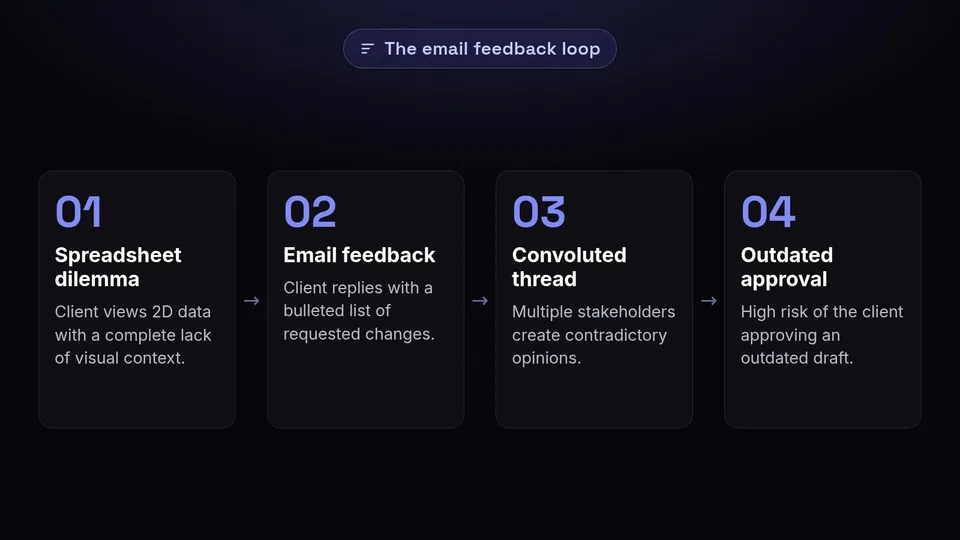
To appreciate the value of a dedicated workflow, it is first necessary to examine what happens when one is absent. Many social media professionals begin their journey relying on general-purpose tools to manage specialised tasks. While a spreadsheet might seem like a logical starting point for planning a content calendar, its limitations become glaringly obvious the moment it is shared with a client for review.
The Spreadsheet Dilemma
Spreadsheets are inherently two-dimensional. They are excellent for organising data but poorly equipped for visualising creative assets. When a client reviews a proposed post in a spreadsheet, they are forced to imagine how a block of text and a separate hyperlink to an image will look when published on a dynamic platform. This lack of visual context frequently leads to misunderstandings regarding formatting, image cropping, and the overall impact of the post.
The Email Feedback Loop
Compounding the spreadsheet problem is the reliance on email for feedback. A typical scenario involves sending a document to a client, who then replies with a bulleted list of requested changes. If multiple stakeholders are involved, this quickly devolves into a convoluted thread of contradictory opinions. Tracking which changes apply to which specific post becomes an exercise in frustration. Furthermore, as revisions are made and new versions of the document are circulated, the risk of a client approving an outdated draft increases exponentially.
A fragmented content review process inevitably leads to delayed publishing schedules, increased administrative overhead, and compromised content quality. To deliver a premium service, the review mechanism itself must be premium.
Building a Robust Social Media Approval Workflow

A successful social media approval workflow is built on three foundational pillars: accessibility, contextual communication, and accountability. When these elements are integrated seamlessly, the friction of getting content signed off disappears.
- Accessibility: Clients must be able to view proposed content easily, without navigating complex software or remembering new login credentials.
- Contextual Communication: Feedback must be attached directly to the specific post in question, eliminating ambiguity.
- Accountability: A clear, unalterable record of all changes, suggestions, and approvals must be maintained to protect both the agency and the client.
SchedulifyX addresses these pillars directly through its purpose-built client management features. By transitioning away from ad-hoc methods and embracing a dedicated platform, you establish a professional boundary and a clear operational standard that instils confidence in your clientele.
Portal Links: Simplifying Client Approval Posts

One of the most significant barriers to a smooth content review process is software fatigue. Clients are busy running their own businesses; the last thing they want is to learn how to navigate another complex dashboard or manage yet another set of passwords. When you place administrative burdens on your clients, approval delays are inevitable.
SchedulifyX solves this problem through the use of Portal Links. A Portal Link is a secure, unique URL generated specifically for a client or a specific campaign. When the client clicks the link, they are instantly transported to a clean, white-labelled environment where their proposed content is displayed exactly as it will appear on the native social media platforms.
The Mechanics of Frictionless Access
The mechanism behind Portal Links is designed entirely around user experience. Because the link itself acts as the authentication key, there is no login screen. This frictionless entry point means a busy executive can review and approve a week's worth of content directly from their mobile phone while commuting. They simply click, read, and act.
Visualising the Final Product
Unlike a spreadsheet, the Portal Link environment renders the content accurately. If a post includes a carousel of images, the client can swipe through them. If it includes a video, they can play it inline. They see the exact character counts, the line breaks, and the hashtag placements. By providing this accurate visual representation, you remove the guesswork from client approval posts. The client knows precisely what they are authorising, which drastically reduces post-publication anxiety and the need for emergency edits.
Contextual Notes: Centralising Your Feedback Loop
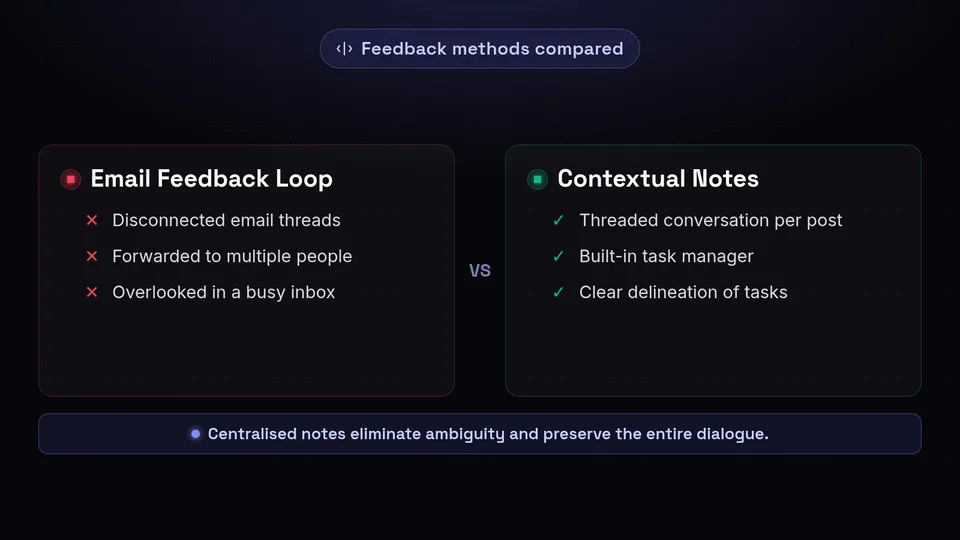
Even with perfect visual representation, revisions are a natural part of the creative process. However, how that feedback is collected and actioned determines the efficiency of your social media approval workflow. Moving feedback out of disconnected email threads and directly onto the content itself is a transformative step.
Within the SchedulifyX Portal, clients can utilise the Notes feature to leave specific, contextual feedback. Instead of writing an email that says, "Can we change the second sentence on the post scheduled for next Tuesday?", the client simply clicks on that specific post within the portal and types their note directly alongside it.
Streamlining the Dialogue
This mechanism creates a dedicated, threaded conversation for every individual piece of content. If a post requires multiple rounds of revision, the entire dialogue is preserved in one logical place. Your team can reply to the client's note directly within SchedulifyX, asking for clarification or confirming that the requested change has been made. This back-and-forth is entirely contained, meaning that any member of your team can step in, read the notes, and immediately understand the status of the post without needing to be forwarded a dozen emails.
Categorising and Resolving Feedback
The Notes system also acts as a built-in task manager for your content review process. Once a client leaves a note requesting a change, the post's status is clearly flagged. After your copywriter or designer implements the requested adjustment, they can resolve the note, signalling to the client that the new version is ready for a final look. This clear delineation of tasks ensures that no piece of feedback is ever overlooked or forgotten in a busy inbox.
Version History: Ensuring Accountability and Clarity
In agency-client relationships, clarity and accountability are paramount. Scope creep, miscommunications, and the dreaded "I didn't approve this" scenario can severely damage trust. To protect your team and provide absolute transparency to your clients, a rigorous audit trail is essential.
This is where SchedulifyX's Version History feature becomes the ultimate safety net for your social media approval workflow. Every time a post is edited—whether text is rewritten, an image is swapped, or a publishing date is moved—the system automatically logs the change, creating a permanent, chronological record.
The Mechanism of Traceability
Version History operates quietly in the background, capturing a snapshot of the content at every stage of its lifecycle. If a client questions why a specific phrasing was used, you can simply open the Version History to see exactly when the change was made and who requested it via the attached Notes. This mechanism removes emotion and memory from the equation, replacing them with objective facts.
Restoring Previous Iterations
The creative process is rarely linear. It is common for a client to request a series of changes, only to decide a few days later that they actually preferred the original concept. Without Version History, reverting to a previous draft relies on someone having saved a backup document or digging through old emails to find the original text. With SchedulifyX, you can simply browse the timeline of edits and restore a previous version with a single click. This flexibility encourages creative experimentation, knowing that previous iterations are never permanently lost.
Tutorial: Implementing Your Workflow in SchedulifyX
Now that we have explored the mechanisms of Portal Links, Notes, and Version History, let us walk through a practical tutorial on how to implement this content review process within SchedulifyX.
Step 1: Draft and Organise Your Content
Begin by creating your posts within the SchedulifyX composer. Upload your media assets, write your captions, and assign the appropriate social media channels. Ensure that you have categorised the posts under the correct client workspace. Do not schedule them for publication yet; instead, set their status to 'Pending Review'.
Step 2: Generate and Share the Portal Link
Navigate to the client's workspace settings and locate the Portal generation tool. You can choose to share all posts marked 'Pending Review' or filter by specific date ranges or campaigns. Generate the unique Portal Link. Copy this secure URL and send it to your client via your preferred communication method—be it a direct message, a project management update, or a formal email. Instruct the client to click the link to view their upcoming calendar.
Step 3: Monitor Client Notes
As the client reviews the content via the Portal Link, they will begin leaving Notes on posts that require attention. You will see these notes populate in real-time within your SchedulifyX dashboard. Assign your team members to address these notes systematically. If a note is straightforward, make the edit. If a note requires clarification, reply directly within the thread to maintain contextual communication.
Step 4: Utilise Version History for Revisions
As your team makes the requested edits, SchedulifyX will automatically log each change in the Version History. Once an edit is complete, resolve the client's note. The client can refresh their Portal Link to see the updated post immediately. If they decide they prefer the previous wording, use the Version History tab on the post to revert the text instantly.
Step 5: Final Sign-Off and Scheduling
Once the client is satisfied, they can use the Portal to mark the posts as 'Approved'. This action updates the status within your SchedulifyX dashboard automatically. You can now safely transition these approved posts into your active publishing queue, confident that every piece of content has been rigorously reviewed, properly documented, and formally authorised.
Conclusion: Elevate Your Client Management
Implementing a professional social media approval workflow is one of the most impactful operational upgrades an agency or freelancer can make. By moving away from disjointed spreadsheets and chaotic email threads, you minimise administrative errors, accelerate publishing timelines, and present a highly polished image to your clients.
Through the strategic use of Portal Links, you remove the friction of the content review process, allowing clients to see exactly what they are approving. By centralising communication with inline Notes, you ensure that feedback is always contextual and actionable. Finally, by relying on automated Version History, you guarantee accountability and safeguard your creative process against miscommunication.
Stop letting disorganised feedback slow down your agency's growth. Embrace a structured, transparent, and highly efficient system for managing your client approval posts. Visit the SchedulifyX website today to discover how our dedicated collaboration tools can completely revolutionise your content review process and help you deliver exceptional results for your clients.
