End-to-End Tutorial: Automate Social Media with SchedulifyX AI
SchedulifyX Team · July 9, 2026
Master AI social media automation with our complete SchedulifyX tutorial. Learn to auto schedule posts, generate captions, and optimize engagement effortlessly.
In today's fast-paced digital landscape, maintaining a consistent and engaging social media presence can feel like a full-time job. Between brainstorming content, writing captivating captions, researching trending hashtags, and figuring out the exact right moment to hit 'publish,' social media managers and business owners are often left overwhelmed. Enter the era of ai social media automation. What if you could put your entire social media strategy on autopilot while actually improving your engagement rates?
Welcome to the ultimate end-to-end tutorial on using SchedulifyX. As a premier ai social media tool, SchedulifyX is designed to eliminate the manual grind of digital marketing. In this comprehensive guide, we will walk you through exactly how to leverage our platform to automatically write captions, analyze images, generate targeted hashtags, and auto schedule posts at optimal times. By the end of this tutorial, you will know how to achieve true automated content creation with zero manual effort.
The Power of AI Social Media Automation

Before we dive into the step-by-step mechanics of the platform, it is crucial to understand why ai social media automation is transforming the marketing industry. For years, automation simply meant queuing up posts in a calendar. You still had to do all the heavy lifting: the writing, the researching, and the timing. Today, AI has flipped the script.
With a modern ai social media tool like SchedulifyX, automation encompasses the entire lifecycle of a post. Natural Language Processing (NLP) algorithms can now understand your brand voice and ai write social posts that sound indistinguishable from a human marketer. Computer vision can 'see' your images and instantly know what hashtags will perform best. Predictive analytics can look at millions of data points to determine the exact minute your specific audience is most active.
"The future of social media marketing isn't about working harder; it's about working smarter. AI doesn't replace the marketer; it empowers them to focus on high-level strategy while the machine handles the execution."
By embracing automated content creation, you are not just saving hours of your week—you are optimizing your output. AI doesn't suffer from writer's block. It doesn't guess when to post. It relies on hard data and sophisticated generation models to ensure every piece of content is primed for success. Let's explore how you can harness this power within SchedulifyX.
Step 1: Setting Up Your SchedulifyX Workspace
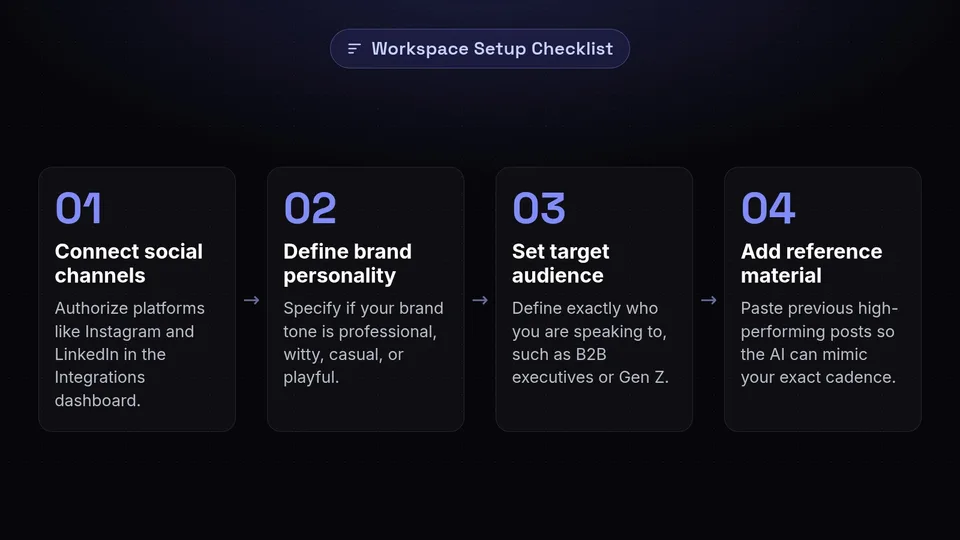
The foundation of any successful automation strategy is a properly configured workspace. SchedulifyX needs to understand who you are, what your brand represents, and where you want to publish your content. Here is how to set up your account for maximum AI efficiency.
Connecting Your Social Channels
First, navigate to the Integrations dashboard. SchedulifyX supports seamless connections with all major platforms: Instagram, Facebook, X (formerly Twitter), LinkedIn, TikTok, and Pinterest. Click on the Connect button for each platform you wish to manage. You will be prompted to authorize SchedulifyX to publish on your behalf. This is a secure, one-time process.
Defining Your Brand Voice
This is arguably the most important step for ensuring the AI generates high-quality content. Go to Settings > Brand Identity. Here, you will find the Brand Voice configuration tool. You can input:
- Brand Personality: Are you professional, witty, casual, authoritative, or playful?
- Target Audience: Who are you speaking to? (e.g., Gen Z tech enthusiasts, B2B marketing executives, fitness beginners).
- Custom Instructions: Add specific rules, such as "Never use emojis," or "Always refer to our customers as 'Insiders'."
- Reference Material: Paste in previous high-performing posts so the AI can mimic your exact tone and cadence.
By feeding this context into SchedulifyX, you ensure that every time you ask the system to ai write social posts, the output is perfectly aligned with your brand's unique identity.
Step 2: Letting AI Write Social Posts and Captions
Staring at a blank screen is the biggest bottleneck in social media management. SchedulifyX's AI Caption Generator eliminates this completely. Whether you have a fully formed idea or just a vague concept, the AI can craft compelling, conversion-optimized text in seconds.
Using the AI Prompt Engine
Navigate to the Create Post dashboard. You will see a text box labeled AI Prompt. Here, you simply tell SchedulifyX what the post is about. Because you have already set up your Brand Voice, you don't need to specify the tone every time.
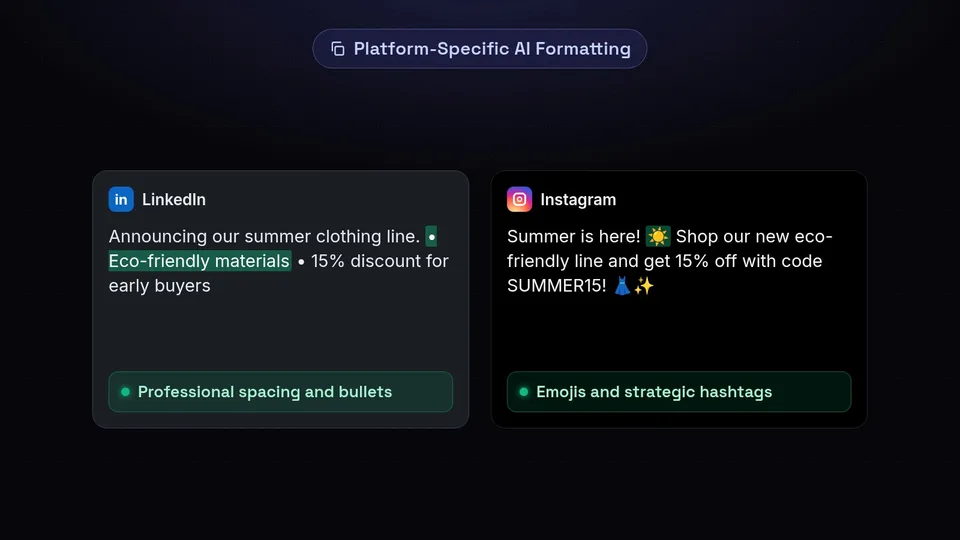
For example, instead of writing a full caption, you just type: "Announce our new summer clothing line launch. Highlight the eco-friendly materials and offer a 15% discount code (SUMMER15) for early buyers."
Generating and Refining
Click Generate Captions. Within seconds, SchedulifyX will provide you with three distinct variations of the caption.
- Variation 1 (Short & Punchy): Ideal for platforms like X or quick Instagram updates.
- Variation 2 (Story-driven): A longer, narrative-style caption perfect for LinkedIn or deeply engaging Facebook posts.
- Variation 3 (Action-Oriented): Heavily focused on driving clicks to your link-in-bio or website.
If the results aren't exactly what you want, you can use the Rewrite buttons. Options include "Make it funnier," "Make it more professional," "Expand this," or "Shorten this." This interactive process makes automated content creation feel like a collaborative effort with a world-class copywriter.
Platform-Specific Formatting
SchedulifyX doesn't just write generic text. It understands the nuances of each network. If you select LinkedIn, the AI will format the text with professional spacing and bullet points. If you select Instagram, it will naturally weave emojis into the text and place hashtags strategically in the first comment or at the bottom of the caption. This level of detail is what makes it a superior ai social media tool.
Step 3: AI Image Analysis and Auto-Hashtag Generation
A great caption is only half the battle. Visuals are the hook, and hashtags are the map that leads users to your content. Manually researching hashtags is tedious and often relies on guesswork. SchedulifyX automates this entirely using advanced computer vision and real-time trend analysis.
How Computer Vision Works in SchedulifyX
When you upload an image or video to the Media Library, SchedulifyX's AI instantly scans the visual elements. It identifies objects, colors, settings, text within the image, and even the emotional sentiment of the photo (e.g., a happy group of people in a sunny park).
For instance, if you upload a picture of a person working on a laptop in a cozy coffee shop, the AI recognizes: laptop, coffee, cafe, remote work, focus, cozy. It then cross-references these visual tags with your caption text and your brand identity to build a comprehensive context profile for the post.
Intelligent Hashtag Generation
Based on the context profile, SchedulifyX generates a tiered list of hashtags designed to maximize your reach. It doesn't just spam the most popular tags (which often bury your post in seconds). Instead, it uses a strategic mix:
- Broad Hashtags (High Volume): e.g., #RemoteWork, #CoffeeShop (To cast a wide net).
- Niche Hashtags (Medium Volume): e.g., #DigitalNomadLife, #FreelanceHustle (To target specific communities).
- Hyper-Local/Specific Hashtags (Low Volume, High Intent): e.g., #AustinCoffeeShops, #RemoteWorkSetup (To capture highly engaged users).
You can set the tool to automatically append these hashtags to your posts, completely automating the discoverability aspect of your strategy.
Step 4: How to Auto Schedule Posts at Optimal Times
You have a brilliant, AI-generated caption and the perfect mix of hashtags. Now, when do you post it? Posting at the wrong time can kill a post's momentum before it even starts. This is where SchedulifyX's predictive scheduling engine takes over, allowing you to auto schedule posts with mathematical precision.
The Problem with Traditional Scheduling
Most scheduling tools allow you to pick a date and time. Some even offer generic "best times to post" based on global averages (e.g., "Post on Wednesdays at 10 AM"). The problem is that your audience is unique. Global averages do not account for your specific followers' time zones, work habits, or app usage patterns.
SchedulifyX's Predictive Optimal Timing
SchedulifyX uses a proprietary machine learning algorithm to analyze your past post performance and your followers' active hours. It creates a dynamic heatmap of when your specific audience is online and most likely to engage (like, comment, share, or click).
When you are ready to publish, simply click Auto-Schedule for Optimal Time. You don't have to look at a calendar or guess. The AI will evaluate your queue and slot the new post into the exact minute that offers the highest statistical probability of engagement over the next 7 to 14 days.
Building an Autonomous Queue
For true ai social media automation, you can use the Smart Queue feature. You can create content categories (e.g., "Inspirational Quotes," "Product Promos," "Blog Links") and tell SchedulifyX how often you want each category published per week.
From there, you simply dump your AI-generated posts into the respective categories. SchedulifyX will automatically pull from these buckets and auto schedule posts continuously, ensuring a balanced, perfectly timed content mix without you ever having to manually place a post on a calendar.
Step 5: Analyzing and Optimizing Post Performance
The beauty of an advanced ai social media tool is that it gets smarter over time. SchedulifyX doesn't just publish your content; it actively monitors how that content performs and learns from it to improve future outputs.
The AI Analytics Dashboard
Navigate to the Insights tab. Here, you won't just see vanity metrics like total likes or follower counts. SchedulifyX provides deep, AI-driven insights into why your content is performing the way it is.
- Content Theme Analysis: The AI categorizes your posts and tells you which topics are driving the most engagement. (e.g., "Your posts about 'Team Culture' are receiving 40% more comments than your posts about 'Product Updates'.")
- Visual Performance: SchedulifyX analyzes the colors, subjects, and formats of your media. It might tell you that videos under 15 seconds perform better, or that images with a blue color palette yield higher click-through rates.
- Hashtag Effectiveness: The platform tracks which specific hashtags are actually bringing in non-follower impressions, allowing the AI to refine its future hashtag recommendations.
Automated A/B Testing
If you want to take your optimization to the next level, you can use SchedulifyX's Automated A/B Testing. When you generate a post, select two different captions or two different images. SchedulifyX will publish them at similar optimal times (or to different segments if the platform allows) and measure the results. The winning variables are fed back into your Brand Voice profile, making your automated content creation progressively more effective.
Best Practices for Automated Content Creation
While SchedulifyX can handle 99% of the heavy lifting, achieving the best possible results requires a strategic mindset. Here are the top best practices for managing your ai social media automation.
1. Keep the "Human in the Loop"
AI is incredibly powerful, but it lacks genuine human empathy and real-world context (like breaking news events). We recommend reviewing your Smart Queue once a week. Take 15 minutes to read through the captions the AI has generated. Tweak a word here or there, add a personal anecdote, or pause the queue if a major global event makes your scheduled content seem tone-deaf. Automation should enhance your authenticity, not replace it.
2. Continuously Update Your Brand Voice
As your business evolves, so should your AI. If you launch a new product, target a new demographic, or undergo a rebrand, make sure to update your settings in the Brand Identity tab. Feed the AI your latest successful posts so its training data remains fresh and relevant.
3. Leverage User-Generated Content (UGC)
Mix AI-generated content with real photos and videos from your customers or team. SchedulifyX can still ai write social posts to accompany these authentic visuals, giving you the perfect blend of high-efficiency automation and relatable, human-centric marketing.
4. Engage with Your Audience
Automation handles the broadcasting, but social media is a two-way street. Use the time you save on content creation to actively engage with your community. Reply to comments, participate in industry conversations, and build relationships. SchedulifyX frees up your schedule precisely so you can focus on this high-value community building.
Conclusion: Reclaim Your Time with SchedulifyX
The days of struggling to maintain a consistent social media calendar are over. By leveraging the full suite of features within SchedulifyX, you can transform a chaotic, time-consuming process into a streamlined, highly effective machine.
From the moment you set up your Brand Voice, you unlock the ability to let ai write social posts that resonate with your audience. Through intelligent image analysis and auto-hashtag generation, you ensure maximum discoverability. By utilizing predictive algorithms to auto schedule posts, you guarantee that your content is seen by the right people at the right time. And with continuous AI-driven analytics, your strategy will only get sharper and more profitable as time goes on.
Automated content creation is no longer a futuristic concept; it is a present-day necessity for any brand looking to scale. SchedulifyX is the ultimate ai social media tool designed to give you back your time while skyrocketing your digital presence.
Ready to put your social media on autopilot and watch your engagement soar? Sign up for SchedulifyX today and experience the future of AI social media automation with zero manual effort!
