Build a Professional Link in Bio Page in 30 Minutes
SchedulifyX Team · August 16, 2026
Build a high-converting link in bio page in under 30 minutes. Compare top tools, discover design tips, and optimize your social media landing page today.
If you are marketing a brand on Instagram, TikTok, or Twitter, you are intimately familiar with one of the most frustrating limitations of modern social media: the single bio link. In a world where you have articles to share, products to sell, newsletters to promote, and videos to showcase, being restricted to just one clickable URL feels like a massive bottleneck. This is exactly why you need to build link in bio solutions that work as a centralized hub for your audience.
A well-designed link in bio page acts as a dedicated social media landing page. It bridges the gap between your bite-sized social content and your broader digital ecosystem. But with so many tools available, how do you choose the right one? And more importantly, how do you set it up so that it actually converts your followers into subscribers, customers, and loyal fans?
In this comprehensive weekend tutorial, we are going to walk you through exactly how to build a professional, high-converting instagram link in bio in under 30 minutes. We will compare the industry heavyweights, explore the best linktree alternative options, and dive deep into design, conversion optimization, and analytics.
Why You Need a Professional Link in Bio Page
Before we dive into the "how," it is crucial to understand the "why." A customized link in bio page is no longer just a nice-to-have; it is a fundamental component of any serious social media marketing strategy.
Overcoming Platform Limitations
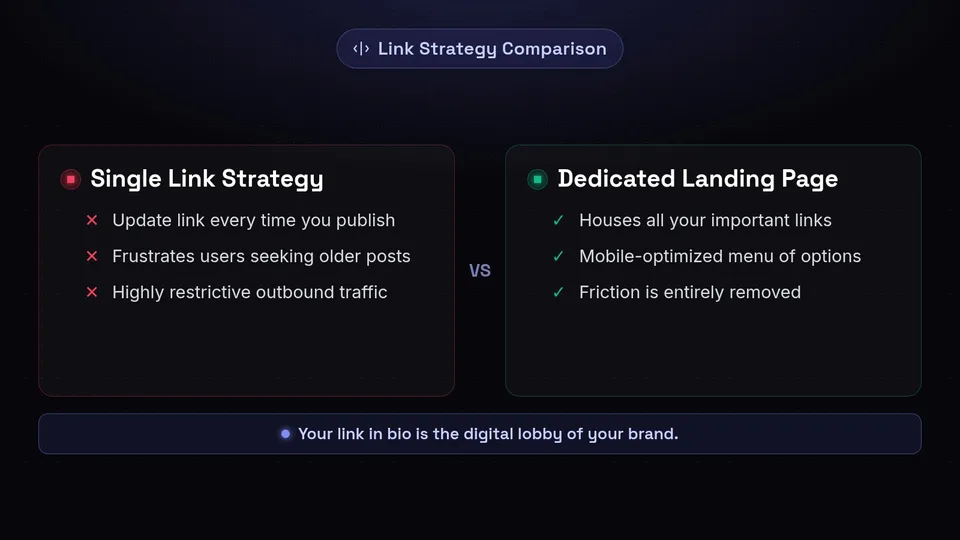
Platforms like Instagram and TikTok intentionally keep users on their apps for as long as possible. By restricting outbound links to a single URL in your profile, they force you to be highly selective about where you send your traffic. If you update your link every time you publish a new post, you risk frustrating users who discover older posts and click your bio link expecting to find a specific product or article, only to find it has been replaced.
Creating a Seamless User Journey
A dedicated social media landing page solves this problem by offering a menu of options. When a follower clicks the link in your bio, they are greeted with a beautifully designed, mobile-optimized page that houses all your important links. Whether they want to read your latest blog post, shop your feed, or sign up for your newsletter, the friction is entirely removed.
"Your link in bio is the digital lobby of your brand. It should be welcoming, easy to navigate, and clearly direct visitors to their desired destination."
Comparing Top Tools: Linktree vs. Later vs. Custom
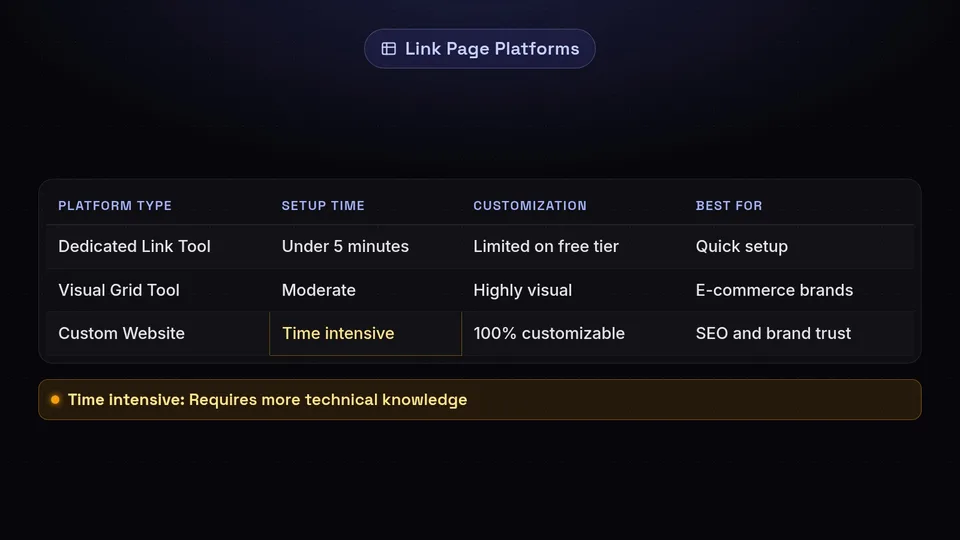
When you decide to build link in bio pages, the first step is choosing the right platform. Let us compare the most popular options to help you find the perfect fit, whether you want the industry standard or a powerful linktree alternative.
Linktree: The Industry Pioneer
Linktree is the most recognized name in the space, and for good reason. It is incredibly easy to use and offers a robust free tier.
- Pros: Setup takes less than five minutes. It integrates seamlessly with numerous third-party apps (like Mailchimp, Shopify, and YouTube). The analytics on paid plans are highly detailed.
- Cons: The free version is heavily branded with the Linktree logo. Customization options are somewhat limited unless you upgrade to a premium tier.
Later Link in Bio: The Visual Approach
Later, a popular social media scheduling tool, offers a feature specifically called "Link in Bio." This tool is designed with Instagram in mind, allowing you to recreate your Instagram grid on your landing page.
- Pros: Highly visual. Users can click on the exact image they saw on your Instagram feed to be taken to the corresponding link. Excellent for e-commerce brands.
- Cons: It can be slightly more complex to set up than a simple list of buttons. It is heavily tied to the Later ecosystem.
Custom Options: WordPress, Carrd, and Squarespace
If you want ultimate control, building a custom page on your own website builder is the ultimate linktree alternative.
- Pros: 100% customizable. You own the domain (e.g., yourwebsite.com/links), which is great for SEO and brand trust. No monthly subscription fees specifically for the link tool if you already pay for hosting.
- Cons: Requires more technical knowledge and time to set up. You have to ensure it is perfectly mobile-optimized yourself.
Weekend Tutorial: Build Your Page in 30 Minutes
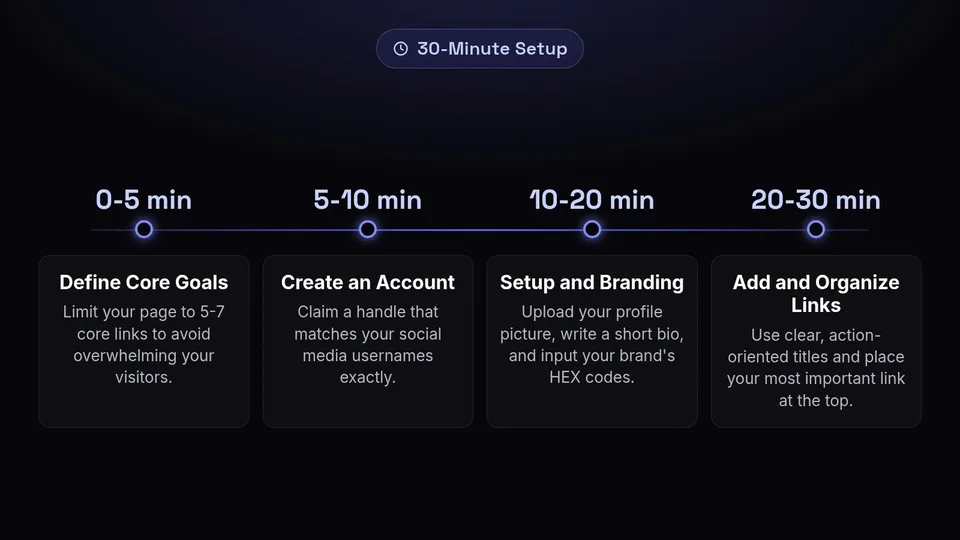
Ready to get hands-on? Let us build your professional instagram link in bio page. Set a timer for 30 minutes, and let us get to work.
Minutes 0-5: Define Your Core Goals
Do not start adding links blindly. Ask yourself: What is the primary action I want my followers to take? Your goals might include:
- Driving sales to a specific product
- Growing your email newsletter list
- Increasing views on a recent YouTube video
- Booking consultation calls
Limit your page to 5-7 core links to avoid overwhelming your visitors. The paradox of choice is real; too many options will lead to decision fatigue and lower conversion rates.
Minutes 5-10: Choose Your Platform and Create an Account
For this tutorial, let us assume you are using a dedicated link-in-bio tool (like Linktree or a similar alternative). Go to the website, sign up using your brand's email, and claim your handle. Make sure your handle matches your social media usernames exactly for brand consistency.
Minutes 10-20: Setup and Branding
This is where your social media landing page starts to look professional.
- Profile Picture: Upload the exact same profile picture or logo you use on your social media accounts.
- Bio Description: Write a short, punchy bio (under 80 characters). Reiterate your value proposition. Example: "Helping you master social media marketing. 👇"
- Colors and Fonts: Most tools allow you to customize the background and button colors. Input your brand's exact HEX codes. Choose a font that aligns with your website's typography.
Minutes 20-30: Add and Organize Your Links
Start adding your URLs. Remember to use clear, action-oriented titles for your buttons. Instead of "My Website," use "Shop the Spring Collection." Instead of "Newsletter," use "Join 10,000+ Marketers - Subscribe Here."
Once your links are added, drag and drop them into a logical hierarchy. Your most important link (your primary goal) should always be at the very top.
Design Tips for Maximum Impact

A beautiful link in bio page builds trust. If your page looks cluttered or amateurish, users will bounce before clicking anything.
Keep It Visually Cohesive
Your link in bio should feel like a natural extension of your brand. If your Instagram feed is minimalist and uses neutral tones, your landing page should reflect that. Avoid jarring neon backgrounds unless that is your established brand identity. Consistency breeds trust, and trust drives clicks.
Prioritize Link Hierarchy
Not all links are created equal. Use visual cues to highlight the most important link. Many platforms allow you to add animations (like a subtle bounce or pulse) to a specific button. Use this feature sparingly—only on the one link you desperately want people to click.
Use High-Quality Thumbnails
If your chosen tool allows you to add thumbnail images or icons next to your links, use them. A small shopping bag icon next to your store link, or a play button next to your video link, helps users process the information faster. Visual processing is significantly quicker than reading text.
Conversion Optimization Tricks
Getting people to your social media landing page is only half the battle. The other half is getting them to take action.
Write Action-Oriented Microcopy
The text on your buttons is known as microcopy. Weak microcopy kills conversions. Transform passive labels into active commands.
- Passive: "Blog Posts" -> Active: "Read Our Latest Marketing Tips"
- Passive: "Contact Us" -> Active: "Book Your Free Consultation"
- Passive: "Podcast" -> Active: "Listen to the Newest Episode"
Implement Lead Capture Directly
The best linktree alternative tools allow you to embed forms directly onto the page. Instead of making a user click a link to go to a newsletter signup page, let them type their email directly into your link in bio page. Reducing the number of clicks required to complete an action will drastically increase your conversion rate.
Remove Dead Links Regularly
Nothing frustrates a user more than a 404 error. Make it a habit to audit your link in bio page every single week. Remove links to expired promotions, out-of-stock products, or old campaigns.
Setting Up Analytics for Your Link in Bio
If you are not tracking your clicks, you are flying blind. You need to know which links are performing and which are taking up valuable real estate.
Platform Built-In Analytics
Most tools provide basic analytics: total views, total clicks, and click-through rate (CTR). Monitor these weekly. If a link at the bottom of your page is getting zero clicks, it is time to remove it or move it up.
Adding UTM Parameters
To truly understand your traffic, you must use UTM parameters. UTMs are short text codes added to URLs that help track the performance of campaigns in Google Analytics. For example, instead of linking to `yourwebsite.com/shop`, link to `yourwebsite.com/shop?utm_source=instagram&utm_medium=social&utm_campaign=linkinbio`. This allows you to see exactly how much revenue your instagram link in bio is generating.
Tracking Pixel Integration
If you are running retargeting ads on Facebook, Instagram, or TikTok, you must add your tracking pixels to your link in bio page. This allows you to build custom audiences of people who clicked the link in your bio, meaning they are highly engaged and primed for conversion campaigns.
Conclusion: Elevate Your Social Media Strategy
Creating a professional link in bio page is one of the highest-ROI activities you can do for your brand this weekend. In under 30 minutes, you can transform a single, static URL into a dynamic, high-converting social media landing page that routes your followers exactly where they need to go.
By choosing the right tool, applying sound design principles, optimizing for conversions, and tracking your analytics, you turn your social media profiles into powerful engines for growth. Whether you stick with the industry standard or opt for a custom linktree alternative, the key is to keep it clean, branded, and action-oriented.
Of course, a great link in bio only works if you have consistent, high-quality traffic going to it. That is where SchedulifyX comes in. As an AI-powered social media scheduling platform, SchedulifyX helps you plan, create, and publish engaging content across all your channels automatically. By keeping your feed active with compelling posts that direct users to your newly optimized bio link, SchedulifyX ensures your landing page never runs out of visitors. Sign up for SchedulifyX today and start driving serious traffic to your new link in bio page!
