How to Build a Social Media Content Calendar from Scratch
SchedulifyX Team · June 16, 2026
Master content planning with our step-by-step social media content calendar tutorial. Learn content pillars, batch creation, and scheduling with SchedulifyX.
Are you tired of waking up in a cold sweat, realizing you haven't posted on your business's Instagram today? Does the thought of coming up with a clever tweet or an engaging LinkedIn post on the fly fill you with dread? If you are constantly scrambling to feed the endless beast of social media algorithms, you are not alone. However, there is a better way. The secret to maintaining a consistent, high-quality online presence without losing your mind is a well-structured social media content calendar.
In the fast-paced world of digital marketing, flying by the seat of your pants is a recipe for burnout and inconsistent results. A strategic approach to content planning allows you to step back, look at the bigger picture, and align your daily posts with your long-term business goals. This comprehensive content calendar tutorial will walk you through the exact process of building a bulletproof social media strategy from the ground up.
Whether you are a solopreneur, a growing agency, or an in-house marketing manager, this guide will teach you how to define your content pillars, determine your ideal posting frequency, master batch content creation, and streamline your social media scheduling workflows using SchedulifyX, the ultimate AI-powered social media management platform.
Why You Need a Social Media Content Calendar
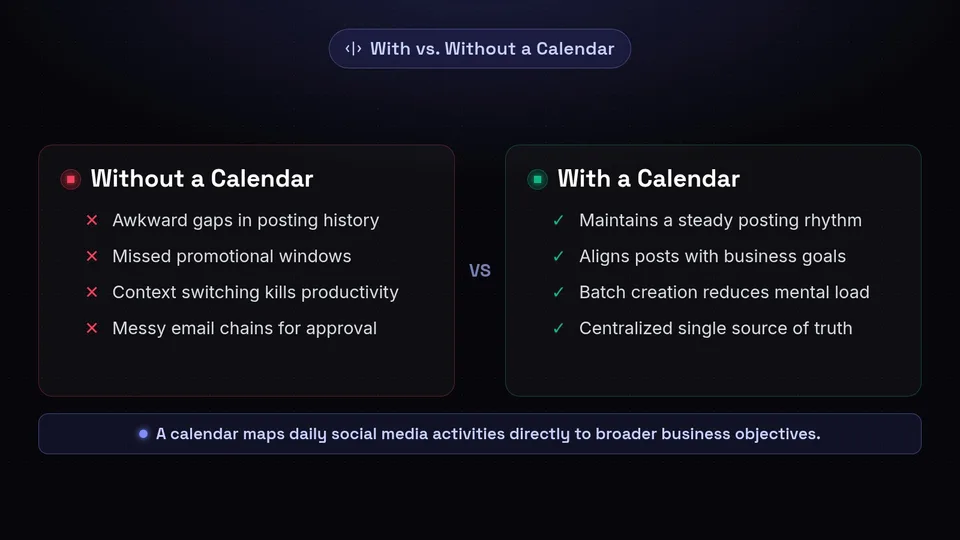
Before we dive into the "how," it is crucial to understand the "why." A social media content calendar is much more than just a schedule of what to post and when. It is the central nervous system of your entire digital marketing strategy. Here is why investing time in content planning is non-negotiable for modern businesses:
1. Ensures Brand Consistency
Consistency is the golden rule of social media. Algorithms favor accounts that post regularly, and audiences build trust with brands that show up consistently. When you plan your content weeks or months in advance, you ensure that there are no awkward gaps in your posting history. A calendar forces you to maintain a steady rhythm, which is vital for staying top-of-mind with your target audience.
2. Aligns Social Media with Business Goals
Posting for the sake of posting rarely moves the needle. A content calendar allows you to map your social media activities directly to your broader business objectives. Launching a new product in November? Your October calendar should be strategically filled with teaser content, educational posts about the problem your product solves, and early-bird sign-ups. Without a calendar, these crucial promotional windows are easily missed.
3. Saves Time and Prevents Burnout
Context switching—moving from writing an email, to designing a graphic, to writing a social caption—kills productivity. By utilizing a content calendar alongside batch content creation, you consolidate your efforts. You can spend one day writing all your captions for the month, and another day designing all the graphics. This systematic approach drastically reduces the daily mental load of social media management.
4. Facilitates Team Collaboration
If you work with a team—whether it is a graphic designer, a copywriter, or a client who needs to approve posts—a centralized content calendar is essential. It provides a single source of truth where everyone can see what is coming up, what assets are missing, and what needs approval. This eliminates messy email chains and ensures everyone is rowing in the same direction.
"A goal without a plan is just a wish. A social media presence without a content calendar is just a series of random thoughts."
Step 1: Define Your Core Content Pillars
The foundation of any effective social media content calendar is a solid set of content pillars. Content pillars (also known as content categories or buckets) are 3 to 5 specific topics or themes that your brand will consistently discuss, amplify, and create content around.
Having defined pillars ensures your content remains focused, relevant to your audience, and aligned with your brand identity. It also makes ideation incredibly easy; instead of asking "What should I post today?" you ask "What is a good post for our 'Educational' pillar?"
Common Types of Content Pillars
- Educational/Informative: Content that teaches your audience something new, solves a specific problem, or provides industry insights. (e.g., "How to..." tutorials, industry news, tips and tricks).
- Entertaining/Engaging: Content designed to make your audience smile, laugh, or interact. (e.g., relatable memes, polls, trending audio reels, behind-the-scenes bloopers).
- Promotional/Conversion: Content that directly asks the audience to take action, such as buying a product, signing up for a webinar, or downloading an ebook. (e.g., product features, testimonials, limited-time offers).
- Community/Culture: Content that humanizes your brand and builds a sense of belonging. (e.g., employee spotlights, user-generated content, company values, behind-the-scenes).
Example: Content Pillars in Action
Let's look at how content pillars apply to different types of businesses:
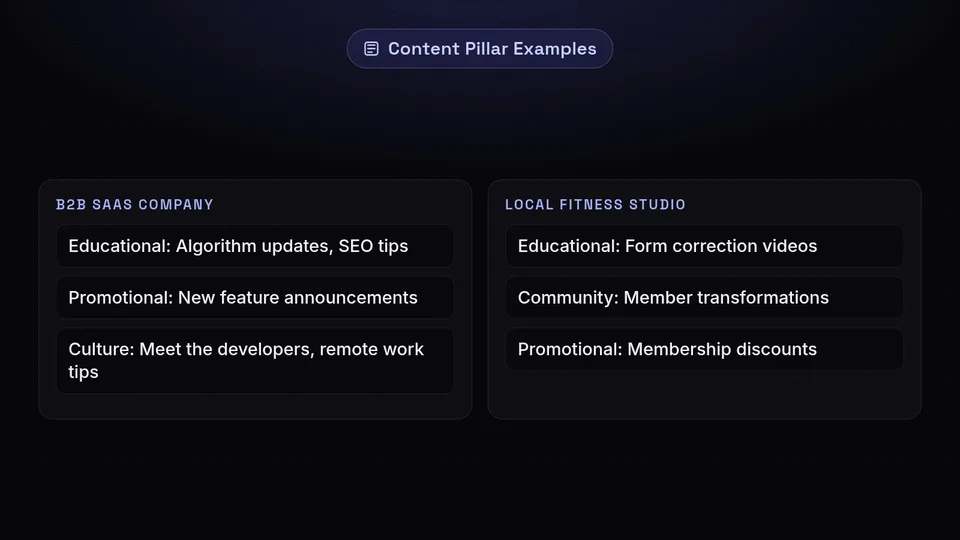
Example 1: A B2B SaaS Company (like SchedulifyX)
- Pillar 1 (Educational): Best practices for social media marketing, algorithm updates, SEO tips.
- Pillar 2 (Product/Promotional): New feature announcements, case studies, tutorials on how to use the software.
- Pillar 3 (Culture): "Meet the developers" posts, remote work tips, company milestones.
Example 2: A Local Fitness Studio
- Pillar 1 (Educational): Form correction videos, nutritional advice, recovery tips.
- Pillar 2 (Community): Member transformations, trainer spotlights, class highlights.
- Pillar 3 (Promotional): Membership discounts, new class schedules, merchandise sales.
Action Step: Take 30 minutes to brainstorm 3-5 core pillars for your brand. Ensure they overlap with what your audience cares about and what your business actually sells. Once you have these pillars, you will use them to color-code and organize your calendar.
Step 2: Determine Your Ideal Posting Frequency
One of the most common questions in any content calendar tutorial is: "How often should I post?" The answer is a delicate balance between platform best practices, algorithm demands, and your actual capacity to produce high-quality content.
It is crucial to remember the golden rule of social media scheduling: Quality always trumps quantity. Posting mediocre content three times a day will hurt your engagement rate more than posting excellent content three times a week. Your posting frequency should be ambitious but sustainable.
Platform-Specific Guidelines (2024-2026 Standards)
While algorithms constantly evolve, here are the current baseline recommendations for optimal growth:
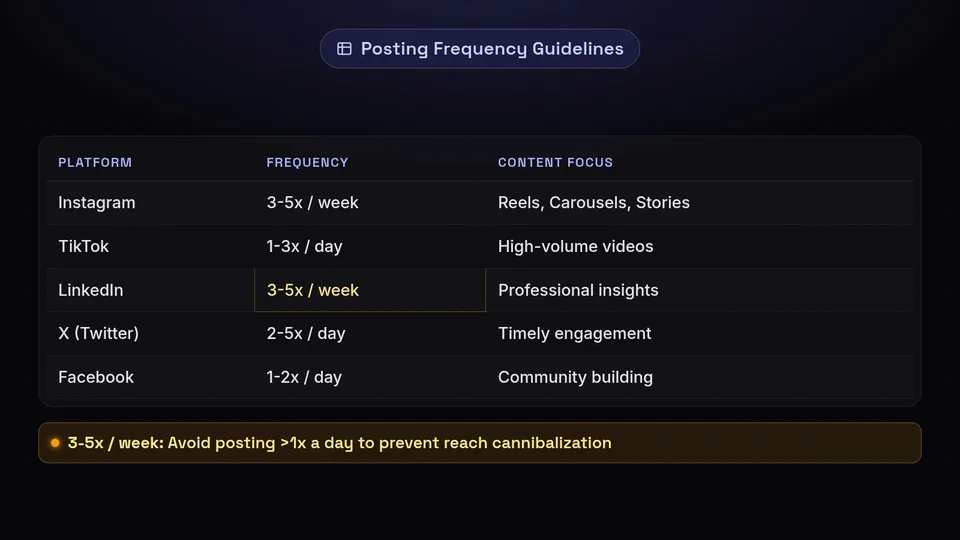
- Instagram: 3-5 times per week to the feed (mix of Reels and Carousels), plus daily Stories to stay at the top of your followers' feeds.
- TikTok: 1-3 times per day. TikTok is a high-volume platform where frequent posting significantly increases your chances of going viral.
- LinkedIn: 3-5 times per week. LinkedIn favors thoughtful, text-heavy posts, document carousels, and professional insights. Avoid posting more than once a day, as it can cannibalize the reach of your previous post.
- X (formerly Twitter): 2-5 times per day. The lifespan of a tweet is incredibly short, so volume and timely engagement are key here.
- Facebook: 1-2 times per day. Focus on community building, sharing links, and engaging video content.
- Pinterest: 1-3 fresh pins per day. Pinterest acts more like a search engine than a social network, so consistency over time is critical.
Finding Your Sustainable Rhythm
If you are a solo creator, posting 3 times a day on TikTok while managing 5 weekly LinkedIn posts and daily Instagram Reels is a fast track to burnout. Start small. Commit to a baseline—for example, 3 high-quality posts per week across your top two platforms. Once you have mastered that rhythm using batch content creation and scheduling tools, you can scale up your frequency.
Step 3: Master Batch Content Creation
If there is one secret weapon in the arsenal of successful social media managers, it is batch content creation. Batching is the process of grouping similar tasks together to complete them in one dedicated time block, rather than doing them sporadically throughout the week.
When you batch create, you eliminate the friction of starting and stopping. You get into a "flow state," allowing you to produce better content in a fraction of the time. Here is a step-by-step workflow for batching a month's worth of content.
Phase 1: The Ideation Session (Day 1)
Set aside 2 hours at the beginning of the month strictly for brainstorming. Open your list of content pillars and start generating ideas. Do not worry about formatting or writing captions yet; just get the core concepts down.
- Look at frequently asked questions from your customers.
- Check industry news and trending topics.
- Review your analytics to see what performed well last month.
- Use SchedulifyX's AI ideation tools to generate fresh angles for your pillars.
Phase 2: Scripting and Copywriting (Day 2)
Once you have a list of approved ideas, sit down and write all the copy. This includes video scripts, carousel text, tweet threads, and the actual captions for your posts. Doing this all at once ensures your brand voice remains consistent. Remember to include strong hooks and clear calls-to-action (CTAs) in every piece of copy.
Phase 3: Production and Shooting (Day 3)
This is where you gather your visual assets. If you are creating video content, set up your camera, lighting, and microphone once. Film all your talking-head videos, TikToks, and Reels back-to-back. Bring a few different shirts or jackets to change into so it doesn't look like you filmed everything on the same day.
If your content is graphic-based, open your design software (like Canva or Figma) and design all your carousels, infographics, and single-image posts using your brand templates.
Phase 4: Editing and Formatting (Day 4)
Take all your raw footage and designs and polish them. Add captions to your videos, trim the dead space, select trending audio, and export everything into a centralized folder (e.g., Google Drive or Dropbox) neatly labeled by date or topic.
By splitting the process into these distinct phases, you turn a chaotic daily chore into a streamlined, highly efficient production line.
Step 4: Map Out Your Content Plan
Now that you have your pillars, your frequency, and your raw content, it is time to map it onto a calendar. This is where content planning becomes visual and strategic.
The Visual Layout
While some people prefer to start with a simple spreadsheet (Google Sheets or Excel), transitioning directly into a visual calendar is highly recommended. You need to see how your content flows over the week and month.
When mapping out your content, consider the following rules of thumb:
- The 80/20 Rule: Ensure that 80% of your content is designed to educate, entertain, or engage your audience, and only 20% is directly promotional. If you map out your calendar and see that 4 out of 5 posts are asking people to buy, you need to adjust.
- Pillar Rotation: Distribute your content pillars evenly. For example, if you post 4 times a week, Monday might be Educational, Wednesday might be Community, Friday might be Entertaining, and Sunday might be Promotional.
- Platform Nuances: A video that works on TikTok might need a different caption or format for LinkedIn. Map out these variations in your calendar so you know exactly what needs to be adapted.
Incorporating Important Dates
Before filling in your evergreen content, block out key dates on your calendar. These include:
- Product launches or major company announcements.
- Industry-specific holidays (e.g., "National Coffee Day" if you are a cafe).
- Major global holidays and seasonal shifts.
- Webinars, live Q&A sessions, or events you are hosting.
Work backward from these key dates to ensure you have adequate promotional runway built into your schedule.
Step 5: Social Media Scheduling Workflows in SchedulifyX
Having a plan is great, but executing it flawlessly is where the magic happens. This is where a robust social media scheduling tool becomes your best friend. SchedulifyX is designed specifically to take the heavy lifting out of calendar management, utilizing AI to optimize your strategy.
Here is a step-by-step tutorial on how to implement your newly minted content calendar into SchedulifyX:
1. Connect Your Social Profiles
Log into your SchedulifyX dashboard and navigate to the 'Integrations' tab. Securely connect your Facebook Pages, Instagram Business accounts, X (Twitter), LinkedIn, TikTok, and Pinterest profiles. SchedulifyX uses official APIs, ensuring your accounts remain secure and compliant with platform rules.
2. Upload Your Batched Assets to the Media Library
Remember all that content you batched in Step 3? Upload your images, graphics, and videos directly into the SchedulifyX Media Library. You can organize these assets into folders based on your Content Pillars, making it incredibly easy to pull the right graphic when you are building a post.
3. Utilize AI for Caption Refinement and Hashtags
While you may have drafted your core copy, SchedulifyX's AI Assistant can take it to the next level. Paste your draft caption into the post composer and use the AI to:
- Adjust the tone (e.g., make it more professional for LinkedIn, or more casual for Instagram).
- Generate platform-specific hashtag clusters based on real-time search volume.
- Add relevant emojis to break up text blocks and increase readability.
4. Schedule for the Best Time to Post
Guessing when your audience is online is a thing of the past. As you drag and drop your posts onto the visual calendar in SchedulifyX, the platform will analyze your historical follower data and suggest the optimal posting times for maximum reach and engagement. Select the "Auto-Schedule to Best Time" feature to let the algorithm do the heavy lifting.
5. Set Up Approval Workflows (For Teams)
If you are working with clients or a marketing team, use SchedulifyX's built-in collaboration tools. You can set posts to "Draft" or "Needs Approval." Stakeholders can log in, view the visual calendar, leave comments directly on specific posts, and hit "Approve." Once approved, the post automatically moves into the active publishing queue.
6. Leverage the 'Evergreen' Feature
For your absolute best, non-time-sensitive content (like a comprehensive guide to your services or a high-performing educational video), use SchedulifyX to mark the post as "Evergreen." The system can automatically recycle this content to fill gaps in your calendar months down the line, ensuring your best work continues to drive traffic.
Step 6: Analyze and Refine Your Strategy
A social media content calendar is not a "set it and forget it" document. It is a living, breathing strategy that requires constant iteration. The final step in mastering your content planning is analyzing the data to see what is working and what is falling flat.
Key Metrics to Track
At the end of every month, open the Analytics dashboard in SchedulifyX and review the performance of your scheduled posts. Focus on the metrics that matter most to your specific goals:
- Reach and Impressions: Is your content being seen? Which platform is giving you the most organic visibility?
- Engagement Rate: Are people liking, commenting, saving, and sharing? High engagement indicates your content is resonating with your audience. (Pay special attention to 'Saves' and 'Shares', as algorithms heavily reward these actions).
- Click-Through Rate (CTR): For promotional posts, are people actually clicking the link in your bio or the link in your post to visit your website?
- Audience Growth: Are you gaining net new followers consistently?
Conducting a Content Audit
Look back at your content pillars. Did your "Educational" posts vastly outperform your "Entertaining" posts? If so, you may want to adjust your 80/20 split for the following month to lean heavier into education. Did carousel posts generate more saves than single images? Pivot your batch creation strategy to design more carousels.
A/B testing is also highly recommended. Try posting the same core message but with a different visual format (e.g., a short-form video vs. a text graphic) and see which one your audience prefers. Use these insights to inform your ideation session for the next month's batching process.
Conclusion
Building a social media content calendar from scratch might seem daunting at first, but it is the single most impactful step you can take to professionalize your digital presence. By defining clear content pillars, establishing a realistic posting frequency, and committing to a batch content creation workflow, you will transform social media from a daily source of stress into a powerful, predictable engine for business growth.
Remember, the goal of content planning is not to restrict your creativity, but to organize it. When the logistical burden of "what to post today" is removed, you have the mental bandwidth to engage authentically with your community, spot new trends, and focus on the strategic growth of your brand.
Are you ready to take absolute control of your social media strategy? Stop relying on messy spreadsheets and disjointed alarms. Sign up for SchedulifyX today and experience the power of AI-driven social media scheduling. Build your calendar, automate your posting, and watch your engagement soar. Your future self will thank you!
