How to Write Engaging Social Media Captions: A Craft Guide
SchedulifyX Team · October 29, 2026
Master the art of caption writing with our craft guide. Learn how to beat truncation, write for non-tappers, and master the 3 jobs of social media captions.
We have all been there. You have the perfect image, a stunning graphic, or a highly edited video ready to go live. You upload it to your scheduling tool, and then... you stare at the blinking cursor. The image is great, but the words escape you. In a desperate bid to get the post published, you might turn to a generic "swipe file" of pre-written templates. You copy, paste, fill in the blanks, and hit publish. But a few hours later, the engagement is flat. The likes are sparse, and the comments are non-existent. Why? Because swipe files lack soul, context, and a fundamental understanding of how users actually consume text on social platforms.
If you want to know how to write engaging social media captions, you must abandon the copy-and-paste mentality. You do not need another swipe file; you need a craft guide. Caption writing is a distinct discipline of copywriting, one that requires an understanding of platform architecture, human psychology, and the brutal reality of the endless scroll.
In this comprehensive guide, we are going to break down the mechanics of effective social media captions. We will explore why your first line is your only guaranteed-read real estate, how platform truncation points dictate your structural formatting, the three distinct jobs every caption must perform, how to write for the user who refuses to tap "Read More," and the ruthless art of editing your captions down. By the end of this masterclass, you will approach caption writing not as an afterthought, but as a strategic tool to drive massive engagement for your brand, perfectly orchestrated through your SchedulifyX dashboard.
The First Line: Your Only Guaranteed-Read Real Estate

Let us establish a harsh truth right from the start: nobody owes you their attention. When a user is scrolling through their feed on Instagram, LinkedIn, TikTok, or Facebook, they are processing information at lightning speed. They are looking for a reason to stop, or more accurately, a reason not to keep scrolling.
While a striking visual might act as the initial speed bump, it is the first line of your caption that applies the brakes. In the world of social media captions, your first line is your headline. It is the only part of your text that is guaranteed to be seen without the user having to take any physical action (like tapping a "more" button). If that first line fails to hook them, the rest of your carefully crafted 2,000-character caption might as well not exist.
The Psychology of the Hook
To understand how to write captions that convert, you must understand what makes a compelling hook. A great first line creates an "information gap"—a psychological itch that can only be scratched by reading further. It promises value, sparks curiosity, challenges an assumption, or evokes an immediate emotional response.
Here are several proven frameworks for crafting irresistible first lines:
- The Contrarian Statement: Challenge a widely held belief in your industry. Example: "Stop waking up at 5 AM to be productive."
- The Direct Question: Ask something highly relevant to your target audience's pain points. Example: "Are you making this critical SEO mistake on your blog?"
- The Data Point: Lead with a shocking or impressive statistic. Example: "80% of your followers will never read past the first line of this post."
- The Story Loop: Start in the middle of a compelling narrative. Example: "I lost 0,000 on Facebook ads before I realized one simple truth."
- The Hyper-Specific Promise: Tell them exactly what they will gain by reading. Example: "Here is the exact 3-step framework I use to write engaging social media captions in 5 minutes."
Notice what these examples do not do. They do not start with "Happy Monday!" They do not say, "We are so excited to announce..." They do not waste precious, guaranteed-read characters on pleasantries or corporate fluff. They get straight to the point, respecting the reader's time while demanding their attention.
Platform Truncation: Where the "Read More" Button Hides
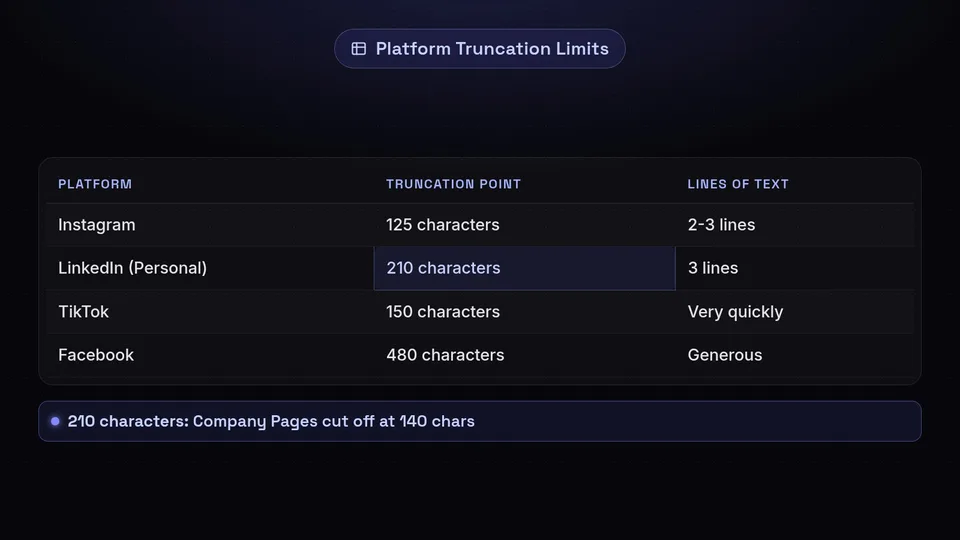
Always place your core message and hook before the platform cuts off your text. One of the biggest mistakes marketers make when learning how to write engaging social media captions is treating all platforms equally. You cannot write one giant block of text and blast it across Instagram, LinkedIn, and Facebook without considering how each platform displays that text.
Every social network has a "truncation point"—the exact moment where they cut off your text and hide the rest behind a "Read More," "See More," or "..." link. Understanding where this truncation happens is critical because it dictates the structural architecture of your caption. You must place your hook and your primary value proposition before this cut-off point.
The Truncation Cheat Sheet
To master caption writing, you must memorize (or at least reference) the truncation rules for your primary platforms. Because these limits can occasionally change based on device sizes and platform updates, we highly recommend running your drafts through our Character Counter tool to visualize exactly where your text will break.
- Instagram: Truncation typically occurs around 125 characters, or roughly two to three lines of text depending on line breaks. If you use a line break immediately after your first sentence, the "more" button will often appear right there.
- LinkedIn: On personal profiles, LinkedIn truncates at about 210 characters, or exactly three lines of text. On Company Pages, it can be even shorter (around 140 characters). The "See more" button on LinkedIn is arguably the most important click you can get, as the platform's algorithm heavily rewards this specific engagement metric.
- Facebook: Facebook is more generous, usually allowing around 480 characters before truncating. However, just because you have more space does not mean you should waste the opening lines.
- TikTok: TikTok's interface is heavily focused on the video. Captions are overlaid on the content, and truncation happens very quickly—often around 150 characters. The first few words are vital here.
- X (Twitter): While standard accounts have a 280-character limit (meaning no truncation, just a hard stop), Premium users can post long-form content. For long-form tweets, the truncation usually happens around the 280-character mark, acting similarly to a "Read More" prompt.
Structural Implications of Truncation
Knowing these limits changes how you structure your writing. You must adopt the "Inverted Pyramid" style of writing, borrowed from traditional journalism. The most crucial, attention-grabbing information must go at the very top. The supporting details follow, and the background information or secondary links are pushed to the bottom.
Furthermore, you must use formatting to your advantage. A massive wall of text is intimidating and will cause users to scroll past, even if the first line is good. Use strategic line breaks to make your caption scannable. A single sentence followed by a line break creates visual breathing room and makes the text feel less dense, encouraging the user to tap that crucial "Read More" button.
The Three Jobs of a Caption (And Why Doing Them All at Once Fails)

Context transforms a generic visual into a specific, relatable narrative for your audience. When analyzing how to write engaging social media captions, we must look at what a caption is actually supposed to achieve. A truly effective caption does not just sit there looking pretty; it works hard for your brand. Specifically, every great caption has three distinct jobs to do. The problem arises when writers try to force one sentence or one paragraph to do all three jobs simultaneously.
Job 1: Context (Setting the Scene)
The first job of a caption is to provide context to the visual asset. Whether it is a photo, an infographic, a reel, or a carousel, the visual rarely tells the whole story. The caption must anchor the visual in reality and explain why the user is looking at it.
If you post a picture of your team laughing in the office, the visual conveys "fun workplace." But the caption provides the context: "This is what happens when the marketing team finally cracks the code on our Q4 strategy after a three-hour brainstorming sprint." Context transforms a generic image into a specific, relatable narrative.
Job 2: Invitation (Fostering Engagement)
Social media is meant to be social. The second job of your caption is to invite the reader into the conversation. This is where you foster community and trigger the algorithm by generating comments and shares.
An invitation is not just a lazy "Thoughts?" tacked onto the end of a post. A good invitation asks a specific, low-friction question that makes the reader feel valued. "What is the one productivity tool you absolutely cannot live without?" or "Have you ever experienced this kind of creative block? Tell me I'm not alone in the comments."
Job 3: Call to Action (Driving the Next Step)
The final job is the Call to Action (CTA). This is where you tell the reader exactly what you want them to do next. Do you want them to click the link in your bio? Save the post for later? Share it with a friend? Sign up for your newsletter?
The CTA must be clear, singular, and direct. "Click the link in our bio to download the full report," or "Hit the save button so you can reference this checklist later."
The Danger of the "Franken-Sentence"
Here is where most caption writing goes wrong. Marketers try to cram context, invitation, and CTA into a single, breathless "Franken-sentence."
Bad Example: "Check out our new software update that makes scheduling faster than ever (context), let us know what your favorite feature is in the comments below (invitation), and don't forget to click the link in our bio to upgrade your account today (CTA)!"
This fails because it creates immense cognitive load. The reader is being asked to process information, formulate an opinion, leave a comment, and navigate away from the app, all at the same time. The result? They do nothing and keep scrolling.
To write highly engaging social media captions, you must sequence these jobs sequentially, giving each its own space and breathing room.
- Hook: Grab attention immediately.
- Context: Tell the story or provide the value.
- Invitation OR Call to Action: Pick ONE primary goal for the post. If you want comments, lean heavily into the invitation and make the CTA secondary or omit it entirely. If you want clicks, skip the conversational question and drive hard toward the link. Focus is the key to conversion.
Writing for the Person Who Will Not Tap "More"
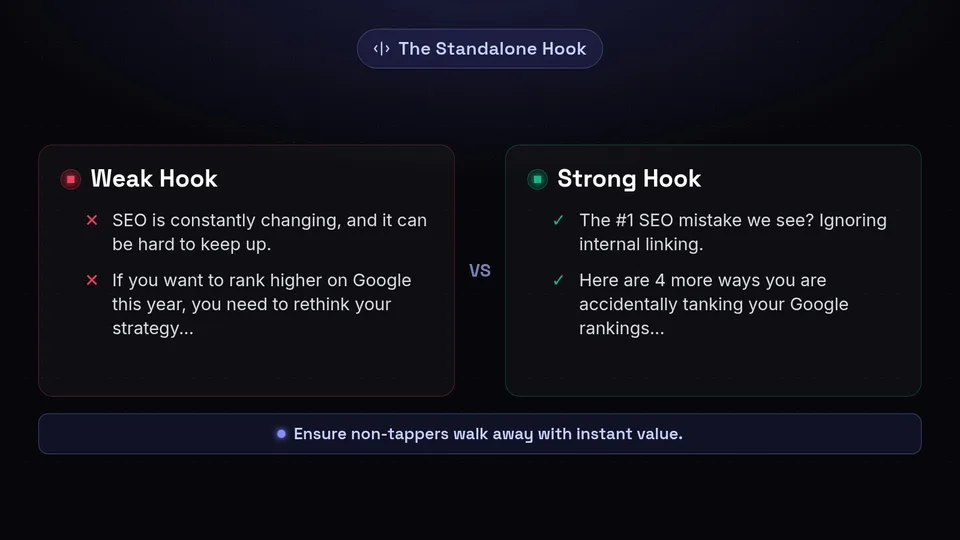
Write opening lines that function as a standalone micro-post for the passive scroller. Despite your best efforts, your brilliant hooks, and your perfectly sequenced jobs, a significant portion of your audience will never tap the "Read More" button. They are the "non-tappers," the passive scrollers who consume content purely on a surface level. If your strategy for social media captions relies entirely on people reading to the very bottom, you are losing out on massive amounts of brand awareness and passive value delivery.
You must learn to write for the non-tapper. This means ensuring that even if a user only reads the first 125 characters of your Instagram post or the first three lines of your LinkedIn update, they still walk away with a complete thought, a piece of value, or a clear understanding of your message.
The Standalone Hook
Your opening lines must function as a standalone micro-post. Think of it like a billboard on the highway. You have three seconds to deliver the core message. If the rest of the caption provides the deep dive, the visible portion must provide the executive summary.
For example, if you are writing a long caption about five ways to improve SEO, do not hide all five ways below the fold.
Weak: "SEO is constantly changing, and it can be hard to keep up. If you want to rank higher on Google this year, you need to rethink your strategy... [Read More]" (The non-tapper learned nothing).
Strong: "The #1 SEO mistake we see? Ignoring internal linking. Here are 4 more ways you are accidentally tanking your Google rankings... [Read More]" (The non-tapper learned that internal linking is crucial, associating your brand with instant value).
Visual Formatting and Emojis
For the non-tapper, visual cues are everything. Since they are only scanning, you can use formatting to draw their eye to the most critical information before the truncation point. Emojis can act as excellent visual bullet points or emotional signifiers, breaking up the text and making it instantly digestible.
However, emoji use must be strategic, not chaotic. Too many emojis look spammy; the right emojis act as universal visual shorthand. We highly recommend using our Emoji Translator tool to ensure the emojis you select accurately convey the tone and meaning you intend across different demographics and platforms. A well-placed pointing finger emoji (👇) right before the truncation point can also serve as a subtle, visual nudge to encourage tapping.
The Art of Editing Down: Before and After Rewrites
Good writing is rewriting. Great caption writing is editing down ruthlessly. When drafting social media captions, your first pass will almost always be too long, too wordy, and too focused on yourself rather than the reader. The magic happens in the edit.
Let us look at three common caption writing mistakes and how to fix them through the lens of our craft guide.
Example 1: The Overstuffed Announcement
The Scenario: A company is launching a new feature on their software platform.
BEFORE:
We are so incredibly thrilled to finally announce that after months of hard work from our amazing development team, the new Analytics Dashboard is officially live! 🎉 We know you guys have been asking for this for a long time, and we really wanted to make sure we got it right before releasing it. This new dashboard will allow you to see your metrics in real-time, export reports to PDF, and track your ROI seamlessly. We think you are going to love it. Let us know what you think in the comments, and be sure to click the link in our bio to read the full press release and update your app today!The Critique: This caption is entirely company-centric ("We are thrilled," "our amazing team"). The first line is wasted on corporate fluff, meaning the actual value (the Analytics Dashboard) is pushed dangerously close to the truncation point. It also ends with a dreaded Franken-sentence, asking for comments, bio clicks, reading a press release, and updating the app.
AFTER:
Stop guessing what your social media ROI is. 🛑
The new Real-Time Analytics Dashboard is officially live.
You asked for deeper insights, and we listened. Starting today, you can:
📊 Track metrics in real-time
📑 Export client-ready PDFs in one click
💰 Prove your exact ROI
Ready to stop guessing and start scaling? Click the link in our bio to unlock your new dashboard.Why it Works: The hook immediately addresses a customer pain point (guessing ROI). The non-tapper sees the problem and the solution before the cut-off. The formatting uses line breaks and strategic emojis to make the features scannable. Finally, it strips away the confusing multiple CTAs and focuses solely on driving the user to the link in the bio.
Example 2: The Rambling Thought-Leadership Post
The Scenario: A CEO sharing business advice on LinkedIn.
BEFORE:
I was thinking the other day about leadership and what it really means to be a good manager in today's fast-paced corporate environment. When I first started my company 10 years ago, I thought being a leader meant having all the answers and telling everyone what to do. But over time, I've realized that this isn't true at all. The best leaders I know are actually the ones who listen more than they speak. They empower their teams to make decisions and they aren't afraid to admit when they are wrong. Empathy is the most important skill you can have. What do you guys think makes a good leader?The Critique: The first three lines (the LinkedIn truncation point) are incredibly boring and generic. "I was thinking the other day..." offers zero value to the scroller. The actual insight is buried in the middle of a dense paragraph.
AFTER:
The biggest lie we tell new managers?
"You need to have all the answers."
When I founded my company 10 years ago, I led with my ego. I micromanaged. I spoke first in every meeting. And I nearly burned my team out.
Here is the hard truth I had to learn: Leadership isn't about having the answers. It is about asking the right questions.
The best leaders do three things:
1. They listen aggressively.
2. They empower decision-making.
3. They normalize saying, "I don't know, let's figure it out."
Empathy > Ego.
What is the best piece of leadership advice you have ever received?Why it Works: The hook is punchy and controversial, perfectly fitting the LinkedIn 3-line limit before truncation. It uses storytelling (the founder's failure) to build credibility. The core message is broken down into a scannable numbered list. The invitation at the end is specific and likely to generate high-quality comments.
Example 3: The Vague Product Pitch
The Scenario: An e-commerce brand selling a new skincare serum on Instagram.
BEFORE:
Glow up this summer with our brand new Vitamin C serum! ✨ Made with natural ingredients to help your skin look its absolute best. It's super hydrating and smells amazing. Get yours now before they sell out! Link in bio to shop. 🛍️The Critique: It sounds like a commercial. It uses generic buzzwords ("glow up," "natural ingredients," "absolute best"). It creates fake urgency ("before they sell out"). It completely lacks an emotional connection or a specific benefit.
AFTER:
Dull, tired skin doesn't stand a chance. 🍋
Meet your new morning non-negotiable: The Brightening Vitamin C Serum.
We formulated this specifically for the days when you are running on 4 hours of sleep and too much iced coffee. It delivers an instant hit of hydration, fades dark spots over time, and leaves you looking like you actually got 8 hours of rest.
Tap the link in our bio to add the ultimate wake-up call to your routine.Why it Works: It speaks directly to the customer's reality (tired, running on coffee). It translates features ("natural ingredients") into tangible benefits ("looks like you got 8 hours of rest"). It feels conversational rather than transactional, making the CTA feel like a helpful recommendation rather than a hard sell.
Mastering the Craft of Caption Writing
Learning how to write engaging social media captions is not about finding the perfect template or hacking the algorithm with a secret combination of hashtags. It is about respecting the craft of copywriting within the unique constraints of social media platforms.
Remember the core tenets of this guide: Treat your first line like headline real estate, because it is the only part of your caption guaranteed to be read. Respect platform truncation points and structure your text so the primary value is delivered above the fold. Understand the three distinct jobs of a caption—context, invitation, and call to action—and sequence them logically rather than cramming them together. Always write with the "non-tapper" in mind, ensuring your post delivers value at a glance. And finally, edit ruthlessly. Strip away the fluff, center the reader, and make every single character count.
When you elevate your caption writing from an afterthought to a strategic craft, you will stop fighting for scraps of attention and start building a deeply engaged community. And when you are ready to take those perfectly crafted captions and deploy them seamlessly across all your channels at the optimal times, SchedulifyX is here to make the process effortless. Stop relying on swipe files. Start writing with intention, schedule with precision, and watch your engagement soar.
