Master Strategy With the SchedulifyX Visual Content Calendar
SchedulifyX Team · August 5, 2026
Discover how the SchedulifyX visual content calendar streamlines your social media strategy with drag-and-drop scheduling, color-coding, and post previews.
In the fast-paced, ever-evolving landscape of digital marketing, managing multiple social media channels can quickly turn into a chaotic juggling act. Between drafting compelling copy, designing eye-catching assets, securing stakeholder approvals, and analyzing performance metrics, social media managers are often stretched incredibly thin. For years, marketers relied on clunky spreadsheets and disjointed tools to plan their campaigns, leading to missed opportunities, formatting errors, and immense frustration. The modern digital ecosystem demands agility, precision, and above all, a clear, unified view of your entire strategy. Enter the ultimate solution: the visual content planner.
At SchedulifyX, we understand that an effective social media strategy is built on a foundation of organization and foresight. That is why we are thrilled to announce our latest product update, designed specifically to empower marketing teams, agencies, and independent creators. We have completely overhauled our scheduling interface to bring you the all-new SchedulifyX calendar—a dynamic, intuitive, and highly visual hub that transforms the way you plan, preview, and publish your content.
This comprehensive guide will walk you through every facet of our new social media calendar, showcasing how its innovative features can save you hours of manual work each week, eliminate costly posting errors, and ultimately drive better engagement across all your digital channels. From seamless drag drop scheduling to real-time post previews, get ready to take absolute control of your digital narrative.
Why You Need a Visual Content Planner in 2026
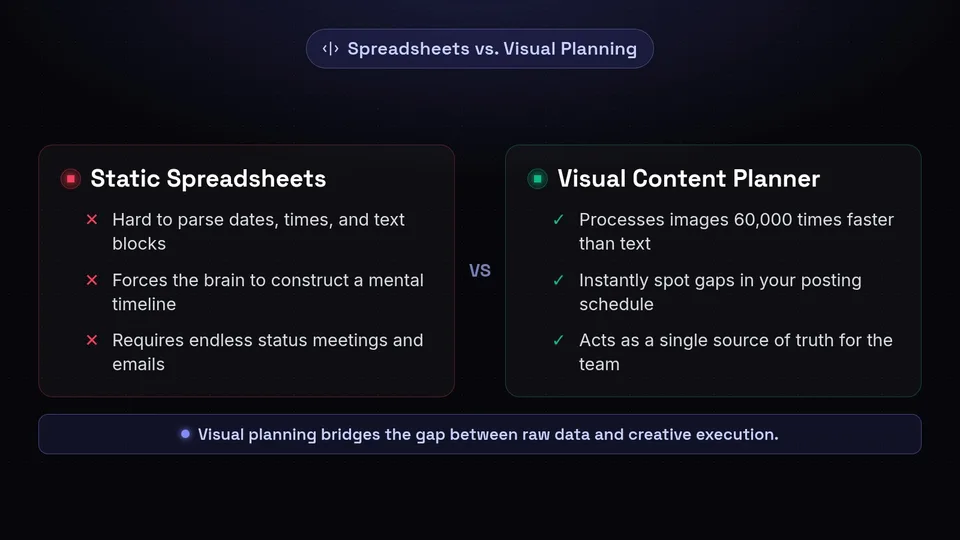
The days of managing social media campaigns via static spreadsheets are long gone. In 2026, the digital marketing space is characterized by omnichannel presence, rapid trend cycles, and highly sophisticated audience expectations. Brands are no longer just posting on one or two platforms; they are maintaining active presences on LinkedIn, X (formerly Twitter), Instagram, TikTok, Facebook, Pinterest, and Threads. Each of these platforms possesses its own unique algorithm, optimal posting times, and content format requirements.
Attempting to manage this complexity without a dedicated visual content planner is a recipe for burnout and strategic misalignment. A visual planner bridges the gap between raw data and creative execution. It allows you to step back and view your overarching narrative, ensuring that your messaging is consistent, your content mix is balanced, and your promotional campaigns are perfectly timed.
The Psychological Advantage of Visual Planning
Human beings are inherently visual creatures. Research shows that the human brain processes images 60,000 times faster than text. When you look at a spreadsheet filled with dates, times, and text blocks, your brain has to work incredibly hard to parse that information and construct a mental timeline. A visual social media calendar, on the other hand, instantly communicates the rhythm and flow of your content strategy. You can immediately spot gaps in your posting schedule, identify days that are overly saturated, and ensure that your mix of educational, entertaining, and promotional content is perfectly balanced.
Enhancing Team Collaboration
Furthermore, a visual content planner acts as a single source of truth for your entire marketing team. Copywriters, graphic designers, community managers, and executive stakeholders can all look at the same calendar and instantly understand the game plan. This transparency drastically reduces the need for endless status meetings and confusing email chains. When everyone can see the pipeline visually, collaboration becomes seamless, and bottlenecks are identified and resolved before they impact your publishing cadence.
Introducing the New SchedulifyX Calendar

Building upon our robust AI-powered foundation, the new SchedulifyX calendar has been engineered from the ground up with the user experience at the forefront. We spent months gathering feedback from our community of social media managers, analyzing their pain points, and studying their daily workflows. The resounding consensus was clear: marketers need a tool that is as flexible and dynamic as the social media landscape itself.
The result is a state-of-the-art content calendar tool that seamlessly integrates our advanced AI scheduling algorithms with a highly intuitive, visually rich interface. The SchedulifyX calendar is not just a place to store your upcoming posts; it is an active, intelligent workspace where your social media strategy comes to life.
Key Pillars of the New Design
- Intuitive Navigation: We have stripped away the clutter to provide a clean, modern interface that lets your content shine.
- Unmatched Flexibility: Social media is unpredictable. Our new calendar is built to accommodate last-minute changes and sudden pivots with ease.
- Holistic Visibility: Whether you are planning a year-long macro campaign or scheduling micro-interactions for the afternoon, the calendar adapts to your perspective.
- Actionable Insights: By visualizing your content, you organically uncover insights about your posting habits and audience engagement patterns.
Let us dive deep into the specific features that make the SchedulifyX calendar the ultimate tool for modern social media management.
Drag Drop Scheduling: Flexibility at Your Fingertips

If there is one constant in social media marketing, it is that things change. A sudden breaking news event, a viral trend, a product launch delay, or a shift in company strategy can instantly render your carefully planned content calendar obsolete. In the past, rescheduling posts meant painstakingly editing individual entries, changing dates and times manually, and hoping you did not accidentally overlap with another scheduled post.
With the introduction of drag drop scheduling in the SchedulifyX calendar, adapting to change is as simple as a flick of the wrist. This feature is a massive quality-of-life improvement for social media managers who need to remain agile.
How Drag Drop Scheduling Works
Imagine you have a comprehensive promotional campaign scheduled for Wednesday. On Tuesday afternoon, a major industry news story breaks, and you realize that your promotional posts will appear tone-deaf if published as planned. With drag drop scheduling, you simply click on the scheduled posts for Wednesday, drag them over to Friday, and drop them into place. The SchedulifyX calendar automatically updates all the backend metadata, adjusting the dates and times while preserving your carefully crafted copy, tags, and media attachments.
Strategic Advantages of Drag and Drop
- Rapid Response to Trends: When a trend emerges on TikTok or X, speed is essential. Drag and drop allows you to instantly clear space on your calendar to capitalize on real-time engagement opportunities.
- Effortless Content Repurposing: If a post performs exceptionally well, you can easily duplicate it and drag it to a future date for a quick and effective repost.
- Stress-Free Campaign Shifting: Entire campaigns spanning multiple days can be shifted forward or backward in a matter of seconds, saving you hours of tedious manual adjustments.
"The ability to drag and drop posts across the calendar has completely transformed our workflow. What used to take 45 minutes of manual rescheduling now takes 15 seconds. It gives our team the confidence to be agile and reactive without fearing that we'll break our entire schedule."
Color-Coded Platform Labels for Instant Clarity
Managing an omnichannel strategy means dealing with a massive volume of content. When you are looking at a calendar populated with dozens of posts for a single week, it can easily become a wall of text and thumbnails. How do you quickly ensure that you are maintaining a consistent presence on LinkedIn without neglecting your Instagram audience? The answer lies in our newly implemented color-coded platform labels.
Visualizing Your Omnichannel Strategy
The SchedulifyX calendar utilizes a distinct, vibrant color palette to represent each social media platform. By default, Facebook is represented by its iconic blue, X by a stark black, LinkedIn by a professional navy, Instagram by a vibrant gradient-inspired magenta, and TikTok by a dynamic teal. When you glance at your calendar, these color codes provide an instant visual breakdown of your platform distribution.
Customization and Workflow Optimization
Beyond platform identification, SchedulifyX allows for advanced color-coding customization. You can assign specific colors to different types of content or campaign pillars. For example:
- Green: Evergreen educational content and blog promotions.
- Red: Urgent announcements, product launches, or limited-time sales.
- Yellow: User-generated content (UGC) and community spotlights.
- Purple: Behind-the-scenes company culture posts.
By combining platform labels with thematic color-coding, a social media manager can look at a month-long view and instantly assess the health of their strategy. If a week looks entirely "red" (promotional), you immediately know you need to drag and drop some "green" (educational) or "yellow" (community) content into the mix to prevent audience fatigue. This level of visual assessment is impossible to achieve with standard text-based lists.
Month, Week, and Day Views: See the Big Picture and the Details
Different roles within a marketing team require different perspectives on the social media strategy. A Chief Marketing Officer (CMO) wants to see the macro-level narrative and how social campaigns align with broader company initiatives. A Social Media Manager needs to ensure the weekly cadence is balanced and engaging. A Community Manager needs to know exactly what is going out today, down to the minute, so they can monitor comments and engage with the audience.
To accommodate these diverse needs, the SchedulifyX visual content planner features seamlessly integrated Month, Week, and Day views, allowing you to zoom in and out of your strategy with a single click.
The Month View: Strategic Macro-Planning
The Month view is your strategic command center. It provides a bird's-eye view of your entire content pipeline. This view is ideal for:
- Plotting out major product launches, holidays, and industry events.
- Ensuring a consistent publishing cadence across the entire month.
- Identifying long-term content gaps that need to be filled by the creative team.
- Sharing high-level roadmaps with stakeholders and clients for macro-approval.
The Week View: Tactical Execution
The Week view is where the day-to-day magic happens. It strikes the perfect balance between strategic oversight and granular detail. In the Week view, you can:
- Utilize drag drop scheduling to fine-tune your posting cadence based on early-week performance data.
- Ensure that your daily mix of platforms and content types is perfectly balanced.
- Review the specific copy and creative assets for the upcoming days to ensure immediate relevance.
The Day View: Granular Precision
The Day view breaks down your schedule hour by hour. This view is essential for high-volume publishing days, such as during a live event or a major crisis management scenario. It allows you to:
- Pinpoint the exact minute a post will go live.
- Manage rapid-fire posting schedules on platforms like X.
- Coordinate social posts with real-world events, press releases, or email newsletter drops.
By offering these three distinct perspectives, the SchedulifyX calendar ensures that your team is always aligned, regardless of whether they are focused on the big picture or the immediate details.
Flawless Execution with Real-Time Post Previews
One of the most anxiety-inducing moments for any social media manager is hitting "publish" and realizing that the image is cropped awkwardly, the text formatting is broken, or the link preview looks terrible. Every social media platform has its own unique set of rules regarding image aspect ratios, character limits, line breaks, and link metadata. Keeping track of all these rules manually is nearly impossible.
To eliminate this anxiety and guarantee flawless execution, the SchedulifyX calendar includes an advanced, real-time post preview engine.
WYSIWYG (What You See Is What You Get)
As you draft your content within the calendar interface, the post preview panel generates a pixel-perfect, real-time rendering of exactly how your post will look natively on the chosen platform. If you are scheduling a multi-image carousel for Instagram, you can swipe through the preview to ensure the narrative flows perfectly. If you are drafting a long-form thought leadership post for LinkedIn, the preview will show you exactly where the "See more" truncation will occur, allowing you to optimize your hook.
Catching Errors Before They Go Live
The preview feature is an invaluable quality assurance tool. It helps you catch common formatting errors, such as:
- Awkward Image Cropping: Ensure your crucial visual elements are not cut off by Twitter's landscape crop or Instagram's square grid.
- Broken Mentions and Tags: Verify that your @mentions are hyperlinking correctly and that your hashtags are formatted properly.
- Link Preview Failures: Check that your URL is pulling the correct Open Graph image and meta description before the post goes live.
By utilizing the visual content planner's preview capabilities, you protect your brand's professional image and ensure that every piece of content you publish looks polished, intentional, and highly engaging.
One-Click Publishing Directly from the Calendar
Efficiency is the cornerstone of effective social media management. Every extra click, every unnecessary screen load, and every context switch drains valuable time and mental energy. We designed the SchedulifyX calendar not just as a planning tool, but as a powerful execution engine.
Streamlining the Workflow
In traditional workflows, social media managers often plan their content in a spreadsheet, draft the copy in a text document, download assets from a cloud drive, and then manually upload everything into a native platform or a disjointed scheduling tool. This fragmented process is inefficient and prone to user error.
With SchedulifyX, the entire workflow is consolidated into a single, unified interface. Once your content is planned, approved, and previewed within the calendar, executing the strategy requires virtually zero friction. Our one-click publishing functionality allows you to push content live directly from the calendar interface.
How It Enhances Productivity
- Immediate Action: Notice an empty slot on today's calendar? Click the slot, use our AI tools to generate a quick, engaging post, preview it, and hit publish—all in under two minutes.
- Bypassing Native Platform Distractions: Logging into native social media platforms to post manually often leads to getting sucked into the feed, wasting valuable time. One-click publishing keeps you focused on your strategy within the distraction-free SchedulifyX environment.
- Seamless Integration with AI: Because the calendar is built directly into the SchedulifyX AI ecosystem, you can seamlessly transition from AI content generation to calendar scheduling to live publishing without ever leaving the app.
Best Practices for Using a Content Calendar Tool
Having a powerful content calendar tool like SchedulifyX is only half the battle; knowing how to leverage it strategically is what separates good social media managers from great ones. To help you get the most out of our new visual content planner, here are several actionable best practices you should implement into your workflow today.
1. Embrace Content Batching
Context switching is the enemy of productivity. Instead of writing one post every day, use the SchedulifyX calendar to batch your work. Dedicate Monday morning to writing all your copy for the week. Spend Tuesday afternoon designing all your visual assets. Then, use the drag drop scheduling feature to quickly distribute these batched assets across your month view. Batching significantly reduces cognitive load and ensures a more consistent brand voice.
2. Establish a Color-Coding Taxonomy
Do not just use colors randomly. Sit down with your team and establish a strict color-coding taxonomy for your calendar. Document this taxonomy in your brand guidelines so that anyone who looks at the SchedulifyX calendar instantly understands the strategy. Whether you color-code by platform, content pillar, or campaign status (e.g., Draft, Pending Approval, Scheduled), consistency is key to making the visual cues effective.
3. Plan for the Unexpected (Leave Blank Spaces)
A common mistake novice social media managers make is packing their calendar tool so full of scheduled content that there is no room for spontaneity. Social media thrives on real-time engagement and trend participation. When looking at your week view, intentionally leave 15-20% of your slots open. This gives you the flexibility to jump on trending audios, share breaking industry news, or highlight spontaneous user-generated content without having to constantly use drag drop scheduling to push back your evergreen posts.
4. Utilize the Previews for Platform-Specific Optimization
Never cross-post the exact same content across all platforms without optimization. Use the real-time post previews to tailor your message. A post going to LinkedIn should have a professional tone and appropriate paragraph spacing, which you can verify in the preview. That same core message going to X should be concise and punchy. The visual content planner allows you to view these variations side-by-side, ensuring your omnichannel strategy is nuanced and highly effective.
5. Conduct Regular Calendar Audits
At the end of every month, switch to the Month view and conduct a retrospective audit. Look at the color distribution. Did you over-index on promotional content? Did you neglect a specific platform? Compare your visual calendar layout with your analytics dashboard. If you notice that weeks with a higher density of video content (perhaps color-coded purple) yielded higher engagement, you can use that insight to structure the following month's calendar more effectively.
Conclusion: Take Control of Your Social Media Strategy
The era of disjointed, chaotic social media management is over. To succeed in today's hyper-competitive digital landscape, you need tools that provide clarity, foster agility, and empower execution. The new SchedulifyX visual content calendar is more than just a scheduling upgrade; it is a comprehensive strategic workspace designed to elevate your entire marketing workflow.
By leveraging features like intuitive drag drop scheduling, instant color-coded platform labels, versatile time views, pixel-perfect post previews, and seamless one-click publishing, you can reclaim hours of your week and focus on what truly matters: crafting compelling narratives that resonate with your audience.
Stop letting spreadsheets dictate your strategy. It is time to visualize your success. Log in to your SchedulifyX account today to explore the new content calendar tool, or if you are new to our platform, sign up for a free trial and experience the future of AI-powered social media management. Master your strategy, streamline your workflow, and watch your digital presence thrive with the SchedulifyX calendar.
