Setting Up Pinterest for Business in 2026: Ultimate Guide
SchedulifyX Team · August 31, 2026
Learn how to use Pinterest for business in 2026. Master board architecture, pin formats, SEO keywords, and scheduling to drive massive traffic and sales.
If you are still treating Pinterest like a traditional social media platform, you are leaving substantial revenue and website traffic on the table. As we move deeper into 2026, Pinterest has firmly established itself not as a social network, but as a highly sophisticated, AI-driven visual discovery engine. For brands and creators, mastering pinterest for business is no longer optional—it is a critical pillar of a sustainable, evergreen inbound marketing strategy.
Unlike standard social media platforms where the lifespan of a post is measured in mere hours (or even minutes), a well-optimized Pin can continue to drive targeted, high-intent traffic to your website for months, or even years, after it is published. Users do not log onto Pinterest to see what their friends had for lunch; they log on to plan their lives, design their homes, build their wardrobes, and, most importantly, to make purchasing decisions.
In this comprehensive guide, we will break down exactly how to use Pinterest to scale your brand. We will cover everything from the initial business account conversion and strategic board architecture to pin sizes, SEO keyword placement, and the ideal scheduling cadence. Finally, we will outline exactly what realistic month-by-month growth looks like so you can set your team up for long-term success with your pinterest marketing 2026 strategy.
Step 1: Converting to a Pinterest Business Account
The very first step in leveraging Pinterest for business is ensuring you are actually using a Business Account. If you are currently pinning from a personal account, you are missing out on vital analytics, advertising capabilities, and the ability to claim your website—all of which are non-negotiable for a professional presence in 2026.
Why You Must Convert
Converting to a business account is free and unlocks the Pinterest Analytics dashboard. This dashboard provides granular data on your impressions, engagements, outbound clicks, and audience demographics. Furthermore, a business account allows you to enable Rich Pins, which automatically sync information from your website (like product prices, article authors, or recipe ingredients) directly to your Pins.
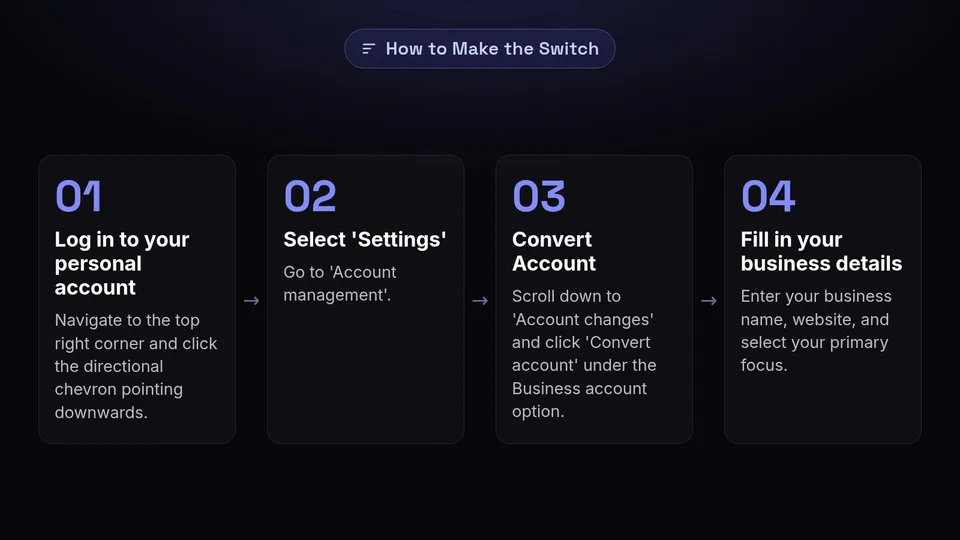
How to Make the Switch
- Log in to your personal account: Navigate to the top right corner and click the directional chevron pointing downwards.
- Select 'Settings': Go to 'Account management'.
- Convert Account: Scroll down to 'Account changes' and click 'Convert account' under the Business account option.
- Fill in your business details: You will be prompted to enter your business name, website, and select your primary focus (e.g., e-commerce, blogger, local service).
Pro Tip: Immediately claim your website after converting. This process involves adding a meta tag or uploading an HTML file to your website's root directory. Claiming your website tells Pinterest that you are the verified owner of your content, giving your Pins an algorithmic boost and displaying your profile picture next to any Pin that originates from your domain.
Step 2: Designing Your Board Architecture

Once your account is set up, you need to build the foundation of your profile: your boards. Board architecture is critical for Pinterest SEO. Pinterest's algorithm looks at the board a Pin is saved to in order to understand the context of that Pin. If you save a Pin about "Summer Dresses" to a board titled "Recipes," you are confusing the algorithm, and your Pin will not rank.
The Niche-Down Strategy
In the past, brands would create broad boards like "Marketing" or "Fashion." In 2026, the algorithm favors hyper-specificity. Instead of one broad board, you need a cluster of tightly themed, keyword-rich boards.
For example, if you run a digital marketing agency, your board architecture should look like this:
- Social Media Marketing Tips
- Email Marketing Strategy
- SEO Best Practices 2026
- Content Marketing Ideas
- Pinterest for Business Strategies
Structuring Your Boards
Aim to launch your account with 10 to 15 highly relevant boards. Each board should have a clear, keyword-optimized title (avoid cute or clever names like "My Brain Dump"—use "Business Organization Tips" instead). Furthermore, every board requires a robust description. Write 2-3 sentences explaining exactly what users will find on the board, naturally weaving in secondary keywords.
Ensure that the first board on your profile is your "Best Of" board. This board should exclusively feature content that links back to your own claimed website. It acts as a digital storefront for your very best products, articles, or services.
Step 3: Mastering Pin Sizes and Formats
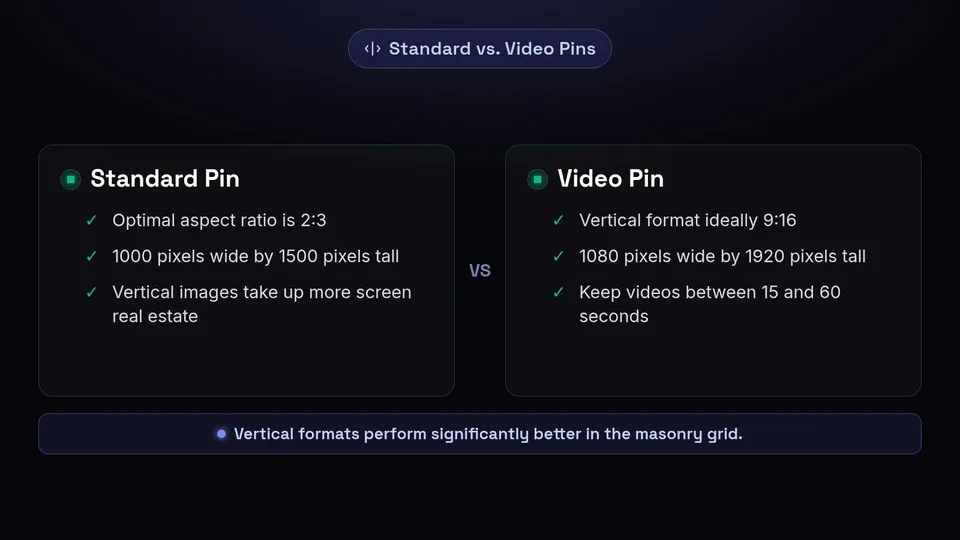
Pinterest is a visual platform, which means the design and dimensions of your Pins will make or break your click-through rate. The platform's interface is organized into a masonry grid, meaning the width of all Pins is fixed, but the height is variable. Because of this, vertical images take up more screen real estate and perform significantly better.
Standard Pin Dimensions
The optimal aspect ratio for a standard static Pin remains 2:3. This translates to an image size of 1000 pixels wide by 1500 pixels tall. Pins that are longer than this (such as the old "giraffe pins" that were popular years ago) will be truncated in the feed, cutting off crucial information and reducing your engagement.
Video Pins
Video content continues to be heavily pushed by the Pinterest algorithm in 2026. Video Pins should also follow a vertical format, ideally 9:16 (1080 pixels wide by 1920 pixels tall). These are excellent for tutorials, behind-the-scenes looks, or dynamic product showcases. Keep videos between 15 and 60 seconds for maximum retention.
Need a quick reference for all your social media graphics? Check out our comprehensive, constantly updated guide on social media image sizes to ensure your assets are always pixel-perfect across every platform.
Design Best Practices
- Text Overlays: The majority of Pinterest users scroll with the sound off, and many simply look at the images rather than reading the captions immediately. Include a bold, readable text overlay on your Pin that tells the user exactly what they will get if they click.
- High Contrast: Use colors that pop against Pinterest's white background. Warm colors (reds, oranges, pinks) historically drive higher click-through rates than cool colors.
- Brand Consistency: Subtly include your logo or website URL at the top or bottom center of your Pin. This builds brand recognition and protects your assets from being scraped by spam accounts.
Step 4: Strategic Keyword Placement in Pin Descriptions

Understanding how to use Pinterest effectively means understanding that it is a search engine. Just like Google, Pinterest relies on keywords to categorize and serve content to users. Your pinterest marketing 2026 strategy must be rooted in robust SEO practices.
How to Find the Right Keywords
Do not guess what your audience is searching for. Use Pinterest's native tools. The easiest method is the Guided Search feature. Type a broad term (like "home office") into the Pinterest search bar and look at the autocomplete suggestions. These are the exact, long-tail phrases real users are actively searching for (e.g., "home office setup ideas," "home office desk organization"). Additionally, use the Pinterest Trends tool to identify seasonal spikes and rising search volumes in your industry.
Where to Place Your Keywords
To maximize your reach, your target keywords need to be placed in multiple locations to create a strong context signal for the algorithm. Ensure your focus keyword is present in:
- The Pin Title: This is the most heavily weighted area. Keep it catchy but ensure the exact phrase is included (e.g., "10 Proven Pinterest for Business Strategies").
- The Pin Description: You have up to 500 characters here. Write natural, conversational sentences that describe the Pin and the destination URL. Include your primary keyword in the first sentence, and sprinkle 2-3 secondary keywords throughout the rest of the text.
- The Text Overlay on the Image: Pinterest's visual AI literally reads the text on your image. Make sure the text on the graphic matches the keywords in your title and description.
- The Destination URL Slug: If possible, ensure the link you are driving traffic to has the keyword in its URL string.
- The Board Title and Description: As mentioned in Step 2, the board where the Pin lives must also be optimized for related keywords.
Step 5: Establishing the Perfect Scheduling Cadence
Consistency is the secret weapon of Pinterest marketing. Pinning 30 times in one day and then disappearing for a month will actively harm your account's algorithmic standing. Pinterest prefers creators who contribute high-quality, fresh content on a regular, predictable basis.
How Often Should You Pin?
In 2026, the emphasis is heavily on "Fresh Pins" (new images or videos that Pinterest has not seen before) rather than repinning the same content over and over. You do not need to pin 50 times a day like marketers did in 2018. Instead, aim for 1 to 3 Fresh Pins per day.
A Fresh Pin can point to an old blog post or product, provided the image itself is brand new. This means you can create 5 different Pin designs for a single article and schedule them to go out over several weeks.
The Power of Automation
Logging into Pinterest every single day to manually upload and publish Pins is an inefficient use of your time. To maintain a flawless scheduling cadence without the daily hassle, you need a robust scheduling tool.
By utilizing SchedulifyX's social media scheduling features, you can batch-create your Pinterest content for the entire month in just a few hours. Our platform allows you to upload your assets, input your SEO-optimized titles and descriptions, and drip-feed your Pins to your carefully architected boards at the exact times your audience is most active.
Pro Tip: Space out your Pins. If you have 5 different designs for the same blog post, do not schedule them all on the same day. Use your scheduler to space them out by at least 7 to 14 days to avoid looking spammy to the algorithm.
Realistic Month-by-Month Growth Expectations
One of the biggest reasons businesses fail on Pinterest is a lack of patience. Unlike platforms where you might get a viral hit overnight, Pinterest is a slow burn. It is a long-term investment that compounds over time. Here is what realistic growth looks like when you execute a proper pinterest marketing 2026 strategy.
Month 1-3: The Foundation Phase
During the first 90 days, you are building trust with the algorithm. You are consistently publishing Fresh Pins, filling out your boards, and establishing your niche authority. What to expect: Your impressions may look like a rollercoaster. You might see a few spikes, but overall traffic to your website will likely be low. Do not panic. The algorithm is currently testing your content across different user feeds to see who engages with it. Focus on consistency and creating high-quality designs rather than obsessing over outbound clicks.
Month 4-6: The Traction Phase
As you cross the 4-month mark, your earlier Pins will have been indexed properly and will start showing up in user search queries. What to expect: You should begin to see a steady, upward trend in impressions. More importantly, your outbound clicks (the metric that actually matters) will start to climb. You will notice that Pins you published in Month 1 are suddenly driving daily traffic. This is the compounding effect in action. Use your analytics during this phase to identify which Pin formats and topics are resonating, and double down on creating similar content.
Month 7-12: The Scaling Phase
By the time you reach the second half of your first year, your Pinterest account should be a well-oiled machine. What to expect: Pinterest should now be one of the top traffic referrers in your Google Analytics dashboard. Your seasonal content will begin to rank ahead of time, and your evergreen content will drive a baseline of daily traffic that requires zero additional effort. At this stage, you can begin experimenting with Pinterest Ads to pour gasoline on the organic fire you have built, scaling your leads and sales exponentially.
Conclusion: Automate Your Pinterest Marketing 2026 Strategy
Setting up Pinterest for business requires a strategic approach. From converting to a business account and designing a logical board architecture, to mastering pin sizes, conducting SEO keyword research, and maintaining a strict scheduling cadence, there are many moving parts. However, the payoff—a steady stream of highly targeted, evergreen traffic—is unmatched by any other platform.
The key to winning on Pinterest is consistency and patience. Do not let the daily grind of publishing derail your strategy. By leveraging AI-powered tools, you can streamline your entire workflow. Start batching your content, optimizing your SEO, and let SchedulifyX handle the rest. Sign up today to explore our advanced scheduling features and take your Pinterest presence to the next level in 2026.
