The Ultimate Buyer's Guide to Social Media Scheduling Tools in 2026
SchedulifyX Team · September 16, 2026
Navigate the complex landscape of social media scheduling tools. Uncover hidden pricing traps, essential features, and the true costs of platform migration.
The True Cost of Social Media Scheduling in 2026

Finding the right workflow for your digital marketing team has never been more critical, yet the landscape of social media scheduling tools remains a minefield of hidden costs and mismatched features. On August 24, 2026, a workflow analysis published by Mydrop identified the "tab-switching tax" as a primary operational bottleneck for marketers. This tax refers to the fragmentation and lost productivity that occurs when social media managers are forced to constantly bounce between Google Drive for assets, Canva for design, spreadsheets for planning, and publishing dashboards for execution. Every time you switch tabs, you lose focus, time, and ultimately, money.
As we head into the busiest quarters of the year, the urgency to solve this fragmentation spikes. According to a Semrush search analysis conducted by Tabula on August 31, 2026, social scheduling vendors absolutely dominate September awareness calendar queries. Marketers are desperately seeking tool usage that can help them efficiently fill their 30 monthly content slots. But in the rush to adopt scheduling software, many teams make critical errors in evaluating pricing models and feature sets.
This comprehensive buyer's guide is designed to cut through the marketing noise. We will explore the honest trade-offs between per-channel, per-brand, and per-seat pricing models. We will dissect exactly which features matter most for solo creators versus scaling agencies, uncover the reality of cost-gated approval workflows, provide a definitive checklist of what to test during a trial, and expose the migration costs that nobody budgets for. By the end of this guide, you will have the knowledge you need to choose the best social media scheduler for your specific business model.
Decoding Pricing Models: Per-Channel vs. Per-Seat vs. Per-Brand
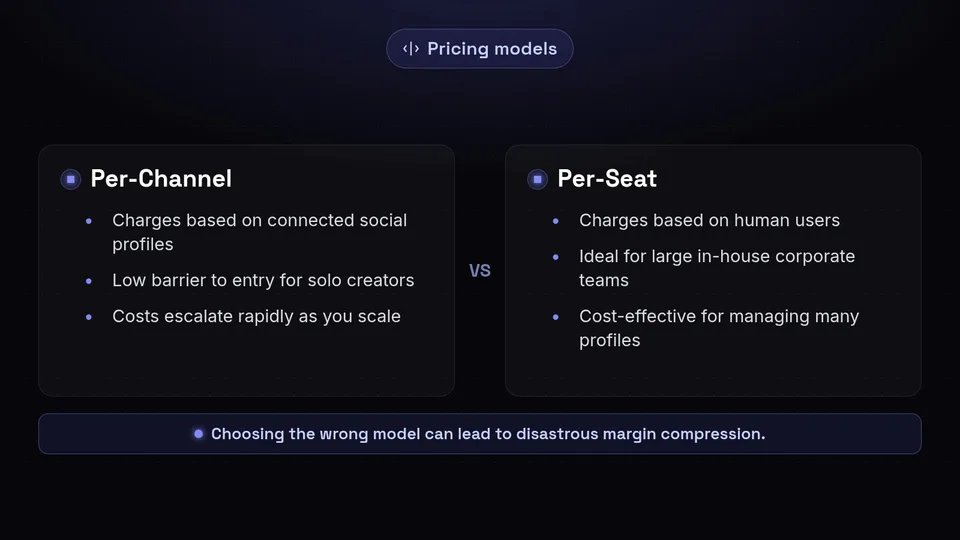
The most significant factor in choosing social media scheduling tools is not always the feature set, but the pricing architecture. Software companies structure their pricing to attract specific types of customers, and choosing a model that conflicts with your business structure can lead to disastrous margin compression as you scale.
The Per-Channel Pricing Model
Per-channel pricing charges you based on the sheer number of social media profiles you connect to the platform. This model is exceptionally attractive for those just starting out. For example, as verified by Distribb on August 7, 2026, platforms like Viraly offer 3 free profiles across 11 platforms. Similarly, Buffer's entry-level pricing starts at just $5 per channel per month when billed annually (or $6 per month on a monthly basis, as of 2026-09-16).
Who it suits: This model is tailor-made for solo creators, independent consultants, or small local brands that only need to manage a core presence on one to three networks (e.g., an Instagram page, a Facebook page, and a LinkedIn profile). The barrier to entry is remarkably low.
The Trade-off: Total costs escalate rapidly and unpredictably when you attempt to scale. If an agency with 10 clients (each having 4 social profiles) uses a per-channel model, they are suddenly paying for 40 channels. What started as a cheap $6/month tool quickly balloons into hundreds of dollars, punishing you for acquiring new clients or expanding a brand's footprint into new networks like Threads or TikTok.
The Per-Seat Pricing Model
The per-seat pricing model shifts the cost burden from the number of accounts to the number of human beings accessing the software. As of 2026-09-16, this is the dominant model for enterprise-grade scheduling software. For instance, Sprout Social charges
Who it suits: Large enterprises, in-house corporate marketing teams, and massive brands that require stringent governance, deep social listening, and comprehensive cross-channel analytics. When a single brand has a dedicated team of five marketers managing its output, per-seat pricing makes sense because the tool is providing heavy, enterprise-level infrastructure.
The Trade-off: Per-seat pricing actively penalizes marketing agencies. In an agency model, you need to grant access to copywriters, graphic designers, account managers, and, crucially, the clients themselves for approvals. Every time an agency adds a new team member or a client reviewer to a per-seat platform, their profit margins on that client retainer shrink. It creates a perverse incentive where agencies share login credentials (a massive security risk) just to avoid paying an extra
The Flat-Rate / Per-Brand Pricing Model
Recognizing the friction caused by per-seat models, a new wave of social media scheduling platforms has embraced flat-rate or per-brand pricing. As of 2026-09-16, Metricool charges between $22 and $59 per month for 1 to 2 brands. Schedulala offers a tiered flat rate, ranging from $29 per month for 10 accounts up to $99 per month for 100 accounts. Cloud Campaign offers bundles ranging from $49 to
Who it suits: Marketing agencies and multi-client freelancers. These platforms typically offer unlimited users or bundle workspace tiers without charging per-seat surcharges.
The Trade-off: While these platforms protect agency margins by allowing unlimited client logins, they sometimes lack the ultra-deep, enterprise-level social listening or sentiment analysis tools found in the expensive per-seat alternatives. However, for agencies focused primarily on content publishing, client approvals, and core reporting, this model is vastly superior for the bottom line.
Feature Needs: Solo Creators vs. Agencies
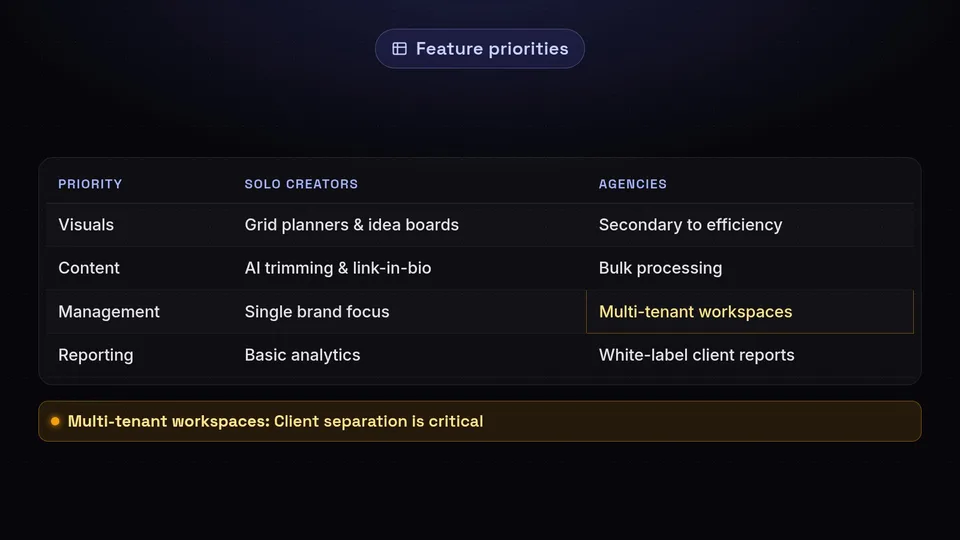
The best social media scheduler for a solo influencer is rarely the best tool for an agency managing thirty clients. The operational requirements are fundamentally different, and evaluating tools based on the wrong criteria will lead to frustration.
What Solo Creators Need to Thrive
Solo creators, influencers, and single-brand marketing managers prioritize speed, visual aesthetics, and idea generation. They are less concerned with complex permissions and more concerned with how their content looks and performs.
- Visual Grid Planners: For Instagram-heavy brands, visualizing the grid is non-negotiable. On September 9, 2026, OneUp introduced an automated Instagram grid generator that splits single images into multi-post layouts, a feature highly sought after by visual creators.
- Idea Management Boards: Creators need spaces to dump raw thoughts before they become scheduled posts. Tools like Buffer's Ideas space, Later's visual sets, and Pallyy cater heavily to this unstructured brainstorming phase.
- Link-in-Bio Builders: Seamlessly connecting scheduled Instagram or TikTok posts to a monetized link-in-bio page is a core requirement for solo operators driving direct sales.
- AI Content Trimming: Creators lean heavily on native and integrated AI tools. For example, on September 3, 2026, Instagram launched "First Draft for Reels," an AI clip trimmer and silence cutter. Solo creators look for scheduling tools that either integrate with or mimic these rapid video editing capabilities.
What Agencies Need to Scale
Agencies live and die by their operational workflows. Aesthetics matter, but efficiency, client separation, and bulk processing matter more. Agency-focused platforms like Cloud Campaign, DemandBird, Planable, Heropost, and OneUp focus on these heavy-duty features.
- Multi-Tenant Workspaces: Agencies must keep client assets, social profiles, and analytics strictly separated. A mistake here—like posting Client A's content to Client B's Twitter feed—is a fireable offense.
- White-Label Client Reports: Agencies need to prove their value automatically. Generating automated, white-labeled reports that feature the agency's logo (not the software vendor's logo) is critical for client retention.
- CSV Bulk Scheduling: When managing evergreen content or massive seasonal campaigns, the ability to upload hundreds of posts via a single CSV file saves countless administrative hours.
- B2B Integration and Value: Agencies managing B2B clients need robust LinkedIn integrations. On September 10, 2026, Ordinal released workspace data across 1,142 active Pro accounts indicating that connected B2B LinkedIn profiles generated an average of ,087 in earned media value per profile per month. Agencies need tools that can reliably tap into this lucrative network.
The Hidden Truth About Approval Workflows
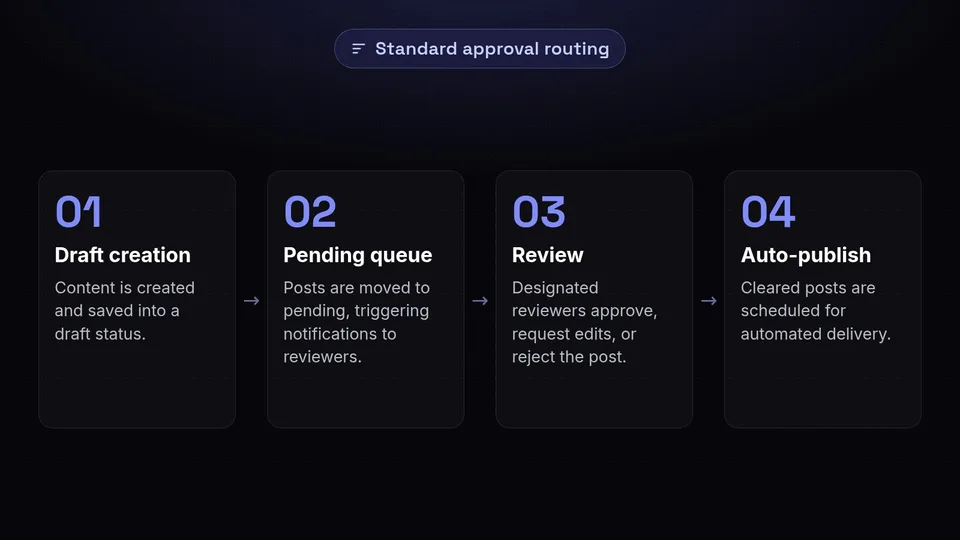
A strict routing mechanism is the backbone of professional-grade approval workflows. If there is one feature that separates consumer-grade social media scheduling tools from professional-grade infrastructure, it is the approval workflow. However, this is also the area where software vendors hide their most aggressive price gating.
Routing Mechanisms and Cost Gating
A proper approval workflow relies on a strict routing mechanism: posts are created and moved from a draft status into a pending queue. This action triggers automated notifications to designated reviewers (usually clients or senior managers) who can then approve, request edits, or reject the post before it is cleared for auto-publishing.
The problem is how much you have to pay to access this basic operational necessity. As of 2026-09-16, Hootsuite restricts its robust approval features to its Advanced plan, which costs a staggering $399 per month. Agorapulse requires users to be on its
19 per user per month plan to access advanced approvals. For an agency with 10 clients needing approval access, these costs are prohibitive.Fortunately, lower-cost options exist that democratize the approval process. Cloud Campaign offers unlimited client reviewers on its $49 per month plan. CampaignSwift offers a highly efficient no-login magic link approval system for $97 per month, removing the friction of forcing clients to remember passwords. Planable also offers highly visual, accessible approval workflows without enterprise-level price tags.
Agency-Specific Approval Features
Beyond the cost, the mechanics of the approval process matter. When a client rejects a post, the feedback loop must be contained within the tool to avoid the dreaded "tab-switching tax" mentioned earlier. Platforms like Cloud Campaign have innovated in this space by offering separate internal team notes and client-facing comment layers on the exact same review document. This allows the agency team to discuss strategy privately while presenting a unified, polished front to the client.
What to Actually Test During Your Trial
Most marketers waste their 14-day free trials. They connect one Facebook page, schedule a single text post, see that it publishes, and hand over their credit card. To truly evaluate scheduling software, you must stress-test the edges of its capabilities before committing to an annual plan.
Network API Depth and Fallbacks
Not all integrations are created equal. You must test the API depth of the platform. Does the tool offer true direct publishing, or does it rely on mobile notification fallbacks (where the app sends a push notification to your phone, forcing you to manually copy and paste the post into the native social app)?
"A scheduling tool that relies entirely on push notifications for your primary content formats is not a scheduling tool; it is an expensive alarm clock."
During your trial, specifically test formats that historically challenge APIs. Attempt to auto-publish Instagram Reels and Stories. Test multi-image posts on TikTok. Connect to emerging platforms like Threads and Bluesky. Crucially for B2B marketers, test the direct publishing of LinkedIn PDF carousels, which many platforms struggle to support natively.
Content Complexities and Customizations
A great piece of content needs to be tailored to the network it lives on. Test how the software handles content complexities across different platforms from a single compose window:
- Custom Per-Platform Captions: Can you write a long-form caption for LinkedIn, and easily tweak it into a shorter, hashtag-heavy caption for Instagram without creating two separate posts?
- Accessibility Features: Can you easily add alt text to images for visually impaired users across all supported networks?
- Engagement Boosters: Does the tool allow you to schedule a "first comment" on Instagram or LinkedIn to house your hashtags or outbound links?
- Media Management: Can you select custom video covers for Reels and TikToks? Can you tag users directly in the images?
- Analytics Tracking: Does the platform support automated UTM parameter tagging so you can track your social traffic accurately in Google Analytics?
The Unbudgeted Costs of Migration
When teams decide to switch social media scheduling tools, they usually only calculate the difference in the monthly subscription fee. They completely ignore the massive, unbudgeted costs of migration.
Historical Data Loss
When you leave a platform, you leave your data behind. Native social inboxes—where you have categorized customer service requests, saved CRM notes on frequent commenters, and built a history of interactions—are typically not transferred between platforms. Furthermore, your past performance analytics history is lost. If you switch tools in October, generating a year-end report in December that compares Q1 to Q4 becomes a highly manual, spreadsheet-driven nightmare.
Setup and Onboarding Friction
The administrative hours required to stand up a new system are substantial. You will face setup and onboarding friction that includes:
- Re-authenticating API Tokens: You must manually log in and reconnect every single social media account. For an agency with 50 clients, this can take days of billable hours.
- Rebuilding Evergreen Queues: If you rely on recycling evergreen content, those queues do not export. You must manually rebuild your content libraries in the new tool.
- Permissions and Training: You have to recreate your entire team permission structure from scratch and spend hours re-training both your internal staff and your external clients on how to use the new dashboard and approval links.
Before switching tools to save $20 a month, calculate the monetary value of the administrative hours required to execute the migration.
Where Competitors Excel: An Honest Look
At SchedulifyX, we are building the ultimate AI-powered social media scheduling platform, but we believe in being entirely transparent about the landscape. There are specific areas where our competitors currently hold distinct advantages depending on your exact needs.
For massive, multinational enterprise corporations that require intense governance, compliance routing, and deep, multi-language social listening, Sprout Social remains a powerhouse. Their per-seat pricing reflects this enterprise focus, and their listening tools are incredibly robust. If your primary bottleneck is visual collaboration and you need an interface that looks exactly like a live social feed for client presentations, Planable offers a best-in-class visual grid experience. Finally, as noted in their September 9, 2026 update, OneUp has developed a highly specialized automated Instagram grid generator and a unified social inbox that is exceptionally well-suited for highly visual, single-brand creators.
SchedulifyX focuses heavily on leveraging AI to eliminate the "tab-switching tax," automate your content workflows, and provide agency-friendly pricing without the per-seat penalty. We excel in intelligent scheduling and workflow automation, but if your needs lean heavily into enterprise compliance or hyper-specialized visual grid splitting, those competitors are worth your consideration.
Conclusion: Finding Your Perfect Fit
Choosing the best social media scheduler requires looking past the marketing copy and examining the structural realities of the software. You must align the platform's pricing model—whether per-channel, per-seat, or flat-rate—with your business's growth trajectory. You must ensure the feature set matches whether you are a solo creator needing visual tools or an agency needing multi-tenant workspaces and robust, affordable approval workflows.
Never skip the trial phase. Test the API depth, push the limits of content customization, and always factor in the hidden costs of data loss and onboarding friction before making a migration decision. The landscape is shifting rapidly, with AI tools like Instagram's First Draft for Reels (launched Sept 3, 2026) and Meta's push toward AI-optimized ad placements changing how we interact with social networks.
If you are tired of per-seat pricing penalties and want an AI-powered solution built to scale with your team, we invite you to explore SchedulifyX. Check out our /alternatives page for deeper, one-on-one comparisons with the tools mentioned in this guide, and visit our /pricing page to see how our flat-rate models can protect your margins.
Disclaimer: Software pricing and feature availability change frequently. The pricing and plan details mentioned in this article are accurate based on research as of September 2026. Always confirm current pricing, limits, and features directly on the vendor's own official website before making a purchasing decision.
Sources
Facts checked against the sources below on September 16, 2026.
- youtube.com
- youtube.com
- Social Media Management Pricing — tryordinal.com
- September Social Media Content Calendar — tabula.agency
- Best Social Media Calendar Tools For 2026 — mydropai.com
- Best Social Media Scheduling Software — distribb.io
- Social Media Tools Pricing Comparison — schedulala.com
- Best Social Media Scheduling Tools — postdrip.io
- Best Social Media Scheduling Tools — demandbird.com
- Pricing Insights For Popular Social Scheduling Tools — smmplanner.io
