Instagram Caption Length: When Two Lines Beat 200 Words
SchedulifyX Team · November 24, 2026
Two lines or two hundred words? The right Instagram caption length depends on what the post is for. Here is how to match length to intent, and how to test it.
Ask how long an Instagram caption should be and you will hear confident answers in both directions. Keep it to a line, because nobody reads. Write a mini blog post, because long captions hold attention. Each is right for a different kind of post. Instagram caption length is not one setting to get right for the whole account. It follows from the job each post is doing.
Here is the short answer. When the image does the work and you want a quick reaction or a share, two lines usually beat two hundred words. When the post has to teach, persuade, tell a story or be found in search, the long caption earns its place, as long as every line is worth reading.
What Instagram allows, and what people actually see
The hard limit is generous. Meta's developer documentation puts the maximum caption at 2,200 characters, which is room for well over two hundred words of ordinary English. Hashtags are part of the caption and count towards that total, and there are now far fewer of them: Instagram's help centre says you can add up to five hashtags to a post, after a change announced in December 2025 that replaced the old allowance of 30.
What people see is much less. In the feed, Instagram shows the start of the caption, usually a line or two, and folds the rest behind "more". On a reel, the caption appears as a short preview over the bottom of the video while it plays. The exact cut-off depends on the screen, the length of your username and where your line breaks fall, so treat any precise character count you read online as a rough guide, not a rule.
The gap between what you can write and what gets seen is what matters. Everyone who meets the post sees the opening; only the people who choose to tap see the rest. So the better question is not how long a caption should be, but what this post needs its reader to know.
The first line does most of the work
In Instagram Ranking Explained, published in 2023, Instagram listed the predictions its Feed ranking watches most closely: how likely you are to spend a few seconds on a post, comment on it, like it, share it and tap on the profile photo. Caption length is not on that list. A long caption helps only if people actually stop to read it, and a short one works only if the image earns the pause on its own.
Either way, the first line carries most of the load, because it is the only part of the caption everyone sees. It has one of two jobs. In a short caption, it is the caption: it finishes the thought the image starts. In a long caption, it is the reason to tap "more", so it has to promise something specific, such as the mistake you are about to explain, the number of steps that follow or the question the post answers.
A handful of habits waste that line whatever the length: a greeting, a "Happy Monday", an @mention, a row of emoji or hashtags, or "link in bio" before anyone knows what the link is for. One useful discipline is to write the first line last, once you know what the rest of the caption actually says.
Match the length to the post's job
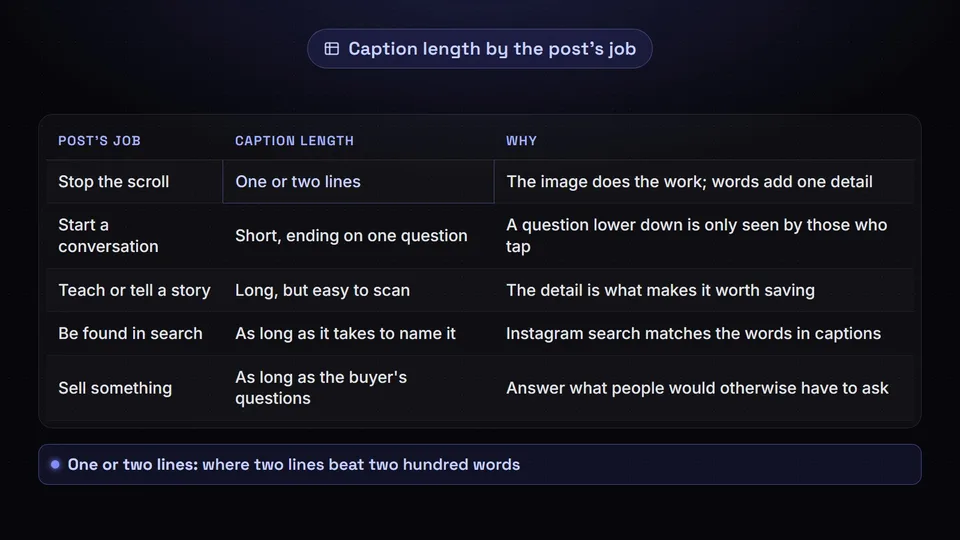
Decide what the post is for before you write a word of the caption. Most posts have one main job, and each job pulls the length in a different direction.
Stop the scroll: one or two lines
When the picture or video is the point (a finished piece of work, a striking view, a before-and-after), the caption should add the one thing the image cannot say: a detail, a twist, a reason to send it to a friend. Two lines is plenty. Anything longer competes with the image for attention, and the people this kind of post is for are looking, not reading. "Third attempt. Worth the burnt fingers." under a photo of a finished loaf does more than a paragraph about the bake.
Start a conversation: short, ending on one question
If you want comments, the question has to be visible and easy to answer. Put it in the first line, or straight after a single line of context. A question at the bottom of a long caption is only seen by the people who read that far, and a vague prompt such as "Thoughts?" leaves people to work out what to say. A specific question with an easy answer, such as which of two options someone would choose, takes a second to reply to.
Teach something or tell a story: long, if every line earns the next
Posts that explain a method, share a checklist or tell the story behind something are where length pays. The detail is what makes a teaching post worth saving for later, and the middle of a story is what makes it a story. Two hundred words is not too long here, provided it is easy to scan: short paragraphs, numbered steps where there are steps, and nothing added for bulk. If the post is a carousel, the slides can carry the detail and the caption can be shorter.
Be found in search: as long as it takes to name it
Instagram's search reads captions. In its explanation of how search works, Instagram says it matches what people type against usernames, bios, captions, hashtags and places, and advises putting keywords and hashtags in the caption rather than the comments. Its help centre also says that if an account is public, professional and run by someone over 18, search engines may index its public posts and reels, unless the owner turns that off in the privacy settings. A caption that names the subject in the words people actually search, such as "a sourdough starter feeding schedule for beginners" rather than "feeding the beast again", gives both kinds of search something to match. That rarely takes two hundred words. It takes the right twenty. Our guide to Instagram SEO goes further.
Sell something: as long as the buyer's questions
For an offer, the right length tracks the size of the decision. A new flavour, a free event or a restock needs two lines: what it is and where to get it. A course, a service or anything that costs real money raises questions (what is included, who it is for, how it works, what happens after buying), and a caption that answers them saves people a message they might never have sent. Put the offer and the action near the top, where people who never tap "more" will see them, and repeat the action at the end for those who read everything.
Short vs long captions: what each one costs
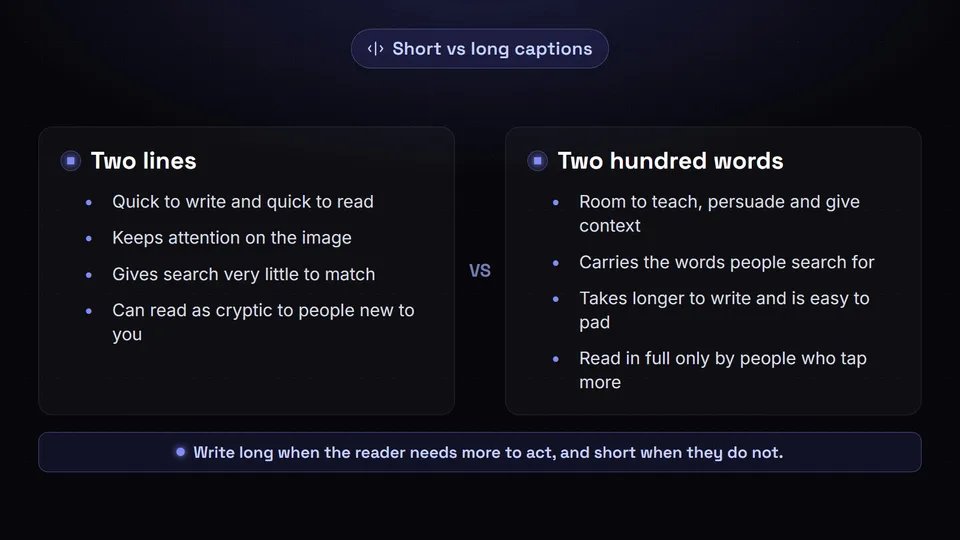
Neither length is free. A short caption is quick to write and quick to read, keeps attention on the image and is hard to get badly wrong. Its costs are that it gives search very little to match, leaves the meaning to the visual and can read as cryptic to someone who does not know you yet.
A long caption has room to teach, persuade and give context, and it carries the words people search for. Its costs are writing time, the temptation to pad, and the fact that its full text reaches a smaller group: the people interested enough to tap. That is less of a flaw than it sounds: those readers have already shown interest, so write the long caption for them, not for everyone scrolling past.
Advice that one length always wins is usually generalising from one kind of post, so treat it as something to test on your own account rather than a rule.
How Reels and carousels change the calculation
On a reel, people are watching rather than reading. The hook belongs on screen and in the first seconds of the video, with the caption's opening line backing it up rather than carrying it. The rest of the caption can still do useful work: the full recipe, the list of items shown, the plain-language description that helps the reel turn up in search. Just don't rely on it to deliver the message.
A carousel moves long-form content into the slides, and the whole carousel shares one caption. That caption then has two jobs: give people a reason to swipe, and describe what is inside in plain words, since the caption is the text Instagram has told you its search matches. A single image that has to teach has no slides to lean on, so its caption has to carry the detail.
Caption writing tips that hold at any length
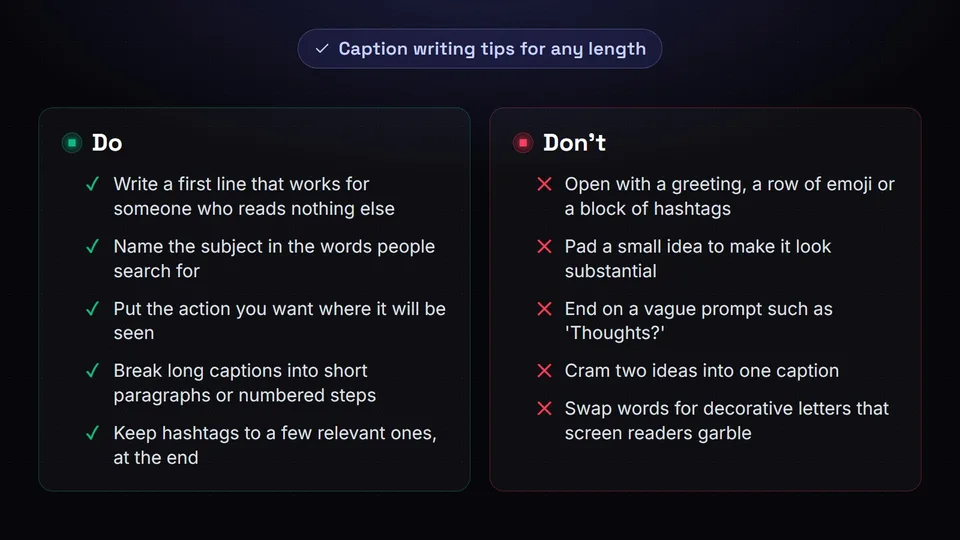
Whatever the length, these habits help a caption do its job.
- One idea per caption. If you need two, you probably have two posts.
- Front-load the point. The first line should make sense to someone who reads nothing else.
- Break up long captions. Short paragraphs, and numbered lines where there are steps, are easier to scan on a phone. Read the caption on your own phone before it goes out.
- Put the action where it will be seen. If the post exists to get a save, a reply or a visit to your profile, say so near the top.
- Keep hashtags few and relevant. Instagram now allows five on a post; choose the most relevant and put them at the end, where they do not crowd the opening.
- Let alt text describe the image. Instagram has a separate alt text option, in a post's advanced settings, for people who use screen readers, so the caption is free to say what the picture cannot.
- Skip decorative letters. "Fancy font" characters and emoji used in place of words can be read out by screen readers as strings of symbol names, or skipped altogether.
For the craft of the words themselves, from hooks to tone of voice, see our guide to writing engaging social media captions.
How to test caption length on your own account
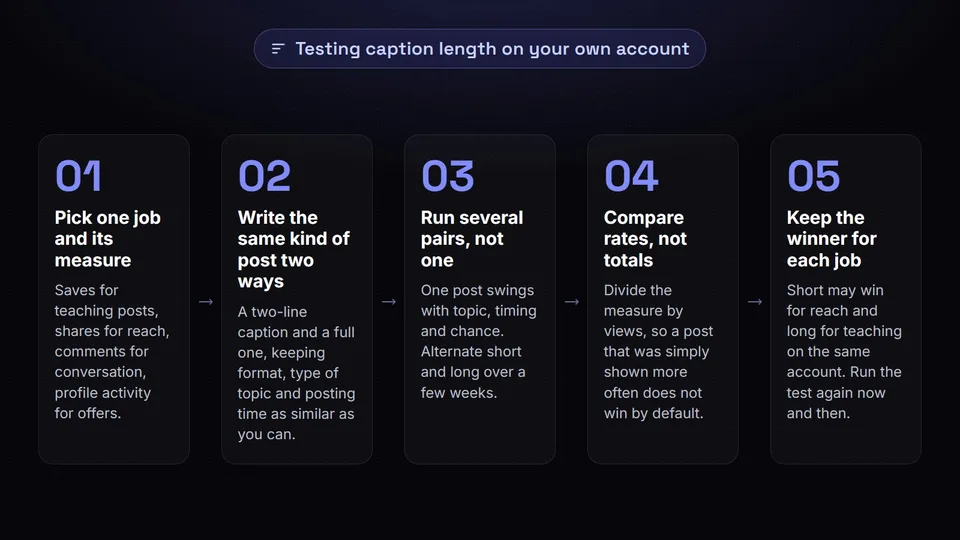
General advice on Instagram caption length only gets you so far, because your own audience decides. A simple, fair test settles the question for your account.
- Pick one job and its measure. Saves for teaching posts, shares for reach, comments for conversation and profile activity for offers. Open a post and tap View insights: Instagram shows its views, its interactions split into likes, comments, saves and shares, and the profile activity it led to.
- Write the same kind of post two ways. Give one a two-line caption and one a full caption, and keep the format, the type of topic and the posting time as similar as you can, so the caption is the main thing that changes.
- Run several pairs, not one. A single post's results swing with the topic, the timing and plain chance. Alternate short and long over a few weeks before you decide anything.
- Compare rates, not totals. Divide the measure by views, so a post that was simply shown more often does not win by default.
- Keep the winner for each job. You may find that short wins for reach posts and long wins for teaching posts on the same account. That is the point: the answer belongs to the intent, not the account. Run the test again now and then, because audiences change.
A rule to start from
If you want one rule to begin with: if the picture says it, write two lines; if the reader needs more to act, write as much as the action needs and no more. Either way, put the point in the first line, keep hashtags to a few at the end, and let your own insights settle the rest.
Once you know what each post in the week is for, write its caption to fit that job and plan it in SchedulifyX.