Instagram Story vs Post vs Reel: Choosing the Right Format
SchedulifyX Team · November 25, 2026
Reels, feed posts and stories do different jobs. Here is who each one reaches, how long it lasts, what it costs to make, and when a carousel beats a reel.
Most Instagram posts get their format by accident. You have a photo, so it becomes a post. You filmed something, so it becomes a reel. You are short of time, so it becomes a story. Yet the format decides who sees the work, how long it lasts and how much it costs to make, so it is worth choosing on purpose.
Here is the short answer to the Instagram story vs post question, with reels added in. Use a reel when you want people who don't follow you yet to find you. Use a feed post, either a single photo or a carousel, when you want followers to get something worth keeping. Use a story when you want to talk to the followers you already have, today.
Who sees each format, and for how long
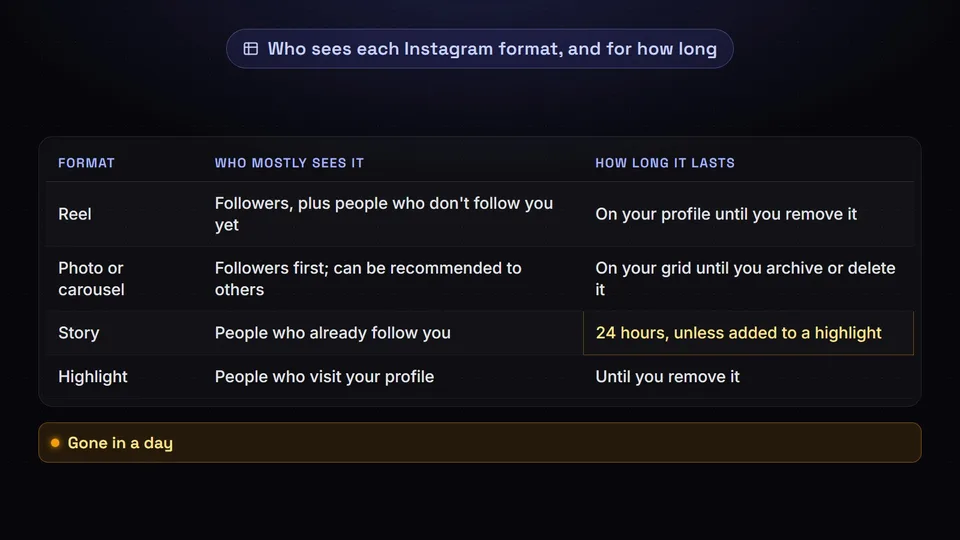
Reels are where Instagram does most of its recommending. In its explanation of how ranking works, Instagram says the majority of what people watch in Reels comes from accounts they don't follow, and the same goes for Explore. Followers see them too, but reels are built for reaching strangers. A reel stays on your profile until you remove it, so it keeps working after its first push has faded.
Feed posts, meaning single photos and carousels, go first to the people who follow you, but they are not limited to them: Feed mixes in recommended posts from accounts people don't follow, and Explore shows photos as well as videos. In April 2026 Instagram extended its originality rules from reels to photos and carousels, so accounts that mainly repost other people's images are no longer shown where it recommends content. A feed post stays on your grid until you archive or delete it.
Stories are for the people who already follow you. Instagram says the stories each person sees come from accounts they have chosen to follow, plus ads, and Meta's notes on the stories system rank them by signals such as how often the viewer watches your stories and how close the two of you are. Neither describes stories being recommended to people who don't follow you. A story disappears from Feed, your profile and messages after 24 hours unless you add it to a highlight, though a private copy stays in your Stories Archive if that setting is on.
Highlights bridge the gap. They stay on your profile until you remove them, so a story can keep working for people who find your account later.
What each format is actually good at
Reels: being found
A reel's job is to win attention from someone who has never heard of you. Motion, sound, a face and a visible process all help, and the opening moments decide whether anyone stays. In January 2025 Adam Mosseri, the head of Instagram, named watch time, likes and sends as the signals that matter most for ranking, and said sends, the shares people make by direct message, count for slightly more when content reaches people who don't follow you. A good test for any reel, then, is whether someone would send it to a particular friend.
Reels also let you experiment. Trial reels, where your account has them, are shown to non-followers first and kept out of your followers' feed and Reels tab, and you can choose to have one shared with your followers automatically if it does well in its first 72 hours.
Carousels and photos: being kept
A carousel holds up to 20 photos and videos, and its strength is depth at the reader's own pace. People can stop on a slide, go back, read the detail and save the whole thing. Instagram's notes show those behaviours count: Feed tries to predict whether someone will swipe through a whole carousel, and Explore whether they will save a post. That makes carousels the natural home for steps, checklists, comparisons and anything else worth coming back to.
A single photo is the lightest feed format: right for one strong image, an announcement or a moment that needs no explanation, though it gives people less to explore than a carousel.
Stories: staying in touch
Stories are the everyday channel to your followers. They can carry polls, questions, quizzes, countdowns and a link sticker that takes viewers to a web page, and replies land in your messages, which makes them Instagram's most conversational format. Nobody expects a story to be polished, which keeps each one cheap and makes stories the place for quick updates, reminders, behind-the-scenes moments and questions.
Effort versus return
Most comparisons of Instagram reels vs posts stop at reach, which makes stories look pointless and reels look like the only format that matters. In fact each costs something different and pays back in a different currency.
- Reels cost the most. An idea, filming, editing, on-screen text and a cover. They give you the best chance of unpaid reach beyond your followers, but the least predictable return: two reels made with equal care can land very differently. Batching a repeatable format brings the cost down.
- Carousels cost a middling amount. Mostly writing and design time, which a good template cuts down. The return is steadier: saves, followers who value the account and a post that keeps working on your profile.
- Single photos cost the least of the feed formats and return the least depth. They earn their place when the picture is the point.
- Stories cost little per frame but a lot in total, because they only work as a habit. The return is relationship rather than reach: replies, poll votes, link taps and followers who keep watching.
Your insights show what each format really returns: for posts and stories, Instagram can split the accounts that engaged into followers and non-followers, which shows whether a piece did the job you made it for.
When a carousel beats a reel
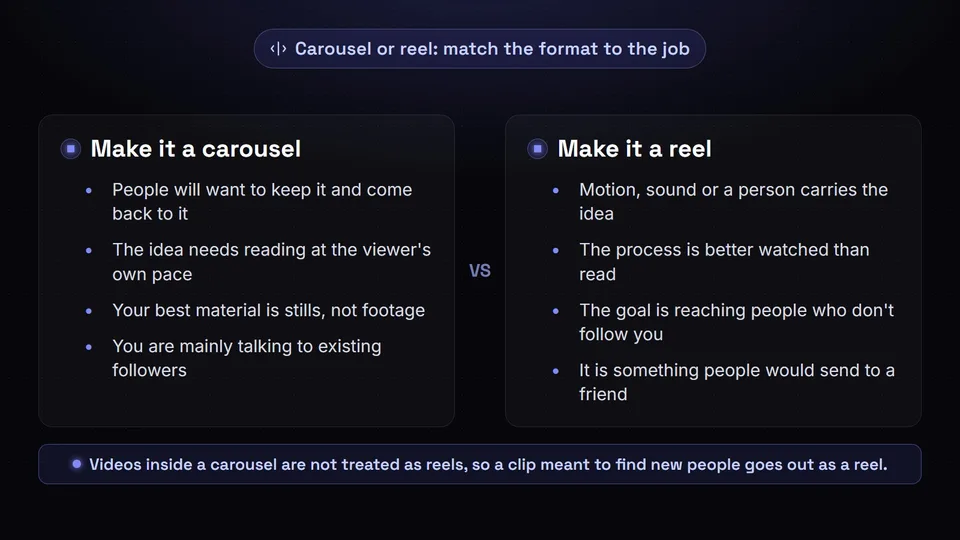
Reels get the attention, but a carousel often serves you better. It usually wins when:
- The content is worth keeping. Steps, checklists and comparisons get saved and revisited. A reel that flashes ten tips past in a few seconds asks viewers to pause and screenshot; a carousel simply lets them read.
- The idea needs reading. If your reel would be text laid over background footage, the footage adds little.
- Your best material is stills. Product shots, before-and-after pairs and design work often look better held still than panned across.
- You are mainly talking to followers. When the aim is depth with people who know you rather than reach with people who don't, a carousel's place in Feed is an advantage.
A reel wins when motion, sound or a person carries the idea, when the process is better watched than read, and when the whole point is reaching new people. According to Instagram's help centre, videos inside a carousel are not treated as reels and don't show up in the Reels tab, so a clip meant to find new people should go out as a reel of its own. For more on making the call early, see choosing between a carousel and a reel before you shoot.
Why sharing a feed post to your story underperforms
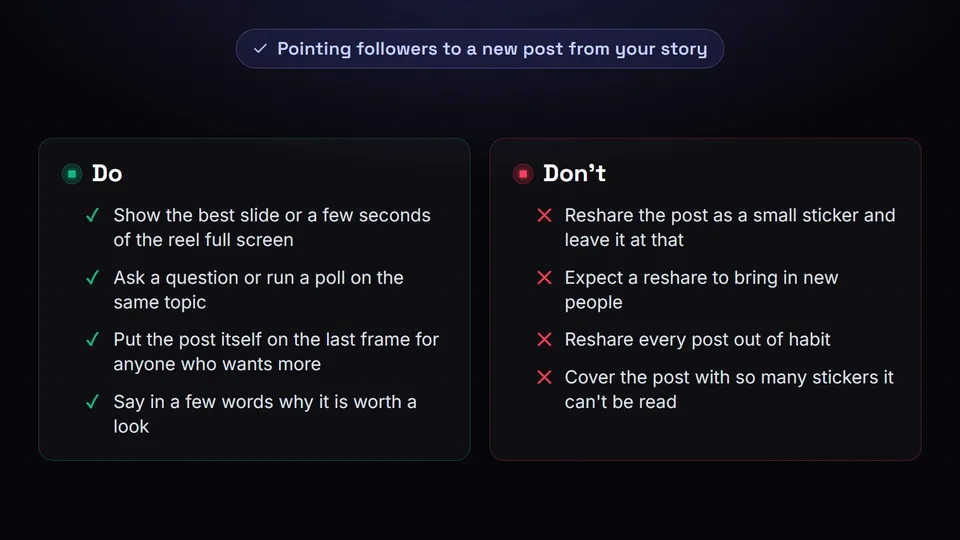
Resharing a new post to your story is the usual way to give it a push, and it rarely moves much. Asked about it in April 2026, Mosseri said you can share your own post to your stories, but "it's not going to meaningfully change your reach overall", adding that feed posts generally reach more people than stories. It is not a penalty: Instagram used to value reshared stories less, and said in 2021 that it had stopped. The trouble is the format.
- It reaches the same people twice. Stories are shown to your followers, the same people Feed shows the post to first, so the reshare adds almost no one new.
- It is a small picture of a picture. A reshared post appears as a sticker inside the frame, and viewers must stop and tap through to reach it, which loses people who were happily tapping on.
- It ignores what stories do well. No question, no poll, no voice: just a pointer to something elsewhere.
- It can cost you later. Meta's notes on the stories system say it predicts each viewer's behaviour partly from how they have watched and replied to your stories before, and frames people skip straight past add nothing to that.
When a post deserves a mention, make it native: show the best slide or a few seconds of the reel full screen, ask a question or run a poll on the topic, and put the post itself on the last frame for anyone who wants more. Treat the story as a trailer, not a repeat.
A simple decision table
Start from what you want the piece to do, not from what happens to be on your phone.
| If you want to | Use | Why it fits |
|---|---|---|
| Reach people who don't follow you yet | A reel | Reels and Explore mostly show accounts people don't follow |
| Teach something people will keep | A carousel | Read at their own pace, easy to save, stays on your grid |
| Make one announcement or show one strong image | A single photo | The least work for a permanent post |
| Talk to followers today with a question, poll or link | A story | Shown to followers, built for replies, gone in 24 hours |
| Keep your best story frames on your profile | A highlight | Stays until you remove it |
| Test an idea without filling followers' feeds | A trial reel, if you have them | Shown to non-followers first |
Two rules sit underneath it. If the goal is new people, it is probably a reel. If it is the people you already have, it is a carousel when they should keep it and a story when it only matters today.
How the three work together across a week
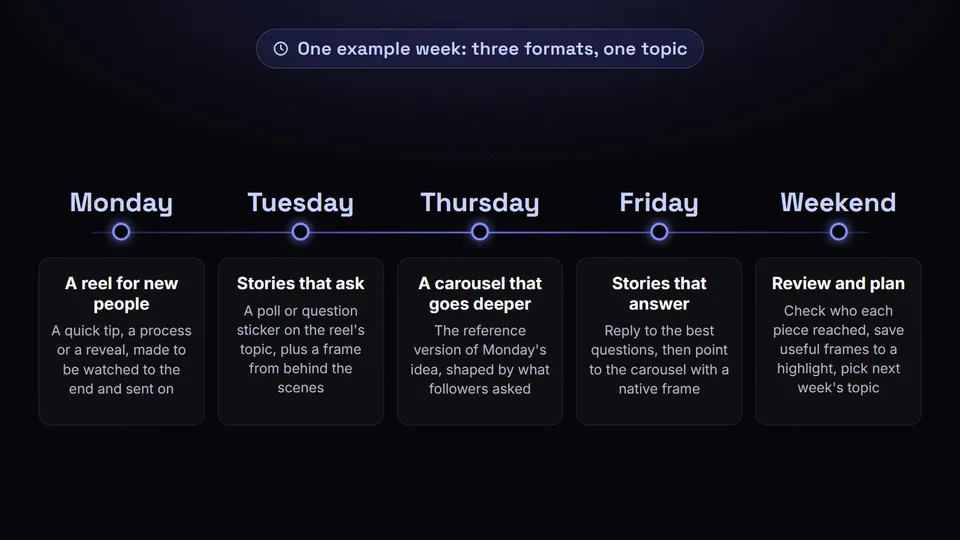
The formats work best as a system, each doing its own job on one topic. Here is an example week:
- Monday: a reel for new people. A quick tip, a process or a reveal, made to be watched to the end and sent on.
- Tuesday: stories that ask. A poll or question sticker on the reel's topic, plus a frame from behind the scenes.
- Thursday: a carousel that goes deeper. The reference version of Monday's idea, shaped by what followers asked and made to be saved.
- Friday: stories that answer. Reply to the best questions on screen, then point to the carousel with a native frame rather than a bare reshare.
- Weekend: review. Check who each piece reached, add the useful story frames to a highlight and pick next week's topic from the questions.
The days don't matter; the flow does. The reel brings people in; your profile, highlights and carousels show them what following would get them; and stories keep the people who stay. A small week you can keep up beats an ambitious one you abandon after a fortnight.
Before you schedule, confirm the current dimensions for each format in our image sizes tool, since reels and stories are full-screen vertical and feed posts usually portrait or square. Then use the best time to post tool to convert commonly cited posting windows into your time zone, and let your own insights take over once you have a few weeks of data.
The short version
Whether the question is reel vs post or story vs post, choose by the job: reels to be found, carousels and photos to be kept, stories to stay in touch. Point to new posts with a story made for the purpose, not a bare reshare, and judge each format by the return it is meant to bring, not by reach alone. When the week is mapped out, plan it in SchedulifyX.