Instagram Templates in 2026: Speed, Sizing, and Strategy
SchedulifyX Team · September 2, 2026
Discover how to build custom Instagram templates that boost production speed without diluting your brand. Plus, get the latest 2026 dimension updates.
In the fast-paced world of social media marketing, efficiency is just as important as creativity. For digital marketers, agency owners, and content creators, the demand to publish high-quality content daily can quickly lead to burnout. Enter the instagram template—a powerful tool designed to streamline your workflow, maintain visual consistency, and keep your audience engaged. However, as we navigate the evolving landscape of 2026, the strategy behind using templates has shifted dramatically.
Today, the real benefit of an instagram post template is the incredible speed and brand recognisability it offers. But there is a significant risk: if you rely on off-the-shelf packs, your brand might end up looking exactly like every other account in your niche. In this comprehensive guide, we will explore how to build a custom template system from your own brand identity, which elements should remain fixed, and how to adapt to Instagram's latest 2026 dimension and grid updates.
The Double-Edged Sword of Instagram Templates
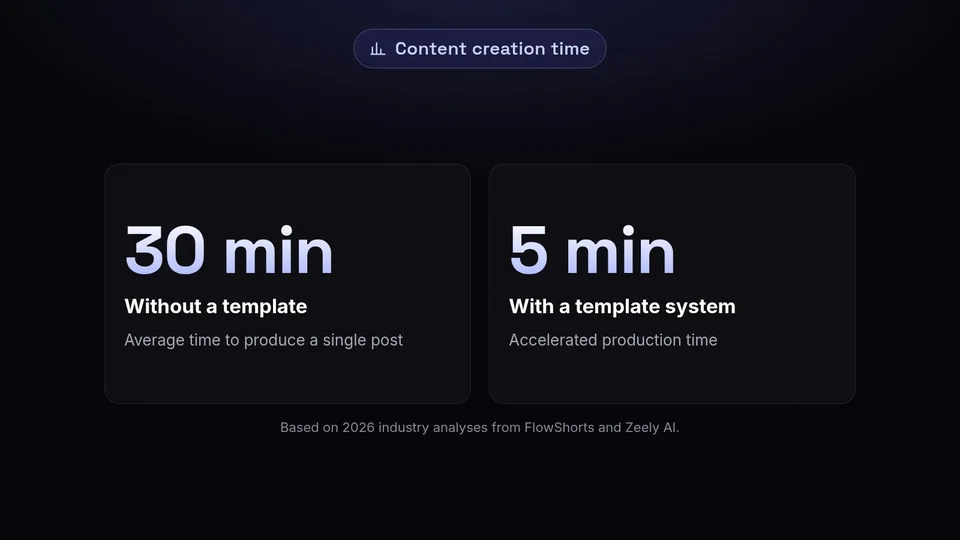
The appeal of an instagram template is undeniable. According to industry analyses from platforms like FlowShorts and Zeely AI in late 2025 and early 2026, implementing a robust template system can cut content creation time drastically—reducing the production of a single post from roughly 30 minutes down to just 5 minutes. This acceleration allows creators to focus on community engagement, strategy, and analytics rather than pushing pixels around a canvas.
The Benefit: Speed and Recognisability
When you use a consistent set of instagram templates, you train your audience to recognize your content instantly. Whether they are scrolling rapidly through their feed or tapping through Stories, a familiar color palette, typographic hierarchy, and layout signal to their brain that this content belongs to you. This visual recognisability builds trust and authority over time. When your audience knows what to expect visually, they are more likely to pause and consume the actual message.
The Risk: Visual Dilution
However, the convenience of buying a pre-made pack comes with a severe downside: visual dilution. If you purchase a trending, off-the-shelf template of instagram content, there is a high probability that your direct competitors are using the exact same designs. When every post features the same beige arches, minimalist serif fonts, and generic drop shadows, your brand identity vanishes into a sea of sameness. The risk is that your meticulously crafted message is ignored because the visual vehicle carrying it looks like generic spam.
Building Your Custom Brand Template System
To reap the benefits of speed without falling victim to visual dilution, you must build a template system derived directly from your unique brand guidelines, rather than adapting your brand to fit a purchased template.
Fixed vs. Variable Elements
A successful custom template system relies on a strict understanding of what changes and what stays the same. Insights from design experts at Metricool and EmbedSocial in 2026 emphasize the importance of separating fixed and variable elements.
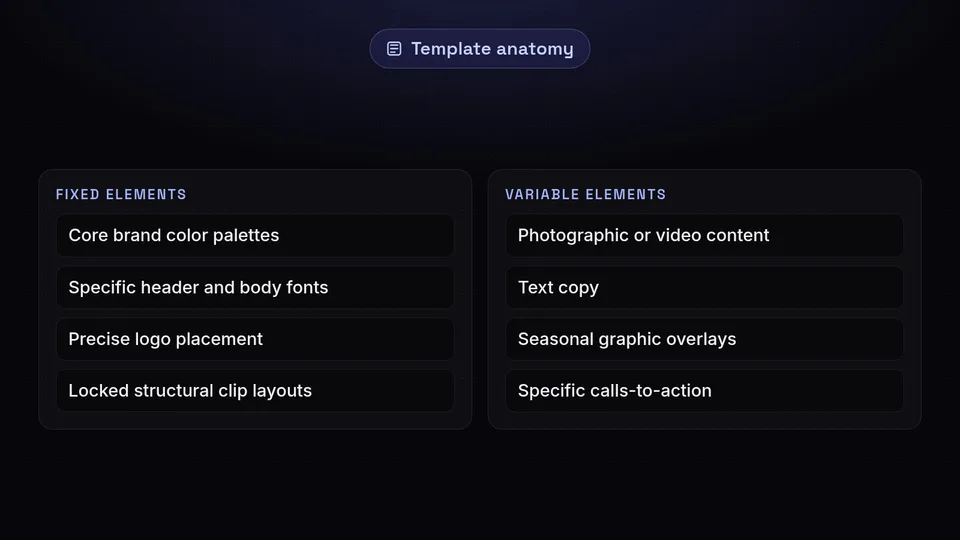
- Fixed Elements: These are the non-negotiables that anchor your brand identity. They should include your core brand color palettes, typography (specific header and body fonts), border framing, precise logo placement, and locked structural clip layouts. By keeping these elements static, you ensure every piece of content feels like part of a unified family.
- Variable Elements: These are the pieces that change to keep the content fresh and engaging. They include the actual photographic or video content, the text copy, seasonal graphic overlays, and the specific calls-to-action.
Interestingly, native tools are adapting to support these custom workflows. In July 2026 (with wider reporting in August 2026), Meta updated the native Instagram Edits app to include advanced overlay support and clip-locking capabilities. This allows creators to lock their fixed structural clip layouts in place, ensuring that the foundational layout structure is preserved even when variable media is swapped out rapidly.
Essential Dimensions for 2026 Placements
Even the most beautifully designed instagram post template will fail if it is sized incorrectly. Instagram's cropping algorithms can ruin a post by cutting off crucial text or awkwardly framing a subject. Based on updated requirements documented by RecurPost and Hootsuite in August 2026, here are the exact dimensions you need to build into your templates:
Feed Posts
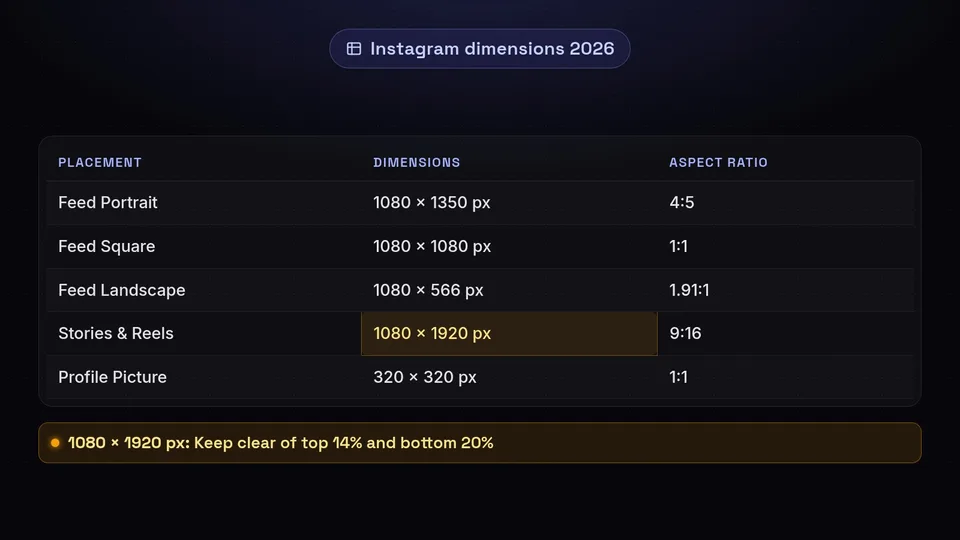
- Feed Portrait (Recommended): 1080 × 1350 px (4:5 aspect ratio). This is the gold standard for feed posts as it takes up the maximum amount of vertical screen real estate on mobile devices.
- Feed Square: 1080 × 1080 px (1:1 aspect ratio). The classic Instagram format, though increasingly less favored compared to portrait.
- Feed Landscape: 1080 × 566 px (1.91:1 aspect ratio). Best used for cinematic video previews or wide panoramic shots.
Video and Ephemeral Content
- Stories: 1080 × 1920 px (9:16 aspect ratio). When designing your Story templates, it is critical to keep essential content clear of the top 14% (where the profile icon and UI sit) and the bottom 20% (where the reply box and sharing tools are located). Note that the video limit is 60 seconds and 100 MB per card.
- Reels: 1080 × 1920 px (9:16 aspect ratio). Reels covers should also be uploaded at 9:16. The video maximum is 15 minutes, with a 300 MB limit when uploading via the API.
Profile Elements
- Profile Picture: 320 × 320 px (1:1 aspect ratio, rendered in a circle).
To make resizing your assets effortless, we highly recommend bookmarking our dedicated tool. For a comprehensive breakdown of image dimensions and an easy-to-use in-browser resizer, visit /tools/image-sizes.
Curating a Coherent Grid Without Monotony

For years, marketers designed their templates around the classic 1:1 square grid crop. However, a massive shift occurred in 2026. As documented by CreatorFlow and The Business Toolkit, Instagram officially changed profile grid previews to display at a 3:4 aspect ratio crop (roughly 1080 × 1440 px preview region), entirely replacing the former 1:1 square crop.
This means your instagram post template must now be designed with a 3:4 safe zone in mind for the grid preview, even if the post itself is a 4:5 portrait or a 9:16 Reel cover. Failure to account for this will result in chopped-off text and unaligned graphics on your profile page.
Avoiding the Checkerboard Trap
To keep a grid coherent without becoming monotonous, avoid rigid, predictable patterns like the outdated "checkerboard" (alternating quotes and photos). Instead, use a cohesive color palette and consistent typography to tie disparate types of content together.
Furthermore, managing your grid aesthetics became much easier on July 9, 2026, when Instagram rolled out a highly requested grid customization feature. This update allows users to reorder existing posts on their profile grid without having to delete or repost them. You can now visually merchandise your profile page, bringing your most relevant or aesthetically pleasing templates to the top row.
Mastering Reels and Stories with Templates
Video content requires a slightly different template strategy. As of June 8, 2026, Instagram's algorithm updates placed primary weight on two specific metrics for reach: watch time and skip rate. If your Reels template is visually boring or takes too long to deliver the hook, your skip rate will skyrocket, and the algorithm will bury your content.
AI and Localization in Reels
Your video templates should incorporate fast-paced, locked-clip structures that keep the eye moving. Additionally, accessibility and global reach have become paramount. On August 21, 2026, Instagram head Adam Mosseri announced the rollout of AI translation support for five additional languages: Japanese, Korean, French, German, and Italian. This covers both voice dubbing and on-screen captions within Reels. When building your Reels templates, ensure your lower-third graphics leave ample room for these automated bilingual captions so they do not overlap with your burned-in text.
Primal Video also reported in August 2026 that the Instagram Edits app received major updates, including built-in AI tools, full color correction, and new landscape video aspect ratio options. Leveraging these native features alongside your custom templates can significantly boost your production value.
Story Strategies and Instagram Plus
For Stories, speed is everything. Having a template for "New Post Alerts," "Behind the Scenes," and "Q&A Sessions" allows you to react to your audience in real-time. It is also worth noting that Meta officially launched "Instagram Plus" in June 2026 at $3.99/month, which provides subscribers with custom tools specifically for Stories and profile management, giving creators even more ways to deploy their templates effectively.
Tooling Up: Native Apps vs. SchedulifyX and Competitors
Executing a flawless template strategy requires the right software ecosystem. You have native tools, third-party schedulers, and enterprise management platforms to choose from.
As of 2026-09-02, Hootsuite remains a major player in the social media management space. To be completely transparent, legacy platforms like Hootsuite are stronger than SchedulifyX when it comes to deep, multi-channel enterprise legacy reporting for massive global teams with highly complex, multi-tiered approval workflows. They have spent years building robust integrations for massive corporate structures.
However, when it comes to agile, AI-powered social media scheduling designed specifically for modern creators and growth-focused brands, SchedulifyX shines. Our platform is built to handle the rigorous demands of modern Instagram management, ensuring your carefully crafted templates are published at the exact right time, with perfect formatting, via seamless API integrations that respect the 300 MB Reels limit and the latest 2026 aspect ratios.
Please note that pricing models, plan names, and plan limits for all mentioned platforms (including Instagram Plus and enterprise tools) are subject to change over time; always confirm current details on the vendor's own pricing page.
Conclusion
Mastering the instagram template in 2026 is about striking the perfect balance between rapid production and distinct brand identity. By building custom systems with fixed brand elements and variable content zones, adapting to the new 3:4 grid previews, and respecting the latest dimensional requirements, you can create a feed that is both highly efficient and visually stunning.
Don't let the technicalities of posting slow down your creative momentum. Once you have perfected your templates, let SchedulifyX handle the rest. With our AI-powered scheduling platform, you can automate your calendar, optimize your posting times, and ensure your brand looks flawless across every single placement. Start streamlining your social media strategy with SchedulifyX today.
Sources
Facts checked against the sources below on September 2, 2026.
- New Instagram Features 2026 — embedsocial.com
- youtube.com
- Social Media Image Sizes Guide — blog.hootsuite.com
- Instagram Post Size Guide — recurpost.com
- The Complete Guide To Social Media Image Sizes For 2023 — thebusinesstoolkit.com
- Instagram Post Size Guide — creatorflow.so
- Instagram Updates 2026 What Creators And Businesses Need To Know — lacrea-tives.com
- youtube.com
- Instagram Reels Templates — flowshorts.app
- 6 Ways Story Templates Make Your Instagram Faster — zeely.ai
