Master Your Assets with the SchedulifyX Media Library
SchedulifyX Team · July 20, 2026
Discover how the SchedulifyX Media Library transforms your social media workflow with cloud storage, folder organization, and in-app editing features.
In the fast-paced world of digital marketing, content is king, but organization is the kingdom. If you have ever spent twenty minutes frantically searching for a specific product image, or accidentally published an outdated version of your company logo, you know the chaotic reality of mismanaged digital assets. As social media platforms become increasingly visual, the sheer volume of photos, graphics, and videos that marketing teams must handle has skyrocketed. This is where a dedicated social media media library becomes not just a luxury, but an absolute necessity.
Welcome to our deep dive into the SchedulifyX Media Library. We have completely reimagined how marketers, agencies, and content creators store, organize, edit, and deploy their visual content. By integrating an advanced image management tool directly into your scheduling workflow, SchedulifyX eliminates the friction between content creation and publication. In this comprehensive guide, we will explore the robust SchedulifyX media features designed to streamline your brand asset management and supercharge your social media strategy.
The Content Chaos Dilemma
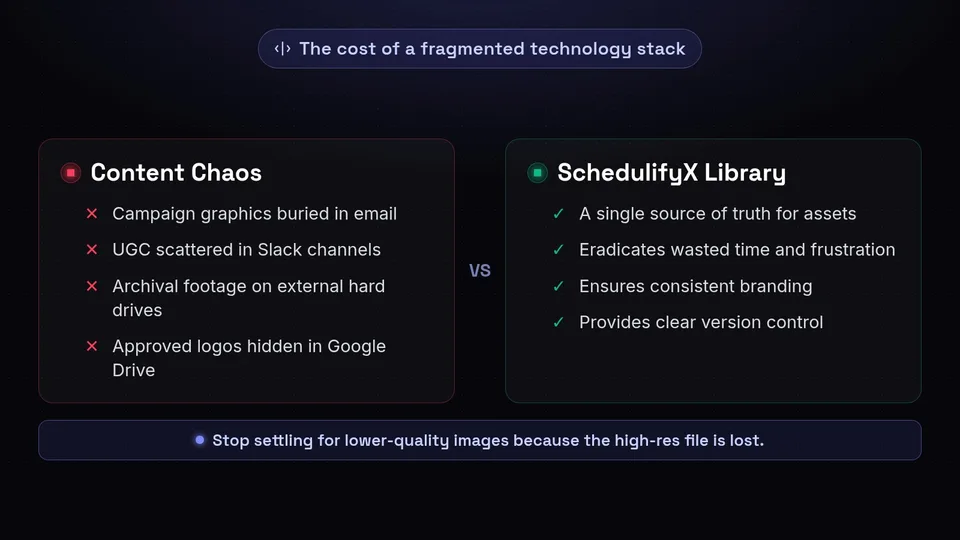
Before we dive into the specific features of the SchedulifyX Media Library, it is crucial to understand the problem it solves. The modern marketing technology stack is often highly fragmented. You might receive campaign graphics via email, download user-generated content from a shared Slack channel, store archival footage on an external hard drive, and keep approved logos in a Google Drive folder. This fragmentation leads to what we call "Content Chaos."
Content Chaos results in wasted time, inconsistent branding, and team frustration. When your media organization is lacking, your social media output suffers. A social media manager might settle for a lower-quality image simply because the high-resolution version is buried in an unmarked folder. Furthermore, when multiple team members are collaborating on a campaign, version control becomes a nightmare. SchedulifyX was built to eradicate this chaos by providing a single source of truth for all your social media assets.
Cloud Storage: Secure, Accessible, and Scalable

At the core of the SchedulifyX Media Library is our robust, enterprise-grade cloud storage solution. When you use an integrated social media media library, you are no longer tethered to a specific device or a clunky local server. Your assets live securely in the cloud, accessible from anywhere in the world, at any time.
Why Cloud Storage Matters for Social Media
Social media does not sleep, and neither should your access to your content. Whether you are a remote team collaborating across different time zones, or a solo creator traveling to an event, cloud storage ensures that your entire visual arsenal is right at your fingertips. SchedulifyX's cloud infrastructure is built for speed and reliability, ensuring that even large, high-resolution image files load quickly.
- Accessibility: Log in from your laptop at the office, or your tablet at a coffee shop. Your media library is always synced and up-to-date.
- Security: We employ state-of-the-art encryption to ensure that your proprietary brand assets, unreleased campaign graphics, and sensitive media are protected against unauthorized access.
- Scalability: As your brand grows, your content library grows with it. SchedulifyX offers scalable storage solutions so you never have to worry about hitting a wall right before a major product launch.
Folder Organization: Building a Logical Hierarchy
Having all your files in one place is only helpful if they are organized logically. Throwing thousands of images into a single digital bucket simply replaces one form of chaos with another. This is why SchedulifyX features an intuitive, highly customizable folder organization system.
Effective media organization requires a structural hierarchy that makes sense for your specific workflow. With our folder system, you can create infinite nesting levels to categorize your content precisely how your brain (and your team) works.
Structuring Your Folders
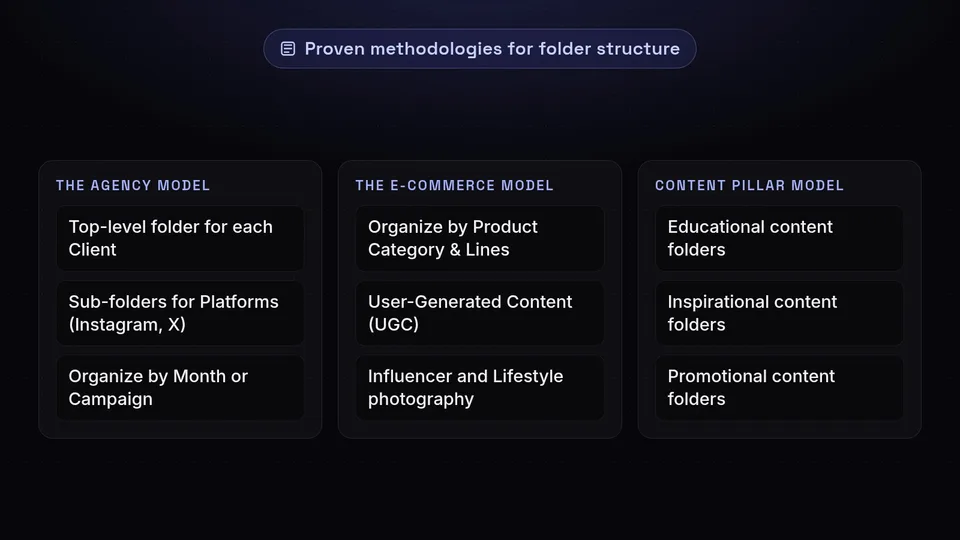
How you structure your folders will depend on your business model. Here are a few proven methodologies you can easily implement within SchedulifyX:
- The Agency Model: Create a top-level folder for each Client. Inside the client folder, create sub-folders for Platforms (Instagram, LinkedIn, X), and inside those, organize by Month or Campaign (e.g., "Client A > Instagram > 2026 Q3 > Summer Sale").
- The E-Commerce Model: Organize by Product Category, then by specific Product Lines. Add separate folders for User-Generated Content (UGC), Influencer collaborations, and Lifestyle photography.
- The Content Pillar Model: If your strategy revolves around content pillars (e.g., Educational, Inspirational, Promotional), structure your top-level folders to reflect these pillars, making it easy to ensure a balanced content mix when scheduling.
Drag-and-Drop Upload: Frictionless Asset Import
We know that time is your most valuable resource. The last thing you want to do is click through five different dialogue boxes just to upload a single photo. The SchedulifyX Media Library features a seamless drag-and-drop upload interface designed for maximum efficiency.
Whether you are importing a single infographic or bulk-uploading a batch of fifty event photos, you can simply highlight the files on your desktop and drag them directly into your browser window. SchedulifyX instantly begins processing and uploading the files in the background, allowing you to continue working within the platform without interruption.
"Efficiency in social media management is not about working harder; it is about removing the micro-frictions from your daily workflow. Drag-and-drop functionality seems simple, but it saves hours of accumulated time over a month."
Media Tagging & Smart Search: Never Lose a File Again
Even with the best folder structure in the world, finding a specific asset can sometimes be challenging, especially as your library grows into the thousands of files. This is where SchedulifyX's advanced media tagging and smart search capabilities shine, elevating it from a simple storage drive to a powerful image management tool.
The Power of Metadata
When you upload an image to SchedulifyX, you can assign custom tags to it. Think of tags as descriptive keywords that tell the system exactly what the image contains, what its purpose is, or who it features.
For example, if you upload a photo of a woman drinking coffee while looking at a laptop, you might tag it with: lifestyle, coffee, laptop, remote work, blue background, Q3 campaign. Later, when you are drafting a post about remote work productivity, you don't need to remember which folder that image is in. You simply type "remote work" into the SchedulifyX smart search bar, and the image instantly appears.
Developing a Tagging Taxonomy
To get the most out of this feature, we recommend developing a standardized tagging taxonomy for your team. This means agreeing on a consistent set of keywords. For instance, decide whether you will use the tag "UGC" or "User Generated Content," and stick to it. A well-maintained tagging system turns your media library into a highly searchable, instant-recall database of visual inspiration.
In-App Image Editor: Perfection Without Leaving the Platform
One of the most frustrating aspects of social media management is the constant need to switch between applications. You find an image, realize it needs to be cropped for Instagram, download it, open Photoshop or Canva, make the edit, export it, and re-upload it to your scheduler. SchedulifyX eliminates this tedious loop with its comprehensive in-app image editor.
Our built-in editor provides all the essential tools you need to optimize your visual content directly within your social media media library. This means faster workflows and less context switching.
Key Editing Features
- Aspect Ratio Cropping: Social platforms have notoriously specific and ever-changing dimension requirements. Our editor includes pre-set aspect ratios (1:1 for Instagram grids, 9:16 for Stories/Reels, 1.91:1 for LinkedIn links, etc.). With one click, your image is perfectly sized for its destination.
- Filters and Adjustments: Tweak the brightness, contrast, saturation, and hue of your images to ensure they match your brand's aesthetic. Apply consistent filters across multiple images for a cohesive grid appearance.
- Text Overlays and Annotations: Need to turn a stock photo into a motivational quote or add a quick promotional banner? The text overlay tool allows you to add custom typography, adjust fonts, colors, and opacity, all without leaving SchedulifyX.
- Focal Point Selection: When an image is auto-cropped for different feed views, you can select the focal point to ensure the most important part of the image (like a face or a product) is never cut off.
Brand Asset Management: Maintaining Visual Consistency
Brand consistency is the bedrock of trust. If your audience sees varying shades of your brand colors, distorted logos, or mismatched fonts across your social channels, it degrades your brand's perceived professionalism. SchedulifyX serves as an unparalleled brand asset management hub.
Creating Your Brand Kit
Within the Media Library, you can designate specific folders and files as core Brand Assets. This is where you store your definitive, approved brand materials:
- Primary and secondary logos (in PNG, SVG, and JPG formats).
- Brand color palettes (with hex codes readily accessible).
- Approved typography and font files.
- Brand guidelines and visual mood boards.
By centralizing these assets, you empower your entire team to stay on-brand. When a new social media coordinator joins the team, they don't need to ask where the "transparent white logo" is—it is already organized and tagged in the Brand Assets folder. This feature is particularly vital for agencies managing multiple client brands; you can create distinct, isolated brand kits for every single client, ensuring cross-contamination of brand identities never happens.
Seamless Post Attachment: From Library to Live
The ultimate goal of any social media asset is to be published. The true power of the SchedulifyX Media Library lies in its deep integration with our post scheduling and publishing engine. We call this "Seamless Post Attachment."
When you are in the SchedulifyX post composer drafting your caption, you don't need to open a separate file browser. You simply click the "Add Media" button, which instantly opens a modal window of your Media Library. From there, you can browse folders, search by tags, or filter by media type (image, video, GIF).
Once you select an asset, it is instantly attached to your draft. If you realize the image needs a tweak, you can open the in-app editor right from the composer, make the adjustment, save it, and schedule the post. The workflow is incredibly fluid, saving you countless clicks and reducing the time it takes to go from an idea to a scheduled post.
Real-World Use Cases
To truly understand the impact of the SchedulifyX media features, let's look at how different types of users leverage the platform to transform their workflows.
The Marketing Agency
A mid-sized marketing agency manages social media for 15 different clients. Before SchedulifyX, they used a mix of Google Drive links and local desktop folders, leading to frequent errors where wrong client logos were used. By adopting SchedulifyX, they created top-level folders for each client, complete with isolated Brand Kits. They utilize the media tagging feature to label "Approved" vs. "Draft" assets, ensuring account managers only schedule finalized graphics. The in-app editor allows their social media managers to make quick aspect ratio crops without having to submit a ticket back to the graphic design department.
The E-Commerce Brand
An online fashion retailer generates hundreds of product photos and user-generated content pieces every month. They use the SchedulifyX Media Library to organize content by season and clothing line. Their favorite feature is the drag-and-drop bulk upload, which they use after every major photoshoot. By tagging images with specific product SKUs and color names, their social team can instantly find the exact image they need when a specific product goes on sale, attaching it seamlessly to a promotional post in seconds.
The Solo Influencer
A travel influencer needs to manage thousands of high-resolution photos and short-form video clips. They rely heavily on the SchedulifyX cloud storage to free up space on their mobile devices while traveling. They use the in-app editor to apply a consistent visual filter to all their images, maintaining their signature aesthetic across Instagram and Pinterest. The smart search feature allows them to quickly pull up "beach sunsets" or "Paris architecture" whenever they need a throwback post.
Best Practices for Media Organization
To maximize the benefits of your social media media library, we recommend adopting the following best practices:
- Establish Naming Conventions: Don't upload files named "IMG_98234.jpg" or "Final_Final_Logo_V2.png". Implement a standardized naming convention such as "YYYY-MM-DD_CampaignName_Platform_AssetType". This makes searching and sorting infinitely easier.
- Audit Regularly: Set aside time once a quarter to audit your media library. Archive outdated campaign assets, delete unused drafts, and ensure tags are being applied correctly. A clean library is an efficient library.
- Train Your Team: The best image management tool in the world won't help if your team doesn't use it correctly. Ensure all team members understand your folder hierarchy, tagging taxonomy, and brand asset guidelines.
- Leverage the Editor for Variations: Instead of asking your designer for five different sizes of the same graphic, ask for one high-resolution square or portrait image. Use the SchedulifyX in-app editor to crop and adjust that single asset for all your different platform needs.
Conclusion: Take Control of Your Media
In the modern digital landscape, visual content is the primary currency of engagement. However, the value of that content is severely diminished if you cannot find it, edit it, or publish it efficiently. The SchedulifyX Media Library is more than just a storage space; it is a comprehensive command center for your entire visual strategy.
From the security and accessibility of our cloud storage to the granular control of our folder organization and media tagging, every aspect of the platform is designed to eliminate content chaos. By integrating powerful brand asset management and an intuitive in-app image editor directly into your scheduling workflow, SchedulifyX empowers you to work smarter, not harder.
Are you ready to stop searching for lost files and start scheduling brilliant content? Experience the seamless integration of asset management and social publishing. Try SchedulifyX today and master your media library once and for all.
