Manage Multiple Brands with SchedulifyX Workspaces
SchedulifyX Team · July 28, 2026
Manage unlimited brands from a single dashboard with SchedulifyX's new multi-brand workspaces. Enjoy independent calendars, analytics, and brand switching.
In the fast-paced world of digital marketing, the ability to pivot, adapt, and manage multiple identities simultaneously is no longer just a luxury—it is an absolute necessity. Whether you are a solo entrepreneur running several distinct e-commerce stores, an in-house marketing team managing a parent company and its various subsidiaries, or a bustling marketing agency handling dozens of diverse clients, the complexity of your daily operations can quickly spiral out of control. Today, we are thrilled to announce a monumental leap forward in how you handle these complexities. Welcome to the future of multi-brand social media management: SchedulifyX Workspaces.
With our latest major product update, we are introducing a comprehensive suite of features designed specifically to eliminate the friction of juggling various brands. SchedulifyX Workspaces allows you to manage unlimited brands from a single, unified dashboard. Complete with instant brand switching, per-brand social accounts, independent posting calendars, and unified analytics, this is the ultimate brand management tool you have been waiting for. In this comprehensive guide, we will explore the profound impact this update will have on your workflow, dive deep into the specific features of our new multiple brands dashboard, and provide actionable strategies to elevate your agency brand management to unprecedented heights.
The Chaos of Multi-Brand Social Media Management
Before we dive into the transformative power of SchedulifyX Workspaces, it is crucial to understand the very real pain points that social media managers, agency owners, and digital marketers face every single day. Managing a single brand's social media presence is challenging enough. You have to conceptualize engaging content, design eye-catching graphics, write compelling copy, schedule posts at optimal times, engage with your audience, and analyze performance metrics. Now, multiply that workload by three, five, or even twenty different brands, each with its own unique voice, target audience, and set of social media accounts.
The Nightmare of Logging In and Out
Historically, managing multi-brand social media meant one of two things: either you used a fragmented system of different scheduling tools for different clients, or you constantly logged in and out of native platforms. The sheer amount of time wasted navigating login screens, managing two-factor authentication codes, and resetting forgotten passwords is staggering. This administrative bloat drains creativity and reduces the time you can spend actually strategizing and creating impactful content.
The Dreaded 'Cross-Posting' Catastrophe
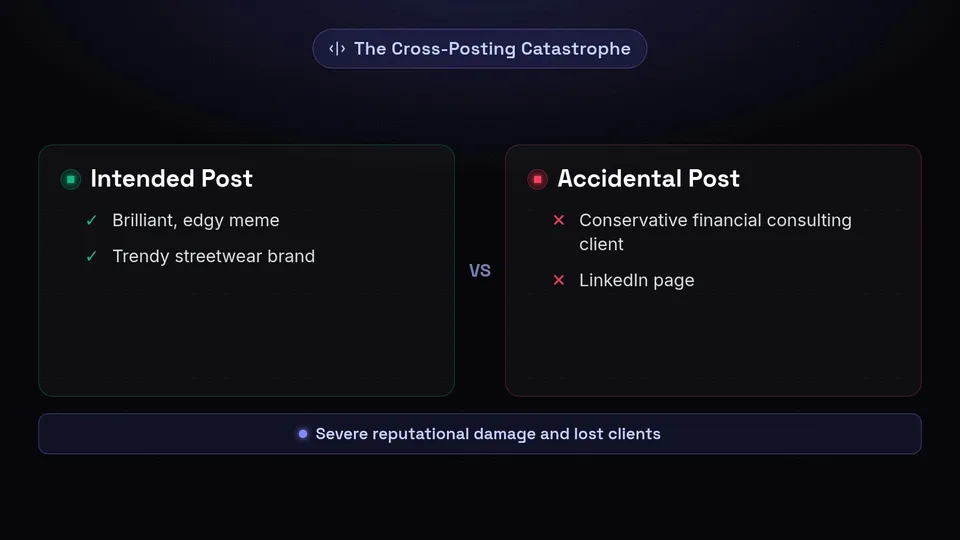
Perhaps the most anxiety-inducing aspect of managing multiple brands without a dedicated brand management tool is the risk of cross-posting. We have all heard the horror stories—or perhaps experienced them firsthand. You draft a brilliant, edgy meme intended for a trendy streetwear brand, but in a moment of distraction, you accidentally publish it to the LinkedIn page of a conservative financial consulting client. These mistakes can cause severe reputational damage, lead to lost clients, and create a PR nightmare that takes weeks to resolve.
Fragmented Data and Cluttered Calendars
When all your social media accounts are dumped into a single, unorganized calendar, visualizing your content strategy becomes impossible. A unified calendar is great if you only manage one entity, but when you are trying to balance the content mix for a bakery, a tech startup, and a fitness influencer all on the same screen, the visual clutter is overwhelming. Furthermore, pulling analytics reports requires manually filtering out the noise, leading to inaccurate reporting and a frustrating lack of clear, actionable insights.
"The complexity of managing multiple brands shouldn't scale linearly with the number of brands you manage. The right technology should absorb that complexity, leaving you with a clean, intuitive workflow."
Introducing SchedulifyX Workspaces: The Ultimate Brand Management Tool
We built SchedulifyX on the foundational belief that artificial intelligence and smart software design can drastically reduce the busywork associated with social media management. With the launch of SchedulifyX Workspaces, we are tackling the multi-brand dilemma head-on. This isn't just a minor feature update; it is a fundamental architectural evolution of our platform.
SchedulifyX Workspaces acts as a digital filing cabinet for your brain. It allows you to compartmentalize your digital marketing efforts into distinct, isolated environments (Workspaces), while still housing them under one overarching, easily accessible roof. Whether you are managing two brands or two hundred, our platform scales effortlessly to meet your needs.
What Exactly is a Workspace?
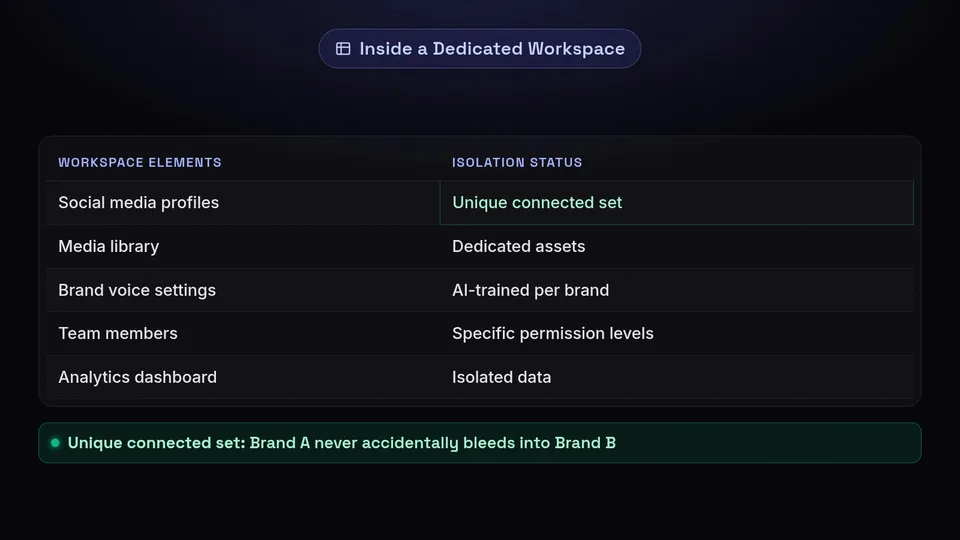
In the context of SchedulifyX, a Workspace is a dedicated, self-contained hub for a specific brand, client, or project. Each Workspace has its own unique set of connected social media profiles, its own media library, its own AI-trained brand voice settings, its own team members with specific permission levels, and its own analytics dashboard. By isolating these elements, we ensure that the data, assets, and strategies for Brand A never accidentally bleed into Brand B.
Key Features of the Multiple Brands Dashboard

Our engineering and design teams have spent months meticulously crafting a multiple brands dashboard that is as powerful as it is intuitive. Let's explore the core features that make SchedulifyX Workspaces the premier choice for multi-brand social media management.
1. Seamless, One-Click Brand Switching
Say goodbye to the endless cycle of logging in and out. At the top left corner of your SchedulifyX interface, you will now find the Workspace Switcher. This elegant dropdown menu allows you to transition instantly from one brand's environment to another with a single click. The entire interface—including the calendar, asset library, and analytics—instantly repopulates with the data relevant to the selected brand. We have also implemented customizable color-coding and logo uploads for each Workspace, providing an immediate visual cue so you always know exactly which brand you are working on.
2. Per-Brand Social Accounts and API Isolation
Security and organization go hand-in-hand. Within each Workspace, you can connect the specific Facebook Pages, Instagram Business accounts, X (Twitter) profiles, LinkedIn pages, TikTok accounts, and Pinterest boards relevant to that brand. Because these connections are isolated at the API level within the Workspace, there is zero risk of an account from Workspace A showing up as a publishing option in Workspace B. This completely eliminates the risk of accidental cross-posting and ensures that your client's credentials remain secure and strictly compartmentalized.
3. Independent, AI-Optimized Posting Calendars
Each Workspace features its own independent posting calendar. This means you can view your content strategy for a specific brand without the visual noise of your other clients' posts. But because this is SchedulifyX, these aren't just standard calendars. Each independent calendar leverages our proprietary AI to analyze the specific audience data for that particular brand. The AI will suggest optimal posting times, content formats, and even generate caption variations tailored specifically to the unique audience of the brand within that Workspace.
4. Unified AND Granular Analytics
Reporting is often the most tedious part of agency brand management. SchedulifyX Workspaces revolutionizes this process by offering two distinct layers of analytics.
- Granular Workspace Analytics: When inside a specific Workspace, you get a deep dive into the performance metrics of that brand alone. Track engagement rates, audience growth, click-through rates, and AI-driven sentiment analysis without any cross-contamination of data.
- Unified Global Dashboard: For agency owners and marketing directors, we offer a high-level Global Dashboard. This view aggregates the top-line performance metrics across all your Workspaces. You can instantly see which brands are overperforming, which need more attention, and track the overall ROI of your entire portfolio in one beautifully designed interface.
5. Dedicated Media Libraries and Asset Management
A major headache in multi-brand social media is organizing digital assets. Using a single media library for multiple brands often results in a chaotic jumble of logos, product shots, and promotional videos. SchedulifyX Workspaces provides a dedicated media library for every single brand. You can store brand guidelines, hex codes, typography files, and visual assets in their rightful place. Furthermore, our AI image tagging feature works within the context of the specific Workspace, making it incredibly easy to search for 'summer campaign' and only see the assets relevant to the current brand.
Revolutionizing Agency Brand Management
While SchedulifyX Workspaces is incredibly beneficial for in-house teams and serial entrepreneurs, it is an absolute game-changer for marketing agencies. Agency brand management requires a delicate balance of client transparency, team collaboration, and strict access control. Here is how our new features empower agencies to scale efficiently.
Granular Team Permissions and Role-Based Access
Not every team member needs access to every client. With our new update, agency administrators can invite team members to specific Workspaces with tailored permission levels. For example, you can grant a junior copywriter 'Draft Only' access to Client A and Client B, while giving your senior strategist 'Admin' access to Client C. This ensures that team members only see the brands they are actively working on, reducing dashboard clutter and minimizing the risk of unauthorized actions.
Streamlined Client Approval Workflows
One of the most requested features from our agency partners has been a better way to handle client approvals. With SchedulifyX Workspaces, you can invite your clients into their specific Workspace as a 'Reviewer'. They will have a clean, simplified view of their upcoming content calendar where they can approve posts, leave comments, or request revisions. Because they are restricted to their own Workspace, they will never see the content or data of your other clients, maintaining strict confidentiality and professionalism.
Customizable White-Label Reporting
Demonstrating value to your clients is critical for retention. Our enhanced analytics suite allows you to generate comprehensive, white-labeled reports for each Workspace. You can automatically compile data, add your agency's logo, and schedule these reports to be emailed directly to your clients at the end of each month. The reports highlight key victories, showcase AI-driven insights, and prove the ROI of your agency's efforts, all without you having to manually crunch a single number in a spreadsheet.
How to Set Up Your SchedulifyX Workspaces
Transitioning to a multi-brand workflow might sound daunting, but we have designed the setup process to be as frictionless as possible. Whether you are a new user or migrating an existing account, setting up your multiple brands dashboard takes just a few minutes. Here is a step-by-step guide to getting started:
- Create Your First Workspace: Log into your SchedulifyX account. On the left-hand navigation menu, click the new 'Workspaces' icon. Select 'Create New Workspace'. Give it a clear name (e.g., 'Acme Corp'), upload the brand's logo, and select a primary color theme.
- Connect Social Channels: Once inside the new Workspace, navigate to the 'Integrations' tab. Connect the specific social media accounts associated with this brand. You will be prompted to authorize the connections via the native platforms.
- Define the Brand Voice: Head over to the 'AI Settings' tab within the Workspace. Here, you can input the brand's core values, target audience demographics, and preferred tone of voice (e.g., professional, witty, empathetic). Our AI will use this profile to generate hyper-relevant content suggestions for this specific brand.
- Invite Your Team and Clients: Go to the 'Team' tab. Enter the email addresses of the colleagues who will be working on this brand and assign them the appropriate roles (Admin, Editor, Contributor, or Reviewer).
- Repeat and Scale: Click the Workspace Switcher at the top left, select 'Create New Workspace', and repeat the process for your next brand. There is no limit to the number of Workspaces you can create on our Agency and Enterprise plans!
Best Practices for Multi-Brand Social Media Success
Having the ultimate brand management tool is only half the battle; utilizing it effectively requires a strategic approach. Here are some expert best practices for maximizing your efficiency and impact when managing multi-brand social media with SchedulifyX.
1. Establish Strict Naming Conventions
When you are managing dozens of Workspaces, organization is key. Establish a standardized naming convention for your Workspaces, campaigns, and media assets. For example, use a format like '[Client Name] - [Platform] - [Campaign Year]' for your internal tagging. This makes the search functionality within SchedulifyX lightning fast and ensures your team is always on the same page.
2. Leverage AI for Content Repurposing Across Brands
While brands should remain distinct, there are often industry-wide trends or news pieces that are relevant to multiple clients in your portfolio. Instead of writing the same post five different ways from scratch, use the SchedulifyX AI Assistant. You can take a core concept, switch to Workspace A, and ask the AI to "Write a post about [Topic] using this brand's professional tone." Then, switch to Workspace B, and ask the AI to "Write a post about [Topic] using this brand's humorous, Gen-Z tone." This allows you to capitalize on trends rapidly while maintaining strict brand authenticity.
3. Utilize the Global Dashboard for Strategic Resource Allocation
Make it a habit to check the Unified Global Dashboard every Monday morning. By looking at the aggregate data across all your Workspaces, you can identify which brands are experiencing high growth and which are stagnating. This high-level view allows agency owners and marketing directors to dynamically allocate resources, shifting team members or ad spend to the brands that need a boost or the campaigns that are showing the highest ROI.
4. Create Standard Operating Procedures (SOPs) for Workspaces
To ensure consistency, especially if you have a growing team, create a document outlining the SOPs for managing Workspaces. Detail exactly how a new Workspace should be set up, who is responsible for client approvals, and what the daily checklist looks like for community management within each isolated brand environment. SchedulifyX provides the structure, but your SOPs provide the discipline.
Frequently Asked Questions (FAQ)
We know that a major update like this brings questions. Here are some of the most common inquiries we have received during the beta testing phase of SchedulifyX Workspaces.
Is there a limit to how many Workspaces I can create?
The number of Workspaces available depends on your subscription tier. Our Pro plan includes up to 5 Workspaces, perfect for small businesses with a few sub-brands. Our Agency and Enterprise plans offer unlimited Workspaces, allowing you to scale your client base without ever worrying about software limitations.
Can I move existing scheduled posts into a new Workspace?
Yes! We have built a migration tool specifically for our existing users. When you create a new Workspace, you will have the option to bulk-select existing social profiles and their associated scheduled content and seamlessly migrate them into the new isolated environment.
How does the AI handle multiple brands?
This is one of our proudest achievements. The SchedulifyX AI engine is compartmentalized alongside your Workspaces. When you train the AI on the tone, style, and audience of Brand A, that learning is strictly confined to Brand A's Workspace. It will not influence the content generated for Brand B. This ensures that every brand retains its unique digital fingerprint.
Can clients see my other Workspaces?
Absolutely not. When you invite a client as a 'Reviewer' to their specific Workspace, they only have access to that environment. The Workspace Switcher will not even appear on their interface, ensuring complete privacy and professional boundaries between your different clients.
Conclusion: Step Into the Future of Social Media Scheduling
The days of chaotic spreadsheets, accidental cross-posting, and fragmented analytics are officially over. With the introduction of SchedulifyX Workspaces, we are empowering marketers, agencies, and entrepreneurs to take absolute control over their digital portfolios. By providing a multiple brands dashboard that combines strict data isolation with seamless navigation and powerful AI capabilities, we have built the definitive brand management tool for the modern web.
Multi-brand social media no longer has to be a source of stress. It can be a streamlined, organized, and highly profitable aspect of your business. Whether you are looking to improve your agency brand management, scale your in-house marketing efforts, or simply get your digital life organized, SchedulifyX Workspaces is the solution.
Ready to experience the ultimate in multi-brand management? Log in to your SchedulifyX account today to start building your Workspaces, or if you are new here, start your 14-day free trial and discover how our AI-powered platform can revolutionize your social media strategy.
