Does Instagram Notify When You Screenshot a Story in 2026?
SchedulifyX Team · October 26, 2026
Wondering if Instagram notifies when you screenshot a story? Get the definitive 2026 answer, learn the exceptions, and find out how to test it yourself.
Let us cut right to the chase. If you are panicking right now, frantically searching Google to ask, "does instagram notify when you screenshot a story?" you can take a deep breath and relax. The direct answer is no. As of late 2026, Instagram does not notify users if you take a screenshot of their Story, their regular posts, or their Reels.
However, before you go screenshotting everything in sight, you need to know that there is one major exception where Instagram absolutely does send a notification. If you screenshot a disappearing photo or video sent in a Direct Message (DM), the sender will be notified immediately.
If you have been searching for this information, you have probably noticed that nearly every article online is out of date, confusing, or contradictory. This happens because social media companies change their privacy features constantly. In this comprehensive guide, we will break down exactly what triggers an instagram screenshot notification in 2026, why the internet is so confused about this topic, how to verify the facts yourself, and how other platforms handle screenshots.
What Instagram Does NOT Notify You About (The Safe Zone)
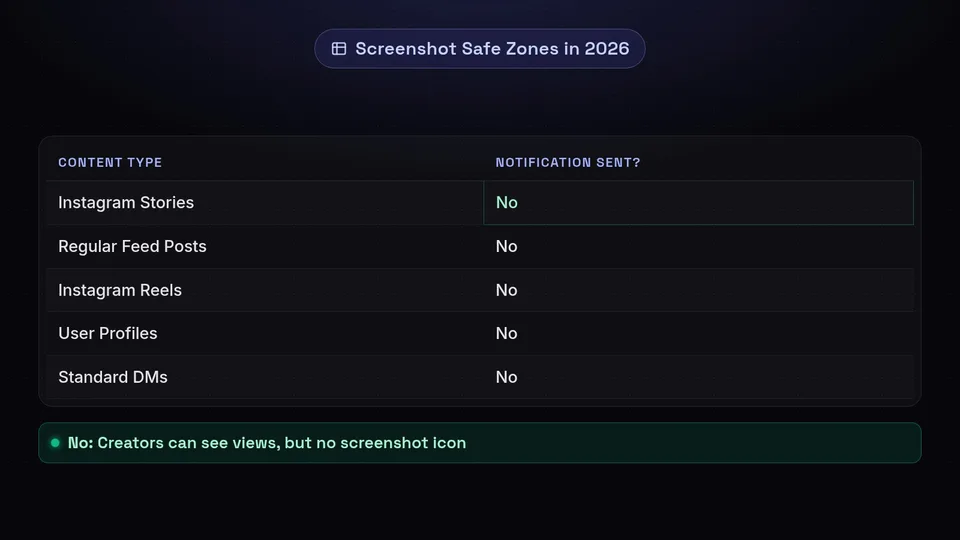
Let us start with the safe zone. When you are casually browsing the app, there are several areas where you can take screenshots or screen recordings without triggering any kind of alert to the original poster. As of 2026, you will not trigger an alert if you screenshot:
- Instagram Stories: Despite widespread rumors, if you screenshot instagram story content, the creator will not know. They can see that you viewed the story, but there is no special icon indicating a screenshot.
- Regular Feed Posts: Photos and videos posted to a user's main grid are completely safe to screenshot.
- Instagram Reels: Whether you are scrolling the Reels tab or viewing a Reel on someone's profile, taking a screenshot or screen recording is entirely private.
- User Profiles: Screenshotting someone's bio, follower count, or profile picture grid does not send an alert.
- Standard Direct Messages (DMs): If you screenshot a regular text conversation, a voice note, or a permanent photo sent from the camera roll in a standard DM chat, no notification is sent.
- Explore Page Content: Anything you find on the Explore page is fair game.
If your primary concern is whether does instagram tell when you screenshot a standard piece of public or follower-only content, the answer remains a definitive no.
The One Exception: When DOES Instagram Send a Notification?
Here is where you need to be careful. Instagram is highly protective of ephemeral (temporary) content sent privately between users. There is a specific scenario where taking a screenshot will instantly rat you out.
Disappearing Photos and Videos in DMs
If someone uses the Instagram camera inside a Direct Message chat to take a photo or video, and they set it to "View Once" or "Allow Replay," this is considered a disappearing message. If you take a screenshot or a screen recording of this specific type of media, Instagram will notify the sender.
How does the sender know? They will see a small, hatched circle icon (it looks like a little starburst or a shutter icon) next to the message in their chat history. Additionally, they may receive a push notification on their phone saying, "[Username] took a screenshot of the photo you sent."
Vanish Mode
Instagram also has a feature called Vanish Mode, which you activate by swiping up in a DM chat. In Vanish Mode, all messages, photos, and videos disappear after they are seen and the chat is closed. If you take a screenshot of anything while Vanish Mode is active—even just standard text—an explicit message will appear in the chat saying "[Username] took a screenshot." Both parties will see this alert.
So, if you are wondering does instagram notify when you screenshot a story, you are safe. But if you are in DMs dealing with disappearing content or Vanish Mode, keep your fingers away from those screenshot buttons.
Why is the Internet Full of Outdated Information?
If you search for an instagram screenshot notification guide, you will find hundreds of articles giving you conflicting advice. Why is this question so hard to get a straight answer to?
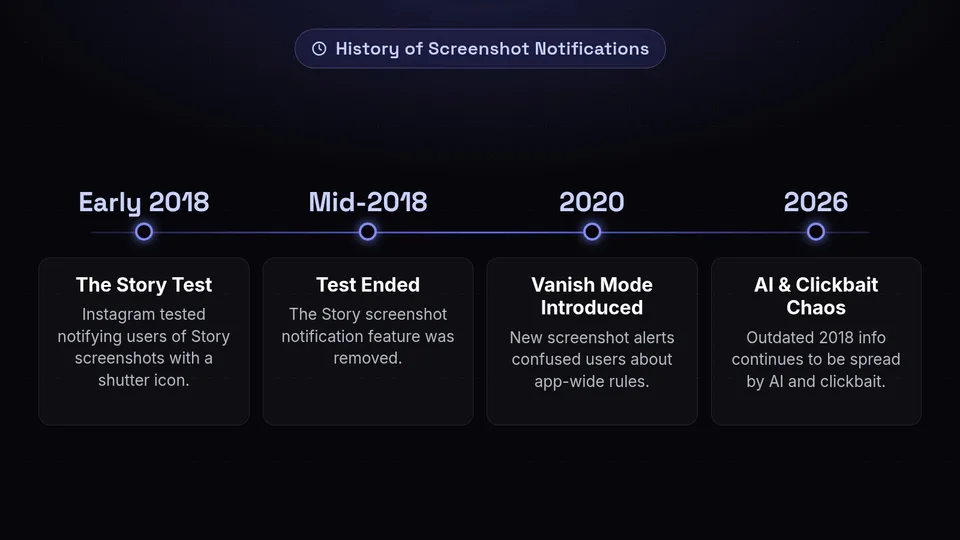
The confusion stems from the fact that Instagram's policies have changed repeatedly over the years. Here is a brief history of the chaos:
- The 2018 Story Test: In early 2018, Instagram actually did test a feature that notified users when someone screenshotted their Story. A small camera shutter icon would appear next to the person's name in the Story viewer list. The internet had a collective meltdown. However, Instagram ended the test after just a few months. Since mid-2018, they have never brought this feature back for Stories.
- The Introduction of Vanish Mode: When Vanish Mode was introduced in 2020, people saw the "screenshot taken" alerts and mistakenly assumed this applied to the whole app, including Stories.
- Clickbait and AI Content: Many websites simply copy older articles without verifying the facts, or they use AI tools that scrape outdated information from 2018. This creates an echo chamber of false warnings.
Because these features are constantly evolving, it is crucial to recognize that the information in this article reflects 2026 behavior. Next year, Meta (Instagram's parent company) could change the rules again.
How to Verify This Yourself (Don't Trust Us, Test It)
Because policies change so frequently, the golden rule of social media privacy is: never blindly trust an article, including this one. If you are about to screenshot something sensitive and want to be 100% certain that an instagram screenshot notification will not be sent, you should test it yourself.
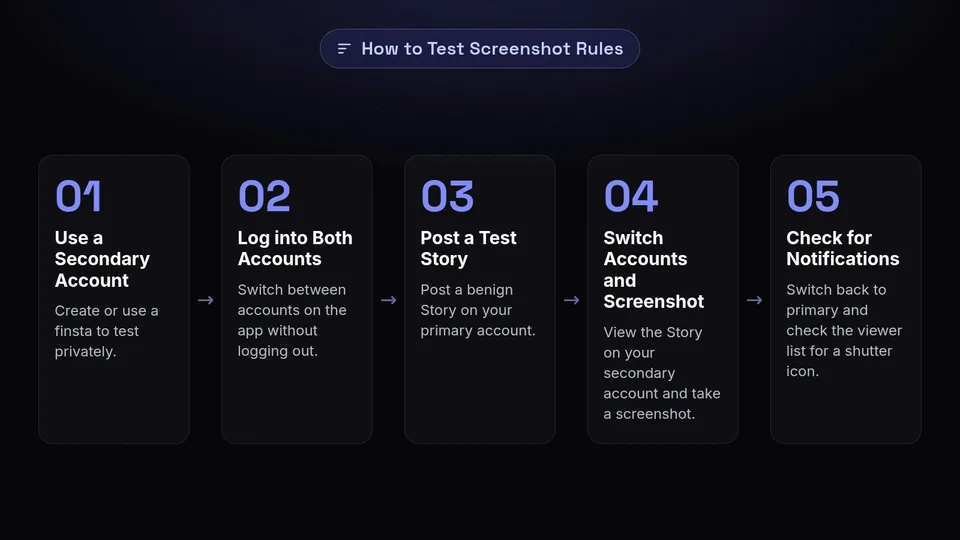
Here is the foolproof, 2026 method for verifying Instagram's screenshot rules:
- Use a Secondary Account: If you don't already have one, create a secondary account (often referred to as a finsta).
- Log into Both Accounts: You can easily switch between accounts on the Instagram app without logging out.
- Post a Test Story: Go to your primary account and post a benign Story (like a picture of your coffee).
- Switch Accounts and Screenshot: Switch to your secondary account, view the Story you just posted on your main account, and take a screenshot.
- Check for Notifications: Switch back to your primary account. Look at your notifications tab and look at the viewer list for that Story. Do you see a shutter icon? Did you get a push alert? (Spoiler alert: You won't).
You can use this exact same method to test disappearing DMs, regular DMs, and Reels. By testing it yourself between two accounts you control, you never have to worry about whether a blog post is out of date.
Beware of Third-Party Apps Claiming to Show Screenshotters
A quick warning: if you are a creator wondering does instagram tell when you screenshot, you might be tempted to download third-party apps that promise to reveal exactly who is saving your content. Do not do this.
Instagram's API (Application Programming Interface) strictly prohibits third-party apps from accessing this kind of data. Any app in the iOS App Store or Google Play Store that claims to show you who screenshotted your Stories or posts is lying. These apps are almost always scams designed to steal your login credentials, serve you endless ads, or charge you a premium subscription for fake data. Using them can also result in your Instagram account being permanently banned for violating the Terms of Service.
Social Media Etiquette: To Screenshot or Not to Screenshot?
Just because you can screenshot instagram story content without getting caught doesn't always mean you should. Navigating modern social media etiquette can be tricky, especially if you aren't up to date on social media slang and cultural norms.
"The rule of thumb for digital etiquette in 2026: If you wouldn't want someone saving a permanent copy of it, don't post it. Conversely, if someone posted it temporarily, respect their right to digital privacy."
Here are a few legitimate reasons people take screenshots:
- Saving a recipe, a book recommendation, or a helpful tip.
- Taking a picture of a funny meme to send to a friend who isn't on the app.
- Saving a beautiful wallpaper shared by an artist.
However, screenshotting someone's personal, vulnerable moments just to gossip about them in a group chat is poor etiquette. Even though Instagram won't notify them, it's important to treat others' digital boundaries with respect.
Screenshot Notifications on Other Social Media Platforms
Since you are already wondering about Instagram, you might be curious about how other platforms handle screenshot notifications in 2026. Here is a brief rundown so you don't get caught out on another app:
Snapchat
Snapchat is the pioneer of the screenshot notification. Yes, Snapchat notifies users if you screenshot a Snap, a Chat, or a Story. They are relentless about this, and even screen recordings will trigger an alert. If you value your privacy, treat everything on Snapchat as heavily monitored.
TikTok
No, TikTok does not notify creators if you screenshot or screen record their public videos. However, if you screenshot a Direct Message on TikTok, no notification is sent unless it is a specific type of protected content (which is rare). TikTok is generally safe for screenshots.
BeReal
Yes, BeReal will show a small number next to your post indicating how many people screenshotted it. To see exactly who took the screenshot, the app usually requires you to share the post to another platform first. It is a clever way to encourage engagement while still warning users about screenshots.
It depends. For regular chats and Status updates (WhatsApp's version of Stories), no notifications are sent. However, WhatsApp has introduced a "View Once" feature for photos and videos. As of recent updates, WhatsApp actually blocks you from screenshotting View Once media entirely on mobile devices. If you try, the screen will just capture a black image or an error message.
Conclusion: Manage Your Social Media Safely
To summarize: does instagram notify when you screenshot a story? No. Does instagram tell when you screenshot a regular post or Reel? No. The only time you need to worry about an instagram screenshot notification is when you are dealing with disappearing photos, videos, or Vanish Mode inside Direct Messages.
Remember that social media platforms are constantly updating their privacy policies. What is true today in 2026 might change tomorrow. The best way to protect yourself is to use the "finsta test" method we outlined above whenever you are in doubt.
If you are a creator, a business owner, or a social media manager trying to navigate the complex world of Instagram, worrying about who is screenshotting your content shouldn't be your main focus. Your focus should be on creating high-quality, engaging content that your audience actually wants to save and share.
That is where SchedulifyX comes in. As an AI-powered social media scheduling platform, SchedulifyX helps you plan, optimize, and automatically publish your content across multiple platforms. Stop stressing about the algorithm and let our AI tools help you find the perfect posting times, generate engaging captions, and track your real analytics. Ready to take your social media strategy to the next level? Sign up for SchedulifyX today and start building an audience that truly connects with your brand.
