Master Your TikTok Privacy Settings Post & Composer Options
SchedulifyX Team · October 20, 2026
Learn how to manage your TikTok privacy settings post, control who views your content, and disable Duet and Stitch directly from the SchedulifyX composer.
In the fast-paced realm of short-form video, visibility is often viewed as the ultimate goal. Creators and social media managers work tirelessly to craft content that resonates, entertains, and ultimately lands on the highly coveted For You Page. However, with massive reach comes the necessity for meticulous control over how that content is consumed, shared, and repurposed by the broader community. Understanding how to configure your tiktok privacy settings post by post is not merely an administrative task; it is a fundamental component of modern digital brand safety and content strategy.
When you publish a video, you are not simply broadcasting a message into the void. You are introducing a piece of media into a highly interactive ecosystem where users can react, remix, and respond in real-time. TikTok provides a suite of tools designed to govern these interactions, allowing creators to dictate the boundaries of user engagement. Whether you need to restrict viewing access to a select group or specifically disable duet stitch functionalities to protect your brand narrative, mastering your tiktok post options is essential.
This comprehensive guide will explore the mechanics of TikTok's privacy levels, delve into the technical realities of the Duet and Stitch features, and demonstrate how you can streamline your workflow by managing these crucial settings directly from the SchedulifyX composer. By the end of this tutorial, you will possess a thorough understanding of how to protect your content whilst maximising its strategic impact.
Understanding Your Core TikTok Post Options
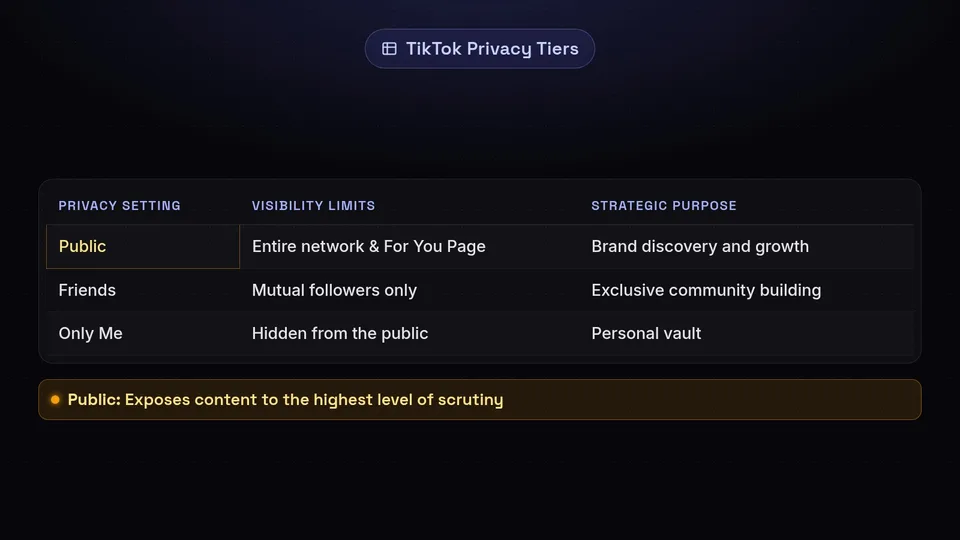
Before delving into the interactive features of the platform, it is vital to grasp the foundational privacy levels available for every video you upload. TikTok categorises viewing permissions into three distinct tiers, each serving a unique strategic purpose within your broader content plan.
The Public Setting
The 'Public' setting is the default objective for most creators aiming for growth. When a video is set to public, it becomes eligible for distribution across the entire TikTok network. This means the algorithm can serve your video to users on their For You Page, regardless of whether they follow your account. Furthermore, public videos are searchable, can appear under specific hashtag feeds, and are visible to anyone who navigates directly to your profile grid.
From a strategic standpoint, public videos are your primary engine for brand discovery. They cast the widest possible net, relying on TikTok's recommendation engine to identify and engage relevant audiences based on their viewing behaviour and interests. However, publishing publicly also exposes your content to the highest level of scrutiny and unsolicited interaction, making the management of secondary settings—like comments and remixes—all the more critical.
The Friends Setting
TikTok defines 'Friends' as users who mutually follow each other. If you follow an account and they follow you back, you are considered friends within the platform's architecture. Setting a video's privacy to 'Friends' restricts its visibility exclusively to this mutual network.
This setting is particularly advantageous for community building and exclusive content distribution. Brands and creators might utilise the Friends setting to reward loyal followers with behind-the-scenes footage, exclusive announcements, or more candid, unpolished updates that are not intended for the broader public. It fosters a sense of intimacy and exclusivity, encouraging users to engage more deeply with your profile in hopes of gaining access to this restricted content tier.
The Only Me (Private) Setting
The 'Only Me' setting acts as a personal vault. Videos published with this privacy level are entirely hidden from the public and your followers, visible only to you when logged into your account. These videos reside in a dedicated, padlocked tab on your profile grid.
While it might seem counterintuitive to publish a video that no one else can see, the private setting is an incredibly useful utility. It allows social media managers to test how a video will look once uploaded, verify audio sync, and check text placement against TikTok's native interface overlays (such as the like button, caption area, and profile icon) without risking a public error. Additionally, it serves as a method for saving drafts long-term or utilising TikTok's built-in editing tools to create a video that you intend to download and distribute elsewhere, without committing it to your public feed.
The Mechanics Behind Duet and Stitch
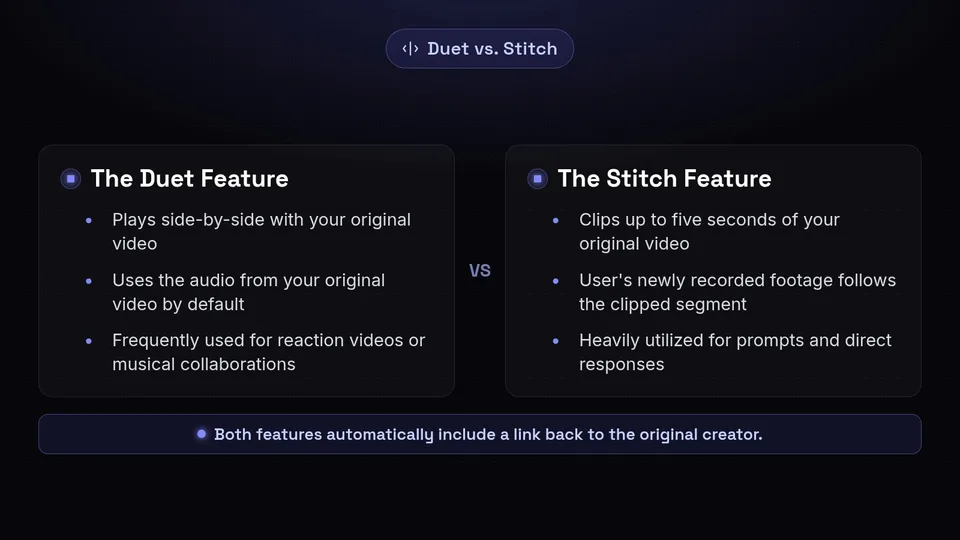
To fully appreciate why you might need to adjust your tiktok privacy settings post by post, you must understand the technical mechanisms of TikTok's most defining interactive features: Duet and Stitch. These tools are the lifeblood of TikTok's remix culture, transforming passive viewers into active participants.
How the Duet Feature Functions
A Duet allows another user to post their video side-by-side with your original video. When a user initiates a Duet, the screen splits (typically vertically, though other layouts like picture-in-picture or green screen are available). Both videos play simultaneously, and the audio from your original video serves as the default soundtrack for the combined piece.
Duets are frequently used for reaction videos, musical collaborations, or commentary. When someone Duets your content, their new video is distributed to their audience, potentially exposing your original account to a completely new demographic. The original creator's handle is automatically tagged in the caption of the Duetted video, providing a direct pathway back to the source material.
How the Stitch Feature Functions
Stitch, conversely, allows users to clip and integrate scenes from your video into their own. When a user Stitches your content, they can select a segment of your video (typically up to five seconds) to play first. Immediately following this clipped segment, the user's newly recorded footage begins.
This feature is heavily utilised for prompts, answering questions, or providing direct responses to statements made in the original video. Like the Duet feature, a Stitch automatically includes a link back to the original creator's video in the caption. It is a powerful mechanism for starting trends and encouraging dialogue, as it directly incorporates your premise into another creator's narrative.
Strategic Reasons to Disable Duet Stitch

While Duet and Stitch can act as significant multipliers for organic reach, there are numerous scenarios where maintaining strict control over your content is paramount. Choosing to disable duet stitch functionalities is a proactive measure in brand reputation management.
Protecting Brand Messaging and Context
The most compelling reason to restrict these features is to preserve the integrity of your message. Because Stitch allows users to clip only a few seconds of your video, it is entirely possible for your words to be taken out of context. A nuanced statement can be truncated to appear controversial, or a serious brand announcement can be appended to unrelated, potentially inappropriate user-generated content.
By disabling these features, you ensure that your video can only be consumed in its entirety, exactly as you intended. This is particularly crucial for videos concerning sensitive topics, corporate communications, or strict compliance messaging where context is non-negotiable.
Mitigating Harassment and Negative Campaigns
In the dynamic landscape of social media, content can occasionally attract coordinated negative attention. If a video becomes the target of a backlash, the Duet and Stitch features can be weaponised to amplify criticism or harassment. Users may create reaction videos that mock the original content or spread misinformation.
If you anticipate that a particular topic might be polarising, or if you notice a trend of negative remixes beginning to form, adjusting your tiktok post options to disable these interactive features can effectively halt the momentum of a negative campaign, forcing users to rely on the standard comment section—which can be more easily moderated—if they wish to engage.
Copyright and Intellectual Property Concerns
If your video contains proprietary visuals, exclusive reveals, or licensed audio that you have specific rights to use but others do not, allowing Duets and Stitches can complicate intellectual property boundaries. While TikTok's internal systems manage standard audio library rights, unique original sounds or highly protected visual assets are better safeguarded by preventing users from directly integrating them into their own monetised or promotional content.
Native App Walkthrough: Your TikTok Privacy Settings Post
Understanding how to manually configure these settings within the TikTok application is foundational. The platform offers granular control immediately prior to publication.
When you have finished recording and editing your video, you will arrive at the final 'Post' screen where you write your caption and add hashtags. On this screen, you will find a menu item typically labelled 'Who can watch this video'. Tapping this reveals the three core privacy tiers: Public, Friends, and Only Me.
Directly beneath this, you will find a section often labelled 'More options' or directly displaying toggle switches for user interactions. Here, you will see distinct toggles for 'Allow Duet' and 'Allow Stitch'. By default, these toggles are usually switched on for public accounts. Tapping the toggles will turn them grey, indicating that the features have been disabled for this specific video.
It is important to note that if you set your overarching video privacy to 'Only Me' or 'Friends', TikTok will automatically disable the Duet and Stitch functions, as the content is not available to the wider public required for these features to operate effectively. The manual toggles are primarily relevant when your video is set to 'Public'.
Managing Privacy Levels from the SchedulifyX Composer
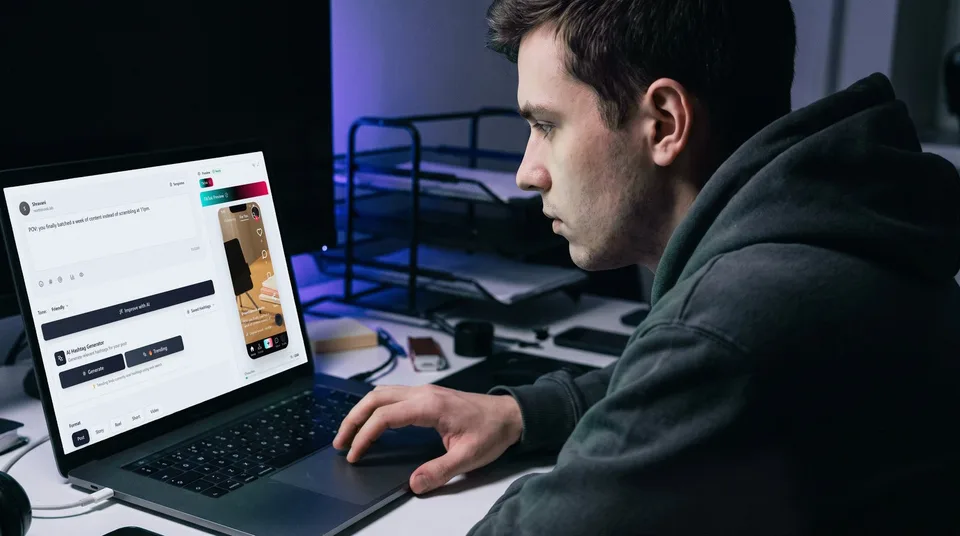
For social media managers and professional creators, executing content strategies natively on a mobile device is often inefficient. Planning, reviewing, and scheduling content in advance requires a robust desktop environment. This is where the SchedulifyX platform transforms your workflow, allowing you to configure every aspect of your tiktok privacy settings post directly from the composer before the content ever goes live.
Streamlining the Scheduling Workflow
When you upload your video asset into the SchedulifyX composer, you are presented with a comprehensive suite of publishing tools. Alongside the standard caption and scheduling date fields, SchedulifyX integrates directly with TikTok's API to offer you the exact same privacy and interaction controls found in the native app.
Within the composer interface, you can select your desired privacy level from a clear dropdown menu, choosing between Public, Friends, or Private. This ensures that your overarching visibility strategy is locked in at the moment of scheduling, removing the risk of a team member accidentally publishing a sensitive video to the public feed.
Proactive Duet and Stitch Management
Beneath the privacy level selection in the SchedulifyX composer, you will find dedicated checkboxes or toggles to disable duet stitch. By integrating these controls into the scheduling phase, SchedulifyX empowers you to make strategic decisions about user interaction during the planning process, rather than scrambling to adjust settings on a mobile device at the moment of publication.
This asynchronous workflow is vital for teams requiring approval processes. A social media manager can set a video to publish publicly but explicitly disable the Stitch feature to protect a specific brand message. Reviewers can then verify both the content and the associated tiktok post options before granting final approval, ensuring total compliance with the brand's digital safety guidelines.
The Impact of Privacy Controls on Content Reach
Every decision regarding your tiktok post options carries implications for how the TikTok algorithm evaluates and distributes your content. The algorithm thrives on interaction signals; the more users engage with a video, the more the system is incentivised to push that video to a broader audience.
When you allow Duets and Stitches, you are essentially providing the community with more avenues to interact with your media. A popular Duet not only drives traffic back to your original video but also signals to the algorithm that your content is highly engaging and capable of inspiring secondary creation. This can lead to a compounding effect, where the remix drives views to the original, which in turn inspires more remixes.
Conversely, when you choose to disable duet stitch, you are removing these potential interaction signals. The algorithm must then rely solely on primary metrics such as watch time, completion rate, likes, shares, and comments to determine the video's value. While a highly compelling video can absolutely achieve viral reach without the aid of Duets or Stitches, restricting these features does remove a powerful catalyst for algorithmic amplification.
Therefore, adjusting your tiktok privacy settings post requires a calculated trade-off between the desire for maximum potential reach and the requirement for brand safety and narrative control. Content designed purely for entertainment or community participation should generally leave these features enabled. Content focused on corporate announcements, sensitive PR messaging, or strict educational tutorials where context is paramount may benefit from a more restricted approach.
Post-Publication: Auditing Your Video Privacy
A robust social media strategy does not end at publication. As your account matures and your brand evolves, content that was previously deemed appropriate for public interaction may need to be re-evaluated. Fortunately, TikTok allows you to alter your privacy settings and interaction toggles long after a video has been published.
Retroactive Adjustments
To audit an existing video, you must navigate to the specific post on your profile. By accessing the menu for that individual video (typically represented by three dots), you can locate the privacy settings. Here, you can change a previously public video to 'Friends' or 'Only Me', effectively removing it from the broader ecosystem without deleting the asset entirely. Deleting videos is generally discouraged as it removes all associated 'likes' from your profile's total count; changing the privacy to 'Only Me' preserves these metrics while achieving the desired reduction in visibility.
Similarly, you can retroactively toggle the Duet and Stitch permissions. If a public video suddenly begins attracting negative Stitches weeks after publication, you can immediately disable the feature. It is important to understand the mechanism here: disabling the feature prevents *new* Duets or Stitches from being created. It does not automatically delete existing Duets or Stitches that other users have already published to their own profiles. To address existing remixes, you would typically need to pursue standard reporting mechanisms if the content violates community guidelines.
Conclusion
Navigating the complexities of short-form video requires more than just creative flair; it demands a rigorous approach to content governance. By understanding the nuances of your tiktok privacy settings post by post, you empower your brand to participate in viral trends safely and strategically. Knowing exactly when to lean into community interaction and when to disable duet stitch functionalities ensures that your messaging remains clear, contextual, and protected from malicious repurposing.
Managing these tiktok post options natively can be cumbersome, particularly for teams operating at scale. By leveraging a professional scheduling environment, you shift these critical decisions from the chaotic moment of publication to the structured phase of content planning. This proactive approach not only safeguards your brand but also streamlines your entire social media workflow.
Take control of your content strategy and secure your brand's narrative today. Log in to your SchedulifyX account to explore the advanced composer features, and start scheduling your TikTok content with precision, confidence, and uncompromising control over your digital footprint.
