How to Choose a Scheduler in 2026: Twelve Criteria Before Any Feature Table
SchedulifyX Team · September 10, 2026
Discover how to choose a social media tool in 2026. Explore 12 essential evaluation criteria to look beyond basic feature tables and find the perfect fit.
The landscape of digital marketing automation has evolved dramatically, leaving many professionals overwhelmed by the sheer volume of platforms available. When determining how to choose social media tool infrastructure for your organisation, the instinct is often to pull up a massive, multi-column feature comparison table. However, evaluating platforms based solely on a checklist of features can lead to costly operational inefficiencies. To properly evaluate smm tools in 2026, you must look beneath the surface of marketing claims and understand the structural mechanics of how these platforms interact with social networks, handle errors, and scale with your team.
This comprehensive guide outlines twelve fundamental scheduler comparison criteria that you must assess before looking at any vendor's feature matrix. By applying this rigorous evaluation framework, you can ensure that your chosen platform will genuinely streamline your workflows, rather than introducing new bottlenecks into your daily operations.
1. Native API Token Publishing vs. Mobile Notifications
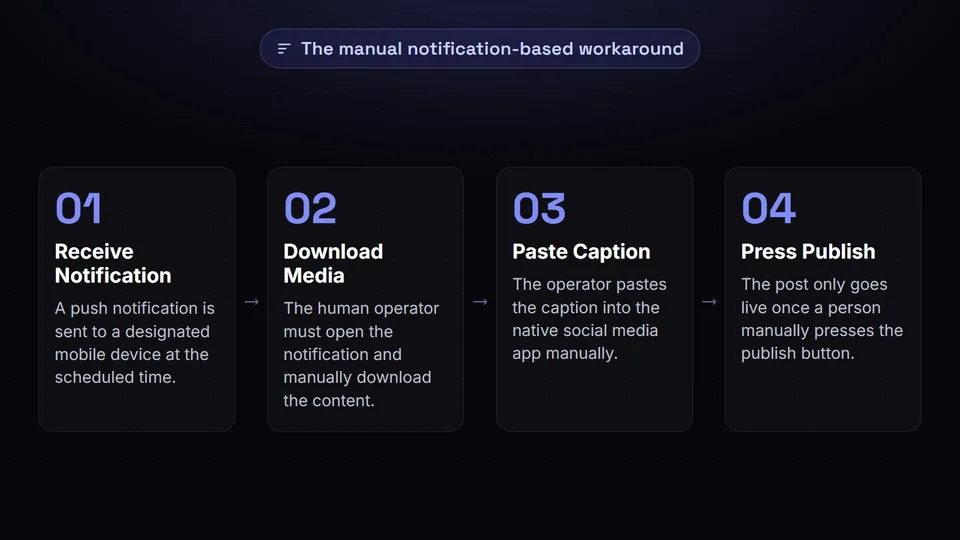
One of the most critical scheduler comparison criteria is understanding exactly how a platform delivers your content to a social network. On September 9, 2026, a newly published evaluation framework titled "How to Pick a Social Media Scheduling App Without Reading 40 Comparison Tables" highlighted a vital distinction: the verification of native API token publishing versus mobile notifications.
Many tools claim to support scheduling for visual platforms, but their actual mechanism is heavily flawed. For channels such as Instagram, TikTok, and Pinterest, platforms frequently substitute true automation with notification-based posting. In this scenario, the "scheduler" simply sends a push notification to a designated mobile device at the scheduled time. A human operator must then open the notification, download the media, paste the caption into the native app, and manually press publish.
The Hidden Cost of Notifications
This notification-based workaround entirely defeats the purpose of automation. If your social media manager is on annual leave, asleep, or in a meeting, the post will not go live. When you evaluate smm tools, you must demand explicit confirmation that the platform utilises native API token publishing. This means the software communicates directly with the social network's servers, authenticating via a secure token, and publishing the content autonomously without any human intervention at the time of posting. For teams managing global campaigns across multiple time zones, native API publishing is not a luxury; it is a fundamental requirement.
2. Automated Post-Failure Handling

Even with the most robust native API integrations, posts will occasionally fail. Social networks frequently update their security protocols, API tokens can expire, or a specific video format might be unexpectedly rejected by a platform's servers. The September 9, 2026 evaluation guide defined automated post-failure handling as a critical, non-negotiable standard for modern teams.
Historically, many platforms required users to manually log into a central dashboard to check the status of their scheduled content. If a post failed on a Friday evening, the team might not discover the error until Monday morning, resulting in a completely disrupted weekend campaign.
Proactive Alerts and Retries
When assessing how to choose social media tool systems, you must assess whether the platform triggers immediate push or email alerts the second a failure occurs. Furthermore, the best platforms incorporate automatic retry logic. Rather than simply failing and giving up, a sophisticated scheduler will attempt to push the content again at staggered intervals before escalating the issue to a human operator. This automated resilience separates enterprise-grade infrastructure from amateur tools.
3. Awareness of Underlying API Constraints

A common pitfall when evaluating software is assuming that if a feature exists on the native social network, the scheduler should be able to do it too. On May 11, 2026, Zapier published an analysis of the 10 best social media management tools (featuring platforms like Buffer, Hootsuite, Sprout Social, Ordinal, Vista Social, Agorapulse, Metricool, Iconosquare, Typefully, and Sendible). A crucial note from this publication is that scheduler capabilities are strictly constrained by the specific API permissions granted by each underlying social network.
For example, if a social network decides not to allow third-party applications to publish a specific type of interactive poll or a multi-document carousel via their API, no scheduling tool in the world will be able to offer that feature natively.
Understanding this limitation is vital for setting realistic expectations. When a vendor promises a feature that contradicts known API restrictions, it is a clear sign that they are either using unapproved scraping methods (which can result in your account being banned) or relying on the aforementioned manual mobile notifications.
4. Pricing Models: Per-Seat vs. Per-Channel
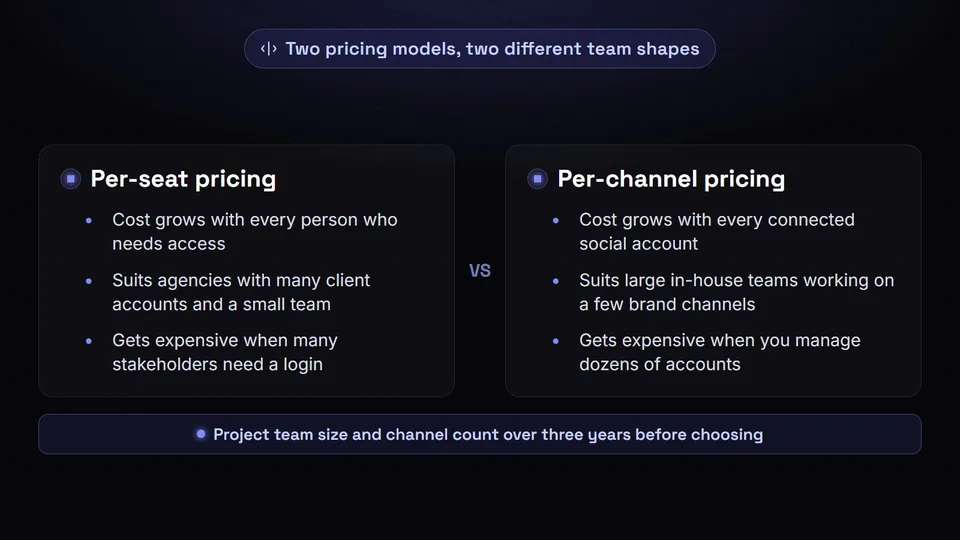
Pricing structures in the social media management industry vary wildly, and understanding the billing model is just as important as the sticker price. On September 9, 2026, a guide titled "The Best Social Media Scheduling Tools in 2026 (+ How to Find the Perfect Fit)" published specific feature tier comparisons that illustrate this divide perfectly.
As of September 9, 2026, Buffer operates on a per-channel model, charging $5 per month per channel (alongside a free plan for up to 3 channels and 10 queued posts per channel). Later charges a flat rate starting at $25 per month. In stark contrast, Sprout Social operates on a premium per-seat model, charging
Calculating Long-Term Value
When you evaluate smm tools, you must project your future growth. If you are an agency managing dozens of client accounts but only have two staff members, a per-seat model like Sprout Social's might be highly cost-effective despite the high individual seat price. Conversely, if you are a large in-house enterprise team with twenty marketing stakeholders who all need access to a single brand's channels, a per-channel model will save you thousands of pounds annually. Always calculate the total cost of ownership based on your projected team size and channel count over a three-year horizon.
5. Peak vs. Non-Peak Scheduling Capabilities
The primary function of a scheduler is to allow you to post content when your audience is most active, regardless of when your marketing team is actually working. However, conventional wisdom regarding "peak hours" is being challenged by recent data.
On May 19, 2026, SMMplanner published an evaluation of tool requirements, citing compelling 2026 data from Research.com. According to this research, Facebook posts published during non-peak hours actually receive 35% higher engagement than posts published during traditional peak hours. The rationale is that during non-peak hours, there is significantly less content competing for space in the algorithmic feed, allowing well-crafted posts to achieve greater organic reach.
This data underscores exactly why robust scheduling infrastructure is essential. If your optimal posting time is 3:00 AM on a Sunday to capture that 35% engagement boost, manual posting is entirely unfeasible. Your chosen platform must possess the reliability to execute perfectly during these unconventional hours.
6. Cross-Platform Posting and Customisation
The May 19, 2026 SMMplanner evaluation also highlighted cross-platform posting as a foundational requirement. However, simply broadcasting the exact same message across five different networks is a highly ineffective strategy in 2026. Each platform has its own distinct culture, character limits, hashtag conventions, and optimal image aspect ratios.
When establishing your scheduler comparison criteria, look for platforms that offer a unified composition window with network-specific customisation tabs. You should be able to upload a core asset and write a base caption, but then seamlessly tweak the LinkedIn version to be more professional, add specific trending audio to the TikTok version, and adjust the hashtags for Instagram—all from a single screen. Tools that force you to create entirely separate posts for each network will drain your team's productivity.
7. Bulk Uploading Efficiency
For agencies and e-commerce brands managing massive content calendars, manually scheduling posts one by one is a poor use of resources. Bulk uploading capabilities remain a vital criterion for high-volume users.
A robust bulk upload feature should allow you to import a CSV file containing dates, times, captions, and links to media assets, instantly populating your calendar with hundreds of posts. When you evaluate smm tools, test their bulk upload error handling. If a single row in a 200-row CSV has a formatting error, does the tool reject the entire file, or does it import the 199 valid posts and flag the single error for manual correction? The latter approach will save your team hours of frustration.
8. Team Collaboration and Access Controls
On August 12, 2026, TechnologyAdvice published an extensive evaluation by sales and marketing analyst Bianca Caballero. Caballero rigorously tested eight prominent social media schedulers (Sprout Social, Later Social, Buffer, Metricool, SocialBee, CoSchedule, Hootsuite, and Planable). One of the core pillars of her evaluation was collaboration tools.
As social media teams grow, the risk of unapproved content going live increases. A critical aspect of how to choose social media tool software is examining its internal workflow capabilities. Can you assign specific roles, such as "Content Creator" (who can draft posts but not publish) and "Approver" (who must sign off before a post is scheduled)? Furthermore, can team members leave internal comments and feedback directly on a drafted post within the platform, or are they forced to rely on disconnected Slack messages and email threads?
9. Analytics and Reporting Depth
Scheduling content is only half the battle; understanding how that content performs is what drives future strategy. Both the SMMplanner and TechnologyAdvice evaluations heavily weighted analytics requirements.
Basic tools will simply aggregate the native metrics provided by the social networks (likes, comments, shares). However, advanced platforms will offer proprietary insights, such as calculating your true engagement rate over time, identifying your top-performing content pillars, and providing automated reporting. The ability to automatically generate and email a white-labelled PDF report to stakeholders on the first of every month is a massive time-saver that should not be overlooked during your evaluation process.
10. Ease of Use and Interface Design
A software platform can possess every advanced feature in the world, but if the user interface is clunky, unintuitive, and slow, your team will resist adopting it. In Bianca Caballero’s August 12, 2026 testing of the eight major schedulers, ease of use was a primary metric.
When conducting trials, observe how many clicks it takes to perform a standard action, such as rescheduling a post from Tuesday to Thursday. Does it require opening multiple menus and manually changing date fields, or can you simply drag and drop the post across a visual calendar interface? Friction in the user interface compounds daily; a tool that takes thirty seconds longer to schedule a single post will cost your team hundreds of hours over the course of a year.
11. Differentiating Scheduler Terminology
When searching for scheduling tools, it is easy to conflate different types of software. On September 5, 2026, Lunacal published an article titled "5 Best Meeting Scheduler Tools in 2026," detailing the pricing for meeting schedulers such as Lunacal ($9/user/month), Calendly (Free /
This article cited a fascinating May 2024 study by Atlassian of 5,000 knowledge workers, which revealed that 77% frequently attended meetings that ended by simply scheduling follow-up meetings. While meeting schedulers solve the specific problem of calendar alignment, social media schedulers solve the problem of content distribution.
However, the underlying philosophy is identical: automation reclaims wasted time. Just as a meeting scheduler eliminates the tedious back-and-forth of finding a time to chat, a robust social media scheduler eliminates the tedious, repetitive task of manually logging into multiple networks to post content. When evaluating your tech stack, ensure you are allocating budget to automate repetitive tasks across both your internal communications and your external marketing.
12. Acknowledging Legacy Platform Strengths
When looking at how to choose social media tool solutions, it is crucial to conduct an honest assessment of the market. While modern, AI-powered platforms like SchedulifyX offer cutting-edge automation, it is important to acknowledge where established legacy competitors remain exceptionally strong.
For instance, as of September 2026, Sprout Social's
Similarly, Buffer’s long-standing free tier (allowing up to 3 channels and 10 queued posts per channel as of September 2026) remains an unbeatable proposition for absolute beginners, solo hobbyists, or local community groups with zero marketing budget. Recognising these specific use cases ensures you select a tool based on reality, not just marketing hype.
Conclusion
Learning how to choose social media tool software requires a methodical approach that prioritises operational reliability over flashy feature lists. By evaluating platforms based on these twelve criteria—particularly their adherence to native API publishing, their handling of automated failures, and their pricing models—you can build a resilient, highly efficient marketing workflow.
If you are looking for an AI-powered platform designed to streamline your content operations with intelligent automation, we invite you to explore SchedulifyX. Our infrastructure is built to handle the complexities of modern social media management, allowing your team to focus on creativity and strategy rather than manual execution.
Disclaimer: All competitor pricing, plan limits, and feature structures mentioned in this article are based on verified industry publications as of September 2026. Pricing models change frequently; please confirm current rates and limits directly on the respective vendors' official websites.
Sources
Facts checked against the sources below on September 10, 2026.
- How To Pick A Social Media Scheduling App Without Reading 40 Comparison Tables — stickermule.com
- Social Media Scheduling Tools — buffer.com
- Meeting Scheduler Software — lunacal.ai
- Top Social Media Scheduler Tools Compared Features And Pricing 2 — smmplanner.io
- Best Social Media Management Tools — zapier.com
