Master Short-Form Video Scheduling with SchedulifyX
SchedulifyX Team · July 17, 2026
Learn how to connect and schedule TikTok posts, Instagram Reels, and YouTube Shorts on SchedulifyX for seamless cross-platform video posting and growth.
In today's fast-paced digital ecosystem, short-form video content is no longer just an option for creators and brands—it is an absolute necessity. With the meteoric rise of platforms prioritizing bite-sized, highly engaging video content, mastering short form video scheduling has become the cornerstone of any successful social media strategy. Whether you are a solo content creator trying to build a personal brand, a social media manager juggling multiple client accounts, or a business owner looking to expand your digital footprint, the ability to efficiently manage and distribute your video content can make or break your online presence.
However, the reality of managing multiple social media profiles is often chaotic. Logging in and out of different apps, transferring massive video files from your editing software to your phone, manually typing out captions, and trying to remember the optimal posting times for each specific platform can quickly lead to burnout. This is where SchedulifyX steps in. As an AI-powered social media scheduling platform, SchedulifyX is designed to eliminate the friction from your content distribution workflow.
In this comprehensive, step-by-step tutorial, we will guide you through the entire process of connecting your TikTok, Instagram, and YouTube accounts to SchedulifyX. We will dive deep into how to seamlessly schedule TikTok posts, schedule Instagram Reels, and master YouTube Shorts scheduling. Furthermore, we will explore advanced strategies for cross-platform video posting, leveraging AI for optimal timing, and making platform-specific format adjustments to ensure your content looks native and performs brilliantly wherever it lives.
The Dominance of Short-Form Video
Before we dive into the technical steps of setting up your SchedulifyX workspace, it is crucial to understand why short-form video scheduling is the most valuable skill in modern social media management. The transition from text and image-based feeds to algorithmic, video-first feeds has fundamentally changed how content is consumed. Platforms like TikTok, Instagram, and YouTube have trained audiences to expect quick, entertaining, and informative videos that capture attention within the first three seconds.
Statistics consistently show that short-form video yields the highest return on investment (ROI) compared to any other social media format. It drives higher engagement rates, increases brand awareness at a fraction of the cost of traditional advertising, and possesses an unparalleled potential for virality. When a single piece of content can reach millions of non-followers through the TikTok For You Page (FYP), the Instagram Reels feed, or the YouTube Shorts shelf, the incentive to produce high-quality vertical video is enormous.
"The modern creator's dilemma is no longer just about making great content; it's about distributing that content efficiently across a fragmented digital landscape without losing your mind."
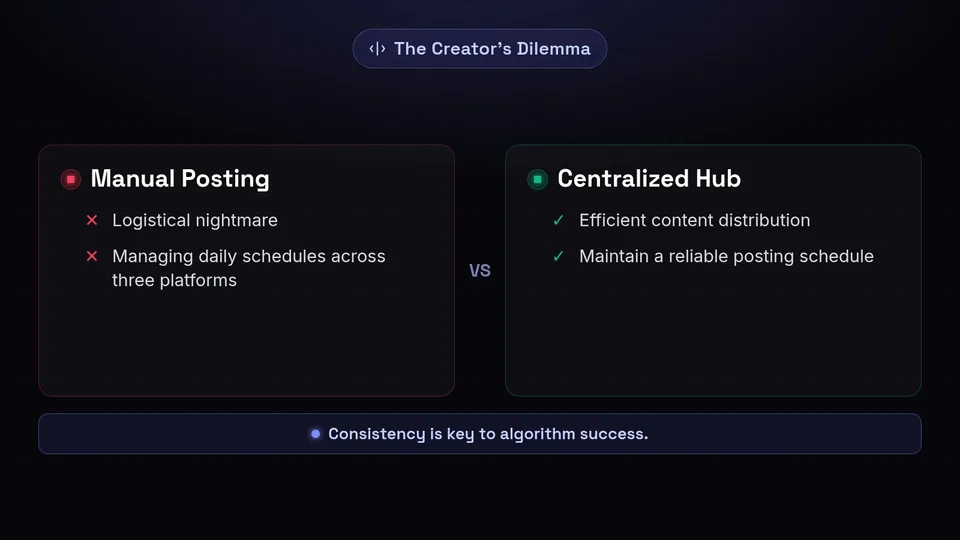
To capitalize on this trend, consistency is key. Algorithms favor accounts that post regularly and reliably. However, maintaining a daily posting schedule across three different platforms manually is a logistical nightmare. This is exactly why a centralized hub for short form video scheduling is indispensable.
Why Choose SchedulifyX for Video Scheduling?
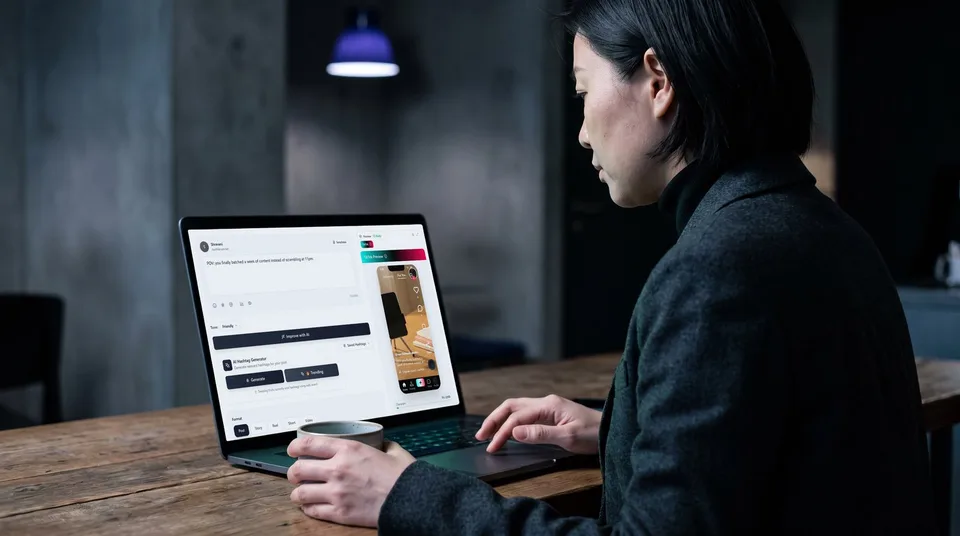
SchedulifyX isn't just another social media calendar; it is an AI-driven command center built specifically with the nuances of modern video platforms in mind. While older scheduling tools were built for Twitter text posts or Facebook link sharing, SchedulifyX was engineered from the ground up to handle high-resolution video files, complex metadata, and platform-specific API requirements.
Here are a few reasons why SchedulifyX stands out for video creators:
- Unified Video Library: Upload your raw or edited video files once to your SchedulifyX media library and use them across all your connected platforms without needing to re-upload.
- AI-Powered Optimization: From generating engaging captions and suggesting trending hashtags to predicting the exact minute your specific audience is most active, the AI engine does the heavy lifting.
- True Cross-Platform Video Posting: SchedulifyX allows you to create a master post and then toggle platform-specific variations. You can tweak the caption for Instagram, change the title for YouTube, and adjust the tags for TikTok—all from one screen.
- Format Safety Previews: Avoid the dreaded UI overlap. SchedulifyX provides exact visual overlays of the TikTok, Reels, and Shorts interfaces so you can ensure your text and crucial visual elements aren't covered by like buttons or captions.
Now that you understand the power at your fingertips, let's get your accounts connected.
Step 1: Connecting Your TikTok Account
TikTok is the undisputed king of short-form video trends. Connecting your TikTok account to SchedulifyX allows you to tap into its massive audience without having to live inside the app. Here is how to establish a secure connection.
Prerequisites for TikTok Integration
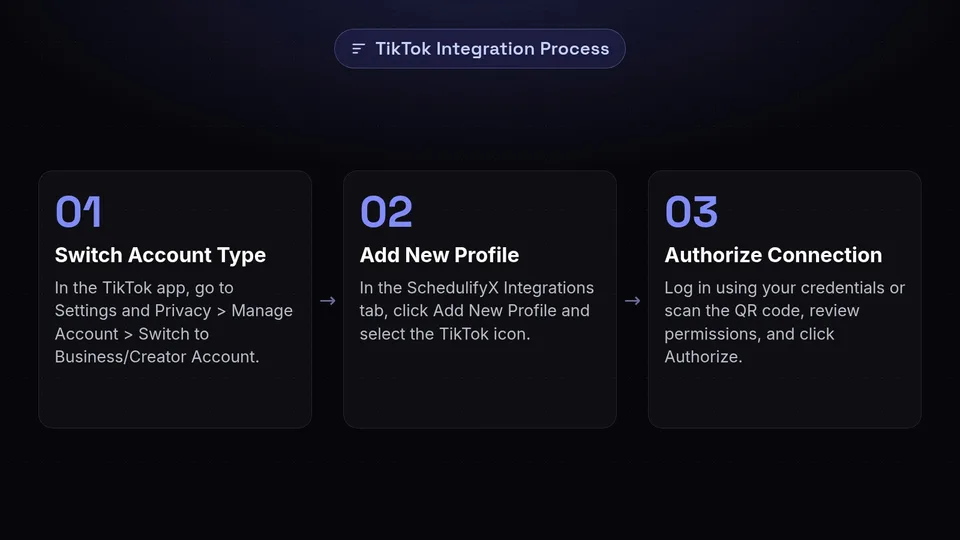
To schedule TikTok posts via third-party tools like SchedulifyX, you must ensure your TikTok account is set to either a Creator or Business account. Personal accounts have limited API access and cannot utilize auto-publishing features. To switch, open the TikTok app, go to Settings and Privacy > Manage Account > Switch to Business/Creator Account.
The Connection Process
- Log in to your SchedulifyX dashboard and navigate to the Integrations tab located on the left-hand sidebar.
- Click on the Add New Profile button and select the TikTok icon.
- You will be redirected to TikTok's secure authorization page. Log in using your TikTok credentials (or scan the QR code using your TikTok app for a faster login).
- Review the permissions requested by SchedulifyX. These permissions are strictly for uploading videos, reading basic profile data, and gathering analytics. SchedulifyX will never modify your account settings or send messages on your behalf.
- Click Authorize. You will be seamlessly redirected back to SchedulifyX, and your TikTok profile will now appear in your active connections list.
Troubleshooting TikTok Connections
If you experience an "Authorization Failed" error, ensure that you do not have any pending terms of service agreements within the TikTok app itself. Sometimes, TikTok requires you to acknowledge a new privacy policy in the native app before it allows third-party API connections. Open the app, clear any pop-ups, and try connecting via SchedulifyX again.
Step 2: Integrating Your Instagram Profile
Instagram Reels have become Meta's primary weapon in the short-form video wars, offering incredible organic reach, especially for accounts looking to build a dedicated community. Integrating Instagram requires a few specific steps due to Meta's security protocols.
Prerequisites for Instagram Reels
To schedule Instagram Reels automatically, Meta requires that your Instagram account is an Instagram Professional Account (Business or Creator) AND that it is linked to a published Facebook Business Page. SchedulifyX connects to Instagram via the official Facebook Graph API, which enforces this rule.
The Connection Process
- In the SchedulifyX Integrations tab, click Add New Profile and select Instagram.
- A prompt will ask you to log in to Facebook. (Note: You must log in with the personal Facebook profile that holds Admin access to the Facebook Page connected to your Instagram account).
- Once logged in, click "Edit Settings" to review the accounts you are granting access to. Ensure that both the specific Instagram Professional account and its linked Facebook Page are checked.
- Grant all requested permissions. Disabling any permissions may result in failed video uploads or broken analytics.
- Click OK. SchedulifyX will process the data and display your Instagram profile in your dashboard.
Why Can't I See My Instagram Account?
The most common issue during this step is the Instagram account not appearing in the Facebook authorization list. If this happens, open your Instagram app, go to Settings > Business/Creator > Connect or Create, and double-check that the connection to your Facebook Page is active and confirmed. Sometimes, Meta requires you to re-confirm this connection natively before third-party apps can see it.
Step 3: Linking Your YouTube Channel
YouTube Shorts represent a massive opportunity for discoverability. Because YouTube functions as the world's second-largest search engine, Shorts have a longer shelf life than TikToks or Reels, continuing to gather views months after posting. Connecting your YouTube channel to SchedulifyX is highly straightforward.
The Connection Process
- From the SchedulifyX Integrations screen, select Add New Profile and click on the YouTube icon.
- You will be redirected to the Google OAuth login screen. Choose the Google account that manages your YouTube channel.
- If your Google account manages multiple Brand Accounts or channels, a screen will prompt you to select the specific channel you wish to connect to SchedulifyX.
- Google will warn you that SchedulifyX wants to "Manage your YouTube videos." This is the standard permission required to upload and schedule YouTube Shorts scheduling. Click Allow.
- You will be routed back to SchedulifyX, and your YouTube channel will be ready for scheduling.
Now that the holy trinity of short-form video platforms is connected, let's explore how to actually schedule your content for maximum impact.
How to Schedule TikTok Posts Like a Pro
When you sit down to schedule TikTok posts, you need to think about the culture of the platform. TikTok thrives on authenticity, trends, and highly engaging hooks. SchedulifyX gives you all the tools to optimize your uploads.
Uploading and Optimizing
To create a new TikTok post, click the Compose button in SchedulifyX and select your connected TikTok account. Upload your vertical video file (MP4 or MOV, up to 1080x1920 resolution). Once uploaded, you can begin crafting your post.
- Caption and Hashtags: Keep your captions relatively short and punchy. Use the SchedulifyX AI Assistant to generate caption ideas based on your video's topic. For hashtags, use a mix of broad tags (e.g., #marketing) and niche tags (e.g., #socialmediatools). SchedulifyX's hashtag analyzer will show you the volume of each tag in real-time.
- Cover Image: Selecting the right cover frame is vital for your profile grid. SchedulifyX allows you to scrub through your video and pick the exact frame where the action is most captivating.
- Privacy Settings: You can choose whether to allow comments, Duets, and Stitches directly from the SchedulifyX dashboard. For maximum reach, it is highly recommended to leave Duets and Stitches enabled, as this encourages user-generated content branching off your original video.
Working with Audio
One limitation of the official TikTok API is that you cannot directly search for and attach trending TikTok commercial sounds through third-party schedulers. However, SchedulifyX offers a brilliant workaround: edit your video with your original audio or a royalty-free track, schedule it to auto-publish, and use TikTok's native "Add Sound" feature post-publication, or use SchedulifyX's "Notification Mode" which sends the video to your phone at the scheduled time, allowing you to add a trending sound manually right before posting.
Best Practices to Schedule Instagram Reels
Learning to schedule Instagram Reels effectively requires an understanding of Instagram's aesthetic and community features. Reels often require a slightly more polished look compared to the raw nature of TikTok.
Crafting the Perfect Reel in SchedulifyX
Select your Instagram profile in the SchedulifyX composer. Upload your video and let's optimize it for the Gram.
- The Grid Cover: Unlike TikTok, Instagram Reels can be shared to your main profile grid. Therefore, the cover photo is incredibly important for maintaining your visual branding. SchedulifyX allows you to upload a custom cover image (a 1080x1920 image that looks good cropped to 1080x1080 for the grid) rather than just pulling a frame from the video.
- Captions and Formatting: Instagram users are more likely to read long-form captions than TikTok users. Use SchedulifyX's formatting tools to add line breaks, emojis, and bullet points to make your caption readable.
- Location and Tags: Tagging a location can significantly boost your local reach. Use the SchedulifyX location search bar to tag your city or business. You can also mention other accounts (like collaborators or brands) directly in the caption using the @ symbol, and SchedulifyX will verify the handle exists before publishing.
To Grid or Not to Grid?
SchedulifyX gives you a toggle switch: "Share to Feed." If you turn this on, the Reel will appear in your main followers' feed and on your profile grid. If you turn it off, it will only appear in the dedicated Reels tab. As a general best practice, always share to the feed for maximum initial engagement, which signals the algorithm to push the Reel to non-followers.
Mastering YouTube Shorts Scheduling
YouTube Shorts scheduling is a slightly different beast. YouTube is fundamentally a search engine, which means metadata—titles, descriptions, and tags—plays a much heavier role in how your video is distributed.
Optimizing Shorts in SchedulifyX
When you select your YouTube channel in the SchedulifyX composer, the interface adapts to show YouTube-specific fields.
- The Title: You have 100 characters, but only the first 40-50 are usually visible on mobile screens. Make them count. Include your primary keyword early in the title. SchedulifyX's AI title generator can help you brainstorm click-worthy titles that aren't clickbait. Always include the hashtag #Shorts in the title or description to ensure YouTube categorizes it correctly, though YouTube's algorithm is getting better at auto-detecting vertical videos under 60 seconds.
- The Description: Do not neglect the description box. While Shorts viewers might not read it, the YouTube algorithm certainly does. Write a 2-3 sentence summary of the video, include relevant keywords, and add links to your website or other long-form videos. SchedulifyX allows you to save description templates for easy insertion.
- Visibility and Audience: SchedulifyX lets you set the video as Public, Private, or Unlisted upon publishing. You must also comply with COPPA regulations by checking the box that states whether the video is "Made for Kids" or not.
By treating your Shorts with the same SEO respect as long-form YouTube videos, you ensure that your content continues to generate views through YouTube Search long after the initial algorithmic spike subsides.
The Art of Cross-Platform Video Posting
Creating a unique video for every single platform is exhausting and highly inefficient. The secret to scaling your presence is cross-platform video posting. However, there is a massive difference between blindly copy-pasting your content and intelligently adapting it. SchedulifyX is built to facilitate the latter.
The "Master Post" Workflow
Instead of creating three separate posts in SchedulifyX, you can create one "Master Post" by selecting TikTok, Instagram, and YouTube simultaneously in the composer. When you upload your video and write a caption, it populates across all three platforms.
But here is where the magic happens: SchedulifyX features a "Customize by Platform" toggle. When activated, your master post splits into three distinct tabs.
- On the TikTok tab: You can shorten the caption, add TikTok-specific trending hashtags (like #fyp or #TikTokTaughtMe), and adjust the privacy settings.
- On the Instagram tab: You can lengthen the caption, add a custom grid cover, tag a location, and ensure your @mentions correspond to actual Instagram handles.
- On the YouTube tab: You can craft an SEO-rich title, expand the description with links, and set your COPPA compliance.
This workflow ensures that you are utilizing the efficiency of uploading once, while still respecting the unique culture and technical requirements of each individual platform. It prevents the amateur mistake of having "Link in bio!" on a YouTube Short where you could have just placed a clickable link in the description, or using an Instagram @mention on TikTok where the user might have a different handle.
Optimizing Posting Times with SchedulifyX AI
You have crafted the perfect video, written engaging captions, and customized the metadata for each platform. But when should you actually hit publish? Posting at the wrong time can cause your video to get buried under an avalanche of newer content before your audience even opens the app.
SchedulifyX removes the guesswork from short form video scheduling with its proprietary AI Timing Engine. Here is how it works:
Historical Data Analysis
Once your accounts are connected, SchedulifyX begins analyzing your past posts. It looks at when your followers are online, when your previous videos received the fastest velocity of likes and comments, and maps this against global platform trends.
Platform-Specific Recommendations
Your TikTok audience might be active late at night, while your YouTube audience might watch Shorts during their morning commute. SchedulifyX doesn't give you one generic "best time to post." Instead, in the scheduling calendar, you will see distinct heatmaps for each platform.
When you go to select a date and time, SchedulifyX will highlight the "Optimal Slots" with a star icon. By clicking this star, the platform will automatically slot your video into the exact minute predicted to yield the highest initial reach. This initial burst of engagement is critical for triggering the platforms' algorithms to push your content to wider, non-follower audiences.
Platform-Specific Format Adjustments
One of the most frustrating aspects of cross-platform video posting is dealing with the user interface (UI) of different apps. What looks perfectly centered in your editing software might get completely covered by TikTok's caption box or Instagram's like and share buttons on the right side of the screen.
The SchedulifyX Safe Zone Previewer
To combat this, SchedulifyX includes a built-in Safe Zone Previewer. When you upload your vertical 9:16 video, you can toggle an overlay that mimics the UI of TikTok, Instagram Reels, and YouTube Shorts.
- TikTok UI Overlay: Shows you where the profile picture, like, comment, bookmark, and share buttons sit on the right, as well as the caption and music ticker at the bottom.
- Instagram Reels Overlay: Highlights the bottom left area where your username and caption expand, ensuring you don't place crucial text there.
- YouTube Shorts Overlay: Displays the right-side engagement buttons and the bottom channel subscription bar.
By previewing your video through these overlays before scheduling, you can catch formatting errors early. If you notice that a crucial piece of text in your video is covered by the TikTok UI, you can go back to your editing software, adjust the text placement, and re-upload to SchedulifyX, saving yourself from a poorly performing post.
Conclusion: Automate Your Video Strategy Today
The era of manual, ad-hoc social media posting is over. To compete in today's attention economy, you need a streamlined, intelligent, and scalable workflow. By mastering short form video scheduling through a dedicated platform, you free up hours of your week—time that can be reinvested into brainstorming better ideas, filming higher-quality content, and engaging with your growing community.
Connecting your TikTok, Instagram, and YouTube accounts to SchedulifyX is the first step toward reclaiming your time. By utilizing the platform's advanced features—from AI caption generation and custom cover uploads to cross-platform customization and optimal time prediction—you ensure that every piece of content you create is given the absolute best chance to succeed.
Stop letting the logistics of social media management throttle your creative potential. Embrace the power of AI, streamline your cross-platform video posting, and watch your digital presence soar. Log in to your SchedulifyX dashboard today, connect your accounts using this tutorial, and schedule your first optimized, multi-platform video campaign. The algorithms are waiting for your next viral hit.
