Use AI to Repurpose a Blog Post into 30+ Social Posts
SchedulifyX Team · August 20, 2026
Learn how to use AI to turn a single blog post into 30+ engaging social media posts, including threads, carousels, and video scripts with this complete guide.
If you are a marketer, creator, or business owner, you already know the exhaustion of the endless content treadmill. You spend hours, sometimes days, researching and writing a brilliant, comprehensive blog post. You hit publish, share the link on your social media channels once or twice, and then... crickets. The post slowly fades into the archives, and the pressure to create the next piece of content begins anew. This cycle is not only exhausting; it is highly inefficient. What if, instead of constantly reinventing the wheel, you could extract weeks of high-quality social media content from that single article? Welcome to the ultimate content multiplication strategy.
By leveraging modern artificial intelligence, you can completely transform your workflow. You no longer need to write every single tweet, LinkedIn post, or TikTok script from scratch. Instead, you can use content repurposing AI to slice, dice, and reformat your long-form blog post into dozens of micro-assets tailored for specific platforms. In this comprehensive tutorial, we will walk you through a step-by-step process to repurpose content, effectively turning one blog post into 30+ unique social media posts across all major platforms.
The Power of a Content Multiplication Strategy
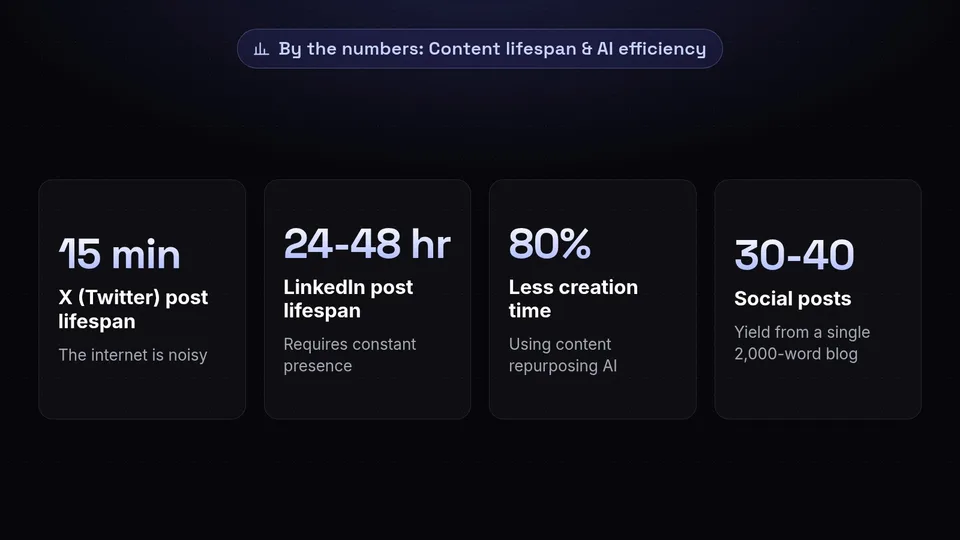
Before diving into the exact prompts and techniques, it is crucial to understand why a content multiplication strategy is the secret weapon of top-tier creators and marketing agencies. The internet is noisy. A single post on X (formerly Twitter) has a lifespan of about 15 minutes. A LinkedIn post might last 24 to 48 hours. A blog post, however, is a foundational piece of pillar content that holds immense intrinsic value, often containing deep research, actionable steps, and nuanced arguments.
When you take a blog to social media approach, you are not just copying and pasting the title and a link. That strategy no longer works because social media algorithms actively penalize posts that drive users away from their platforms. Instead, native repurposing involves extracting the core value from your blog and formatting it natively for each platform. You are meeting your audience where they are, in the format they prefer.
- Omnipresence: By posting across X, LinkedIn, Instagram, TikTok, and Facebook, you create the illusion of being everywhere at once, building massive brand authority.
- Algorithm Friendly: Native content (zero-click content) keeps users on the platform, which algorithms reward with higher reach and engagement.
- Resource Efficiency: Using content repurposing AI reduces your content creation time by up to 80%. You spend your energy on one great pillar piece, and AI handles the distribution formatting.
- Audience Segmentation: Some of your audience loves reading long threads, others prefer swiping through carousels, and others only watch short-form videos. Repurposing ensures your message reaches all of them.
By the end of this process, a single 2,000-word blog post will yield 30 to 40 distinct pieces of social media content. This means one blog post per month could theoretically populate your entire daily social media calendar.
Preparing Your Core Asset: Optimizing the Blog Post
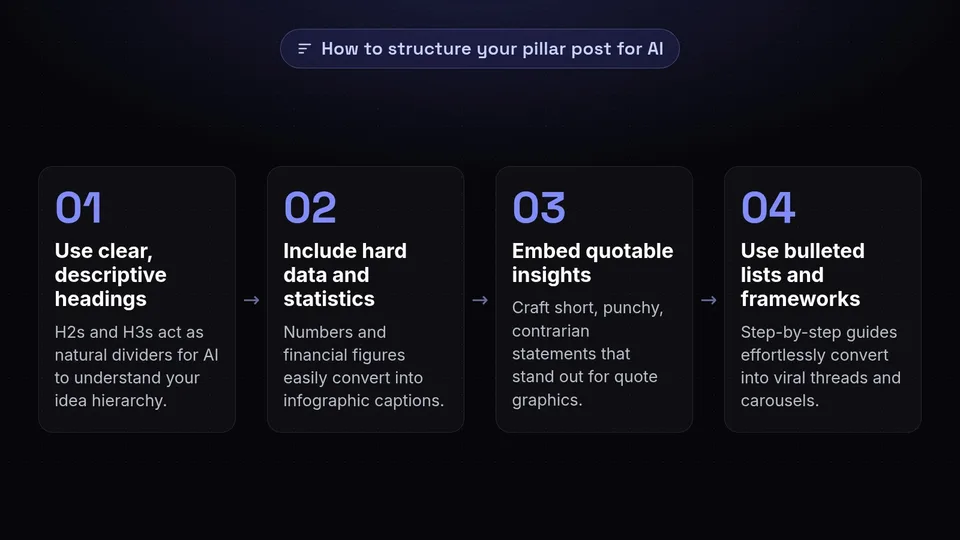
AI is incredibly powerful, but it relies on the quality of the input. If your source blog post is a rambling, unstructured wall of text, the AI will struggle to pull out punchy, engaging social media posts. To get the best results when generating social media from blog content, your pillar post must be structured logically.
1. Use Clear, Descriptive Headings
Your H2s and H3s act as natural dividers. When you feed the blog into an AI, it uses these headings to understand the hierarchy of your ideas. Each H2 can easily become its own standalone social media post or carousel slide.
2. Include Hard Data and Statistics
Social media loves numbers. If your blog post includes statistics, percentages, or financial figures, the AI can easily extract these to create compelling infographic captions or "Did You Know?" style tweets.
3. Embed Quotable Insights
While writing your blog, intentionally craft a few "tweetable" sentences. These are short, punchy, contrarian, or highly insightful statements that stand out from the rest of the text. AI is excellent at spotting these and turning them into quote graphics.
4. Use Bulleted Lists and Frameworks
Step-by-step guides, lists of tools, or strategic frameworks are the easiest content types to convert into threads and carousels. If your blog post has a "Top 5 Ways to..." section, you already have a guaranteed viral format ready to go.
Step 1: Extracting Tweet Threads and X Posts

X (Twitter) thrives on high-value, fast-paced text content. Long-form threads are particularly effective for building authority and driving deep engagement. Instead of trying to summarize your entire blog post in one tweet, we will use AI to break down the post into a multi-part thread, as well as several standalone tweets.
The AI Prompt for Tweet Threads
Copy and paste your entire blog post into your preferred AI tool (like ChatGPT, Claude, or the built-in AI in SchedulifyX) and use the following prompt:
"Act as an expert social media ghostwriter who specializes in viral X (Twitter) threads. I am going to provide you with a comprehensive blog post. I want you to read the post and create a highly engaging, 7-to-10 part Twitter thread summarizing the core concepts.
Rules:
1. The first tweet must be a strong hook that agitates a pain point and promises a solution. Do not use the word 'Thread'.
2. Each subsequent tweet should cover one main point or step from the blog post.
3. Keep the language punchy, concise, and conversational. Avoid corporate jargon.
4. Use plenty of whitespace (line breaks) to make it readable.
5. The final tweet should summarize the takeaway and include a call-to-action asking people to reply with their thoughts, without directly linking to the blog post immediately (we want to optimize for native reach).
Here is the blog post: [Insert Blog Post]"
Generating Standalone Tweets
Once the thread is created, you can ask the AI to generate single tweets to sprinkle throughout your content calendar.
"Now, based on the same blog post, generate 10 standalone tweets. These should not be a thread. Mix up the formats:
- 3 actionable tip tweets
- 3 contrarian takes or strong opinions based on the article
- 2 statistic or data-driven tweets
- 2 question-based tweets to drive engagement in the replies.
Keep them under 280 characters each."
Result: You now have 1 long-form thread (which counts as 1 major asset) and 10 standalone tweets. You are already at 11 pieces of content!
Step 2: Designing LinkedIn and Instagram Carousels
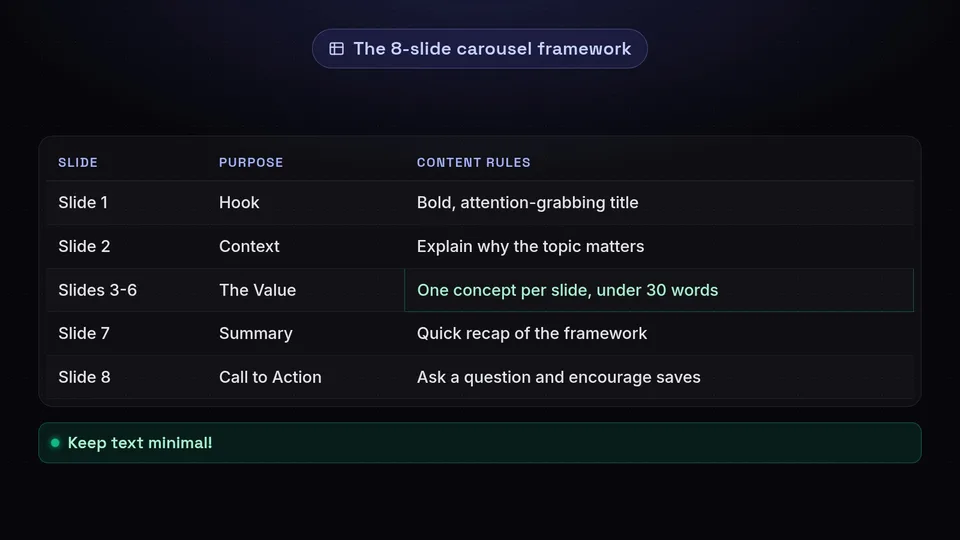
Carousels are the best performing format on both LinkedIn and Instagram. They encourage users to swipe, which signals to the algorithm that people are spending time on your post, thereby boosting its reach. Turning a blog to social media carousel is a perfect way to visually represent a step-by-step guide or a listicle.
The AI Prompt for Carousel Copy
AI cannot generate the final graphic design for you (though you can use Canva for that), but it can perfectly map out the text for every single slide so that designing takes mere minutes.
"Act as a top-tier LinkedIn and Instagram content strategist. I want to turn the core framework of my blog post into an engaging, 8-slide carousel. Please provide the exact text for each slide, keeping it brief and visually friendly.
Follow this structure:
- Slide 1 (Hook): A bold, attention-grabbing title that makes people want to swipe.
- Slide 2 (Context/Problem): Briefly explain why this topic matters or the mistake people are making.
- Slides 3 to 6 (The Value): Break down the main steps, tips, or insights from the blog post. One concept per slide. Keep text minimal (under 30 words per slide).
- Slide 7 (Summary): A quick recap of the framework.
- Slide 8 (Call to Action): Ask the reader a specific question to drive comments, and encourage them to save the post.
Format the output clearly with 'Slide 1:', 'Slide 2:', etc."
Writing the Carousel Caption
A carousel needs a strong caption to accompany it, especially on LinkedIn where the text above the image matters just as much as the image itself.
"Now, write a compelling LinkedIn caption to accompany this carousel. Use the PAS (Problem-Agitation-Solution) framework. Start with a hook that stops the scroll, use short sentences, and tell a brief story related to the blog's topic. Do not use more than 3 emojis. Include 3 relevant hashtags at the bottom."
Result: You now have the exact blueprint for a high-converting carousel and its accompanying caption. This asset can be posted on LinkedIn and Instagram (2 posts).
Step 3: Generating Short-Form Video Scripts (TikTok, Reels, Shorts)
Short-form video is dominating the digital landscape. Many creators avoid it because writing scripts and filming takes too much time. However, when you repurpose content using AI, the scripting phase becomes instantaneous. You can take the main arguments from your blog post and turn them into punchy 30-to-60-second video scripts.
The AI Prompt for Video Scripts
To get the best results, you need the AI to provide both the spoken audio and the visual cues (what you should be doing on camera or what B-roll to show).
"Act as a viral TikTok and Instagram Reels scriptwriter. I want to create 3 short-form videos based on the blog post provided earlier. Each video should be between 30 and 45 seconds long when spoken at a normal pace (roughly 75 to 100 words).
For each video, use a different hook strategy:
- Video 1: The 'Negative Hook' (e.g., 'Stop doing X if you want to achieve Y...')
- Video 2: The 'Secret/Hack Hook' (e.g., 'Here is the secret to X that nobody is telling you...')
- Video 3: The 'Story/Journey Hook' (e.g., 'How I learned to do X in just Y days...')
Format the output in a two-column table format (or clear text separation). Column 1 should be 'Visual/Action' (e.g., pointing to screen, text overlay, B-roll). Column 2 should be 'Audio/Spoken Word'. End each script with a quick engagement CTA."
Filming and Execution
With these 3 scripts in hand, you can set up your phone, ring light, and batch-record them in less than 20 minutes. Because the AI extracted the ideas directly from your blog, the videos remain entirely on-brand and consistent with your core message.
Result: 3 distinct short-form videos. When cross-posted to TikTok, Instagram Reels, and YouTube Shorts, this gives you 9 individual social media touchpoints.
Step 4: Pulling High-Impact Quotes and Snippets
Sometimes, simplicity wins. A beautifully designed quote graphic or a simple text-only post on LinkedIn can generate massive engagement. People love to share quotes because it makes them look smart to their own audience. Your blog post is likely full of these hidden gems.
The AI Prompt for Quote Extraction
"Review the blog post again. I want you to act as a PR specialist looking for the most impactful soundbites. Extract the 5 most profound, thought-provoking, or controversial single sentences from the text.
These sentences must be able to stand completely alone without context. They should be profound, actionable, or highly relatable.
After providing the 5 quotes, write a short, 2-sentence caption for each one that I can use when posting these as text graphics on Instagram and Facebook."
How to Use These Quotes
- Instagram/Facebook Graphics: Paste the quote into a Canva template with your brand colors and photo.
- LinkedIn Text Posts: Post the quote as a large text block, followed by the short caption provided by the AI.
- X (Twitter): Post the quote as a standalone tweet, perhaps with a relevant GIF.
Result: 5 high-impact quotes with captions. If posted across three platforms, this yields up to 15 potential posts. (For our conservative count, let's count them as 5 core assets).
Step 5: Crafting Infographic Captions and Data Visuals
If your blog post contains a process, a timeline, a comparison, or statistical data, it is ripe for infographic repurposing. Infographics are highly savable and shareable, making them an essential part of any content multiplication strategy.
The AI Prompt for Data Extraction
"Analyze the blog post and identify any step-by-step processes, statistical data, or comparisons (e.g., 'Old Way vs. New Way').
I want you to design the textual layout for 2 infographics based on this information.
For Infographic 1, create a 'Process Roadmap' or 'Checklist'. Give me the title and 4-5 bullet points that will go onto the graphic.
For Infographic 2, create a 'Comparison' (e.g., Do This, Not That). Give me the left column text and the right column text.
Finally, write an SEO-optimized caption for Pinterest and a professional caption for LinkedIn for each infographic."
Visualizing the Data
Take the output from the AI and drop it into an infographic maker. Because you asked the AI to limit the text, the resulting image will be clean, readable, and highly engaging. Pinterest is a fantastic platform for these, as infographics function as long-term search assets there.
Result: 2 infographics with tailored captions for Pinterest and LinkedIn. (4 posts).
Step 6: Creating Engaging Stories Content (Polls, Q&As, Teasers)
Feed posts are for discovery; Stories are for community building. You can use your blog post to create interactive 24-hour content on Instagram, Facebook, and LinkedIn Stories. The goal here is to drive engagement through clicks, polls, and direct messages.
The AI Prompt for Stories Sequences
"Act as a community manager. I want to create a 4-part Instagram Story sequence that teases the concepts in my blog post and drives engagement.
Slide 1: A relatable question or pain point with a Poll sticker (give me the question and two poll options).
Slide 2: A surprising fact or insight from the blog post that relates to the poll.
Slide 3: A multiple-choice quiz question based on a concept in the article.
Slide 4: A direct call-to-action asking followers to DM me a specific keyword (e.g., 'Send me the word GUIDE') to get the link to the full article. Provide the exact text for each story slide."
The Power of the DM Strategy
Notice the call-to-action in Slide 4. Instead of just putting a "Link in Bio" sticker, asking for a DM triggers the algorithm favorably. When users DM you, platforms like Instagram register this as a deep connection, meaning your future content is more likely to show up in their feed. You can then use an automation tool to automatically reply to their DM with the link to your original blog post.
Result: 1 interactive Story sequence (which can be used on both IG and Facebook). (2 posts).
The 30-Day Distribution Schedule
If you have followed the steps above, you now have a massive inventory of content. Let us do a quick tally of what our content repurposing ai has generated from a single blog post:
- 1x Long-form Twitter Thread
- 10x Standalone Tweets
- 1x Carousel (Posted on LinkedIn & Instagram = 2 posts)
- 3x Short-form Videos (Posted on TikTok, Reels, Shorts = 9 posts)
- 5x Quote Graphics (Posted on FB, IG, LinkedIn = 15 posts)
- 2x Infographics (Posted on Pinterest & LinkedIn = 4 posts)
- 1x Story Sequence (Posted on IG & FB = 2 posts)
Total Output: 43 unique social media touchpoints!
However, you cannot just blast all 43 posts on the same day. The key to a successful content multiplication strategy is strategic scheduling. You want to drip-feed this content over a 30-day (or even 60-day) period so that your audience gets multiple exposures to your core message without feeling spammed.
Sample 4-Week Drip Campaign
Week 1: The Launch Phase
Focus on high-impact, value-driven posts to introduce the core concept.
Monday: Twitter Thread & LinkedIn Carousel.
Wednesday: Short-form Video 1 (Reels, TikTok, Shorts).
Friday: Quote Graphic 1 (IG, FB) & Standalone Tweet.
Week 2: The Engagement Phase
Focus on interaction and community building.
Tuesday: Story Sequence with Polls and DM call-to-action.
Thursday: Short-form Video 2 & Standalone Tweet.
Saturday: Infographic 1 (Pinterest, LinkedIn).
Week 3: The Reinforcement Phase
Remind the audience of the topic from different angles.
Monday: Quote Graphic 2 & 3 (Spread across platforms).
Wednesday: Short-form Video 3.
Friday: 3x Standalone Tweets.
Week 4: The Evergreen Phase
Solidify the authority and capture latecomers.
Tuesday: Infographic 2.
Thursday: Quote Graphic 4 & 5.
Weekend: Remaining Standalone Tweets.
By spreading the content out, you ensure that even if a follower misses your post on Week 1, they will catch the video or the quote in Week 3. This maximizes the return on investment for the time you spent writing the original blog post.
Automating the Process with SchedulifyX
Having 40+ pieces of content is incredible, but manually logging into five different platforms every day to post them is a fast track to burnout. This is where a robust social media management tool becomes non-negotiable.
With an AI-powered scheduling platform like SchedulifyX, you can take this entire 30-day distribution schedule and automate it in a single afternoon. SchedulifyX allows you to:
- Bulk Upload: Import all your AI-generated tweets, captions, and graphics into the platform at once.
- Platform-Specific Customization: Tweak the captions for each platform natively within the dashboard (e.g., adding hashtags for Instagram, but removing them for Facebook).
- Visual Calendar: Drag and drop your posts across a 30-day visual calendar to ensure you have a healthy mix of videos, carousels, and text posts every week.
- Optimal Timing: Use AI-driven analytics to automatically publish your posts at the exact times your audience is most active on each specific platform.
Instead of waking up every day wondering what to post, you can spend two hours at the beginning of the month generating your content with AI, loading it into SchedulifyX, and letting the software handle the rest. Your social media presence will look like it is managed by a full-time team of experts, while you get to focus on running your business.
Conclusion
Creating content does not have to be a relentless grind. By adopting a content multiplication strategy and using modern content repurposing AI, you can transform a single, well-written blog post into an entire month's worth of high-quality social media assets. From engaging X threads and visually appealing LinkedIn carousels to viral TikTok scripts and interactive Instagram Stories, every piece of your pillar content holds untapped potential.
Stop letting your hard work gather dust in your blog archives. Start extracting the maximum value from every word you write. Take your latest blog post, run it through the AI prompts provided in this tutorial, and watch your social media calendar fill up effortlessly. And when you are ready to put your distribution on autopilot, let SchedulifyX handle the heavy lifting of scheduling and publishing, so you can achieve true digital omnipresence.
