How to Schedule Pinterest Pins and Master Board Mapping
SchedulifyX Team · October 23, 2026
Learn how to effectively schedule Pinterest pins and master Pinterest board mapping to improve your visual discovery and streamline your content strategy.
The Crucial Role of Context in Visual Discovery

Unlike traditional social media platforms that rely heavily on chronological feeds and immediate social interactions, Pinterest operates fundamentally as a visual search engine. Users navigate the platform to find inspiration, discover new products, and plan future projects. Because of this unique architecture, the way you organise and present your content matters immensely. The context in which a pin is saved tells the platform exactly what that content is about, who it is for, and when it should be surfaced in search results. This is precisely why learning how to effectively schedule Pinterest pins and master the art of categorisation is essential for any robust digital strategy.
When you upload an image or a video to Pinterest, the visual asset is only one part of the equation. The title, the description, the destination link, and importantly, the board it is saved to, all work together to provide metadata. This metadata is crawled by the platform's algorithm to understand the pin's relevance. If you are uploading content manually without a clear organisational strategy, you are missing out on vital search engine optimisation (SEO) opportunities. By utilising a dedicated pin scheduler, you can take control of this process, carefully planning where each piece of content belongs through precise Pinterest board mapping.
Understanding Pinterest Board Mapping
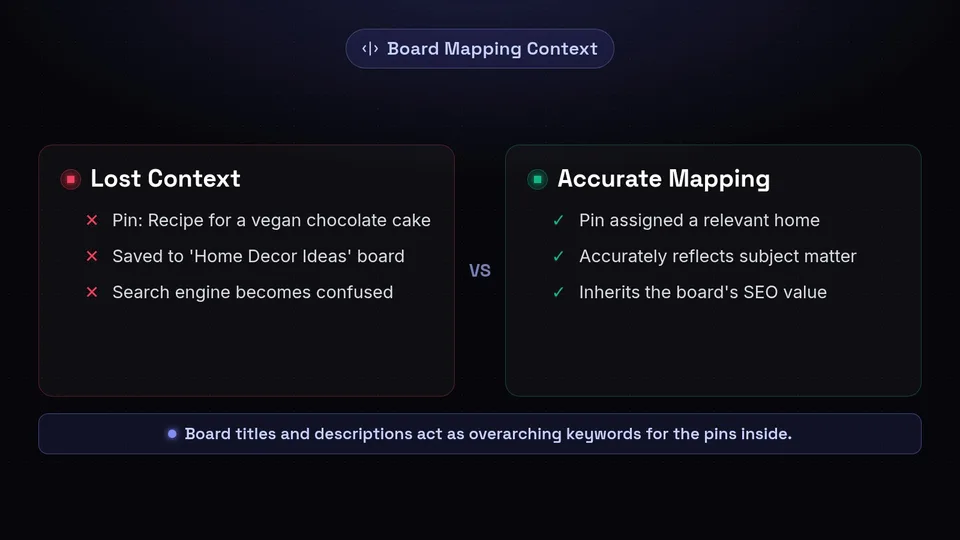
At its core, Pinterest board mapping is the strategic process of aligning your individual pins with the most highly relevant boards on your profile. Think of your Pinterest profile as a well-organised filing cabinet. The boards are the folders, and the pins are the individual documents within those folders. If you place a recipe for a vegan chocolate cake into a folder labelled 'Home Decor Ideas', the context is lost, and the search engine becomes confused about the true nature of your content.
Board mapping ensures that every single pin is assigned a home that accurately reflects its subject matter. When you map a pin to a specific board, the pin inherits the SEO value of that board. The board's title and description act as overarching keywords that pass contextual authority down to the pins saved within it. Therefore, mapping is not just about keeping your profile looking tidy for human visitors; it is a critical communication tool between your content and the platform's search algorithm.
When operating at scale, manually remembering which pin goes to which board, and ensuring that you are consistently populating all of your relevant boards, becomes an administrative burden. This is where the concept of board mapping within a scheduling environment becomes invaluable. By setting up these relationships in advance, you ensure that your content distribution remains logical, consistent, and fully optimised for search visibility.
Why You Need to Schedule Pinterest Pins
Consistency is a foundational pillar of success on almost any content distribution platform, and Pinterest is no exception. The algorithm favours accounts that provide a steady, reliable stream of high-quality content over those that dump dozens of pins in a single day and then go silent for weeks. To maintain this steady cadence without spending hours every day logged into the platform, you must schedule Pinterest pins in advance.
Maintaining a Consistent Presence
By scheduling your content, you guarantee that your profile remains active regardless of your daily workload, holidays, or time zone differences. If your target audience is primarily located in a different country, scheduling allows you to publish content during their peak active hours, increasing the likelihood of early engagement. Early engagement can act as a positive signal to the algorithm, potentially increasing the reach of your pins.
Strategic Content Distribution
When you schedule Pinterest pins, you gain the ability to look at your content strategy from a bird's-eye view. Instead of reacting in the moment, you can plan campaigns around seasonal trends, upcoming product launches, or specific holidays. You can ensure that a new blog post is pinned to its most relevant board first, and then strategically scheduled to secondary, broader boards over the following weeks. This spaced-out distribution prevents you from spamming your followers' feeds while maximising the lifespan and reach of a single visual asset.
Workflow Efficiency and Batching
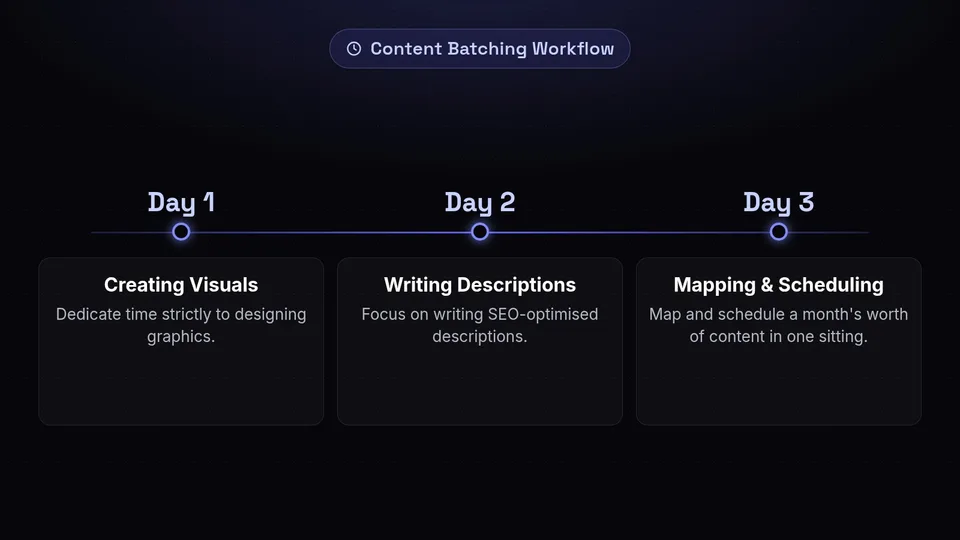
Content creation requires a different mindset than content distribution. Transitioning between designing graphics, writing SEO-optimised descriptions, and publishing can disrupt your workflow. A pin scheduler allows you to batch these tasks. You can dedicate one day to creating visuals, another to writing descriptions, and a final session to mapping and scheduling a month's worth of content in one sitting. This batching process drastically reduces the administrative friction associated with maintaining an active Pinterest presence.
The Mechanics of a Pin Scheduler

To truly appreciate the value of board mapping, it helps to understand the underlying mechanics of how a pin scheduler interacts with your account. Schedulers do not simply replicate human clicking; they communicate directly with the platform via an Application Programming Interface (API).
When you connect your profile to a scheduling tool, you grant it secure permission to read your profile data and publish on your behalf. The scheduler requests a list of all your current boards, including their unique identification numbers, titles, and privacy settings. This data is then synced and mirrored within the scheduling platform's interface.
When you upload a visual asset to the scheduler and select a board from the dropdown menu, you are performing the act of Pinterest board mapping. The scheduler records your choice and holds the image, description, and link on its servers. When your chosen publication time arrives, the scheduler packages this information into a precise digital format and sends it through the API, instructing the platform to place that specific pin onto that specific board. Because this process relies on direct API communication, the mapping is exact, ensuring your content lands exactly where you intended without manual intervention.
Step-by-Step Tutorial: Mapping Pins to Boards
Implementing a successful mapping strategy requires a methodical approach. Here is a comprehensive guide on how to schedule Pinterest pins while ensuring your board mapping is perfectly aligned with your broader SEO goals.
Step 1: Auditing and Optimising Your Boards
Before you begin scheduling, you must ensure that your destination boards are properly set up. Review your current boards and ensure each one has a clear, keyword-rich title. Avoid clever or abstract names; clarity is paramount for visual search engines. Furthermore, ensure every board has a detailed description that naturally incorporates the search terms your target audience is likely to use. A well-optimised board provides the strongest possible foundation for the pins you will map to it.
Step 2: Connecting and Syncing
Log into your chosen pin scheduler and navigate to the integration settings. Follow the prompts to authorise the connection between the scheduling tool and your Pinterest profile. Once connected, initiate a manual sync if the platform does not do so automatically. This ensures that the scheduler has the most up-to-date list of your boards, which is strictly necessary for accurate mapping.
Step 3: Uploading Your Visual Assets
Begin by uploading your prepared images or videos into the scheduler's media library. Ensure your assets follow the recommended best practices for the platform, which typically favour vertical images with a 2:3 aspect ratio. High-quality, visually striking imagery is crucial for capturing attention in a crowded feed.
Step 4: Crafting the Metadata
For each uploaded asset, you must provide the necessary metadata. Write a compelling, keyword-rich pin title and a thorough description that explains the value of the content. Include a clear call-to-action within the description, and ensure the destination URL directs users to a highly relevant page on your website. The metadata you input here works in tandem with the board mapping to establish the pin's context.
Step 5: Applying Pinterest Board Mapping
This is the critical step. Within the scheduler, locate the board selection tool for your specific pin. You will see a list of all your synced boards. Select the most specific, highly relevant board for this pin. For example, if your pin is about 'Sourdough Bread Scoring Techniques', map it to your 'Sourdough Baking' board rather than a generic 'Food' board. The most specific board provides the strongest contextual signal.
Step 6: Setting the Schedule
Once the pin is mapped to its primary board, select the date and time for publication. Consider your audience's habits when choosing a time. If your strategy involves pinning the same asset to multiple relevant boards, use the scheduler's interval or spacing feature. Schedule the pin to the most relevant board first, and then set it to publish to broader, secondary boards with a gap of several days or weeks between each publication to avoid repetitive behaviour.
Best Practices for Board Organisation
Effective Pinterest board mapping is entirely dependent on the quality of your board organisation. If your boards are chaotic, your mapping will be ineffective. To maximise the utility of your pin scheduler, you should structure your boards hierarchically.
A well-structured profile acts as a roadmap for the search algorithm, guiding it from broad concepts down to highly specific niches.
Start with a few broad boards that cover the main categories of your business or content. Then, create a series of niche boards that drill down into specific sub-topics. For instance, a travel blogger might have a broad board titled 'European Travel', and niche boards titled 'Paris Travel Itineraries', 'Budget Travel in Spain', and 'Packing Lists for Europe'.
When you schedule Pinterest pins, always map the content to the most specific niche board first. This establishes the tightest possible topical relevance. Once that initial pin has been indexed, you can leverage your pin scheduler to map the same content to the broader overarching boards at a later date. This strategy ensures that your content is categorised accurately while still gaining exposure across different facets of your profile.
Avoiding Common Pinterest Scheduling Mistakes
While automation tools are powerful, they must be used thoughtfully. Misusing a pin scheduler can lead to poor performance and diminished visibility. Here are several common pitfalls to avoid when mapping and scheduling your content.
Irrelevant Board Mapping
The most detrimental mistake you can make is mapping a pin to an irrelevant board simply to increase your pinning volume. If you map a pin about 'Financial Planning' to a board about 'Summer Wardrobes', you send conflicting signals to the search engine. The algorithm relies on consistent context to understand your content. Irrelevant mapping dilutes your SEO efforts and confuses the system, ultimately harming the visibility of both the pin and the board.
Ignoring Board Descriptions
Many users focus entirely on pin descriptions and neglect their board descriptions. Remember that the board passes contextual authority to the pin. If your board description is empty, you are depriving your mapped pins of valuable SEO metadata. Regularly review and update your board descriptions to ensure they accurately reflect the content you are scheduling to them.
Erratic Scheduling Patterns
A pin scheduler is designed to provide consistency. If you schedule fifty pins to publish on a Monday and then schedule nothing for the rest of the month, you are not utilising the tool effectively. The algorithm favours accounts that demonstrate steady, reliable activity. Aim for a consistent daily pinning frequency rather than sporadic bursts of high volume.
Over-Pinning to the Same Board
While it is beneficial to map a piece of content to multiple relevant boards, you must space these actions out. Using your scheduler to map the exact same pin to ten different boards on the same day can trigger spam filters. Utilise the interval scheduling features within your tool to spread these publications out over a reasonable timeframe.
Streamlining Your Strategy with SchedulifyX
Managing a comprehensive visual discovery strategy requires a tool that understands the nuances of the platform. SchedulifyX is designed to handle the complexities of Pinterest board mapping and scheduling with precision and ease. By integrating seamlessly with your profile, SchedulifyX ensures that your board lists are always perfectly synced, allowing you to map your visual assets with absolute confidence.
When you use SchedulifyX to schedule Pinterest pins, you are presented with an intuitive interface that makes selecting the right board straightforward. The platform allows you to upload your assets, craft your keyword-rich metadata, and meticulously map each pin to its rightful home. Whether you are managing a single brand or multiple client profiles, the ability to plan your board mapping strategy in advance ensures that your content is always organised, contextually relevant, and primed for discovery.
Furthermore, SchedulifyX allows you to maintain the consistent publishing cadence that visual search engines favour. By batching your content creation and utilising the scheduling features, you can ensure a steady stream of high-quality pins are distributed to your meticulously organised boards, day after day, without the need for manual intervention.
Conclusion
Mastering the art of visual discovery requires more than just creating beautiful images; it demands a strategic approach to categorisation and distribution. By understanding the critical role of context, you can leverage Pinterest board mapping to provide clear, unambiguous signals to the platform's search algorithm. When every piece of content is mapped to a highly relevant, deeply optimised board, your entire profile benefits from increased search visibility and authority.
Utilising a dedicated pin scheduler transforms this complex strategic requirement into a manageable, efficient workflow. It empowers you to batch your tasks, maintain a consistent presence, and ensure that your carefully crafted content is delivered to the right place at the right time. By avoiding common pitfalls such as irrelevant mapping and erratic publishing, you can build a robust, sustainable presence that drives long-term traffic and engagement.
If you are ready to take control of your visual content strategy and ensure every pin lands exactly where it belongs, explore how our platform can simplify your workflow. Visit the SchedulifyX homepage today to discover how our intelligent scheduling and precise board mapping tools can elevate your digital marketing efforts.
