The Ultimate Guide to X Lists: Take Control of Your Timeline in 2026
SchedulifyX Team · October 21, 2026
Tired of algorithmic clutter? Learn how to use X (Twitter) Lists to curate custom timelines, monitor competitors, and master your professional feed in 2026.
If you are trying to figure out how to use X effectively for your brand, business, or personal professional growth, you have likely encountered the platform's most polarizing feature: the algorithmic timeline. Millions of users log on daily only to be greeted by a "For You" feed overflowing with viral videos, controversial hot takes, and content they simply never asked for. For casual users, this might be entertaining. But for professionals, marketers, and creators, it is a massive productivity drain.
Welcome to our comprehensive twitter guide 2026. In this article, we are going to explore a feature that almost nobody uses to its full potential, yet it solves the exact problem people complain about most. That feature is X Lists. Whether you are learning twitter for beginners or you are a seasoned social media manager looking to refine your strategy, mastering Lists is the single most impactful thing you can do to take back control of your digital environment.
By the end of this guide, you will know exactly how to create, curate, and leverage custom timelines to monitor competitors, track journalists, and build a chronological feed that actually serves your professional goals. We will also explore how integrating these strategies with platforms like SchedulifyX can transform your social media workflow from chaotic to calculated.
The Problem with the Algorithmic Timeline

To understand why Lists are so valuable, we first need to look at how the default X experience has evolved. When you create a new account today, the platform defaults to the "For You" tab. This feed is powered by a complex recommendation algorithm designed to maximize engagement, dwell time, and ad impressions. It serves you a mix of accounts you follow and, crucially, accounts you do not follow but that the algorithm thinks will keep you scrolling.
For anyone asking how to use twitter for professional networking or industry monitoring, this algorithmic feed is a nightmare. It strips away chronological context. It prioritizes high-emotion content over high-information content. If you are trying to monitor a live industry event, track a PR crisis, or keep an eye on a competitor's product launch, relying on the "For You" feed guarantees you will miss critical updates.
The algorithm is opaque, constantly shifting, and fundamentally misaligned with the needs of a professional user who requires intent-based information consumption. This is where X Lists come in. They are the antidote to the algorithmic chaos, offering a return to chronological, chronological, and highly specific content streams.
What Are X Lists?
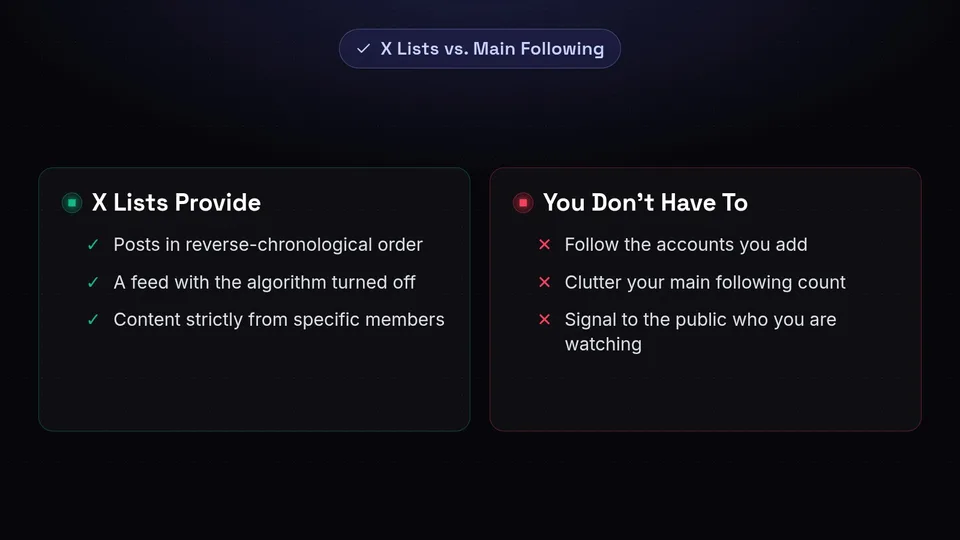
At its core, an X List is a custom timeline showing posts strictly from accounts you have explicitly added to it. When you view a List, the algorithm is turned off. You see only the tweets, replies, and reposts from the specific members of that List, presented in reverse-chronological order.
One of the most powerful aspects of an X List is that it does not require you to follow the accounts you add to it. This means you can monitor dozens of competitors, hundreds of industry influencers, or a vast network of journalists without cluttering your main following count or signaling to the public who you are watching.
While search results are thin regarding official new feature releases specifically for X Lists in the past 30 days, the feature remains a cornerstone of professional platform use. In fact, its value is increasingly being recognized at the premium tier. On October 12, 2026, SocialBee reported that X officially added "Custom timelines" to its set of X Premium benefits, highlighting how the platform itself views curated feeds as a high-value, premium-adjacent utility for power users.
How to Create and Curate an X List
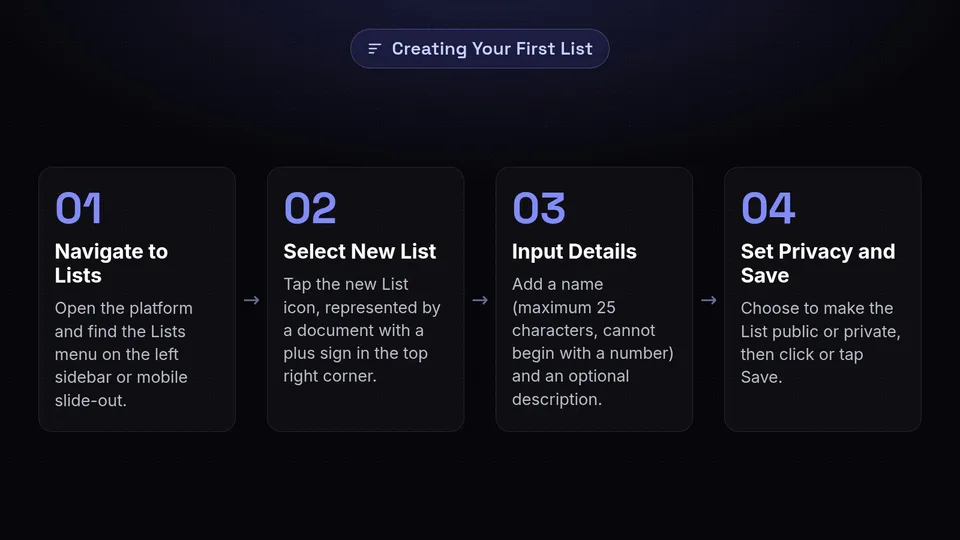
If you are exploring how to use x for the first time, setting up your first List is incredibly straightforward. The interface has been refined over the years, making creation and curation a seamless part of your daily workflow.
Step-by-Step Creation Guide
To build your custom timeline, follow these exact steps:
- Open the platform and navigate to the Lists menu. On desktop, this is located in the left-hand sidebar. On mobile, tap your profile icon in the top left corner to open the slide-out menu, then tap "Lists."
- Select the new List icon, which is typically represented by a document with a plus sign (+) in the top right corner of the screen.
- Input a List name. Note the constraints: your name can be a maximum of 25 characters, and it cannot begin with a number.
- Add an optional short description. This is highly recommended if you plan to make the List public, as it helps others understand the value of subscribing to it.
- Set your privacy preference. You can choose to make the List public (visible to everyone) or private (visible only to you).
- Click or tap Save.
Adding Members to Your List
Once your List is created, it is time to populate it. The process of adding members is done directly from a user's profile, making it easy to build your List organically as you browse the platform.
Navigate to any profile you wish to add. Click or tap the three-dot menu (⋯) located near their profile picture and follow button. From the dropdown menu, select "Add/remove from Lists." A menu will appear showing all the Lists you have created. Simply check the box next to the targeted List, and the user is instantly added. You do not need to click a save button on this screen; the action is immediate.
Account Limits and Constraints
For power users and enterprise social media managers, understanding the technical limits of the platform is crucial. As of our latest data, the platform is incredibly generous with its List allowances.
- Maximum Lists: You can create up to 1,000 Lists per account (Unfollr, April 8, 2026).
- Maximum Members: You can add up to 5,000 members per List (Circleboom, October 17, 2026).
- Being Listed: An account can be added to an unlimited number of Lists by other users.
These massive limits mean you can create highly granular, hyper-specific timelines for virtually any niche, event, or professional requirement without worrying about hitting a ceiling anytime soon.
Public vs. Private Lists: Which Should You Use?
When creating a List, the most important strategic decision you will make is whether to set it to Public or Private. Each serves a drastically different purpose in your overall social media strategy.
The Power of Public Lists
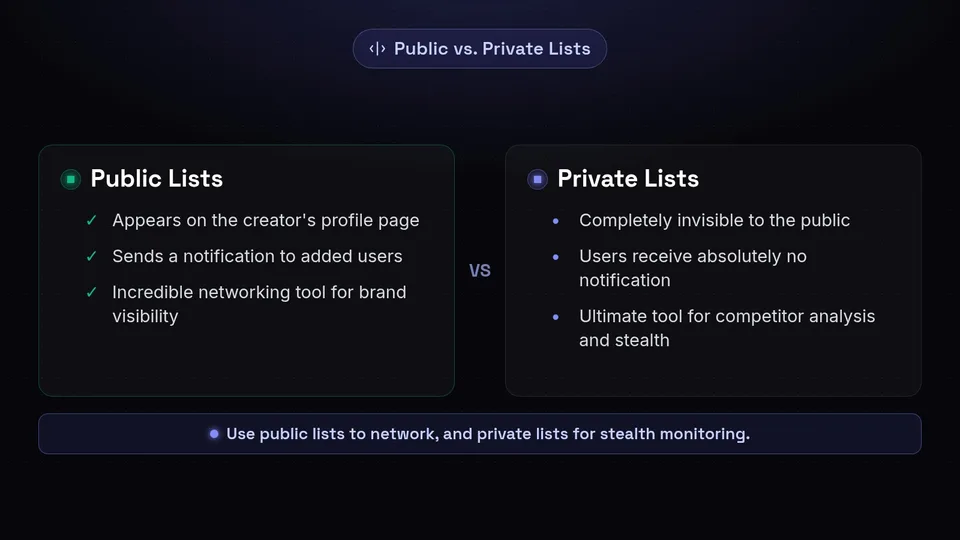
Public Lists are the default setting on the platform. They appear on the creator's profile page, meaning anyone who visits your account can see the Lists you have built, view the members, and read the custom timeline. Furthermore, public Lists can be subscribed to by any other user on the platform.
The most critical feature of a Public List is the notification system. When you add a user to a Public List, they receive a notification stating that you have added them, along with the name of the List (Unfollr, April 8, 2026). This makes Public Lists an incredible networking tool.
For example, if you create a Public List called "Top SaaS Marketers 2026" and add 50 industry leaders to it, all 50 of those leaders will receive a notification that they have been recognized as a top marketer by your account. This flatters the user, increases your brand visibility, and often results in reciprocal follows, profile visits, or engagement. It is a brilliant, low-effort way to introduce yourself to a community.
The Stealth of Private Lists
Private Lists, on the other hand, are designed for internal use, stealth monitoring, and competitive intelligence. They are enabled by toggling the "Private" option (or "Keep private" on Android devices) during the creation process or later in the List's edit settings.
Once a List is marked as Private, it becomes completely invisible to the public. It will not appear on your profile page, nobody else can subscribe to it, and—most importantly—users receive absolutely no notification when they are added to it. They will never know you are watching them.
This makes Private Lists the ultimate tool for competitor analysis. You can track everything your competitors say, how they handle customer service complaints, and what their executives are posting, all from a chronological feed that they do not know exists. Private Lists are also ideal for monitoring clients, keeping tabs on difficult industry figures, or organizing accounts that you find useful but do not want to publicly associate with your brand.
Pinning Lists to the Top of Your Timeline
Creating Lists is only half the battle; integrating them into your daily workflow is what actually boosts your productivity. If you have to dig through three menus just to check your custom timeline, you are unlikely to use it consistently.
Thankfully, the platform allows you to pin Lists directly to your home interface. By navigating to your Lists menu, you will see a "pin" icon next to each List you have created or subscribed to. Clicking this pin attaches the List to your main home screen.
On desktop, pinned Lists appear as distinct tabs at the top of your feed, right next to "For You" and "Following." You can simply click between them to shift from the algorithmic feed to your curated chronological feeds. On the mobile app, pinned Lists become swipeable timelines. From your main feed, you can simply swipe left or right to seamlessly glide between your different curated environments.
This feature transforms the app from a chaotic content aggregator into a highly organized dashboard. You can start your morning by swiping to your "Industry News" list, then swipe to your "Competitor Watch" list, completely bypassing the algorithmic timeline and the distractions it brings.
Strategic Use Cases for X Lists
Understanding the mechanics of Lists is essential for anyone learning twitter for beginners, but applying them strategically is what separates the novices from the professionals. Here are the most powerful ways to deploy Lists in 2026.
1. Competitor Monitoring (Private)
As mentioned earlier, Private Lists are the ultimate competitive intelligence tool. Create a Private List named "Competitors 2026" and add the official brand accounts, CEO accounts, and key employee accounts of every major player in your niche. Because you do not have to follow them, your public "Following" count remains pristine, and your competitors remain unaware of your surveillance.
Check this List daily to observe their content cadence, product announcements, and customer interactions. Pay special attention to their "Replies" tab within the List (if you view specific profiles) or just watch how they handle inbound queries on the timeline. You can often identify gaps in their customer service or product offerings simply by watching the chronological flow of their public communications.
2. Journalist and PR Tracking (Public or Private)
If your brand relies on public relations, earned media, or outreach, Lists are indispensable. Create a List of journalists, editors, and freelance writers who cover your specific industry. If you make it Public and name it something respectful like "Top Tech Journalists," you might earn some goodwill.
By monitoring this List chronologically, you can see exactly what these writers are currently working on, what they are complaining about, and what sources they are actively requesting. When a journalist tweets that they are looking for an expert quote on a topic you specialize in, you will see it immediately in your curated feed, rather than missing it because the algorithm decided not to show it to you.
3. Thought Leadership and Industry News (Public)
To stay sharp in your field, you need a steady stream of high-quality information without the noise of memes and viral outrage. Create a Public List of the top 50 thought leaders, researchers, and data analysts in your industry. This becomes your personalized, real-time trade magazine.
Because it is chronological, it is incredibly useful during live industry events, conferences, or breaking news situations. While the "For You" feed might show you a tweet from three days ago, your Industry News List will show you exactly what the smartest people in your field are saying right this second.
4. Client and Prospect Engagement (Private)
For B2B marketers and sales professionals, staying top-of-mind with prospects is a delicate art. Create a Private List of your top 100 prospects or current clients. Spend 15 minutes a day reviewing this specific timeline.
When a prospect tweets about a milestone, a frustration, or a question, you can reply thoughtfully. Because you are using a focused List, you never miss their updates, allowing you to build organic, consistent relationships over time without having to hunt down their profiles individually.
Subscribing to Someone Else's List
One of the best-kept secrets of how to use twitter efficiently is that you do not have to build every List yourself. The platform is filled with thousands of meticulously curated Public Lists created by other professionals, journalists, and organizations.
If you want to monitor a specific niche—say, AI researchers in Europe, or local food bloggers in Chicago—chances are someone has already done the hard work of finding and grouping those accounts.
To find these Lists, you can visit the profile of a prominent figure in that niche, click the three-dot menu on their profile, and select "View Lists." This will show you all the Public Lists they have created, as well as the Lists they subscribe to. Alternatively, you can use the platform's search bar to look for specific keywords and filter by "Lists."
Once you find a valuable List, simply click the "Subscribe" button. It will now appear in your own Lists menu, and you can pin it to your timeline just as you would a List you created yourself. Subscribing to high-quality Lists is the fastest way to instantly upgrade your feed with zero curation effort.
Why Lists Beat the Algorithm for Professional Use
To truly master this twitter guide 2026, we must reiterate why abandoning the algorithmic feed for Lists is so crucial for your digital well-being and professional output. The algorithm is designed to elicit a reaction; Lists are designed to provide information.
When you rely on the "For You" feed, you are at the mercy of machine learning models that prioritize engagement metrics over relevance. If an industry expert posts a highly valuable, nuanced thread about regulatory changes, it might get low engagement because it is dry and technical. The algorithm will likely bury it. However, if that same expert posts a controversial, emotionally charged opinion, the algorithm will amplify it.
By using Lists, you bypass this engagement bias completely. You see the dry, technical, highly valuable regulatory thread exactly when it is posted. You reclaim your agency over what you consume. You decide who is worth listening to, rather than letting a black-box algorithm make that choice for you.
Furthermore, Lists protect your focus. Social media is inherently distracting. You log on to check a competitor's pricing update and end up spending 45 minutes watching videos. By pinning a Competitor List and navigating straight to it, you create a bounded, finite feed. You can scroll to the point where you last checked the List, consume the new information, and log off. It turns an infinite scroll into a finite task.
Advanced Tips: Combining Lists with Search and Scheduling
Once you have curated your Lists and regained control of your timeline, you can begin integrating these feeds into a broader, more aggressive social media strategy. This is where combining native platform features with third-party tools creates a massive competitive advantage.
Boolean Search Within Lists
Did you know you can run advanced searches restricted entirely to a specific List? This is an incredible tool for finding highly specific conversations without the noise of the entire platform. Using the platform's advanced search operators, you can search for a specific keyword, but limit the results to only the members of your curated List.
If you want to automate and refine this process, we highly recommend utilizing specialized search tools. By integrating your List strategy with our X Search Builder, you can construct complex boolean queries to monitor exactly what your curated audience is saying about specific topics, hashtags, or brand mentions, turning a simple timeline into a powerful social listening engine.
Scheduling and Content Strategy
Curating inputs (what you read) is only half of the social media equation; the other half is your output (what you post). The insights you gather from your highly focused, chronological Lists should directly inform your content strategy.
When you see a recurring question in your "Prospects" List, that is a signal to create a thread answering that exact question. When you notice a gap in your "Competitors" List, that is your opportunity to highlight your own product's strengths. To execute this efficiently, you need a robust scheduling platform to plan, draft, and publish your content.
This is where SchedulifyX becomes your most valuable asset. While native X analytics or specialized enterprise listening tools might offer deeper historical data archives—an area where those massive, expensive platforms are undeniably stronger than SchedulifyX—our platform excels in turning your curated, real-time insights into actionable, scheduled content. SchedulifyX provides the AI-powered drafting, intuitive calendar views, and seamless publishing tools you need to react to your List insights consistently and professionally.
(Please note that pricing models, feature limits, and API access for all third-party social media tools change frequently as platform policies evolve; always confirm current capabilities directly on the vendor's own pricing page.)
Conclusion
Learning how to use x efficiently in 2026 does not require gaming the algorithm, participating in outrage cycles, or spending hours doomscrolling through irrelevant content. It simply requires a return to intentional, curated information consumption.
By mastering X Lists, you transform a noisy, chaotic public square into a series of quiet, highly organized, and deeply valuable professional dashboards. Whether you are building Public Lists to network with industry leaders or utilizing Private Lists to keep a watchful eye on your competitors, this feature is the key to unlocking the platform's true potential.
Stop letting the algorithm dictate your digital diet. Start building your custom timelines today, gather actionable insights, and when you are ready to turn those insights into a world-class content strategy, let SchedulifyX handle your scheduling and publishing. Take control of your timeline, and you will take control of your brand's future.
Sources
Facts checked against the sources below on October 21, 2026.
