Content Recycling Strategy for Small Teams: How to Run It
Build a content recycling strategy for small teams: entry rules, an evergreen library with fixed tags, rotation slots, named owners and checks before reuse.
SchedulifyX is the AI-powered social media command center built for creators, businesses, and agencies. Schedule posts across 10+ platforms, generate content with 9 specialized AI agents, collaborate with your team using approval workflows, analyze performance with deep analytics, and manage all social engagement from a unified inbox. Trusted by professionals worldwide — free plan available, paid plans from
Most small social teams already recycle content; they just do it from memory. Someone remembers a post that did well, the week has a gap, and an old idea goes out again. That works until two people revive the same post in one month, a recycled post links to a page that no longer exists, or the person who knew which posts worked moves on. A recycling strategy replaces memory with a shared library, a visible rotation, named owners and a check before anything is reused. This guide sets out that system for a team of two to five people.
Selection
Decide what qualifies for recycling
A library is only as useful as what goes into it. Admit every post that once did well and the team ends up rotating posts that are out of date, no longer cleared for use or impossible to rebuild. Agree a few entry conditions, and have one person, the library keeper, apply them to every nomination.
- It did its jobJudge the original by its purpose, whether a click, a reply, a save or an enquiry, against your usual posts of that type. High reach alone is not enough.
- Its shelf life is knownNote what it depends on, such as a product name, a screenshot or a process, and give it a review-by date when it is admitted.
- You are free to reuse itStock images, music, creator content and posts featuring customers or staff can carry limits on how long, where or how often they may be used.
- It can be rebuiltThe design files, raw footage and caption text still exist. Rebuilding from a screenshot of the old post loses quality every round.
Record how long each idea can run, too. Core ideas can return indefinitely in fresh versions. Seasonal ideas, such as planning for the year ahead, wait for their window. Some earn one last outing and then retire.
Library
Organise an evergreen library the team can share
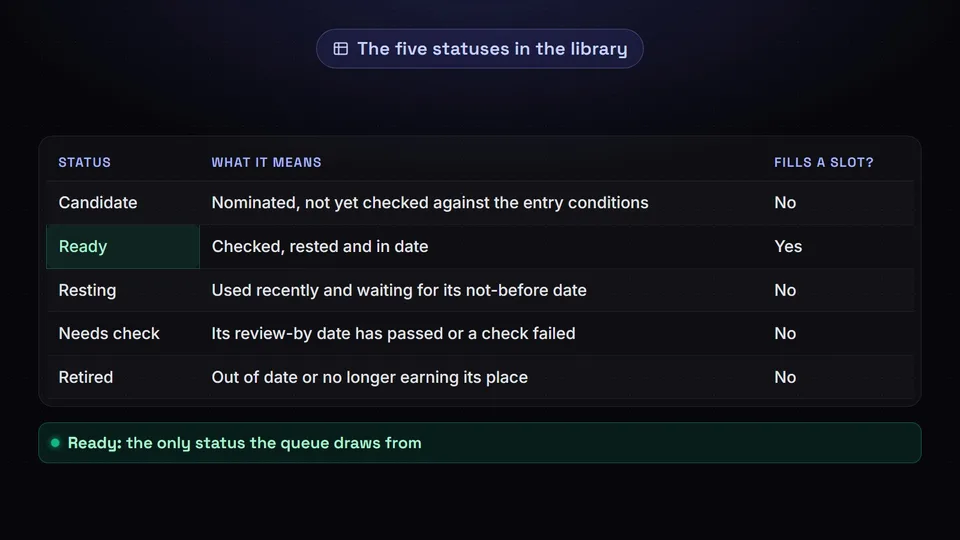
Keep the library where everyone already works, such as a shared spreadsheet; a library only one person can open will not survive their first holiday. Make each row an idea, the thing you rotate, with a log of its versions, the things you measure: when each went out, where, in which format and how it did. A short reference code for each idea lets the team discuss it without pasting captions around.
| Field | What to record | Why it matters |
|---|---|---|
| Pillar | The subject area the idea belongs to | Balances subjects across a month |
| Purpose | Teach, build trust, prompt action or start a conversation | Stops one kind of post taking over |
| Run type | Core, seasonal or one last run | Says when the idea may appear at all |
| Status | Candidate, ready, resting, needs check or retired | Only ready ideas can fill a slot |
| Not before | The earliest date it may return | Replaces memory as the guard against repeats |
| Review by | When its details must be checked again | Takes it out of the queue when it lapses |
| Depends on | Links, screenshots, people, product names and licences | Shows the reviewer what can go stale |
| Brief and files | The core message, the owner and where source files live | Lets anyone rebuild it without asking around |
Keep each tag field to a fixed list of values, because free-text tags multiply: "how-to", "tutorial" and "guide" end up meaning the same thing, and filters quietly miss ideas. Match the pillar values to your content pillars, and let only the keeper add new values.
Roles
Give every part of the system an owner
In a team of two to five, the roles below are hats rather than jobs, and one person often wears two. Each needs a named owner and a backup, so the rotation keeps running through holidays and launches.
Library keeper
Applies the entry conditions, keeps tags and dates accurate, orders the queue and runs the quarterly library review.
Adapter
Builds each new version from the idea's brief and source files, written for the platform it is going to.
Reviewer
Checks facts, links, rights and timing before anything is scheduled. Never the person who adapted that post.
Analyst
Records results against each version and brings a keep, refresh or retire call to the monthly planning session.
In a team of two, one person can keep the library and read the results while the other adapts, each reviewing the other's work. With four or five, separate the keeper from the analyst, so the curator is not the only judge of whether the library works, and ask someone who knows the product or service well to confirm any claims about it.
Cadence
Set a rotation the team can keep
Recycling fails when it is only a fallback for the weeks new work runs late. Give it fixed slots instead: decide how many recycled posts each platform carries in a typical week, based on how much new work the team can make well, and put those slots in the calendar before new work is planned.
Fill the slots from a queue, not from memory: the ready ideas in the keeper's order, each eligible only once its not-before date has passed and while its review-by date has not. Once a month, when new work is planned, run the same routine.
Check the queue
List the ideas that are ready, rested and in date, plus seasonal ideas whose window is approaching.
Balance the month
Pick so that no pillar or purpose dominates, and so recycled posts sit around launches rather than on top of them.
Assign the work
Give each pick an adapter and a reviewer, and agree the level of refresh before work starts.
Schedule and log
Put each finished version in its slot, log it against the idea and set its next not-before date.
Pro Tip: When holidays or illness stretch the team, add recycled slots for a few weeks rather than letting the account go quiet. During a launch, pause them.
Plan recycled slots with new work
Choose next month's recycled posts in the same session as the new ones, so both come from one plan.
Open SchedulifyX →Formats
Refresh the format for each platform
Versions drift when each one is copied from the last, like a photocopy of a photocopy. Build every new version from the idea's brief instead: the core message, the proof behind it and what the reader should do next. Then match the effort to the idea's record, so a small team's scarcest hours go to ideas that have already proved themselves.
| Refresh level | What changes | Use it when |
|---|---|---|
| Light | A new opening line, crop or cover, or a fresher example | It did well recently and its format still suits the platform |
| Rework | A new format built from the brief, such as a carousel from a text post | The idea is proven but its format has had its run |
| Rebuild | New footage, design or angle, made from scratch | The idea keeps earning its place and deserves the investment |
Keep each platform to the few formats the team makes well, and adapt an idea for all its platforms in one sitting, then spread the versions across the rotation. For the craft of changing the angle, hook and examples so a returning idea does not read as a rerun, see how to recycle social content without looking repetitive.
Accuracy
Review every recycled post before it goes out
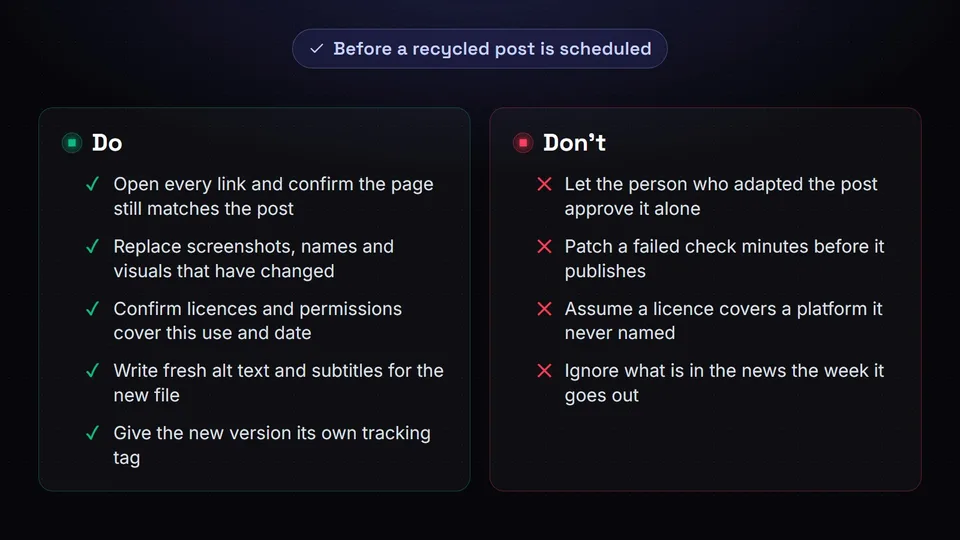
A recycled post was accurate when it was written, and nobody has checked it since. Links break, pages are renamed, people leave and licences expire, and none of that shows in the post itself. Check at two points.
When the idea is picked
Before work starts, the reviewer reads the original against its dependencies and confirms the core claim still holds. Dropping an idea now costs minutes; finding the problem after it has been rebuilt as a video costs the whole version.
Before the new version is scheduled
Someone other than the adapter checks the finished version.
- LinksOpen each one and confirm the page still says what the post promises. If you tag links for tracking, give the new version its own tag so its clicks are not credited to the original.
- Facts, visuals and rightsProduct names, screenshots, logos and anyone pictured who has left, plus licences or permissions that must still cover this use.
- AccessibilityFresh alt text and subtitles, because both belong to the old upload and do not follow the idea into a new file.
- Timing and fitNothing in the news or in customers' recent experience that would make it land badly, and a format that suits the platform as it works now.
If a check fails, the idea goes back to "needs check" with a note instead of being patched minutes before it publishes, and the fix is recorded in the library.
Measurement
Measure whether recycled posts still earn their place
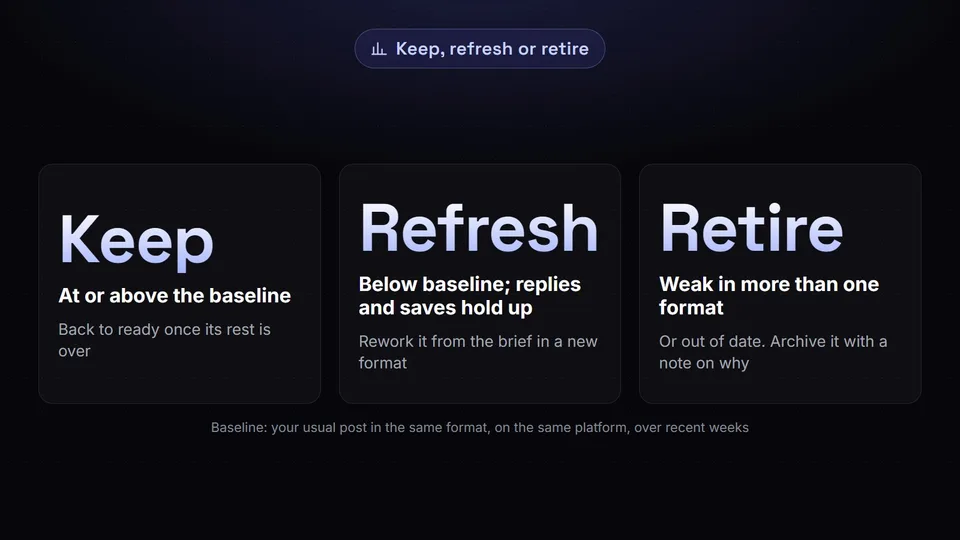
Every recycled slot could have held new work, so the question is not whether a version matched the original but whether it did as well as the posts the slot would otherwise hold. Decide what each post is for before reading its numbers, as a decision-first approach to analytics recommends, then make two comparisons.
Against today's baseline
Your usual post in the same format, on the same platform, over recent weeks. This decides whether the idea keeps its slot.
Against its earlier outings
The idea's previous versions. A decline that continues across different formats points to a tired idea, not a weak version.
Keep
At or above the baseline. The idea returns to ready once its rest is over.
Refresh
Below the baseline, but replies or saves show interest. Rework it from the brief in a new format.
Retire
Weak in more than one format, out of date or no longer something you would say. Archive it with a note on why.
Measure the system too. At each quarterly library review, retire ideas that are never picked, treat a growing pile waiting for checks as a sign that review has become the bottleneck, and reset the refresh levels if versions take as long to make as new posts.
Getting started
Put your content recycling strategy into practice
The system does not need to be complete on day one. A first month might run like this.
- Nominate a handful of past posts that clearly did their job, and run each through the entry conditions.
- Set up the library with fixed tag lists, and give every admitted idea a brief and a review-by date.
- Name a keeper, an adapter, a reviewer and an analyst, each with a backup.
- Agree the recycled slots for each platform and fill the first month from the queue.
- At the end of the month, make the keep, refresh or retire call on every version, and adjust the slots.
Key takeaway
Admit only ideas that did their job and can be reused, keep them in one shared library with fixed tags and dates, fill fixed slots from a queue, give every part an owner, check every version before it goes out, and judge it against what the slot would otherwise hold.
Add new evergreen ideas as they are published, and the library grows with the account: less of each week starts from a blank page, and more goes into improving ideas you know work.
Get started free — no credit card required.
