Master Multi-Platform Publishing with a Cross Posting Tool
SchedulifyX Team · September 14, 2026
Discover how a cross posting tool simplifies multi-platform publishing. Learn to tailor content with per network captions without rewriting from scratch.
Managing a brand's presence across multiple social media channels often feels like a relentless balancing act. When your audience is scattered across LinkedIn, X, Facebook, Instagram, and Pinterest, maintaining a consistent posting schedule requires a significant investment of time and energy. The traditional approach involves drafting a post, logging into one network, publishing it, and then repeating the entire process for the next platform. This manual repetition drains productivity and stifles creativity.
However, modern social media management does not require you to write ten entirely different posts to reach ten different networks. By leveraging a dedicated cross posting tool, you can centralise your workflow, streamline your multi platform publishing efforts, and maintain network-specific nuances using a per network caption. In this tutorial, we will explore how to efficiently distribute your content across various channels without the need for endless rewrites.
The Challenge of Multi Platform Publishing
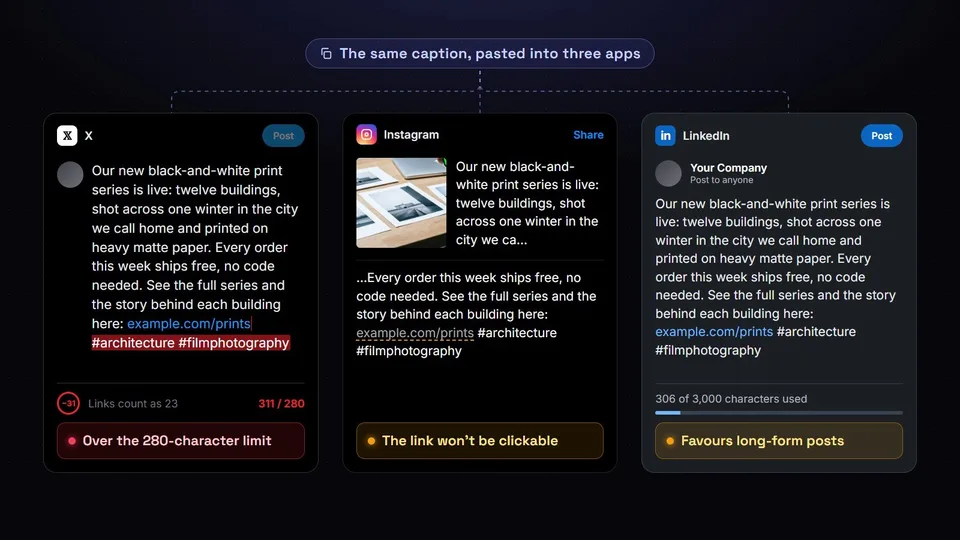
Every social media platform operates on its own unique set of rules, algorithms, and cultural norms. What resonates with a professional audience on LinkedIn may fall flat or appear overly formal to a community on Facebook. Furthermore, the technical constraints of each platform vary significantly.
For instance, micro-blogging platforms impose strict character limits, requiring concise and punchy delivery. Visual platforms like Instagram do not allow clickable hyperlinks within standard post text, meaning any call-to-action must direct users to a link in a profile biography. Meanwhile, platforms like LinkedIn favour longer-form, text-heavy posts that encourage professional discourse.
Because of these fundamental differences, simply copying and pasting the exact same message across all platforms is an ineffective strategy. When you copy-paste, you run the risk of including broken user tags, exceeding character limits, or using formatting that looks out of place. This 'spray and pray' approach often signals to your audience that the content is automated and impersonal, which can diminish engagement. The challenge, therefore, is finding a way to respect the unique environment of each platform without spending hours rewriting your core message from scratch.
What is a Cross Posting Tool?

A cross posting tool is a software solution designed to solve the inefficiencies of multi platform publishing. Instead of requiring you to log into each social network individually, the tool acts as a centralised command centre. Through secure Application Programming Interface (API) connections, the software links directly to your various social media accounts.
When you create a post within a cross posting tool, the software translates your content and pushes it out to the selected networks simultaneously, or according to a schedule you define. The mechanism is straightforward: you upload your core media asset (such as an image or a video) and draft your foundational message once. The tool then handles the complex routing required to deliver that content to multiple destinations.
By consolidating the drafting and scheduling phases into a single dashboard, a cross posting tool removes the friction of platform-hopping. This allows social media managers and business owners to focus their energy on crafting high-quality content rather than managing the mechanics of distribution.
The Power of the Per Network Caption
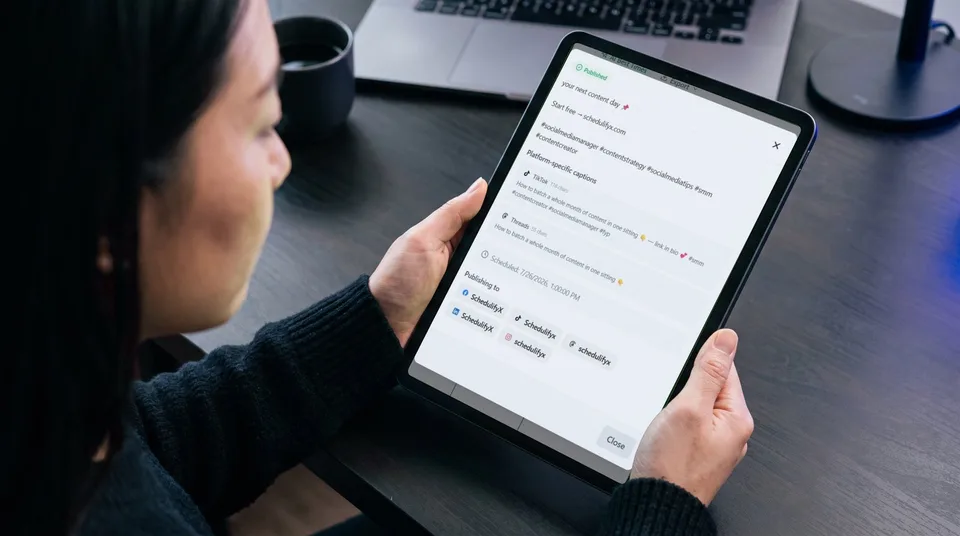
The true secret to publishing one post to ten networks without ten complete rewrites lies in a feature known as the per network caption. This feature bridges the gap between mass automation and bespoke content creation.
Here is how the mechanism works: When you begin drafting a post in your cross posting tool, you start by creating a 'master' or 'base' post. This base post contains the core elements of your message—the primary image or video, the main link you wish to share, and the fundamental text that conveys your core idea.
Once the base post is established, the per network caption feature provides you with individual text editors for each platform you have selected. Instead of starting with a blank page for every network, the tool automatically populates each platform's editor with your base text. From there, you simply apply minor, platform-specific tweaks.
The per network caption allows you to alter only what needs altering, preserving the bulk of your work while ensuring the final output is perfectly optimised for its destination.
For example, you might remove the hyperlink from your Instagram caption and replace it with instructions to check your bio. You might trim a few sentences from your X caption to ensure it fits within the character limit. You might add industry-specific hashtags to your LinkedIn caption while keeping the Facebook caption conversational and hashtag-free. These minor adjustments take mere seconds, yet they ensure your content feels native to every platform.
How to Implement a Cross Posting Strategy

Transitioning to a streamlined multi platform publishing workflow requires a slight adjustment in how you plan your content. Follow these steps to implement an efficient cross posting strategy:
Step 1: Develop a Core Message
Begin by identifying the primary goal of your post. Are you announcing a new product, sharing a recent blog article, or asking your audience a question? Draft a clear, concise base message that communicates this core idea. Attach your primary media assets, ensuring they are high-quality and generally suitable for multiple aspect ratios.
Step 2: Select Your Target Networks
Within your cross posting tool, select the specific social media accounts where you want this message to appear. It is important to only select networks that are relevant to the specific piece of content. Not every post needs to go to every single network.
Step 3: Customise with Per Network Captions
Activate the per network caption feature. Review the base text within each platform's specific tab. Make the necessary adjustments to tone, length, hashtags, and mentions. Ensure that any accounts you are tagging are updated to reflect the correct usernames for that specific platform, as handles often vary from site to site.
Step 4: Review and Schedule
Take a final look at the previews generated by the tool to ensure the formatting appears correct for each network. Once you are satisfied that each post looks native to its environment, schedule the content to be published at the optimal time for your audience.
Best Practices for Adapting Content Across Networks
To maximise the effectiveness of your per network caption adjustments, keep these platform-specific best practices in mind:
- LinkedIn: Maintain a professional tone. Break up large blocks of text with line breaks to improve readability. Incorporate a few highly relevant, industry-specific hashtags at the bottom of the post.
- X (formerly Twitter): Focus on brevity. Get straight to the point and use strong verbs. If you are sharing a link, ensure the text leaves enough room for the URL. Use one or two targeted hashtags.
- Instagram: Prioritise the visual element. Use the first line of your caption as a compelling hook to encourage users to tap 'read more'. Remove hyperlinks from the text, and use line breaks before adding a block of relevant hashtags.
- Facebook: Adopt a conversational and engaging tone. Ask questions to prompt comments and community interaction. Hashtags are generally less effective here, so use them sparingly or omit them entirely.
- Pinterest: If your cross posting tool supports it, ensure your text is highly descriptive and includes keywords, as Pinterest functions largely as a visual search engine.
Conclusion
Multi platform publishing does not have to be a tedious, repetitive chore. By utilising a cross posting tool, you can centralise your social media management and reclaim hours of your week. The key to success is avoiding the copy-paste trap by utilising a per network caption. This powerful feature allows you to draft your core message once and make swift, platform-specific adjustments, ensuring your content always feels native, engaging, and professional, no matter where your audience encounters it.
Ready to streamline your social media workflow and master multi-platform publishing? Visit the SchedulifyX website today to explore our cross posting tool and discover how easy it is to tailor your content with our per network caption features.
