What's New: ClickUp & Slack Integrations Now Live
SchedulifyX Team · April 6, 2026
Streamline your social media workflow with SchedulifyX's new ClickUp and Slack integrations. Sync tasks, get real-time alerts, and boost team productivity.
If you manage social media for a growing brand, a bustling agency, or a fast-paced enterprise, you already know that creating the actual content is only half the battle. The other half? Managing the endless back-and-forth communication, tracking project statuses, chasing down approvals, and ensuring that every stakeholder is on the same page. The constant context-switching between your scheduling tool, your project management platform, and your team communication app can drain your productivity and lead to costly mistakes.
That is why we are absolutely thrilled to make our biggest product announcement of the quarter. What's New: ClickUp & Slack Integrations Now Live on SchedulifyX! We have listened to your feedback, analyzed the workflows of top-performing social media teams, and built seamless connections with two of the most powerful productivity tools on the market.
In this comprehensive guide, we will dive deep into everything you need to know about these new features, how they can revolutionize your daily workflow, and how you can get them set up in just a few clicks.
The Evolution of Social Media Management
Social media management has transformed dramatically over the past decade. What used to be a one-person job involving a few native platform logins has evolved into a highly complex, multi-disciplinary operation. Today's social media strategies require copywriters, graphic designers, video editors, legal compliance officers, and strategists to work in perfect harmony.
As teams grew, so did the software stack. Social media managers found themselves spending hours updating task cards in project management tools, only to jump back into their scheduling platform to copy and paste the final assets. Then, they would have to jump into a messaging app to notify the team that the post was scheduled or published.
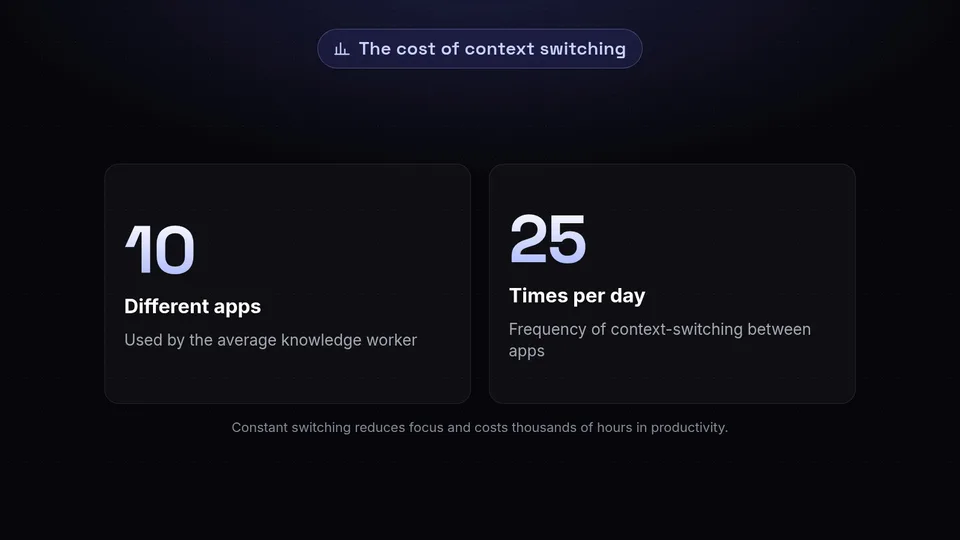
"The average knowledge worker switches between 10 different apps up to 25 times per day. This constant context-switching reduces focus, increases the risk of errors, and ultimately costs businesses thousands of hours in lost productivity."
At SchedulifyX, our mission has always been to use AI and smart automation to eliminate the busywork from social media management. While our AI-powered scheduling and content generation tools have saved our users countless hours, we realized that true efficiency doesn't stop at the edge of our platform. It extends into the ecosystem of tools you already use every day.
Why We Built the ClickUp & Slack Integrations

When we asked our community what features would make the biggest impact on their day-to-day operations, the response was overwhelming. You wanted better ways to connect your content creation workflows with your scheduling and reporting workflows. You wanted to stop double-entering data. You wanted real-time visibility without having to constantly refresh dashboards.
We chose ClickUp and Slack as our premier integrations because they represent the gold standard in project management and team communication, respectively.
- ClickUp offers unparalleled flexibility, allowing teams to manage everything from high-level content calendars to granular, sub-task-heavy video production pipelines.
- Slack is the digital headquarters for modern teams, providing instant communication and a central hub for automated notifications.
By bridging the gap between SchedulifyX, ClickUp, and Slack, we are empowering you to create a unified, frictionless workflow. Let's explore exactly how these integrations work.
Deep Dive: The New ClickUp Integration

The SchedulifyX ClickUp integration is not just a simple one-way data push. We have engineered a robust, two-way synchronization system that ensures your project management board and your social media calendar are always perfectly aligned.
Seamless Task Synchronization
With the new integration, you can automatically generate a SchedulifyX draft whenever a specific type of task is created in ClickUp. Conversely, you can set it up so that creating a new post draft in SchedulifyX automatically generates a task card in a designated ClickUp list.
Imagine this workflow: Your content strategist creates a brief in ClickUp for a new product launch. They assign the copy to a writer and the visuals to a designer. Once the ClickUp task status is moved to "Ready to Schedule," the integration automatically pushes the approved copy and attached media assets directly into SchedulifyX as a draft. Your social media manager simply opens SchedulifyX, selects the optimal AI-suggested posting times, and hits schedule. No copying, no pasting, no downloading and re-uploading assets.
Content Approval Workflows
Approvals are often the biggest bottleneck in social media management. Our ClickUp integration streamlines this process beautifully. You can map SchedulifyX post statuses (e.g., Draft, Pending Approval, Scheduled, Published) to specific ClickUp task statuses.
When a client or manager changes a task status to "Approved" in ClickUp, SchedulifyX instantly updates the post status and moves it into the active queue. If a post is rejected, SchedulifyX pulls it back to draft status and syncs the feedback left in the ClickUp comments directly into the SchedulifyX collaboration panel.
Campaign Tracking and Analytics Alignment
Managing large campaigns requires keeping track of dozens, sometimes hundreds, of individual posts. By linking ClickUp campaign IDs or Custom Fields to SchedulifyX tags, you can easily filter your analytics later. When a campaign wraps up, you can view your SchedulifyX performance data alongside your ClickUp resource allocation data to determine the true ROI of your team's efforts.
Deep Dive: The New Slack Integration
Communication is the lifeblood of any successful team. But when social media updates are buried in endless email threads or scattered across different platforms, important information gets lost. Our new Slack integration turns your Slack workspace into a real-time command center for your social media strategy.
Real-Time Publishing Alerts
Never wonder if a post went out successfully again. You can configure SchedulifyX to send automated messages to specific Slack channels whenever a post is published. These notifications include a preview of the content, the platform it was published to, and a direct link to the live post.
This is incredibly valuable for marketing teams who need to jump into the comments section immediately after a post goes live to drive early engagement, or for sales teams who want to share the company's latest social updates with their prospects.
Instant Approval Notifications
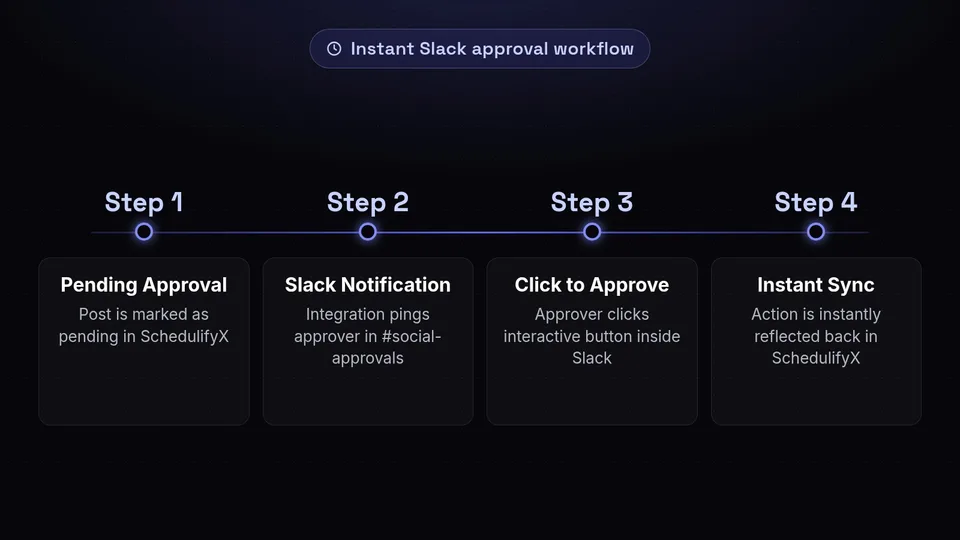
Speed up your workflow by bringing approvals directly to where your team already spends their time. When a post is marked as "Pending Approval" in SchedulifyX, the integration can ping the designated approver via a direct message or in a dedicated #social-approvals Slack channel.
The Slack message includes the post copy, image/video previews, and scheduled time. The best part? Approvers can click an interactive button right inside Slack to Approve or Reject the post. The action is instantly reflected back in SchedulifyX. It's social media management at the speed of chat.
Centralized Team Communication
If a post fails to publish due to an API error or an expired token, SchedulifyX will immediately alert your designated Slack channel. This ensures your team can address the issue instantly, rather than discovering a gap in your social feed hours later. You can also configure daily or weekly digest messages that summarize your upcoming scheduled content and top-performing posts from the previous period.
How to Set Up Your New Integrations
We know that adopting new workflows can sometimes be daunting, which is why we've made the setup process for these integrations incredibly intuitive. You don't need to be an IT expert or hire a developer to get started. Here is how you can activate the new features today.
Connecting ClickUp to SchedulifyX
- Log in to your SchedulifyX dashboard and navigate to the Integrations tab in your workspace settings.
- Locate the ClickUp icon and click Connect.
- You will be redirected to a secure ClickUp authorization page. Log in to your ClickUp account and select the Workspaces you want SchedulifyX to access.
- Once authorized, you will be brought back to SchedulifyX to configure your sync rules. Here, you can select which ClickUp Spaces, Folders, or Lists you want to link.
- Map your custom fields. For example, map the ClickUp "Task Description" to the SchedulifyX "Post Caption," and map the ClickUp "Due Date" to the SchedulifyX "Scheduled Time."
- Save your settings, and your two-way sync is now active!
Connecting Slack to SchedulifyX
- In the same Integrations tab within SchedulifyX, find the Slack icon and click Connect.
- Grant SchedulifyX permission to access your Slack workspace.
- Choose your default notification channels. We recommend creating a dedicated channel like
#social-media-updatesto keep your main channels clutter-free. - Customize your notification triggers. You can toggle on/off alerts for successful publishes, failed publishes, new drafts, and pending approvals.
- Save your preferences. You will receive a test message in Slack confirming the connection is successful.
Best Practices for an Optimized Workflow
Now that you know What's New: ClickUp & Slack Integrations Now Live, how can you ensure your team gets the maximum benefit from these tools? Here are a few practices worth adopting:
- Establish Clear Status Definitions: Ensure that everyone on your team understands exactly what each status means in both ClickUp and SchedulifyX. If "In Review" in ClickUp means it goes to the client, make sure the mapped status in SchedulifyX reflects that security level.
- Use Slack Threads for Feedback: While you can approve or reject posts via Slack, detailed creative feedback is best kept organized. Encourage your team to use Slack threads under the automated notification to discuss specific changes, keeping the main channel clean.
- Leverage ClickUp Templates: Create a standard ClickUp task template for social media posts that includes all the necessary custom fields required by SchedulifyX (e.g., Platform, Target Audience, Visual Assets). This ensures data consistency during synchronization.
- Automate Your Analytics Sharing: Set up a weekly Slack digest through SchedulifyX that pushes your top three performing posts of the week into your company's #general channel. This is a great way to showcase the marketing team's wins and keep the whole company engaged with your social presence.
- Regularly Audit Your Workflows: As your team grows and your strategy evolves, revisit your integration settings every quarter. You may find that you need to add new notification triggers or adjust your field mapping to accommodate new types of content.
What This Means for Agencies and Large Teams
If you run a social media agency or manage content for a large enterprise, efficiency is your primary currency. The more time your team spends on administrative tasks, the less time they have for creative strategy and community engagement.
With the ClickUp integration, agencies can now offer clients an unprecedented level of transparency. You can invite clients to a specific ClickUp list where they can review and approve content. Because of the two-way sync, the moment a client approves a post in ClickUp, it is locked and loaded in SchedulifyX. There is no risk of a social media manager missing an email approval and failing to schedule the post on time.
Similarly, the Slack integration allows large teams to break down silos. The PR team can get instant alerts when a crisis management post goes live. The customer support team can be notified exactly when a new feature announcement is published, allowing them to prepare for incoming user queries. It aligns your entire organization around your social media pulse.
Conclusion
The landscape of digital marketing is moving faster than ever, and the tools you use should accelerate your growth, not hold you back. By breaking down the walls between your scheduling software, your project management platform, and your team communication app, we are helping you build a faster, smarter, and more collaborative workflow.
We couldn't be more excited to say: What's New: ClickUp & Slack Integrations Now Live. These features are available immediately to all SchedulifyX users on our Pro and Agency plans. We believe that once you experience the seamless synchronization and real-time collaboration these integrations offer, you will wonder how you ever managed social media without them.
Are you ready to stop switching tabs and start scaling your social media presence? Log in to your SchedulifyX dashboard today to connect your ClickUp and Slack accounts. If you are new here and want to experience the future of AI-powered, fully integrated social media management, start your free trial of SchedulifyX today!