Instagram Scheduling FAQ: Reels, Stories and Covers
Explore our comprehensive Instagram scheduling FAQ: Reels, Stories and covers. Learn how to optimise your visual content strategy with SchedulifyX today.
SchedulifyX is the AI-powered social media command center built for creators, businesses, and agencies. Schedule posts across 10+ platforms, generate content with 9 specialized AI agents, collaborate with your team using approval workflows, analyze performance with deep analytics, and manage all social engagement from a unified inbox. Trusted by professionals worldwide — free plan available, paid plans from
Maintaining a consistent and visually cohesive presence on Instagram requires meticulous planning and reliable execution. As the platform evolves to prioritise short-form video and ephemeral content, marketers frequently encounter technical hurdles when trying to automate their workflows. Whether you are managing a single brand account or juggling multiple client profiles, understanding the nuances of how to properly queue your media is essential. This guide serves as an extensive companion to our Instagram scheduling FAQ: Reels, Stories and covers, providing you with the foundational knowledge needed to optimise your Instagram strategy without relying on manual, real-time posting.
Core Formats
Understanding the Three Pillars of Instagram Scheduling
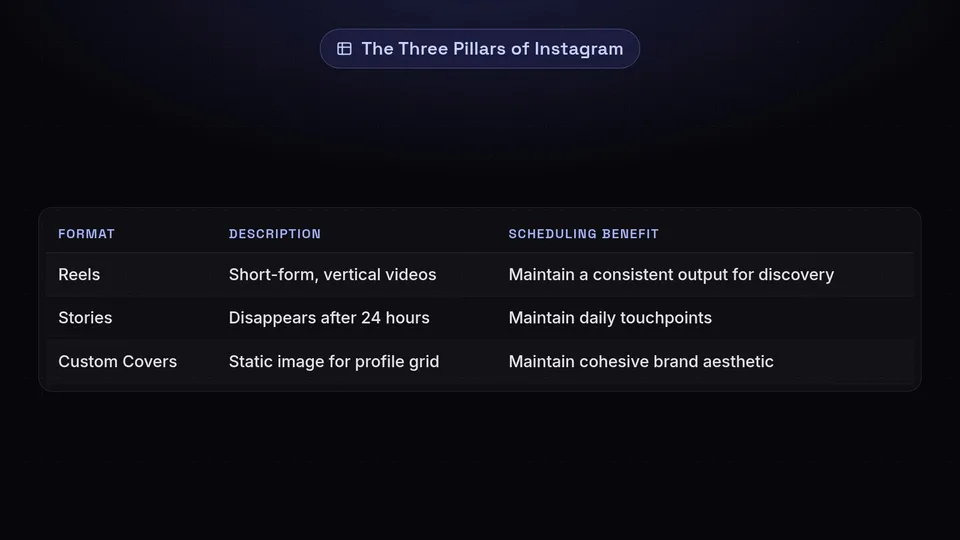
To effectively manage a modern Instagram presence, you must master the three primary content formats that drive engagement and profile aesthetics. Each format carries distinct technical requirements when processed through a scheduling platform.
Instagram Reels
Short-form, vertical videos designed for discovery. Scheduling Reels ensures you maintain a consistent output to capture audience attention in the dedicated Reels tab and the main feed.
Instagram Stories
Ephemeral content that disappears after 24 hours. Scheduling Stories allows you to maintain daily touchpoints with your most engaged followers without interrupting your daily workflow.
Custom Covers
The static image representing your video on your profile grid. Carefully selected covers are vital for maintaining a cohesive and professional brand aesthetic across your account.
Reels Strategy
Mastering Instagram Reels Scheduling
Reels are fundamental to reaching non-followers on Instagram. However, preparing them for auto-publishing requires attention to detail, particularly regarding file specifications and audio choices.
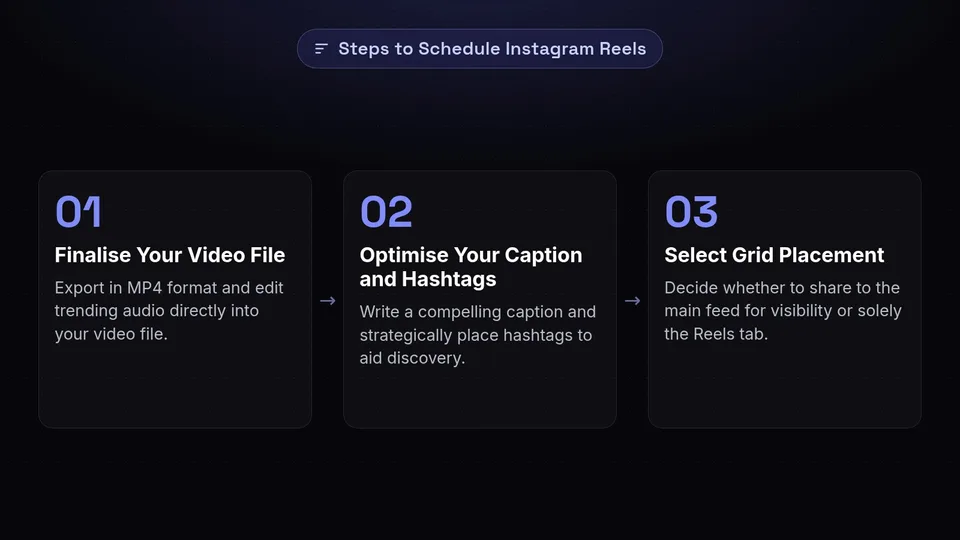
When you schedule a Reel, you are instructing the API to deliver a video file directly to Instagram's servers at a designated time. To ensure this process is seamless, follow these essential steps:
Finalise Your Video File
Ensure your video is fully edited and exported in MP4 format. If you are using trending audio, it is often best to edit the audio directly into your video file prior to uploading it to your scheduling tool, as API limitations can restrict access to Instagram's native commercial audio library.
Optimise Your Caption and Hashtags
Write a compelling caption that encourages viewers to watch until the end or engage in the comments. Strategically place your hashtags within the caption to aid discovery in Instagram search.
Select Grid Placement
Decide whether you want the Reel to appear on your main profile grid or solely in the Reels tab. Sharing to the main feed typically ensures higher initial visibility among your existing followers.
Important Note on Audio Rights
When scheduling through third-party tools, Business accounts are restricted to royalty-free audio or original sound included in the uploaded file. Always ensure you have the appropriate rights to any music used in your scheduled Reels to prevent muted videos or copyright strikes.
Profile Aesthetics
The Art of Managing Reel Covers
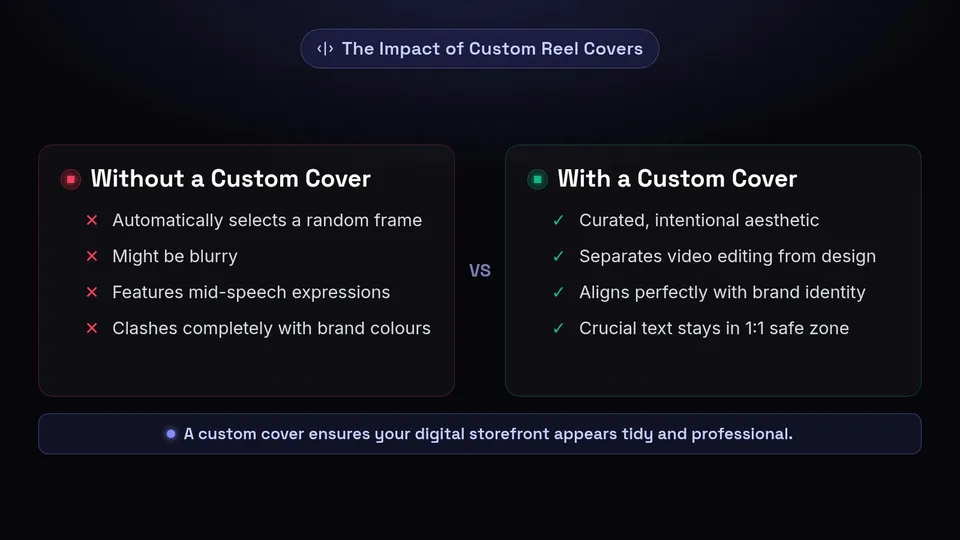
A frequent topic in any Instagram scheduling FAQ: Reels, Stories and covers revolves around the profile grid. Your grid is your digital storefront, and Reel covers dictate how tidy and professional that storefront appears.
Why Covers Matter
Without a custom cover, Instagram will automatically select a random frame from your video. This frame might be blurry, feature mid-speech expressions, or clash completely with your brand colours. A custom cover ensures that when a user visits your profile, they see a curated, intentional aesthetic.
The Safe Zone
While Reel covers are uploaded in a 9:16 vertical format (1080x1920 pixels), they are cropped to a 1:1 square (1080x1080 pixels) on your main profile grid. Crucial text and focal points must remain centrally aligned within this square "safe zone" to ensure they are fully visible on your grid.
When using SchedulifyX to arrange your content calendar, you can upload a distinct image file to serve as your cover. This separates the editing process of the video from the graphic design process of the cover, allowing your design team to craft visually striking thumbnails that align perfectly with your brand identity.
Streamline Your Instagram Strategy
Plan your Reels, align your covers, and schedule your Stories all from one unified dashboard with SchedulifyX.
Start Scheduling Today →Ephemeral Content
Demystifying Instagram Story Scheduling
Stories provide a raw, authentic connection with your audience. However, logging in multiple times a day to post them manually can disrupt your focus. Scheduling Stories allows you to maintain a continuous narrative without the real-time hassle.
- Batch Production: Film and design a week's worth of Stories in one sitting, ensuring a cohesive narrative and consistent styling.
- Time Zone Optimisation: Publish Stories when your audience is most active, even if that falls outside of your normal working hours or in a different time zone.
- Campaign Alignment: Synchronise your Story publications with email newsletters, product launches, or main feed posts for maximum impact.
- Visual Consistency: Apply brand templates and typography consistently before uploading to your scheduler.
Pro Tip: Due to API restrictions, native interactive stickers (like polls, question boxes, or countdowns) cannot always be fully automated through third-party direct publishing. If your strategy relies heavily on these features, utilise a notification-based scheduling method. SchedulifyX can send a push notification to your mobile device at the scheduled time, allowing you to quickly add native stickers before hitting publish.
Workflow Comparison
Native App vs. Dedicated Scheduling Tools
Marketers often debate whether to use the native Instagram app or a dedicated platform. Here is a breakdown of how they compare when handling Reels, Stories, and covers.
| Capability | Native Instagram App | SchedulifyX |
|---|---|---|
| Schedule Reels in Advance | Limited timeframe | Extended timeframe |
| Custom Cover Uploads | ✔ | ✔ |
| Cross-Platform Syncing | ✗ | ✔ |
| Visual Grid Planning | ✗ | ✔ |
| Team Approvals | ✗ | ✔ |
Using a comprehensive tool allows for better team collaboration, ensuring that every asset—from the video file to the caption and the cover image—is reviewed and approved before it goes live.
Troubleshooting
Common Pitfalls and Best Practices
Even with a robust workflow, technical nuances can occasionally cause friction. By understanding the common pitfalls of Instagram automation, you can ensure your content is published exactly as intended.
✔ Best Practices
- Always verify your custom cover fits within the 1:1 centre crop for your profile grid.
- Ensure your Instagram account is set to a Professional (Business or Creator) account and linked to a Facebook Page to enable API publishing.
- Double-check video file sizes and formats before scheduling to prevent upload failures.
✗ Common Pitfalls to Avoid
- Scheduling videos that exceed the platform's maximum file size or duration limits.
- Forgetting that automated publishing does not support native trending audio selection from the Instagram library.
- Neglecting to check how your scheduled Reel cover aligns with your existing grid aesthetics.
To further assist you in navigating the complexities of automated publishing, we have compiled a detailed list of frequently asked questions below. This section addresses the most specific queries regarding our Instagram scheduling FAQ: Reels, Stories and covers, helping you to refine your workflow and eliminate guesswork.
Get started free — no credit card required.
