What Does PFP Mean? The Ultimate Guide to Profile Pictures
SchedulifyX Team · September 25, 2026
Wondering what PFP means? Learn the meaning, history, platform culture, and the exact profile picture size for every network to keep your brand looking sharp.
PFP stands for "profile picture," the image that represents you, your brand, or your persona across social media platforms and digital spaces. If you have ever found yourself scrolling through comments and wondering, what does pfp mean, you now have the direct, simple answer. But while the acronym is straightforward, the culture, formatting, and strategy behind that tiny image are incredibly nuanced.
Your PFP is often the first impression you make online. It is the visual anchor for your digital identity, following every post, comment, and message you send. Making this page worth the visit means going far beyond a simple dictionary definition. In this comprehensive guide, we are diving deep into where the term came from, how PFP culture works on different platforms, the exact dimensions each platform crops to, why circular crops notoriously ruin square logos, and how to pick an image that stays legible even when scaled down to a microscopic 32 pixels.
The Origins and Evolution of PFP Meaning
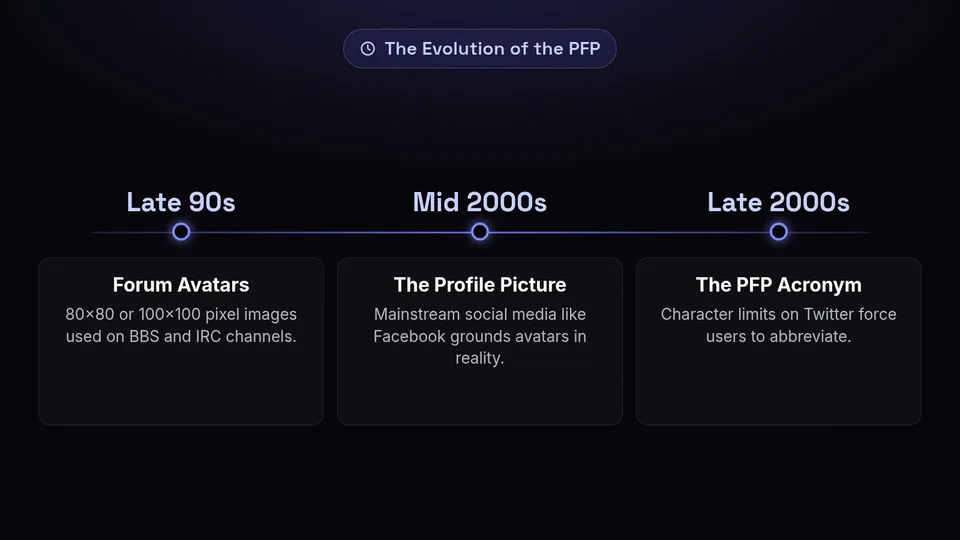
To truly grasp the pfp meaning, we have to look back at the early days of the internet. Before social media giants like Facebook, Instagram, and X (formerly Twitter) dominated the landscape, internet users congregated on bulletin board systems (BBS), IRC channels, and specialized forums. In these early text-heavy spaces, users were identified primarily by usernames and custom signatures.
As forum software evolved (think phpBB and vBulletin in the late 90s and early 2000s), they introduced "avatars"—small, usually 80x80 or 100x100 pixel images that sat next to a user's posts. These avatars were the ancestors of the modern PFP. Gamers and tech enthusiasts used them to showcase their favorite characters, pixel art, or abstract designs.
When mainstream social media took over, the terminology shifted. Facebook asked for a "Profile Picture," a term that felt more grounded in reality than "avatar." As character limits on platforms like Twitter forced users to abbreviate their language, "Profile Picture" was quickly shortened to "PFP." Today, the acronym is ubiquitous. It is used as a noun ("Check out my new PFP"), an adjective ("That's a great PFP aesthetic"), and is a staple of digital communication. If you are curious about other acronyms born from internet culture, check out our comprehensive guide to social media slang.
How PFP Culture Works on Different Platforms
Not all PFPs are created equal. The pfp meaning and the expectations surrounding it change drastically depending on the platform you are using. Let us break down the distinct cultures of profile pictures across the digital ecosystem.
LinkedIn: The Professional Headshot
On LinkedIn, your PFP is your digital handshake. The culture here demands professionalism. Users typically opt for high-resolution headshots with clean backgrounds, professional attire, and a warm smile. A missing PFP on LinkedIn is a major red flag, often signaling a bot or an inactive account. Here, your profile picture size and clarity directly correlate with your perceived credibility.
X (Twitter): The Wild West of Identity
X is where PFP culture is perhaps the most diverse. For brands and public figures, it is a space for polished logos and professional photos. However, for the average user, a PFP can be anything: a meme, a favorite anime character, a celebrity, or a piece of digital art. X is also the birthplace of the "NFT PFP" craze, where users display verifiable digital assets (like Bored Apes or CryptoPunks) in a special hexagonal frame to signal wealth and membership in exclusive communities.
Instagram: The Aesthetic Anchor
Instagram is a highly visual platform, and the PFP sets the tone for a user's entire grid. Influencers and creators often use highly stylized, edited photos that match their overall color palette or "aesthetic." Because you cannot click to enlarge a profile picture on Instagram natively within the app, the image must be striking and recognizable even at a small size.
TikTok: Motion and Virality
TikTok allows users to upload short videos as their PFPs, adding a layer of motion to the traditional static image. TikTok PFP culture is heavily trend-driven. It is common to see users temporarily change their PFPs to match a viral trend, support a creator (like the famous "cult" PFP takeovers), or participate in a platform-wide inside joke.
Discord and Gaming Platforms: The Return of the Avatar
On platforms like Discord, Twitch, and Steam, the PFP culture closely mirrors the old-school forum days. Anonymity is more common, and users often choose illustrations, gaming characters, or custom-commissioned artwork. Discord also allows animated GIFs for users with premium subscriptions, bringing a dynamic element to server chat lists.
The Ultimate Profile Picture Size Guide for Every Platform
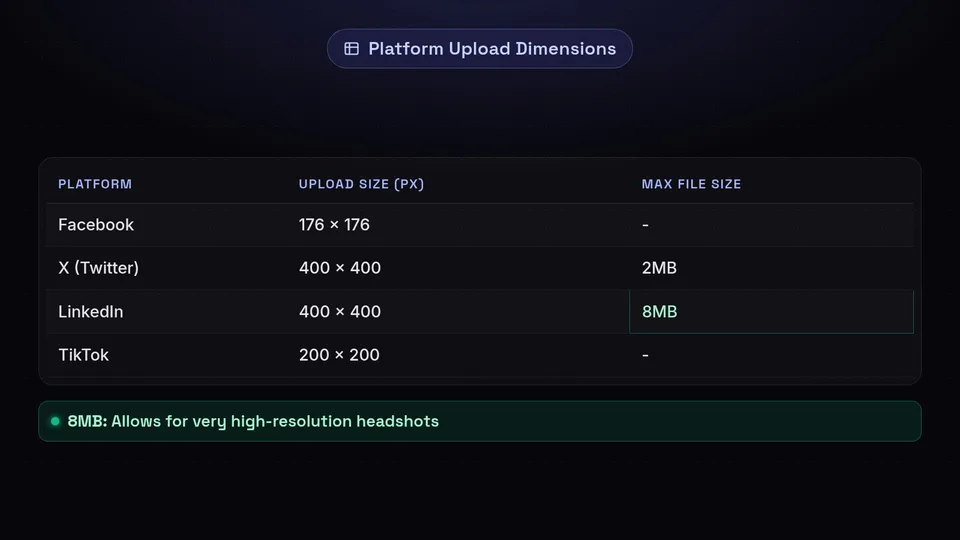
One of the biggest mistakes brands and individuals make is uploading a single image to every platform without considering the specific profile picture size requirements. Uploading an image that is too small results in a blurry, pixelated mess. Uploading one that is too large or incorrectly proportioned can lead to awkward cropping.
Here are the exact dimensions you need to know for the major platforms. For a complete, up-to-date list of all image dimensions and access to our in-browser image resizer, bookmark our social media image sizes tool.
- Facebook: Upload at 176 x 176 pixels. Displays at 176x176 on computers, 196x196 on smartphones, and 36x36 on most feature phones.
- X (Twitter): Upload at 400 x 400 pixels. Maximum file size is 2MB.
- Instagram: Upload at 320 x 320 pixels. Even though it displays smaller on mobile, uploading at this size ensures crispness across all devices.
- LinkedIn: Upload at 400 x 400 pixels. The platform accommodates up to 8MB files, allowing for very high-resolution headshots.
- TikTok: Upload at 200 x 200 pixels. Minimum requirement is 20x20, but always aim higher for quality.
- YouTube: Upload at 800 x 800 pixels. YouTube compresses this heavily across different devices, so starting large is crucial.
- Pinterest: Upload at 165 x 165 pixels.
Remember, while these are the recommended upload dimensions, almost all of these platforms will force your square image into a circular crop. This brings us to the most common headache in social media branding.
The Curse of the Circular Crop: Why It Ruins Square Logos
If you manage a brand account, you have likely experienced the frustration of the circular crop. You upload a perfectly designed, square logo, only to find that the platform has aggressively sliced off the corners, chopping off the first and last letters of your company name.
Why did platforms switch to circles? The shift began in the mid-2010s, led by platforms like Google and Twitter. Circular avatars are psychologically softer and draw the human eye directly to the center of the image, making feeds feel more modern and conversational. However, this UI update was a nightmare for traditional graphic design.
The Math Behind the Crop
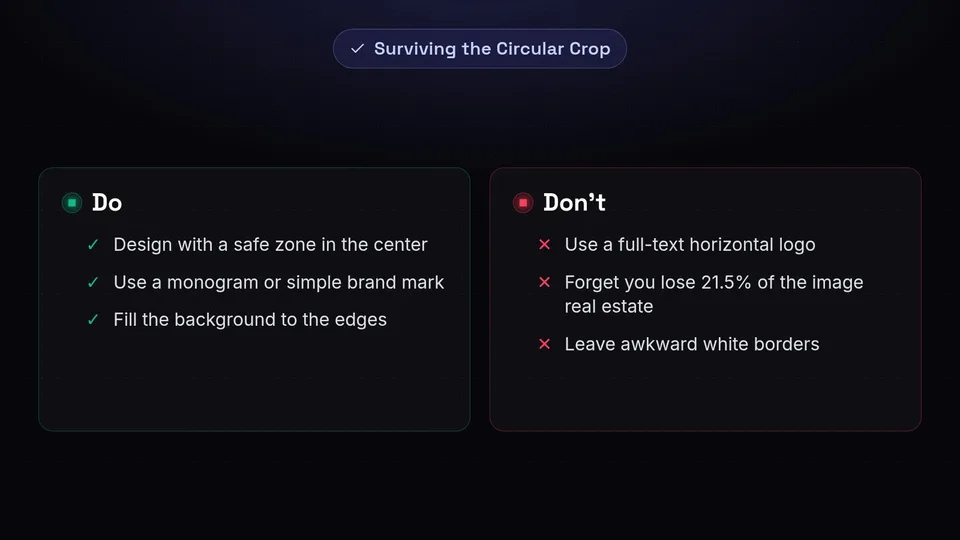
When a platform crops a square into a circle, you lose approximately 21.5% of your image's real estate—specifically, the four corners. If your logo is a wide rectangle placed inside a square canvas, the edges of that rectangle will almost certainly be clipped by the circle's radius.
How to Fix It: The Safe Zone Strategy
To survive the circular crop, you must design with a "safe zone" in mind. Imagine a circle drawn perfectly inside your square canvas, touching all four edges. Everything outside that circle will be invisible.
- Scale it down: If you have a horizontal text logo, you need to shrink it significantly so that it fits entirely within the center circle.
- Use a monogram: The best practice for brands is to avoid full-text logos altogether for PFPs. Instead, use a "brand mark" or monogram—a single letter or a simple icon that represents the brand (e.g., the Nike Swoosh or the McDonald's M). These scale perfectly into a central circle.
- Fill the background: Ensure your background color extends all the way to the edges of your square canvas so there are no awkward white borders when the circle is cut.
How to Choose a PFP That Stays Legible at 32 Pixels
We have answered what does pfp mean and covered the ideal profile picture size, but there is one final, critical hurdle: scale. While you might upload a beautiful 400x400 image, most users will never see it at that size.
In a crowded comment section, a mobile feed, or a direct message inbox, your PFP is often scaled down to a minuscule 32x32 or even 24x24 pixels. At this microscopic size, complex images turn into unrecognizable smudges. Here is how to ensure your PFP remains legible and impactful, no matter how small it gets.
1. Maximize High Contrast
Contrast is your best friend when dealing with small images. If your subject (a face or a logo) is a similar color to the background, it will blend together when scaled down. Use a bright, solid-color background to make the foreground subject pop. For example, a dark blue logo on a stark white or bright yellow background will remain readable at any size.
2. Embrace Simplicity
Clutter is the enemy of the PFP. If your profile picture contains multiple people, complex scenery, or intricate patterns, it will fail at 32 pixels. Strip the image down to its most essential element. If it is a personal brand, the image should be just your face and shoulders—not your whole body. If it is a company logo, drop the tagline and just use the primary icon.
3. Banish the Text
Never put readable text in your PFP unless it is a single, massive letter (like a monogram). Slogans, URLs, and even full brand names become illegible squiggles when scaled down. Rely on visual branding, colors, and shapes to convey your identity, and leave the text for your display name and bio.
4. Perfect the Framing
For headshots, the framing should be tight. The top of the frame should sit just above your hair, and the bottom should cut off around your collarbone. This ensures your face takes up the maximum amount of space within the circular crop. Make sure your eyes are visible and engaging, as humans are biologically wired to recognize and connect with faces, even tiny ones.
Elevate Your Social Media Presence with SchedulifyX
Understanding the intricacies of the pfp meaning, mastering the profile picture size for every network, and navigating the complexities of circular cropping are all vital steps in building a strong digital identity. Your PFP is the face of your brand; it deserves time, strategy, and perfect execution.
But having a flawless profile picture is only the beginning. To truly succeed on social media, you need consistency, engaging content, and a smart publishing strategy. That is where SchedulifyX comes in. As an AI-powered social media scheduling platform, SchedulifyX takes the guesswork out of managing your online presence.
With SchedulifyX, you can seamlessly plan, create, and schedule your posts across all major platforms from one intuitive dashboard. Our AI tools help you generate engaging captions, find the best times to post, and analyze your performance so you can focus on what really matters—connecting with your audience. Now that your PFP is looking sharp, it is time to make sure the content next to it is just as powerful. Sign up for SchedulifyX today and take control of your social media destiny.
