Instagram First Comment Strategy: Does It Really Work?
SchedulifyX Team · September 9, 2026
Discover the truth behind the Instagram first comment trend. Learn if hashtags in the first comment actually boost reach and how to automate the process.
Have you ever hit 'publish' on an Instagram post and immediately scrambled to your phone's keyboard, racing against the algorithm to paste a block of hashtags into the comments section? If so, you are participating in one of the most common, yet widely misunderstood, rituals in social media marketing: the instagram first comment strategy.
For years, social media managers, creators, and small business owners have religiously moved their hashtags out of the caption and into the first comment. It has become a habit that half of Instagram follows without truly knowing whether it does anything beneficial. Is it a secret growth hack? Does it trick the algorithm? Or is it just an aesthetic preference that has spiraled into an industry-wide superstition?
In this comprehensive guide, we are pulling back the curtain on the instagram first comment. We will explore what this space is actually used for—from hiding hashtags and dropping copyable links to adding context that would otherwise bloat your primary caption. Most importantly, we will directly address the elephant in the room: do hashtags in first comment perform differently from hashtags in the caption? The answer is much clearer than most 'guru' advice admits.
Finally, we will show you how to stop racing the clock by setting up an auto first comment instagram workflow, and we will be brutally honest about where this tactic fits into your overall growth strategy. Spoiler alert: it is a small optimisation, not a magic growth lever.
What is the Instagram First Comment?

The instagram first comment is exactly what it sounds like: it is the very first comment left on an Instagram post, Reel, or IGTV video, typically posted by the author of the content immediately after the post goes live. Because it is posted milliseconds after the content is published, it sits at the top of the comment section (at least until the algorithm starts sorting comments by engagement and relevance).
Historically, this practice was born out of a desire for aesthetic purity. In the early days of Instagram, captions were short, punchy, and highly visual. When hashtags became the primary way to gain discoverability, users suddenly needed to include up to 30 tags per post. A giant block of blue, hyperlinked text at the bottom of a carefully crafted caption looked messy. Thus, the first comment strategy was born: hide the clutter in the comments, keep the caption pristine.
However, over the years, the use case for the first comment has evolved. It is no longer just a dumping ground for tags. Savvy marketers have realized that this prime piece of real estate can be used for a variety of strategic purposes, which we will explore in the next section.
What is the First Comment Actually Used For?
While first comment hashtags are the most common use case, they are far from the only one. Social media managers utilize the first comment for several distinct purposes, optimizing the user experience and keeping the main caption focused. Here is a breakdown of what the first comment is actually used for today.
1. Moving Hashtags Out of the Caption
As mentioned, the primary driver for this habit is aesthetic. A caption that ends with a neat, thought-provoking sentence looks much better than one that trails off into a wall of 30 hashtags. By moving hashtags to the first comment, creators can maintain a clean, minimalist look. When users scroll past the post in their feed, they only see the text you want them to read, not the backend SEO mechanics you are using to get the post seen.
2. Providing a Copyable Link
One of Instagram's most notorious limitations is its refusal to allow clickable links in captions (outside of Stories and the coveted 'link in bio'). If you paste a URL into an Instagram caption, it renders as plain text. Furthermore, Instagram does not allow users to copy text directly from a caption in the native mobile app.
However, users can copy text from a comment. If you have a specific, long-tail URL that you want users to visit, placing it in the first comment allows dedicated followers to tap, hold, and copy the link to paste into their mobile browser. While it is not as seamless as a clickable link, it removes a significant point of friction compared to putting an un-copyable link in the main caption.
3. Adding Context That Would Bloat the Caption
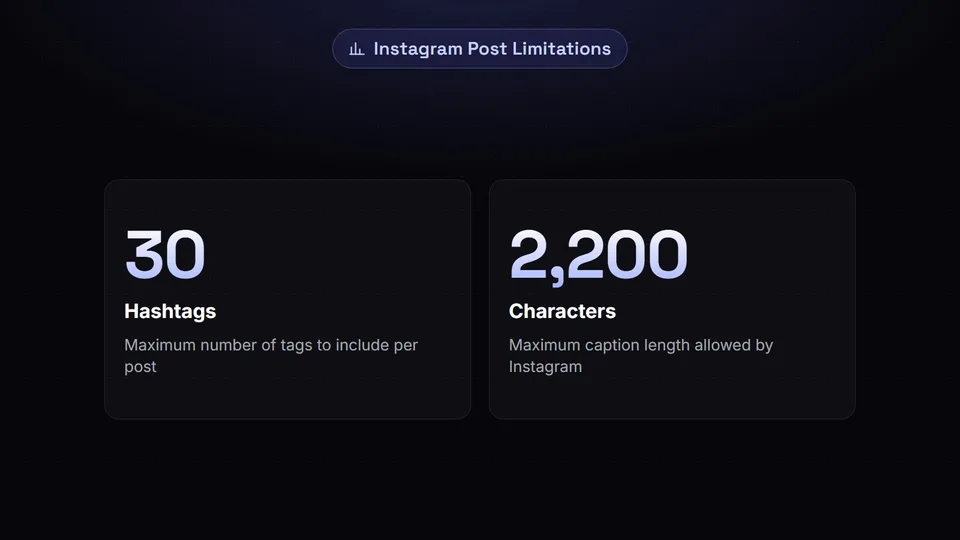
Instagram allows up to 2,200 characters in a caption. While that is plenty of space for most users, micro-bloggers, educators, and storytellers often find themselves hitting that limit. Alternatively, you might have a caption that is perfectly punchy, but you need to include a long list of credits, a recipe, a detailed disclaimer, or technical specifications.
Instead of bloating the main caption and ruining the pacing of your copy, you can use the first comment as an overflow area. You can end your caption with a simple prompt: 'Read the full recipe in the first comment below!' This keeps the initial engagement high while still providing all the necessary information to those who want it.
4. Strategic Call-to-Actions (CTAs)
Sometimes, you want your caption to focus entirely on storytelling, emotion, or value delivery, and you don't want to ruin the vibe with a hard sell. Placing your Call to Action (CTA) in the first comment separates the 'pitch' from the 'content.' For example, your caption might tell a beautiful story about a client's success, while your first comment says: 'Ready to achieve results like this? DM us the word GROWTH to get started.'
The Big Debate: Hashtags in First Comment vs. Caption
Now we arrive at the million-dollar question, the one that causes endless debates in marketing forums and agency Slack channels: Do hashtags in first comment perform differently from hashtags in the caption?
For years, the advice was purely anecdotal. Some claimed the caption resulted in more reach; others swore the first comment was the secret to going viral. People are really asking for a definitive answer, and the truth is much clearer than most advice admits.
The Verdict on Reach and Discoverability
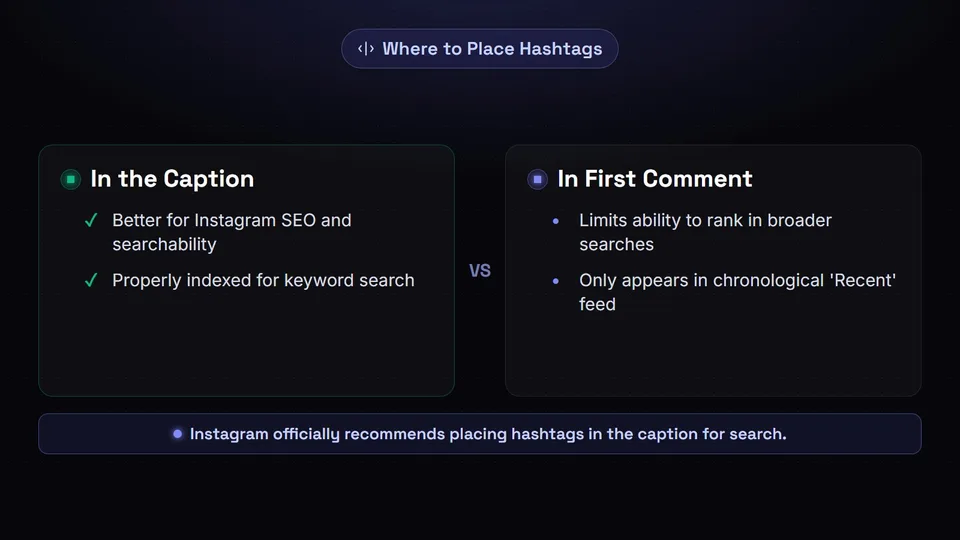
Let's cut right to the chase: Hashtags in the caption are better for Instagram SEO and searchability than hashtags in the first comment.
This isn't a guess; it comes directly from Instagram. In a push to improve how users search for content on the platform, Instagram transitioned from a pure hashtag-based search to a keyword-based search (similar to how Google or Pinterest works). When explaining how to optimize content for this new search functionality, the head of Instagram, Adam Mosseri, and the official @creators account explicitly stated that keywords and hashtags should be placed in the caption to be properly indexed for search.
"For a post to be found in Search, put the keywords and hashtags in the caption, not the comments." — Official Instagram Guidance
When you place a hashtag in the first comment, the algorithm still registers it, and your post will still appear in the chronological 'Recent' feed for that specific hashtag. However, it significantly limits your ability to rank in broader keyword searches. Instagram's text-crawling bots prioritize the caption when determining what a piece of content is about.
Why the Confusion Exists
If the caption is objectively better for SEO, why do so many people still use first comment hashtags? Because for a very long time, it didn't matter. Prior to 2021, Instagram's algorithm treated the caption and the first comment almost identically regarding hashtag indexing. Old habits die hard, and many social media courses created in 2018 are still being circulated today.
Furthermore, the difference in reach is often negligible for accounts that do not rely heavily on search traffic. If your primary growth engine is the Reels algorithm (which pushes content based on visual watch time and audio trends rather than hashtags), moving your tags to the comments won't suddenly tank your views. The algorithm is smart enough to know what your video is about based on on-screen text, audio, and visual AI.
Summary of the Debate
- For Maximum SEO and Searchability: Put hashtags in the caption.
- For Aesthetic Purity: Put hashtags in the first comment (but accept a slight penalty in search indexing).
- For Reels: It matters less, as the recommendation algorithm relies more on video content and user behavior than hashtags.
When is the First Comment Genuinely Better?

If placing hashtags in the caption is better for SEO, should we abandon the instagram first comment entirely? Not at all. There are several specific cases where utilizing the first comment is genuinely better than cramming everything into the caption.
1. Brand Aesthetics and Luxury Positioning
For high-end luxury brands, fashion houses, and minimalist creators, visual presentation is paramount. A caption that reads like a desperate plea for algorithm attention (e.g., #fashion #style #ootd #luxury #viral) completely undermines a premium brand identity. In these cases, the slight dip in SEO discoverability is a worthwhile trade-off for maintaining a clean, sophisticated brand image. The first comment hides the 'marketing machinery' from the end consumer.
2. Multi-Language Accounts
If you have an international audience and need to provide captions in two languages, your caption space will fill up incredibly fast. A brilliant use of the first comment is to place the secondary language translation there. For example, the main caption can be in English, with a prompt saying 'Traducción al español en el primer comentario.' This keeps the post readable and accessible without creating a massive, intimidating wall of text.
3. Engagement Baiting (The Good Kind)
You can use the first comment to instantly spark a debate or guide the conversation. When people open the comment section to leave their thoughts, seeing a pinned or highly-liked first comment from the creator can set the tone. For example, if you post a controversial opinion in your video, your first comment could be: 'I know this is a hot take! Let me know where you think I’m wrong down below.' By being the first to comment, you lower the barrier to entry for others to join the conversation.
4. Giveaways and Contest Rules
Legal disclaimers for Instagram giveaways are notoriously long and boring. Putting the exciting part (What you win and how to enter) in the caption, and the boring part (Terms and conditions, eligibility, legal release) in the first comment ensures you remain legally compliant without ruining the excitement of the post.
The Honest Truth: A Small Optimisation, Not a Growth Lever
As experts in social media scheduling and strategy, we believe in radical transparency. So here is the honest truth about the instagram first comment: It is a minor optimization, not a growth lever.
Many marketers spend hours agonizing over whether to put their hashtags in the caption or the comments, spacing them out perfectly, and counting them to ensure they hit exactly 30. They treat this decision as if it is the key to unlocking viral growth. It is not.
Whether your hashtags are in the caption or the first comment will not save a piece of content that is boring, poorly lit, or irrelevant to your audience. The algorithm prioritizes human behavior: watch time, saves, shares, and meaningful interactions. If your content genuinely resonates with people, it will perform well regardless of where your hashtags live. If your content does not resonate, no amount of hashtag wizardry in the first comment will force the algorithm to push it to the Explore page.
Think of the first comment strategy like choosing the color of the paint on a race car. A sleek paint job might make the car look slightly more professional (aesthetics), and maybe a specific type of paint reduces wind resistance by a fraction of a percent (SEO). But what actually wins the race is the engine (your content) and the driver (your community engagement).
Stop viewing the first comment as a hack to trick the algorithm. Start viewing it as a formatting tool to improve the reading experience for your actual human followers.
How to Schedule an Auto First Comment on Instagram
If you have decided that using the first comment is right for your brand—whether for hiding hashtags, dropping a copyable link, or posting a translation—you quickly run into a logistical nightmare. Manually posting a first comment requires you to be glued to your phone the exact second your post goes live. If you are a minute late, someone else might comment first, ruining the aesthetic, or the algorithm might index the post before your tags are added.
Racing to post it manually is stressful, inefficient, and completely unnecessary in today's digital landscape. This is where an auto first comment instagram feature becomes an absolute lifesaver.
The Power of Automation
Modern social media management platforms allow you to schedule your first comment at the exact same time you schedule your post. When the platform pushes your image or Reel to Instagram, it simultaneously fires off the comment via the official Instagram API.
Here is how you can set this up using a platform like SchedulifyX:
- Create Your Post: Open your social media scheduling dashboard and upload your creative assets (image, carousel, or video).
- Write Your Caption: Craft your engaging, clean caption without worrying about clutter.
- Toggle the First Comment Feature: Look for the 'Add First Comment' toggle in the post composer.
- Draft the Comment: Paste your block of hashtags, your copyable link, or your extended context into the first comment text box.
- Schedule and Forget: Select your desired date and time, and hit schedule.
The system will handle the rest. At the scheduled time, your post will go live, and within milliseconds, your pre-written comment will appear below it. This ensures your hashtags are indexed immediately (if you choose to put them there) and saves you from the anxiety of manual posting.
Why You Need a Specialized Tool
Not all scheduling tools are created equal. Because the first comment relies on specific API permissions from Meta, you need a robust, officially partnered platform to ensure the comment fires reliably. When evaluating tools, ensure they support auto first comments not just for static grid posts, but for Reels and Carousels as well, as these are the dominant content formats on Instagram today.
Best Practices for Your First Comment Strategy
To ensure you are getting the most out of your instagram first comment strategy, follow these industry best practices:
1. Don't Overload It
Just because it's hidden in the comments doesn't mean you should spam it. Instagram allows up to 30 hashtags per post, but recent guidance from Instagram suggests using 3 to 5 highly relevant tags is more effective than spamming 30 broad ones. Quality over quantity always wins.
2. Format for Readability
If you are using the first comment for extra context, recipes, or translations, use line breaks and emojis to make it readable. A massive block of text is just as unappealing in the comments as it is in the caption.
3. Pin Your First Comment
If your first comment contains vital information (like a CTA or a link), use Instagram's 'Pin Comment' feature. This ensures that even as other users comment and the algorithm reshuffles the comment section based on likes, your strategic comment remains permanently locked at the very top for all new viewers to see.
4. Monitor Engagement
If you are using the first comment to ask a question or prompt a debate, make sure you stick around to reply to the people who respond to it! The first 30 minutes after posting are crucial for building algorithmic momentum, so active community management is essential.
5. A/B Test Your Strategy
Don't just take our word for it—test it yourself! For one month, use first comment hashtags. The next month, put your hashtags in the caption. Review your Instagram Insights to see if there is a statistically significant difference in your 'Reach from Explore' or 'Reach from Hashtags.' Every account's audience and niche behaves slightly differently.
Frequently Asked Questions (FAQs)
Can I edit the first comment after it is posted?
No, Instagram does not currently allow you to edit comments. If you make a typo in your first comment, or if you want to change your hashtags, you will need to delete the comment entirely and post a new one manually.
Will I get shadowbanned for using the same hashtags in the first comment every time?
Using the exact same block of 30 hashtags on every single post can trigger Instagram's spam filters, regardless of whether they are in the caption or the first comment. It is highly recommended to rotate your tags and ensure they are hyper-relevant to the specific image or video you are posting.
Does the auto first comment feature work for Reels?
Yes! If you are using an advanced social media scheduling tool like SchedulifyX, you can automate the first comment for Reels, Carousels, and single image posts seamlessly.
Are hashtags dead?
Hashtags are not dead, but their function has changed. They are no longer the primary way to go viral; they are a categorization tool. They tell the algorithm what your content is about so it can serve it to the right people. Think of them as metadata rather than magic beans.
Conclusion: Streamline Your Instagram Strategy
The instagram first comment is a fascinating phenomenon. It started as an aesthetic workaround, evolved into a perceived algorithm hack, and has now settled into its true role: a useful formatting tool for clean captions, copyable links, and extended context.
While the debate over hashtags in first comment versus the caption will likely rage on in marketing circles, the data is clear: captions are slightly better for search engine optimization, but the difference is marginal for most accounts. The true value of the first comment lies in user experience and brand presentation.
Ultimately, this tactic is a small optimization. It will not make or break your Instagram presence. What will make or break your presence is consistency, high-quality content, and an engaged community.
Stop wasting time racing to manually post your comments. Reclaim your time and reduce your stress by using an auto first comment instagram tool. With SchedulifyX, you can schedule your posts, captions, and first comments all in one seamless workflow. Focus your energy on creating content that your audience loves, and let our intelligent automation handle the tedious mechanics of publishing. Ready to streamline your social media strategy? Explore our advanced scheduling features today and take control of your Instagram growth.
