Meta Business Suite Setup: Avoid Costly Mistakes
SchedulifyX Team · November 2, 2026
Master your Meta Business Suite setup. Learn how to secure your Business Portfolio, manage agency access, and recover stuck accounts from former employees.
Introduction: The High Cost of Poor Setup

Imagine waking up one morning to find that your company's most valuable social media asset—a Facebook Page with hundreds of thousands of followers—is entirely inaccessible. You try to log in, only to realize that the former marketing manager, who left the company on bad terms three years ago, holds the master keys. This is not a rare nightmare; it is the single most common disaster in social media management today. A flawed meta business suite setup can cost businesses thousands of dollars in lost revenue, wasted ad spend, and legal fees.
As the digital landscape evolves, so do the tools required to manage it. What was once a simple process of creating a page from a personal profile has transformed into a complex, enterprise-grade architecture. Navigating this ecosystem requires a deep understanding of asset ownership, access hierarchies, and security protocols. This comprehensive guide will walk you through the correct way to structure your Meta assets, ensuring that your business remains the sole owner of its digital presence. We will cover the critical differences between ownership and access, the proper method for onboarding marketing agencies, the nuances of page roles, and the exact recovery path to take if your assets are currently held hostage by a former employee.
Whether you are a small business owner setting up your first ad campaign or an enterprise marketing director auditing your digital infrastructure, mastering the nuances of the meta business manager (now known as the Business Portfolio) is non-negotiable. Let us dive into the architecture, the recent updates, and the strategies that will keep your assets secure.
Terminology & Architecture: The 2024 Shift
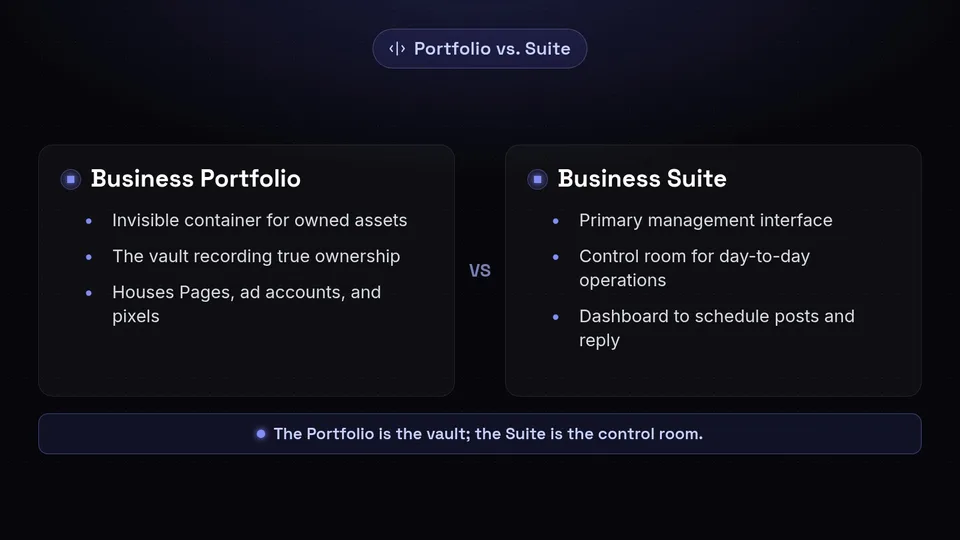
Before diving into the setup process, it is crucial to understand the terminology. Meta's ecosystem has undergone significant rebranding and structural changes, most notably the 2024 architecture shift. The platform historically known as facebook business manager or meta business manager was officially renamed to the "Business Portfolio."
The Business Portfolio acts as the core, invisible container for all your owned assets. Think of it as a digital holding company. It houses your Facebook Pages, Instagram accounts, WhatsApp business profiles, ad accounts, Meta Pixels, datasets, and product catalogs. It is the vault where the true ownership of these assets is recorded.
On the other hand, business suite (specifically Meta Business Suite) serves as the primary management interface. It is the dashboard where you and your team log in to schedule posts, reply to messages, view insights, and manage day-to-day operations. While the Portfolio is the vault, the Suite is the control room. You can learn more about how these platforms interact with third-party tools in our comprehensive guide on /platforms/facebook.
Meta continues to expand this architecture for larger organizations. As of September 28, 2026, Meta announced the launch of the Meta Enterprise Platform, designed to give massive organizations even tighter control over multiple Business Portfolios. The very next day, on September 29, 2026, Meta introduced Meta One, a global subscription service across Facebook, Instagram, WhatsApp, and Meta AI, signaling a move toward more unified, premium business services. Understanding this distinction between the Portfolio (ownership) and the Suite (management) is the foundation of a secure setup.
The Cardinal Rule: Asset Ownership vs. Access
The most expensive mistakes in a meta business suite setup stem from a fundamental misunderstanding of the difference between ownership and access. Meta distinguishes sharply between the two, and mixing them up is how businesses lose their pages.
What is Ownership?
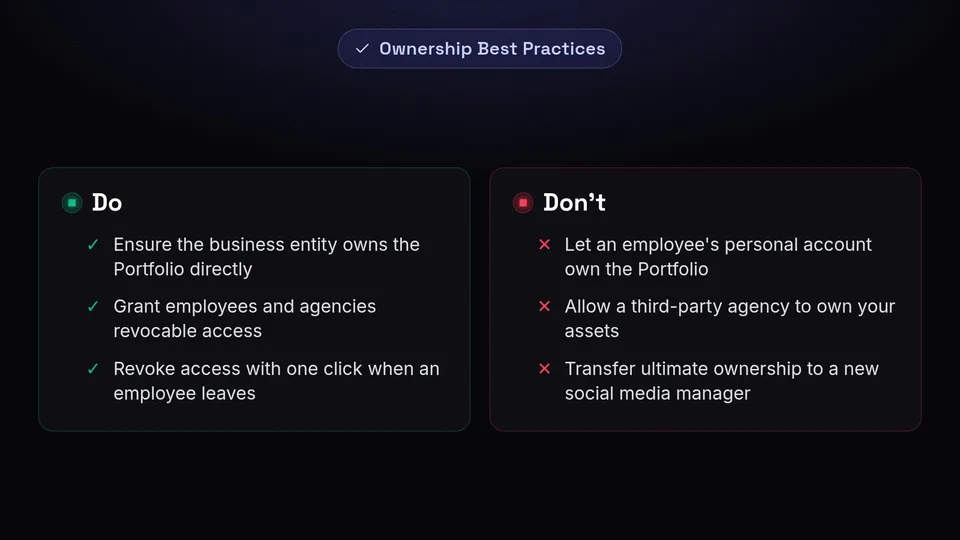
Ownership refers to the ultimate control of the underlying asset containers. When a Facebook Page or an ad account is created, it must be claimed by a Business Portfolio. The golden rule is this: The Business Portfolio should be owned directly by the business entity itself. It should never be owned by an individual's personal account, nor should it be owned by a third-party agency's portfolio.
If an employee creates your company's Business Portfolio using their personal Facebook credentials and claims your Page within it, that employee's personal account is the ultimate owner. If they leave the company, lose their password, or get their personal account banned by Meta, your business assets go down with them. To prevent lockouts, the Portfolio must be established with a generic, company-controlled administrative structure, ensuring that the business entity retains ownership regardless of staff turnover.
What is Access?
Access, conversely, refers to revocable permission roles granted to individuals or partner businesses. Access allows someone to work on an asset—like drafting a post or running an ad—without giving them the keys to the vault. When you hire a new social media manager, you grant them access to your Business Portfolio. You do not transfer ownership of the Portfolio to them.
By strictly separating ownership (held by the business) from access (granted to employees and agencies), you create a fail-safe environment. If an employee leaves, you simply revoke their access with one click in the Meta Business Suite, and your assets remain perfectly secure.
Adding an Agency Correctly: Partner Access
One of the most common scenarios where businesses compromise their security is during the onboarding of a marketing agency. In the past, it was common practice for business owners to share their personal Facebook login credentials with an agency, or worse, allow the agency to claim ownership of the business's ad accounts and Pages within the agency's own Business Portfolio.
This is a catastrophic error. If an agency owns your assets and the relationship sours, they can legally withhold access to your Page, your ad data, and your customer lists. Furthermore, sharing personal logins violates Meta's Terms of Service and can trigger automated security bans.
The Solution: Partner Access via Business Portfolio ID
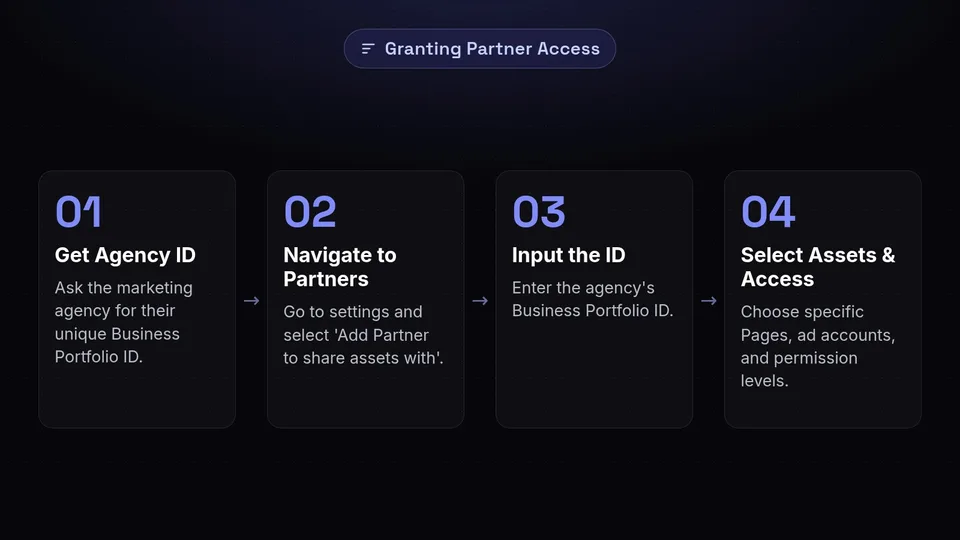
The only correct way to collaborate with a third-party agency is by granting them Partner Access. Every Business Portfolio has a unique identifying number (the Business Portfolio ID). When you hire an agency, you ask them for their ID.
Inside your Meta Business Suite settings, you navigate to the 'Partners' tab and select 'Add Partner to share assets with.' You input the agency's ID and select exactly which assets (Pages, Instagram accounts, ad accounts) they are allowed to work on, and what level of access they have (e.g., content creation, ad management, or insights only).
This method grants the agency operational permissions while retaining strict ownership within the client's Business Portfolio. The agency manages the work through their own dashboard, and you can sever the connection at any time without losing a single piece of data or history.
Page Roles and Connecting Instagram Properly
A successful meta business suite setup requires granular control over who can do what. Once your Business Portfolio is secure, you must assign Page Roles carefully.
User access inside the portfolio can be scoped to various levels. Full control (Admin) should be reserved strictly for business owners or top-level executives. Partial control roles, such as Editor, Moderator, or Ads Manager access, should be used for daily operators. An Editor can create content and send messages, but they cannot delete the Page or remove other users. By applying the principle of least privilege, you minimize the risk of accidental or malicious damage to your digital presence.
The Instagram Connection
Connecting an Instagram business account to your Meta Business Suite is often a point of friction. For a seamless integration, Instagram business accounts must connect directly alongside Facebook Pages within the same Business Portfolio.
To do this correctly, ensure your Instagram account is converted to a Professional/Business account. Then, from within the Meta Business Suite settings, navigate to 'Instagram Accounts' and click 'Add.' You will be prompted to log in to the Instagram account. Once authenticated, the asset is locked into your Portfolio. This unified connection is what allows cross-platform posting, shared ad budgeting, and unified inbox management.
Recent Meta Security and AI Features for 2026
Meta is continuously updating its platform to enhance security and operational efficiency. Staying abreast of these updates is vital for maintaining an optimized setup.
On October 26, 2026, Meta Business Suite began allowing business owners to enable passkeys on their accounts for security. Passkeys replace traditional passwords with cryptographic keys tied to your device (like FaceID or fingerprint scanners), drastically reducing the risk of phishing attacks and unauthorized access. Enabling passkeys should be an immediate priority for any Admin of a Business Portfolio.
Furthermore, automation and artificial intelligence are transforming how businesses operate within the Suite. On August 19, 2026, Meta announced a massive AI integration allowing businesses to link Facebook and Instagram accounts, ad campaigns, and Google Workspace (Gmail, Docs, Sheets, Slides) directly to Meta AI. This integration enables automated ad performance reporting and intelligent budget suggestions right from your workspace. For a deep dive into how to set up these connections alongside third-party scheduling tools, see our guide at /features/integrations.
Content creators also received a massive boost. As of November 2, 2026, Meta announced that Facebook's creator assistant is now proactive, more collaborative, and available on the web. This assistant helps generate content ideas, optimize posting times, and manage community interactions directly within the Business Suite interface.
Leveraging New Advertising Features
Once your facebook business manager infrastructure is secure, you can safely explore the powerful advertising tools Meta offers. A secure foundation ensures that the data generated by these campaigns remains yours forever.
At its Brand Building Summit on October 15, 2026, Meta announced several groundbreaking advertising features that are fundamentally changing how businesses reach audiences:
- Ads Super Burst: Now entering phased general availability, this feature allows brands to dominate ad placements across the Meta ecosystem for short, high-impact windows—perfect for product launches or flash sales.
- First Impression Ads: Currently in US testing, this format guarantees that your ad is the very first thing a user sees when they open the Facebook or Instagram app for the day, maximizing visibility.
- Reels Trending Ads: Expanding globally, this feature allows advertisers to quickly inject their brands into viral, trending audio and visual templates on Reels.
- Aggregated View Time: Currently in alpha, this metric provides a holistic view of how long users are engaging with your video content across all Meta surfaces, allowing for better retargeting strategies.
These advanced tools require a perfectly configured Meta Pixel and dataset, which, as discussed, must be securely owned by your central Business Portfolio.
The Nightmare Scenario: Recovering an Orphaned or Stuck Business Account
Despite best intentions, many businesses find themselves in the worst-case scenario: an orphaned or stuck business account. This occurs when a former employee or a fired agency controls the Business Portfolio and is either unreachable, unresponsive, or hostile. Because Meta's security is designed to keep unauthorized people out, regaining access to your own company's assets can feel like an insurmountable challenge.
However, there is a formal recovery path. If you are the rightful business owner, you must submit a formal Meta Admin Dispute, also known as a Portfolio Access Request. This is a legal and administrative process where you prove to Meta that the entity holding the assets belongs to you, and the current admin is no longer authorized.
Step 1: Gathering Identity & Business Proof
Meta will not hand over a Business Portfolio based on an email request. You must provide undeniable authorization evidence. The documentation required is strict and must perfectly match the details associated with the Page and the business.
You will need to gather:
- A valid, government-issued photo ID of the person making the request (must be a business owner or executive).
- A signed letter on official company letterhead detailing the exact situation, the URL of the Page, the Business Portfolio ID (if known), and the exact Facebook profile URL of the new admin who should be granted access.
- Official business documentation. Meta requires authorization evidence such as articles of incorporation, local business licenses, or official tax certificates (like an EIN assignment letter in the US or a VAT registration certificate in Europe). Utility bills in the business's name can also support the claim.
Step 2: Utilizing Escalation Surfaces
Finding where to submit these documents is often the hardest part, as Meta frequently updates its interface. Dispute and recovery appeals are typically submitted through specific escalation surfaces:
- The Account Quality Dashboard: Often used if the asset has been restricted during the dispute.
- Business Support Home: Look for the disabled-asset forms or the "Contact Support" button. If you have active ad spend on another account, you may have access to live chat support here, which can drastically speed up the process.
- Meta Account Center: For identity verification and linking issues.
Step 3: Navigating Recovery Timelines
Patience is required during this process. Meta's internal teams must manually review the legal documents to prevent social engineering hacks. According to industry data recorded on June 19, 2026, based on a sample of 189 cases, recovery timelines vary based on the complexity of the issue.
Clean admin-access cases (where the documentation is perfect and the dispute is straightforward) typically resolve in 24 to 72 hours. However, full Business Portfolio recovery appeals—where ownership of the entire container must be forcibly transferred—take between 5 and 15 business days. Do not submit multiple requests during this waiting period, as it can push your ticket to the back of the queue.
SchedulifyX vs. Native Meta Tools
As you optimize your meta business suite setup, you may wonder how native Meta tools compare to third-party platforms like SchedulifyX. It is important to evaluate the strengths of each platform to build the best tech stack for your business.
To be completely transparent, Meta Business Suite is undeniably stronger than SchedulifyX when it comes to deep, granular ad campaign creation and native monetization tracking. Because Meta owns the infrastructure, features like the newly announced Ads Super Burst or First Impression Ads (as of October 15, 2026) must be managed directly within the Meta Business Portfolio. If your primary focus is complex media buying, Meta's native tools are unmatched.
However, SchedulifyX excels where Meta falls short: true cross-platform organic management. While Meta Business Suite restricts you to Facebook and Instagram, SchedulifyX allows you to schedule, analyze, and manage content across every major social network from a single, unified dashboard. SchedulifyX's AI-powered scheduling algorithms also provide cross-platform insights that Meta's siloed ecosystem cannot offer. By integrating your secure Meta Business Portfolio with SchedulifyX, you get the best of both worlds: Meta's secure ad infrastructure and SchedulifyX's expansive organic reach capabilities.
Please note that platform features and business models change; as of November 2026, always confirm current capabilities and pricing directly on the vendor's own page.
Conclusion: Secure Your Digital Future Today
Your social media presence is a critical business asset, and treating it with the same security protocols as your bank account is essential. The transition from the old facebook business manager to the modern Business Portfolio architecture was designed to give businesses ultimate control, provided the setup is done correctly.
By ensuring that your business entity holds true ownership of the Portfolio, utilizing Partner Access for agencies instead of shared logins, strictly managing Page roles, and enabling modern security features like passkeys (introduced October 26, 2026), you safeguard your business against the most common and costly digital disasters. And should the worst happen, you now know the exact recovery path and timelines to reclaim your orphaned accounts.
Once your Meta infrastructure is locked down and secure, it is time to scale your organic strategy. Don't limit your brand to just one ecosystem. Supercharge your cross-platform social media strategy by integrating your newly secured Meta assets with SchedulifyX today. Experience seamless scheduling, AI-driven insights, and unified analytics across all your social channels.
Sources
Facts checked against the sources below on November 2, 2026.
- Meta Business Suite — creators.facebook.com
- Meta Facebook Updates News — socialbee.com
- Meta Ads Update — admanage.ai
- releasebot.io
- about.fb.com
- Meta Ads Updates — adsuploader.com
- Request Access Meta Business Portfolio — leadsie.com
- Facebook Business Account Recovery — youreputationsolution.com
- Meta Business Portfolio Recovery — hacked.com
- tj21.com
